MVI in Android vs. BLoC in Flutter: Yes, They Are the Exact Same Thing!
Switching back and forth between native Android development and Flutter can give you an intense “that’s the same” syndrome during state…
MVI in Android vs. BLoC in Flutter: Yes, They Are the Exact Same Thing!
Similarities between Kotlin and Flutter
Switching back and forth between native Android development and Flutter can give you an intense “that’s the same” syndrome during state management.
When you check out Android’s MVI (Model-View-Intent) and Flutter’s BLoC (Business Logic Component), you might think: Wait a minute, these two are pretty much the same architectural pattern, just differently named.
Let’s see how MVI and BLoC are the same concept and how their components relate to one another.
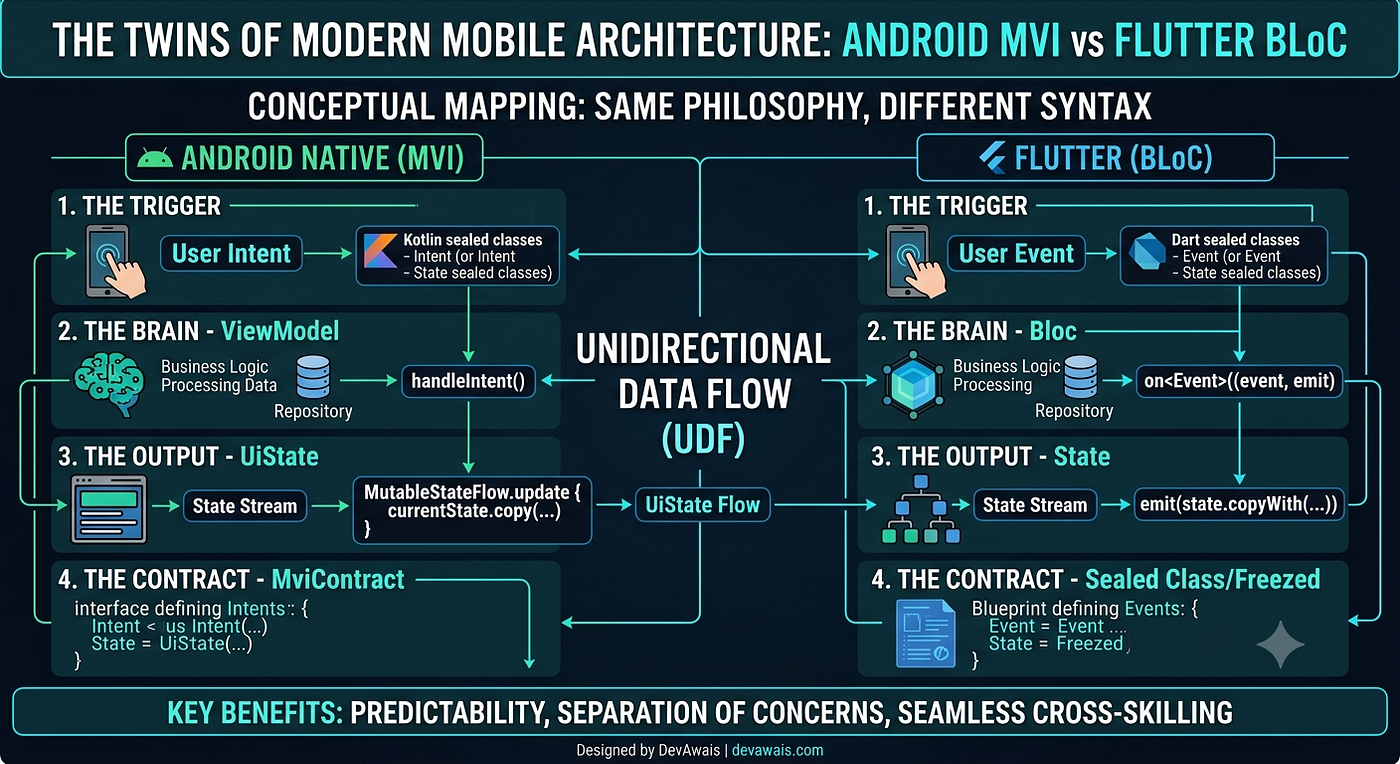
This image was created using Gemini AI
The Core Philosophy: Unidirectional Data Flow (UDF)
Both MVI and BLoC adhere to a single principle regarding Unidirectional Data Flow.
Data follows a precise cycle. The UI initiates an action, business logic processes it, the state is modified, and the UI refreshes itself in relation to the updated state. No shortcuts exist, and changes cannot be made directly.
Component Mapping: Speaking the Same Language
Let’s compare how the structures of the two systems align. In MVI, Contracts/Intents work in the same way communication works in the BLoC system, with events and states.
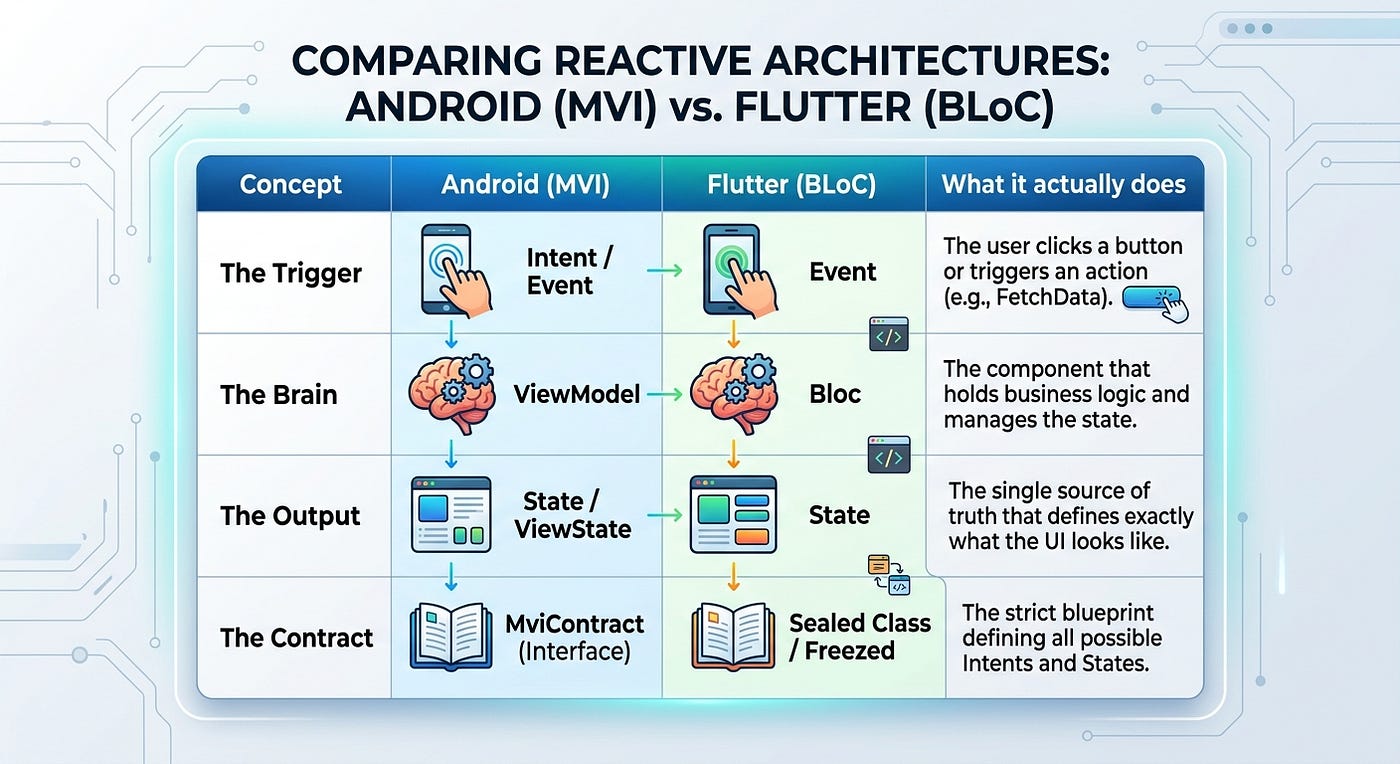
This image was created using Gemini AI.
1. The Way of Communication: Intents vs. Events
In MVI, the View communicates with the ViewModel strictly through Intents (or Actions). You define these inside a contract file using Kotlin sealed classes:
// Android MVI Contract
sealed class UserIntent {
    object LoadProfile : UserIntent()
    data class UpdateName(theName: String) : UserIntent()
}
Now look at Flutter’s BLoC. How does the Widget communicate with the BLoC? Through Events.
// Flutter BLoC Events
abstract class UserEvent {}
class LoadProfile extends UserEvent {}
class UpdateName extends UserEvent {
  final String name;
  UpdateName(this.name);
}
The verdict: MVI Intents and BLoC Events are ideally the same. They are just data-holding structures telling the brain ( viewmodel/BLoC ) to execute a specific operation.
2. Where the State Lives: ViewModel vs. BLoC
In both architectures, the UI is completely dumb. It doesn’t know how data is fetched; it only knows how to render the current state snapshot.
In Android MVI:
The state lives inside theViewModel, usually exposed as a StateFlow or SharedFlow. The View subscribes to this single stream to update the data.
class UserViewModel : ViewModel() {
    private val _state = MutableStateFlow<UserViewState>(UserViewState.Idle)
    val state: StateFlow<UserViewState> = _state
fun handleIntent(intent: UserIntent) {
        // Process intent and emit new UserViewState
    }
}
In Flutter BLoC:
The state lives inside the Bloc class. The UI (Widgets) uses a BlocBuilder or BlocListener to listen to the state stream.
class UserBloc extends Bloc<UserEvent, UserState> {
  UserBloc() : super(UserInitial()) {
    on<LoadProfile>((event, emit) {
      // Process event and emit new UserState
    });
  }
}
3. How State is Handled & Mutated (The Crucial Mechanics)
This is where the real fun starts. Both frameworks consider the state unchangeable at 100%. This means you never directly modify any existing state's property (i.e., state .isLoading = true is absolutely out of the question).
You always emit a new state object. To make this efficient, the two frameworks make heavy use of a .copy() or a .copyWith() method of cloning the old state, and changing only specific fields.
In Android MVI (Kotlin StateFlow + Data Class)
Android leverages Kotlin’s built-in data class .copy() method. The state is then securely updated using the .update { } block of a MutableStateFlow
// 1. Immutable UI State Definition
data class ProfileUiState(
    val username: String = "",
    val isLoading: Boolean = false,
    val errorMessage: String? = null
)

// 2. Handling State Mutation inside the ViewModel
class ProfileViewModel : ViewModel() {
    private val _uiState = MutableStateFlow(ProfileUiState())
    val uiState: StateFlow<ProfileUiState> = _uiState

    fun handleIntent(intent: ProfileIntent) {
        when (intent) {
            is ProfileIntent.UpdateUsername -> {
                // Mutating state by emitting an entirely new data class copy
                _uiState.update { currentState ->
                    currentState.copy(
                        isLoading = false,
                        username = intent.newName
                    )
                }
            }
        }
    }
}
In Flutter BLoC (Dart Bloc + Emitter)
Flutter’s BLoC library provides an emit() function that manages the stream dispatch under the hood. We, as developers, write a custom copyWith function (or use packages like Freezed) to create a new state snapshot:
// 1. Immutable UI State Definition
class ProfileState {
  final String username;
  final bool isLoading;
  final String? errorMessage;

  const ProfileState({this.username = "", this.isLoading = false, this.errorMessage});

  // Replicating Kotlin's copy mechanism in Dart
  ProfileState copyWith({String? username, bool? isLoading, String? errorMessage}) {
    return ProfileState(
      username: username ?? this.username,
      isLoading: isLoading ?? this.isLoading,
      errorMessage: errorMessage ?? this.errorMessage,
    );
  }
}

// 2. Handling State Mutation inside the BLoC
class ProfileBloc extends Bloc<ProfileEvent, ProfileState> {
  ProfileBloc() : super(const ProfileState()) {

    on<UpdateUsername>((event, emit) {
      // Mutating state by emitting a brand new instance snapshot
      emit(state.copyWith(
        isLoading: false,
        username: event.newName
      ));
    });

  }
}
The Exact Mirror
- MVI’s
_uiState.update { state.copy(...) }functions almost the same as BLoC’semit(state.copyWith(...)). - Both architectures read the current state instance, initialize an updated copy in memory, and push it down to the UI.
Why This Paradigm Wins
Whether you call it MVI or BLoC, mastering this reactive, contract-driven approach brings massive benefits to your mobile apps:
- Predictability: Because state changes only happen in one place (like a ViewModel or BLoC) using strict inputs (Intents or Events), debugging becomes incredibly easy. You can track every single action like a timeline.
- Separation of Concerns: Your UI code stays clean. No business logic leaks into your Compose functions or Flutter Widget trees.
- Seamless Cross-Skilling: If you understand MVI in native Android, you can write production-ready Flutter BLoC architecture on day one, and vice versa.
Conclusion
Don’t let ecosystem terminology confuse you. Mobile architecture trends are changing. Android’s modern Jetpack Compose + MVI stack and Flutter’s BLoC ecosystem are fundamentally singing the same song. They rely on the same contracts, utilize the same stream-based communication, and store state in the same logical container. At the end of the day, good architecture is universal.
If you want to see how I implement these clean architecture patterns in production-ready apps, feel free to explore my latest projects, case studies, and full engineering background over at my personal portfolio: **devawais.com (or simply search for [devawais](https://linkedin.com/in/devawais)** online). Let’s connect and talk about mobile scaling!
What’s your take? Do you prefer writing MVI in Kotlin or handling BLoC in Dart? Let’s discuss in the comments!
메타데이터
- post_id
- 58e42bf64ba9
- slug
- mvi-in-android-vs-bloc-in-flutter-yes-they-are-the-exact-same-thing-58e42bf64ba9
- url
- https://medium.com/@devawais/mvi-in-android-vs-bloc-in-flutter-yes-they-are-the-exact-same-thing-58e42bf64ba9
- canonical_url
- https://medium.com/@devawais/mvi-in-android-vs-bloc-in-flutter-yes-they-are-the-exact-same-thing-58e42bf64ba9
- author_url
- https://medium.com/@devawais
- status
- ok
- fetched_at
- 2026-06-28 04:42:08