Hot Code Reloading of Elixir OTP Application
Hi, folks. I’m h3poteto and working at oVice as a part-time developer. In this post, I would like to share what I’ve learned about Elixir’s…
Hot Code Reloading of Elixir OTP Application
Hi, folks. I’m h3poteto and working at oVice as a part-time developer. In this post, I would like to share what I’ve learned about Elixir’s hot code reloading.
Elixir (Erlang/OTP) can deploy without stopping Erlang VM (BEAM). This feature is called Hot Code Reloading / Hot Code Swap / Hot Code Deploy. For the purpose of this article, we will refer to it as Hot Code Reloading.
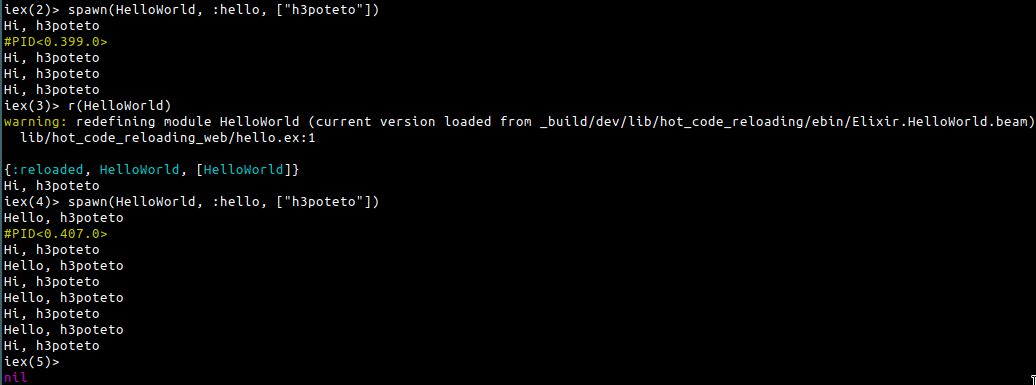
Running 2 versions of a module simultaneously
What is the benefit?
We are using Elixir to develop the oVice application and we are using Hot Code Reloading to deploy the code. It is very useful and it seems like magic.
- Doesn’t stop the process, so the server continues to receive requests
- Doesn’t stop the WebSocket server, so the connection will not disconnect
- The state of the processes will be kept
These points are important for us because we use both WebRTC and WebSocket in our application. Of course, the WebSocket connection (used for passing data between the frontend application and backend server) does not disconnect during deployment, furthermore, the WebRTC connection (used for audio/video data) will not disconnect.
Of course, our front-end application will reconnect when the connection disconnect. Because our application provides real-time communication, we don’t want users to experience disconnects. But we also want to upgrade our software to fix bugs and add features, so we want to be able to deploy without causing disconnects.
However, we need to be careful when writing Elixir code to take advantage of Hot Code Reloading. I will explain how you have to be careful.
Basic: What happens during Hot Code Reloading?
Erlang executes the reloading process according to [relup](https://www.erlang.org/doc/man/relup.html)(release upgrade). For example:
{"1.0.1",
 [{"1.0.0",[],
   [{load_object_code,
        {my_app,"1.0.1",
            ['Elixir.MyApp.Foo']}},
    point_of_no_return,
    {suspend,['Elixir.MyApp.Foo']},
    {load,
        {'Elixir.MyApp.Foo',brutal_purge,
            brutal_purge}},
    {code_change,up,[{'Elixir.MyApp.Foo',[]}]},
    {resume,['Elixir.MyApp.Foo']}]}],
It will suspend the current process, load the new module, call code_change method, and resume the process. I will explain code_change later.
vsn
This is not required, it is optional, but I recommend specifying it when you transform the OTP state.
We can provide [@vsn](https://hexdocs.pm/elixir/1.12/Module.html#module-vsn) a version of the module, and it is read during Hot Code Reloading.
For example,
defmodule MyModule do
  @vsn "2"
def init() do
end
#...
endIf we don’t provide @vsn, the version will be determined automatically from the MD5 hash of the module. So if the code changes, you don’t need to specify a new @vsn, because the MD5 would change. But if you write code_change a method to transform the OTP state, it is required to specify @vsn. Please see the next section about transforming the OTP state.
When should we specify vsn?
- Using
gen_serverorgen_statem. - You want to reload the module without changing it. For example, when you update dependency libraries, and the libraries are used in the module. If you don’t update
@vsnand you don't change the module, the module (process) will not be reloaded. - You write
code_changea method to transform the OTP state.
Transforming state
Normally Erlang doesn’t transform the state of the process during Hot Code Reloading. It means we can not use Hot Code Reloading when we change the module’s struct.
But Erlang special processes (e.g., gen_server and gen_statem) have a function to transform the state of the process during Hot Code Reloading. You can use this function by defining the code_change method. It will be called when upgrading, and it will transform the state of your module from the old version to the new version.
Basic
defmodule MyApp.Foo do
  @vsn "1"
  use GenServer
defstruct [:foo]
def init(state) do
{:ok, state}
end def handle_call(_, _from, state) do
## Some codes
end
endWhen you change MyApp.Foo struct by adding :bar,
defmodule MyApp.Foo do
  @vsn "2"
  use GenServer
defstruct [:foo, :bar]
def init(state) do
{:ok, state}
end def handle_call(_, _from, state) do
## Some codes
end def code_change("1" = vsn, state, _extra) do
{:ok, %{ state | bar: "bar" }}
end
endplease upgrade @vsn, define the code_change method and it returns {:ok, new_state} .
Conditions to execute code_change
- The process must be executed under the application master supervisor or supervision tree.
- The process is an Erlang special process.
First is very important. In the above example, you have to run MyApp.Foo in application.ex .
defmodule MyApp.Application do
use Application @impl true
def start(_type, _args) do
children = [
MyApp.Foo
] opts = [strategy: :one_for_one, name: MyApp.Supervisor]
Supervisor.start_link(children, opts)
end
endOr do you need to run MyApp.Foo under the supervision tree.
defmodule MyApp.Application do
use Application @impl true
def start(_type, _args) do
children = [
MyApp.MySupervisor
] opts = [strategy: :one_for_one, name: MyApp.Supervisor]
Supervisor.start_link(children, opts)
end
enddefmodule MyApp.Supervisor do
use Supervisor def start_link(init_args) do
Supervisor.start_link(__MODULE__, init_args, name: __MODULE__)
end @impl Supervisor
def init(_) do
children = [
MyApp.Foo
] Supervisor.init(children, strategy: :one_for_one)
end
endExamples where code_change will not be called
Not special process
defmodule MyApp.Websocket do
@vsn "2"
@behaviour :cowboy_websocket defstruct [:username]
# Some methods # Will not be called
def code_change("1" = vsn, %{username: username} = state, _extra) do
{:ok, %{state | username: username <> "-user"}}
end
endGenServer is not executed under the application supervisor
defmodule MyApp.Application do
use Application @impl true
def start(_type, _args) do
children = [
MyApp.MyServer
] opts = [strategy: :one_for_one, name: MyApp.Supervisor]
Supervisor.start_link(children, opts)
end
enddefmodule MyApp.MyServer do
@vsn "1"
use GenServer
defstruct [:foo] def init(_state) do
{:ok, pid} = GenServer.start_link(MyApp.Foo, %MyApp.Foo{})
{:ok, %{foo: pid}}
end
# Some methods
enddefmodule MyApp.Foo do
@vsn "2"
use GenServer defstruct [:foo, :bar]
# Some methods # Will not be called
  def code_change("1" = vsn, state, _extra) do
    {:ok, %{ state | bar: "bar" }}
  end
endIn this case, MyApp.MyServer is executed under the application supervisor. But MyApp.Foo is not executed by the application supervisor, and it does not belong to any supervision tree. So the code_change method will not be called.
Renaming module
Please be careful when renaming modules. Hot Code Reloading can’t detect rename events, so it is better to restart Erlang VM without Hot Code Reloading.
What happens?
For example, I change the module name Footo Bar.
- The old processes call
Foo, but there is no moduleFooin the new process. So failed to callFooand the old processes are crashed. If they are members of some supervisor, they are restarted. - If
FooandBarare GenServer, it is more complex. Please see below.
GenServer started by the Application supervisor
If you start Fooin your application.ex ,
defmodule MyApp.Application do
  use Application
@impl true
def start(_type, _args) do
children = [
MyApp.Foo
] opts = [strategy: :one_for_one, name: MyApp.Supervisor]
Supervisor.start_link(children, opts)
end
endthis supervisor will not be restarted during Hot Code Reloading. So if you rewrite it,
children = [
  MyApp.Bar
]
MyApp.Bar will not be started after Hot Code Reloading. That means it will crash when you call it in application codes.
defmodule MyApp.SomeModule do
  def init() do
    MyApp.Bar.baz() #=> (EXIT) no process: the process is not alive or there's no process currently associated with the given name, possibly because its application isn't started
  end
end
And MyApp.Bar will not start after this and will continue to crash.
So, you can’t use Hot Code Reloading in this case. You need to restart Erlang VM when you want to rename the module in the application supervisor.
GenServer started by some other processes
If you start Fooin SomeModule,
defmodule MyApp.SomeModule do
  use GenServer
  def init(state) do
    {:ok, pid} = MyApp.Foo.start_link()
    {:ok, %{foo: pid}}
  end
def handle_info(_, state) do
MyApp.Foo.baz()
end
endand rename it to Bar,
defmodule MyApp.SomeModule do
  use GenServer
  def init(state) do
    {:ok, pid} = MyApp.Bar.start_link()
    {:ok, %{foo: pid}}
  end
def handle_info(_, state) do
MyApp.Bar.baz() #=> (EXIT) no process: the process is not alive or there's no process currently associated with the given name, possibly because its application isn't started
end
endMyApp.Bar.baz() will crash, because Baris not started after Hot Code Reloading. But if you register SomeModule with the application supervisor,
children = [
  MyApp.SomeModule
]
MyApp.SomeModule the process will be restarted after a crash and init will be called. At this time, MyApp.Bar.start_link() will be called, so MyApp.Bar.baz() will execute successfully.
So if you allow one crash, you can use Hot Code Reloading in this case. Of course, if you don’t launch MyApp.SomeModule in supervisor, this case will not work fine.
Method calling
Local call vs Full qualified call
Local call:
defmodule MyModule do
  def foo() do
  end
def bar() do
foo() # local call
end
endFull qualified call:
defmodule MyModule do
  def foo() do
  end
def bar() do
MyModule.foo() # full qualified call
end
endFull qualified calling always invokes the latest version module, but local calling invokes the same version module. Please refer to the following slide for details.
https://www.slideshare.net/Elixir-Meetup/hot-code-replacement-alexei-sholik/19
Changing config
Most Elixir applications are using [Mix.Config](https://hexdocs.pm/mix/1.12/Mix.Config.html) or [Config](https://hexdocs.pm/elixir/master/Config.html) in config/${mix_env}.exs . If you change these config files, a new config will not be loaded after Hot Code Reloading. Of course, rel/config.exs and rel/vm.args have the same issue.
So, in this case, you can not use Hot Code Reloading, please use clean restart.
Things that work fine under hot code reloading
- Change arguments and return values
- Rename the module file name
- Update libraries
These actions are no problem, so you don’t have to worry about them.
In Conclusion
I introduced some notes on writing application code if you use Hot Code Reloading. Especially Erlang OTP and code_change method are complex. Here is a repository I created to check and experiment with this behavior.
Hot Code Reloading provides terrific functions like magic. So let’s enjoy Erlang/Elixir and Hot Code Reloading.
메타데이터
- post_id
- 58ef4170b5aa
- slug
- hot-code-reloading-of-elixir-otp-application-58ef4170b5aa
- url
- https://medium.com/ovice/hot-code-reloading-of-elixir-otp-application-58ef4170b5aa
- canonical_url
- https://medium.com/ovice/hot-code-reloading-of-elixir-otp-application-58ef4170b5aa
- author_url
- https://medium.com/@h3poteto
- status
- ok
- fetched_at
- 2026-06-28 14:26:31