Shopify Development Done Right: How Growing Brands Build Stores That Scale
Your store went live three months ago. The first month brought 200 new customers. Excited, you told your team it was working.
Shopify Development Done Right: How Growing Brands Build Stores That Scale
Photo by Shoper on Unsplash
Your store went live three months ago. The first month brought 200 new customers. Excited, you told your team it was working.
Then the growth plateau hit. Traffic climbed 40% month-over-month, but conversions stayed flat at 1.1%. You tweaked the theme colors, ran a new ad campaign, even hired a conversion specialist. The percentage barely budged.
The problem wasn’t marketing. It was infrastructure.
Your store was built on assumptions that made sense at launch. Now that you’re getting real traffic, those shortcuts are bleeding money. A 0.3% conversion lift would mean an extra $28,000 annual revenue at your current volume. But that lift requires something a theme template and band-aid customizations can’t deliver: a store engineered specifically for your business.
This is where professional Shopify development enters the conversation.
Most founders and eCommerce directors don’t have a clear picture of what that actually means. The term “Shopify development” gets thrown around loosely, often confused with basic store setup, Shopify Plus, theme customization, or hiring a Shopify expert on contract. The distinctions matter enormously , they determine cost, timeline, what you can actually build, and ultimately whether you’re working with a true engineering partner or just someone clicking buttons in the admin.
This guide cuts through the confusion. It’s built on conversations with founders who’ve been exactly where you are, experience scaling stores from $500K to $15M, and real tech stacks that move the needle.
What Shopify Development Actually Means (Beyond the Setup)
When you first launch a Shopify store, someone does setup work: they pick a theme, configure products, add collections, set up basic integrations like Klaviyo for email. That’s valuable. But it’s not Shopify development.
Shopify development is intentional engineering. It means writing custom code — primarily Liquid, the templating language Shopify uses, plus JavaScript and CSS when necessary. It means building experiences that your store’s out-of-the-box theme simply cannot do. It means structuring your backend to handle complexity your template designers never imagined.
Here’s the distinction that matters:
Setup and Configuration: Your store works. Products sell. Basic workflow is functional. Cost: $2,000-$8,000. Usually takes 1–2 weeks.
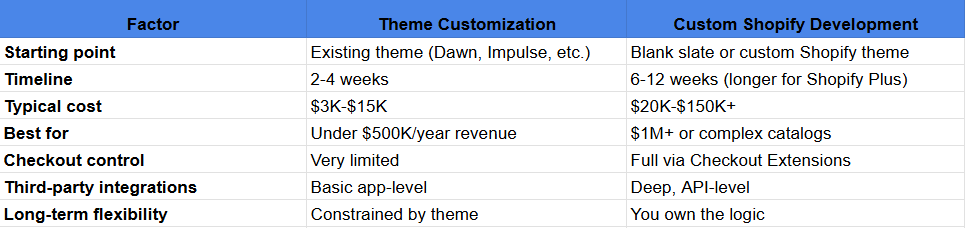
Theme Customization: You’ve got a working store, but the theme doesn’t match your brand or you need a handful of custom features. Developers tweak existing theme code, add some custom sections, adjust CSS. Cost: $3,000-$15,000. Takes 2–4 weeks.
Shopify Development (Professional Build): You need a store engineered for your specific business model, brand, and scale. This often means building from the ground up, writing custom Liquid, creating custom apps, integrating complex backend systems. Cost: $15,000-$150,000+. Takes 6–16 weeks depending on complexity.
The reason most brands end up needing real Shopify development isn’t because basic themes are bad. It’s because your business isn’t basic. You have unique workflows, specific customer segments, custom pricing rules, or integration requirements that templates don’t anticipate.
A fashion brand selling made-to-order might need a custom product configurator that lets customers choose fabric, color, and fit, then generates a unique SKU and production queue. A B2B industrial parts company needs tiered pricing per customer, net-30 payment terms, and a Salesforce sync. A subscription box service needs recurring order management, gifting logic, and retention workflows baked into the storefront.
Those are all “possible on Shopify.” But they’re not possible with a theme. They require development.
Core Services That Make Up Modern Shopify Development
When you hire a professional Shopify development partner, here’s what you’re actually buying:
Custom Shopify Store Development
This is a ground-up build. You don’t start with an existing theme and customize it. You start with Shopify’s core (the product management system, checkout, inventory, customer data) and build a custom experience on top using Liquid and APIs.
When does this make sense? When you have brand requirements a template can’t match. When your store needs to feel completely unique. When performance at scale matters (a custom build optimized for your specific feature set will outrun a bloated template carrying 100 features you don’t use).
Real example: A high-end furniture brand needed product pages that showed each piece in customer homes via AR, let customers customize colors and materials, and generated quotes for custom orders. No theme did this. A custom Shopify build took 8 weeks and cost $38,000. It generated an extra 12% AOV within the first quarter because customers could visualize exactly what they were buying.
Shopify Theme Customization
Your store is already built on a theme (like Debut, Impulse, or a paid template). You love most of it, but you need:
- Brand colors and typography applied throughout
- A custom “About” section with video and timeline
- A loyalty program signup component
- Integration with Yotpo reviews shown in a custom layout
- Improved mobile experience for your customers
Theme customization is lighter-touch than a full build. The developer works within the theme’s architecture, adding Liquid sections, custom JavaScript, and CSS. Turnaround is faster — usually 2–4 weeks. Cost ranges from $3,000-$15,000.
Why this matters: You don’t always need a full rebuild. If your theme is solid and your brand personality needs subtle expression, customization is practical and cost-effective.
Shopify Plus Development for Enterprise Brands
Shopify Plus is Shopify’s enterprise tier. It’s for brands doing $10M+ annual revenue or those with complex operational requirements. Plus stores get access to features standard Shopify doesn’t: Shopify Flow (workflow automation), Shopify Scripts (checkout customization), Launchpad (scheduled sales and releases), and higher API rate limits.
But Shopify Plus access alone changes nothing. The development requirements are actually more rigorous.
Real example: A $40M athleisure brand needed to launch flash sales, manage inventory across wholesale partners, support net-30 terms for corporate buyers, and trigger different checkout flows based on customer segment. Shopify Plus with custom development took 14 weeks and cost $85,000. The investment paid for itself in operational efficiency and new revenue from wholesale channels within 18 months.
Shopify App Development (Private & Public)
Sometimes out-of-the-box apps fall short. You need custom functionality that solves a specific business problem.
This breaks into two categories:
Private Apps: Built for your store alone. Examples: A custom loyalty program that syncs with your ERP. A private app that allows sales reps to create customer accounts and apply custom pricing. A bulk order import tool for B2B customers.
Public Apps: Built once, sold on the Shopify App Store to many merchants. If you see a need you suspect hundreds of other brands have, a public app can become a revenue stream.
Building a custom app takes 4–12 weeks depending on complexity and integration requirements. Cost: $10,000-$60,000. This covers the app code, backend logic, database, and initial deployment.
Shopify Migration Services
You’re on Magento, WooCommerce, or BigCommerce. You’ve decided to move to Shopify or Shopify Plus. A migration is simultaneously straightforward and fraught with risk.
Straightforward because modern tools can extract your product data, customer information, and order history. Fraught because careless migration kills SEO, creates duplicate content issues, loses historical data, or breaks customer relationships if email imports fail.
Professional migration means:
- A data audit on your current platform
- URL mapping strategy that preserves SEO value (301 redirects where appropriate)
- Customer data validation (email deduplication, address normalization)
- Product attribute mapping (size guides, variant logic)
- Historical order import for customer reference
- Post-launch validation and 30-day support
Timeline: 4–8 weeks depending on store size and data complexity. Cost: $8,000-$40,000.
One client migrated from Magento with 50,000 products and a 10-year customer database. The migration took 6 weeks and cost $32,000. Without it, they would have lost organic search traffic, confusing customer accounts, and a clean inventory transition. The investment was insurance.
Shopify Integrations (ERP, CRM, Marketing)
Your store doesn’t exist in isolation. It connects to Salesforce (CRM), NetSuite (inventory and accounting), Klaviyo (email and SMS), QuickBooks (financial data), or your own internal systems.
Most of these connections are “pre-built” — someone at Shopify or a third-party developer already built a public integration. But integration isn’t always plug-and-play. You may need:
- Custom field mapping (your Shopify customer tags need to sync to Salesforce custom fields)
- Automated workflows (when a customer reorders, create a service ticket in your support system)
- Data transformation (convert Shopify’s format to your ERP’s expected format)
- Real-time syncing (inventory updates instantly when a sale happens)
- Error handling and logging (what happens if the API call fails?)
Integration work ranges from light configuration ($2,000-$5,000) to building a custom connector ($15,000-$40,000).
Real scenario: A D2C apparel brand was running inventory in SAP but orders in Shopify. When someone bought online, the inventory in SAP didn’t update, and warehouse staff would accidentally double-sell. A custom integration took 6 weeks and cost $18,000. It saved them $50K+ monthly in lost sales and customer churn from stockouts.
Shopify SEO & Conversion Rate Optimization
Shopify is technically sound for SEO. But a store that’s technically sound still doesn’t rank if the content strategy is weak, if page load speed is sluggish, or if you’re not optimizing for Core Web Vitals (a Google ranking factor).
Professional Shopify SEO and CRO includes:
- Technical SEO audit (crawl errors, indexation issues, duplicate content)
- Structured data implementation (rich snippets for products, FAQs, reviews)
- Core Web Vitals optimization (image compression, lazy loading, reducing render-blocking resources)
- Meta tag optimization per page type
- Internal linking strategy
- Conversion element testing (button colors, CTA copy, form fields)
- Speed optimization (Shopify can be slow if not tuned correctly)
Investment: $8,000-$30,000 depending on baseline performance and goals.
One store was getting 5,000 monthly visitors but only 35 conversions. The SEO/CRO audit revealed: poor Core Web Vitals (site speed was 3.2 seconds), missing structured data, thin product descriptions, and a confusing checkout flow. After 4 weeks of optimization, monthly conversions jumped to 72. That’s a 106% lift from fixing fundamentals.
Why Smart Brands Invest in Professional Shopify Development
Brand Differentiation. If your site looks and feels like everyone else’s, you’ve already lost psychological advantage. Custom Shopify development lets you express your unique brand voice in code, not just in photography and copy.
Revenue is Directly Tied to Performance. There’s no debate here anymore. Core Web Vitals (page speed) is a Google ranking factor. Site speed directly correlates to conversion rate. A 1-second delay can reduce conversions by 7%. A custom build optimized for your feature set almost always outperforms a template bloated with features you don’t use.
Scalability for Traffic and Complexity. A template works at 1,000 monthly visitors. You hit 100,000, and the site feels sluggish. You add a subscription feature, and the template’s cart logic can’t handle it. A professionally built store is architected to scale with your growth and new requirements. You’re not replacing the store every 18 months — you’re building on a solid foundation.
Operational Efficiency. When your Shopify store is properly integrated with your ERP, CRM, and fulfillment systems, your team stops doing manual data entry. Orders sync automatically. Customer data flows between systems without human intervention. At scale, this saves you $10K-$50K+ monthly in labor hours alone.
Long-Term ROI Over Short-Term Savings. A $25,000 custom store build sounds expensive next to a $3,000 theme setup. But if that build generates an extra $2,000 monthly revenue and saves 20 hours of manual work per month, you’ve recovered the investment in 12–13 months. Then you’re running an optimized, differentiated business for years.
Industries Where Shopify Development Pays Off Most
Fashion & Apparel
Size guides and fit recommendations. Virtual try-on using AR. Lookbooks with shoppable images. Inventory management across brick-and-mortar and online. Rapid seasonal collections.
Custom Shopify development here means building custom size logic (that accounts for international sizing), styling tools (help customers coordinate outfits), and flash-sale mechanics for limited drops.
Health & Beauty
Subscription boxes and recurring shipments. Age-gated products (certain supplements require age verification). Bundle builders (“create your own skincare routine”). Compatibility wizards (which products work for your skin type?).
Shopify’s native subscription model is solid, but custom development adds the personalization and compliance layers that health brands need.
Food & Beverage
Delivery integrations (sync Shopify orders to DoorDash, Uber Eats, regional services). Loyalty programs for repeat orders. Flavor/variant selection that drives custom production. Wholesale ordering for restaurants and cafes.
A CPG brand selling direct-to-consumer through Shopify needs custom logic to handle the nuances of food business compliance, inventory freshness, and multi-channel order management.
Home & Furniture
AR product previews (see that sofa in your living room). Custom configurators (choose upholstery, legs, dimensions). Room planners (design your whole space). 3D rendering integration.
A $50K sofa purchase needs visualization that templates can’t provide. Custom Shopify development adds the interactive elements that justify the price point and reduce buyer hesitation.
Electronics & Tech
Product comparison tools. Specification sheets and downloads. Trade-in programs and refurbishment workflows. B2B pricing tiers and net terms. Warranty and support ticketing integration.
Tech brands often have complex product relationships (compatibility between components, bundle pricing, technical support workflows). Shopify development handles this complexity.
Sports & Fitness
Class and event booking integrations. Membership management and tiered access. Digital product downloads (training plans, videos). Community features (leaderboards, progress tracking).
A fitness brand’s store isn’t just selling products. It’s managing a community. Custom development adds the engagement mechanics that bring customers back.
B2B & Wholesale
Net-30 and net-60 payment terms. Tiered pricing per customer or order volume. Private wholesale storefronts for partners. Bulk order management and reporting. Account-level approvals and delegated purchasing.
Shopify Plus is great for B2B, but it requires custom development to add the operational workflows that wholesale partners expect. This is where Shopify development truly earns its investment — B2B commerce at scale requires backend rigor.
The Technologies Behind a Modern Shopify Build
When a professional team builds a Shopify store, here’s what you’re really getting:
Shopify’s Core Stack:
- Liquid: Shopify’s templating language. Developers write Liquid to control how products, collections, and customer data display on the storefront.
- Hydrogen & Oxygen: Modern frameworks for building faster storefronts using React and APIs instead of traditional theme files. Hydrogen is the framework; Oxygen is Shopify’s hosting option for it.
- Storefront API: Lets you fetch product data, build custom experiences, and bypass theme limitations entirely.
- Admin API: Lets you modify products, customers, orders, and inventory programmatically.
- Checkout Extensions: Adds custom fields, messaging, and logic directly into Shopify’s checkout flow.
Frontend Technologies:
- React & Next.js: These frameworks let developers build fast, dynamic interfaces that feel native (not sluggish like some themes).
- Tailwind CSS: A utility-first CSS framework that keeps styles organized and maintainable as the store grows.
- Alpine.js: A lightweight JavaScript framework for interactive components (dropdowns, sliders, dynamic filtering).
Integration Layers:
- Klaviyo: Email and SMS marketing automation. Custom integrations ensure customer behavior (abandoned carts, post-purchase sequences) triggers automatically.
- Recharge: Subscription and recurring revenue management. For brands selling subscriptions, Recharge integrates with Shopify’s order system.
- Gorgias: Customer support ticketing. Syncs Shopify orders so support reps see customer purchase history.
- Yotpo: User-generated content, reviews, and loyalty. Custom implementations showcase reviews on product pages.
- Loop Returns & Attentive: Returns management and SMS marketing.
Backend & Analytics:
- Shopify Scripts (Plus only): Allows programmatic modifications to cart and checkout.
- Shopify Flow: Workflow automation — “if this then that” for operations.
- GA4: Google Analytics for detailed conversion tracking and user behavior.
- Hotjar & Session Recording: See how customers interact with your store.
- Triple Whale & Northbeam: Real-time business metrics and attribution modeling.
Payment Processors:
- Shopify Payments: The simplest option, built-in.
- Stripe & PayPal: For flexibility or if you have existing merchant accounts.
- Klarna & Afterpay: Buy-now-pay-later options for higher AOV stores.
Why does this matter? A professional team chooses the right tool for each layer of your store. They’re not using one tool for everything. They’re architecting a system that handles volume, integrates cleanly, and scales without friction.
How a Professional Shopify Build Actually Works (Week-by-Week)
Here’s what a 6–10 week engagement looks like when you hire a professional Shopify development partner:
Week 1: Discovery & Strategy Your development partner interviews your team, stakeholders, and (ideally) customer samples. They document business requirements, technical constraints, competitive context, and success metrics. They produce a requirements document and propose a tech stack. Deliverable: Technical spec and project roadmap.
Weeks 2–3: Design & UX Wireframes are created for key pages (homepage, collection, product, cart, checkout). Your team reviews, provides feedback, and sign-off happens. This phase locks in the user experience before any code is written. Deliverable: Approved UX flows and design mockups.
Weeks 4–6: Frontend Development Developers build the actual store using Liquid (or Hydrogen if doing a modern build). They’re writing custom code, building components, integrating design mockups into functional pages. Your store is taking shape. Deliverable: A working store in a staging environment that mirrors production but isn’t public yet.
Weeks 7–8: Integrations & Apps Third-party integrations are wired up: Klaviyo syncs customer data, payment processors connect, Salesforce or your ERP syncs inventory, custom apps are deployed. Testing happens at each stage. Deliverable: All systems communicating.
Weeks 9–10: QA, Optimization & Launch Testing across browsers and devices. Performance tuning (making sure pages load fast, especially on mobile). Search console setup, SEO verification, Google Analytics configuration. Final data import (products, inventory, customer accounts if migrating). Deliverable: A production-ready store.
Post-Launch (30 Days): Your partner doesn’t disappear. They monitor performance, fix bugs that surface under real traffic, answer questions, and help your team get comfortable running the store. Deliverable: Handoff documentation and training.
This timeline is realistic but can be condensed (sometimes to 4–5 weeks for simpler builds) or extended (for Shopify Plus or massive migrations, 12–16 weeks is normal).
How to Choose the Right Shopify Development Partner
Not all Shopify development shops are equal. Here’s what actually separates quality teams from mediocre ones:
Certified Shopify & Shopify Plus Partner Status
Shopify certifies development partners who meet standards for quality, support, and expertise. A certified partner has undergone Shopify’s vetting process. It’s not a guarantee of excellence, but it signals that the shop has been reviewed.
Check: Is the partner listed on Shopify’s official partner directory? Can they show recent Plus certifications?
Industry-Specific Experience
A partner who’s built 30 apparel stores understands size guides, reviews, and seasonal merchandising. They’ve seen the patterns. They know what works.
Check: Can they show case studies or portfolio pieces in your industry? Not just “we’ve built 100 stores” — but “we’ve built 8 D2C apparel brands that all surpassed $5M in revenue.”
Technical Depth (Liquid, Hydrogen, APIs)
Some developers are theme-tweakers. They’re good at changing colors and adding plugins. Real Shopify developers write Liquid, work with APIs, and understand when to build custom vs. when to use third-party apps.
Check: Ask them to explain a past project where they wrote custom Liquid or built a custom app. Their explanation should be specific, not vague.
Integration Expertise
Can they connect your store to Salesforce? NetSuite? Your custom ERP? Integration work is complex and specific to your business. A partner experienced in this is invaluable.
Check: Ask for integration case studies. What systems have they successfully connected?
Proven Migration Track Record
If you’re migrating from Magento or WooCommerce, ask specifically: How many migrations have they done? What was the largest store (by product count or revenue)? What went wrong, and how did they handle it?
Check: Request a reference from a completed migration. Talk to that client.
Post-Launch Support Model
Some partners deliver the store and disappear. Others offer 30-day support, monthly maintenance retainers, or ongoing partnership. Which model works for your team depends on your internal expertise.
Check: What’s included in their post-launch support? Are there maintenance packages available?
Transparent Pricing and Timelines
You should get a fixed-price quote and a realistic timeline before signing anything. If a partner says “we’ll get back to you in a week” or “it depends,” that’s a red flag.
Check: Does their quote itemize the work (discovery, design, development, integrations, testing, launch)? Is the timeline broken into phases with deliverables?
What Drives Cost?
Feature Complexity: A basic store with standard product pages and checkout is cheaper than one with custom product configurators, AR visualization, or subscription logic.
Integration Requirements: Connecting to one platform costs less than three. Custom data transformation costs more than using a pre-built integration.
What Drives Cost?
Feature Complexity: A basic store with standard product pages and checkout is cheaper than one with custom product configurators, AR visualization, or subscription logic.
Integration Requirements: Connecting to one platform costs less than three. Custom data transformation costs more than using a pre-built integration.
What Drives Cost?
Feature Complexity: A basic store with standard product pages and checkout is cheaper than one with custom product configurators, AR visualization, or subscription logic.
Integration Requirements: Connecting to one platform costs less than three. Custom data transformation costs more than using a pre-built integration.
Cost of Shopify Development in 2026
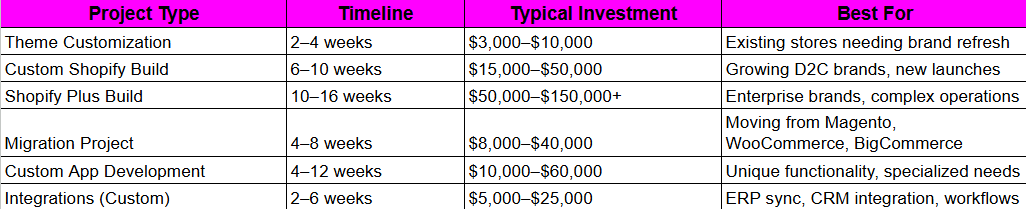
Here’s what professional Shopify development actually costs:
What Drives Cost?
Feature Complexity: A basic store with standard product pages and checkout is cheaper than one with custom product configurators, AR visualization, or subscription logic.
Integration Requirements: Connecting to one platform costs less than three. Custom data transformation costs more than using a pre-built integration
What Drives Cost?
Feature Complexity: A basic store with standard product pages and checkout is cheaper than one with custom product configurators, AR visualization, or subscription logic.
Integration Requirements: Connecting to one platform costs less than three. Custom data transformation costs more than using a pre-built integration.
Timeline: Aggressive timelines (4-week custom build vs. 8-week custom build) often require more resources and cost more.
Scale & Volume: A store expecting 100K monthly visitors requires better performance optimization and infrastructure planning than one expecting 5K.
Post-Launch Support: Most quotes exclude ongoing support. You can add monthly retainers ($1,500–$5,000/month) for maintenance, updates, and optimization.
Why Custom Shopify Development Costs What It Does:
You’re not paying for code. You’re paying for a team of people: project managers to coordinate, designers to create the experience, senior developers to architect the system, QA engineers to find problems, and technical leads to ensure quality. A $30,000 store build assumes roughly 400–600 billable hours. At $50-$100/hour (depending on geography and seniority), that’s the math.
You’re also paying for accountability. A professional team’s reputation depends on your success. They’re investing in case studies, references, and long-term relationships.
Why Professional Shopify Development Is Actually a Smart Investment
Your Shopify store is your revenue engine. It operates 24/7. A 10% improvement in conversion rate at your current traffic volume might mean $100K+ in annual revenue.
Professional Shopify development isn’t a cost center. It’s an investment in the asset that generates your revenue.
When you think about it that way, the $25,000-$50,000 you spend on a custom build becomes very small relative to the upside. And unlike traditional marketing spend (which you need to repeat every month), a solid store architecture lasts years and compounds in value as you layer on marketing, improve products, and expand to new channels.
Ready to Build a Shopify Store Engineered for Scale?
tkxel has helped global brands launch, migrate, and grow on Shopify and Shopify Plus. From custom builds to enterprise integrations, we deliver sophisticated storefronts in 6 to 10 weeks with comprehensive post-launch support.
Whether you’re a growing D2C brand outgrowing your current platform, an enterprise considering Shopify Plus, or a brand that needs custom functionality, we work with you to architect a store that drives revenue, scales with your business, and integrates cleanly with your operations.
Explore tkxel’s Shopify Development Services https://tkxel.com/services/shopify-development/
Frequently Asked Questions
1. What is Shopify Development?
Shopify development is custom software engineering work done on the Shopify platform. It goes beyond basic store setup or theme customization.
2. How Much Does Shopify Development Cost in 2026?
Costs vary widely based on scope. A theme customization ranges from $3,000–$10,000 (2–4 weeks). A custom store build runs $15,000–$50,000 (6–10 weeks). Shopify Plus development for enterprise brands costs $50,000–$150,000+ (10–16 weeks).
3. How Long Does It Take to Build a Custom Shopify Store?
For a professional, full-featured custom build: 6–10 weeks is standard. This includes discovery, design, development, integrations, QA, and launch preparation. Simpler projects might compress to 4 weeks. Enterprise builds or those with complex integrations might stretch to 12–16 weeks. The timeline depends heavily on how much custom functionality you need and how thoroughly you want to validate before launch.
4. What’s the Difference Between Shopify and Shopify Plus?
Shopify (standard) is the core platform. Shopify Plus is the enterprise tier, designed for stores doing $10M+ annual revenue or managing complex operational requirements. Plus includes Shopify Flow (automation), Shopify Scripts (checkout customization), Launchpad (scheduled releases), higher API limits, and dedicated support.
5. Can Shopify Integrate With My ERP and CRM?
Yes. Shopify has public integrations with Salesforce, NetSuite, SAP, HubSpot, QuickBooks, and hundreds of other systems. Some integrations are pre-built and configured through an app.
6. How Do I Migrate From Magento or WooCommerce to Shopify Safely?
A proper migration includes: a data audit of your current platform; URL mapping to preserve SEO; customer data validation and deduplication; product attribute mapping; historical order import; and 30-day post-launch support.
7. Do I Need Custom Shopify Development or Is a Theme Enough?
If you’re launching your first store with standard products and a straightforward customer journey, a solid theme plus customization might be sufficient.
8. What Makes a Certified Shopify Plus Development Partner Different?
A certified Shopify Plus partner has been vetted by Shopify for Plus-specific expertise. They understand Shopify Flow, Scripts, Launchpad, and the operational complexity of enterprise commerce.
메타데이터
- post_id
- 592a4e596e1d
- slug
- shopify-development-done-right-how-growing-brands-build-stores-that-scale-592a4e596e1d
- url
- https://medium.com/@z1845732/shopify-development-done-right-how-growing-brands-build-stores-that-scale-592a4e596e1d
- canonical_url
- https://medium.com/@z1845732/shopify-development-done-right-how-growing-brands-build-stores-that-scale-592a4e596e1d
- author_url
- https://medium.com/@z1845732
- status
- ok
- fetched_at
- 2026-07-11 16:08:17