The long-running agent problem
Agentic tasks take 60–90s but ODC’s UX model expects 3s. Raising timeouts won’t fix broken UX: design for async from the start.
The Long-Running Agent Problem
In my first Agentic processes I had a simple agent that gave suggestions to proceed from a set of FAQs, a user clicked the “Submit” button, waited more than five seconds, saw nothing or it took “too long”. Now there were two tickets opened in progress on the same topic. The logs showed no errors and the agent had behaved exactly as designed. The problem was not the agent, it was the UX contract that was broken since the client and the developers did not review the new paradigm of the duration of AI tasks.
1. The UX contract
Every deterministic ODC UX widget assumes usually a sub-3s response cycle. Buttons re-enable after a server call completes. Loading spinners appear for a second. Screen variables refresh and the user sees the result. This is the implicit contract the platform’s UX model is built around, and it is a reasonable contract for almost all of what ODC applications do, and were built to do.
Agentic tasks break that contract structurally. A document analysis agent making four tool calls, waiting for an LLM reasoning step between each one, and formatting a structured output at the end is not a slow database query. It is a different category of operation. Raising the timeout to 60–90 seconds does not change the user’s expectation that a click produces a visible response within 3 seconds. It just extends the window during which nothing happens.
The user who clicks again is responding rationally to an interface that has given them no signal that the first click registered or that it is taking too long. The duplicate run is a UX failure before it is a technical one.
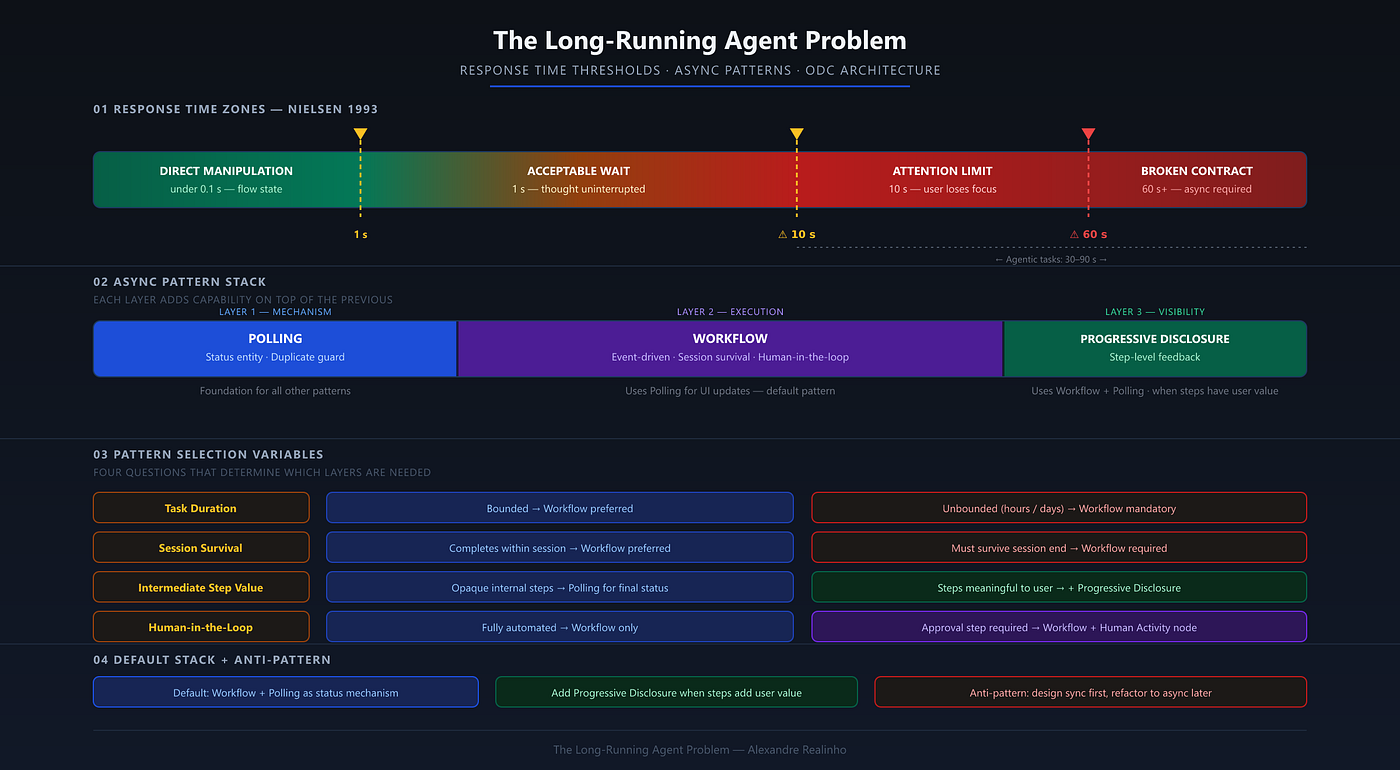
This is not a new problem. Nielsen (1993) established three response-time thresholds that have held for over thirty years: 0.1 seconds for the feeling of direct manipulation, 1 second for uninterrupted flow of thought, and 10 seconds as the limit for keeping the user’s attention focused on the dialogue. Past 10 seconds, users will want to perform other tasks while waiting, and they need explicit feedback indicating when the computer expects to be done (Nielsen, 1993). An agent that takes 45 seconds and provides no intermediate feedback is not violating a new AI-era expectation. It is failing a threshold that has been documented since before modern UI/UX systems for example Miller in 1968 (cited in Nielsen, 1993).
2. Why you cannot just raise timeouts
The Server Action timeout in ODC is not a performance dial. It is a ceiling on synchronous request duration, and when the ceiling is hit, the session does not wait gracefully: the request is terminated, the client receives an error, and any work in progress is lost. There is no partial result, no retry, and no user-facing explanation unless the developer has explicitly built one.
For operations that are inherently fast but occasionally slow (a database query under load, an external REST call with network variability), a larger timeout is a reasonable mitigation. The operation is designed for synchronous execution and the timeout extension just accommodates variance.
For Agentic tasks, the situation is different. A task involving multiple LLM calls, tool invocations, and reasoning steps is not “a fast operation that sometimes runs slow.” It is architecturally asynchronous, the execution time is variable by design, bounded by the number of tool calls the agent decides to make, and cannot be predicted at request time. Raising the timeout from the 10-second default to 60 seconds (the maximum configurable Server Request Timeout property) does not change this. It just makes the blank-wait window longer and the eventual timeout error more disorienting. The fixed 100-second ceiling for cross-app service action calls has the same issue.
The correct architecture decouples execution from the request cycle entirely. The user’s button click starts the agent rather than waiting for it, an event-driven with workflow approach that ODC uses. The agent runs on its own timeline. The UI reports progress independently. It requires in a basic form: one entity to control the status and output of the agent, and two client-side actions. It should be the starting design, not a refactor applied after users complain.
Personal Note: We hit the platform timeout error on a real deployment. The first response was to raise the timeout limit and it bought a few seconds. Then the client flagged that it was taking too long, which is a different problem: the timeout was no longer the ceiling, the user’s patience was. Raising the timeout had made the blank wait longer, not shorter. That is when the async refactor became unavoidable.
3. The Polling Pattern
The simplest applicable pattern for Action-based agents. The user clicks, receives immediate confirmation that the task has started, and the UI polls for the result.
The status entity
Create an AgentTask entity with at minimum these attributes:
AgentTask
  Id             (AutoNumber)
  ContextId      (Text)       -- the invoice ID, the order ID, whatever the agent is processing
  Status         (Text)       -- Pending | Running | Done | Failed
  ResultData     (Text)       -- JSON or structured output, written when Done
  ErrorMessage   (Text)       -- populated when Failed
  CreatedOn      (DateTime)
  UpdatedOn      (DateTime)
The server-side flow
The Server Action that starts the agent:
- Checks whether an
AgentTaskrecord already exists for thisContextIdwithStatus = PendingorRunning. If one does, return itsIdwithout starting a new run. This is the duplicate-request guard. - Creates a new
AgentTaskrecord withStatus = Pending, commits, and returns theIdto the client immediately. - A Timer/Server Action/Service Action/O11 LBPTs picks up
Pendingtasks depending on the complexity of the action. That action queries forAgentTaskrecords withStatus = Pending, sets each toRunning, callsCall<AgentName>, and writes the result toResultDataon completion (or writes the error toErrorMessageand setsStatus = Failed). For on-demand triggering rather than a scheduled interval, use OutSystems's Wake Timer Server Action to fire the Timer immediately after theAgentTaskrecord is committed.
The client-side flow
After the button click returns the AgentTask Id:
- Display a progress indicator or a "processing" state on the screen. ODC's ButtonLoading component, bound to a loading variable, provides this confirmation immediately on click: the button disables before the first poll response returns, closing the window for a second submission at the UI level.
- Use an OutSystems client-side set timeout or a Refresh widget on the relevant data to poll the
AgentTaskrecord every three to five seconds. - When
Status = Done, readResultDataand display the result. WhenStatus = Failed, display theErrorMessageand offer a retry.
The polling interval
Three to five seconds is a good default for most agent tasks. Under two seconds adds platform load for no meaningful UX improvement. Over ten seconds makes the UI feel unresponsive. For long-running document analysis agents (30 to 90 seconds total), a five-second poll interval means the user sees the result within five seconds of completion, which is acceptable.
The duplicate-request guard
The duplicate-request guard is worth noting from a UX research perspective. Sherwin (2014) makes explicit that "the way to avoid extra clicks is to show the user that the first click has been accepted and is being worked on." NNGroup specifically warns against "don't-click-again warnings" as the worst design, because users rarely read them before the duplicate action is already in flight. The server-side guard is the engineering counterpart to the UX principle: show immediate confirmation and prevent the second run structurally, not by asking the user to be careful.
Personal Note: In our first form agent, polling was not in the original design. We added it after the fact: the
AgentTaskstatus check and the "processing your request" message both came as a retrofit. The screen had been built around waiting for a direct Server Action response, and restructuring it was avoidable work. That experience is the reason this section exists as pattern one rather than as an appendix.
4. Workflow-based execution Pattern
Some agentic tasks are not just slow: they are unbounded: A contract review agent that pauses for a compliance officer’s approval. A multi-document reconciliation that must survive a browser close and still complete overnight. A procurement agent that escalates to a human reviewer when a value threshold is crossed. These tasks cannot live inside a Server Action, even with the polling pattern in place, because they need to survive the end of a user session.
ODC Workflows or O11 BPTs are the adopted mechanisms here. The key structural differences from the Polling Pattern are ownership and survivability: in the Polling Pattern, a Server/Service Action or Timer owns execution and the UI polls for it, with request timeouts ranging from 10 seconds to 20 minutes depending on the action type. In the Workflow Pattern, the engine owns execution from the moment the agent task is launched, with a 5-minute timeout per activity, and execution survives the session ending. The UI is a reporting surface only.
Note: This is the preferred pattern for session-spanning or human-in-the-loop tasks, since it will be scalable and event-driven, providing flexibility and detachment from the runtime of the client.
When to choose Workflow-based execution:
- The task duration is genuinely session-spanning
- The task requires a human-in-the-loop step (approval, review, confirmation) before proceeding
- The task must survive a user navigating away or closing the browser
- The task orchestrates work across multiple hours, business days or timezone-bound events or Agentic workflows
A Workflow-based Agentic task typically follows this structure:
- A screen button fires an Event, passing the Workflow identifier and any input parameters (document ID, user ID, task context).
- The Workflow runs the Agentic steps as Automatic Activities. Each Automatic Activity calls the relevant Service Action (which in turn calls
Call<AgentName>), writes output to an entity, and passes control to the next node. - If a human-in-the-loop step is needed, add a Human Activity node. ODC creates an inbox task assigned to the specified user or role. Execution pauses at that node until the task is resolved in the end-user’s inbox.
- The user’s screen surfaces Workflow status via an Aggregate query on the Workflow instance entity, not via polling a custom status entity.
Note: Workflows add overhead compared to Polling Pattern with more development effort, more moving parts, and a tighter coupling to ODC’s Workflow engine lifecycle. Choose them when the execution semantics genuinely require it.
Personal Note: One thing to account for with Workflows is the cold-start latency as the Workflow sometimes takes a few seconds to actually start after the event fired. For very fast agents this is noticeable. The upside was that the Workflow engine state mirrored what the agent showed in the application as the status was always consistent, which removed a class of debugging problems we had with the polling-only approach.
5. Progressive disclosure Pattern
For agents where the intermediate steps have intrinsic value to the user, the blank wait can be replaced with a visible reasoning trace. Instead of “processing…” for 45 seconds, the user sees: “Retrieved 3 invoices from the supplier account. Identified 2 with matching line items. Calculating discrepancy…” Each step as it completes.
This pattern earns its implementation cost when two conditions are true:
- The intermediate steps are meaningfully distinct to the user (they represent real progress signals, not internal plumbing).
- The agent makes enough distinct steps that showing them changes the user’s experience of the wait.
Nah (2004), cited in Sherwin (2014), found that users who saw a dynamic progress indicator were willing to wait on average three times longer than those shown no feedback, and experienced higher satisfaction overall. Sherwin (2014) draws the line at a looped spinner being appropriate only for 2–10 second delays with anything past 10 seconds requires either a percent-done indicator or explicit step-level feedback so the user knows the system has not stopped. For agents running 30–90 seconds, a step-by-step trace serves exactly this function: each completed step is a percent-done signal with more semantic content than a progress bar.
For a single-tool agent that calls GetOrderStatus and returns a result, progressive disclosure is noise. The one step is not worth instrumenting. For a multi-document reconciliation agent that retrieves records, cross-references line items, identifies discrepancies, and proposes resolutions, each step contains information that can be passed to the user.
Each Tool_ Server Action the agent calls is a standard ODC Server Action: instrument it directly to write a status record to an AgentProgress entity with a human-readable description of what just completed before returning. The current run's tool call sequence cannot be read from BuildMessages output, which builds the prompt from prior conversation turns before the reasoning loop starts. The client polls this entity (Polling Pattern, applied to progress rather than final status) and renders each entry as it appears. In screens that trigger several parallel or sequential agents, this becomes the only viable feedback model: each agent's progress stream is rendered independently as results arrive, so the user can see which sub-task has completed and which is still running, rather than waiting behind a single undifferentiated spinner.
Personal Note: OutSystems’s own “Create Your First Agent” training demonstrates the layered model in practice: the multi-agent flow it ships combines Workflow, Progressive Disclosure, and Human-in-the-Loop from the start, with polling as the status-update layer on top. I extended that sample internally (adding polling intervals, a response history view, more policy rules, and additional detected fields) to present internally as a PoC and it made the value concrete: users who could see the agent reasoning through each step were willing to wait, and acceptance of the results was noticeably higher than with the blank-wait version.
The cost for this added complexity is that the agent flow must be instrumented to write progress records, not just a final result. This is modest additional work but it must be designed in from the start. Retrofitting it onto an agent that was built to return a single response requires restructuring the flow.
6. Choosing between the three patterns
The three patterns are not independent alternatives, they are layers. Each adds capability on top of the previous one, and each one incorporates the mechanisms of the ones below it.

The decision variables narrow down which layers are required:

The default stack for any new Agentic feature is the Workflow Pattern, with the Polling Pattern as its client-side update mechanism. The Polling Pattern alone is appropriate only for the simplest, fully bounded tasks where a Timer or Event Workflow is genuinely disproportionate to the problem. Add the Progressive Disclosure Pattern when the agent makes three or more meaningfully distinct steps and surfacing them changes the user’s experience of the wait.
One anti-pattern to avoid: building with the synchronous model first and adding async execution as a refactor. The status entity, the duplicate-request guard, and the client-side polling logic are simpler to design once at the start than to retrofit into a screen and flow already built around waiting for a direct Server Action response.

7. Conclusion
The long-running agent problem is not a performance problem. The agent is running at the speed it runs at. The problem is that the UX was designed as if the agent would be fast, and it is not.
Async execution is a layered design decision, made once at the point when the first Server Action for a new Agentic feature is being designed. Polling provides the status entity and the duplicate-request guard: the mechanism every other pattern depends on. Workflow decouples execution from the request cycle, owns the agent’s lifecycle, and survives a session end. Progressive Disclosure surfaces intermediate steps when they carry user value, building on both.
The minimum before writing the first Server Action for a new Agentic feature: design the Workflow, create the AgentTask status entity, and write the duplicate-request guard. The client-side poll follows directly from that structure. The hour spent on that design at sprint 1 prevents the async refactor at sprint 2.
Personal Note: Before that hour, I look at the feature from the design side: how long will it take, what will the user see at each stage, which layer does it need. That estimation step is where the pattern choice gets made, not after the first timeout error. I wrote about that process in Estimating Agentic Features in ODC.
References
Nielsen, J. (1993). Response Times: The 3 Important Limits. Nielsen Norman Group. https://www.nngroup.com/articles/response-times-3-important-limits/
Sherwin, K. (2014). Progress Indicators Make a Slow System Less Insufferable. Nielsen Norman Group. https://www.nngroup.com/articles/progress-indicators/
Nah, F. (2004). A study on tolerable waiting time: how long are web users willing to wait? Behaviour and Information Technology, Vol. 23, №3. (cited in Sherwin, 2014)
OutSystems. (2026). Agentic apps in ODC. OutSystems Developer Cloud Documentation. https://success.outsystems.com/documentation/outsystems_developer_cloud/building_apps/build_ai_powered_apps/agentic_apps_in_odc/
OutSystems. (2026). Dealing with timeouts on AI agent calls. OutSystems Developer Cloud Documentation. https://success.outsystems.com/documentation/outsystems_developer_cloud/building_apps/build_ai_powered_apps/agentic_apps_in_odc/dealing_with_timeouts_on_ai_agent_calls/
OutSystems. (2026). ODC Workflows. OutSystems Developer Cloud Documentation. https://success.outsystems.com/documentation/outsystems_developer_cloud/building_apps/about_business_processes/workflows_in_odc/
OutSystems. (2026). Timers in ODC. OutSystems Developer Cloud Documentation. https://success.outsystems.com/documentation/outsystems_developer_cloud/building_apps/use_timers/
메타데이터
- post_id
- 594dbedae899
- slug
- the-long-running-agent-problem-594dbedae899
- url
- https://medium.com/@alexrealinho/the-long-running-agent-problem-594dbedae899
- canonical_url
- https://medium.com/@alexrealinho/the-long-running-agent-problem-594dbedae899
- author_url
- https://medium.com/@alexrealinho
- status
- ok
- fetched_at
- 2026-07-07 04:41:59