Build a Modern Music Player in React JS and Tailwind CSS
Creating a modern music player is an excellent project for developers looking to enhance their React skills while building something both…
Build a Modern Music Player in React JS and Tailwind CSS
Creating a modern music player is an excellent project for developers looking to enhance their React skills while building something both functional and visually appealing. This comprehensive guide will walk you through the process of building a sleek, responsive music player using React’s powerful component architecture and Tailwind CSS’s utility-first styling approach.
Why Build a Music Player with React and Tailwind?
Music players are perfect projects for practicing React concepts because they involve state management, component interaction, and real-time updates. The combination of React’s reactive nature and Tailwind’s rapid styling capabilities allows you to create a professional-looking application quickly. This project will help you understand how to handle audio files, manage playback states, create dynamic interfaces, and implement responsive design principles.
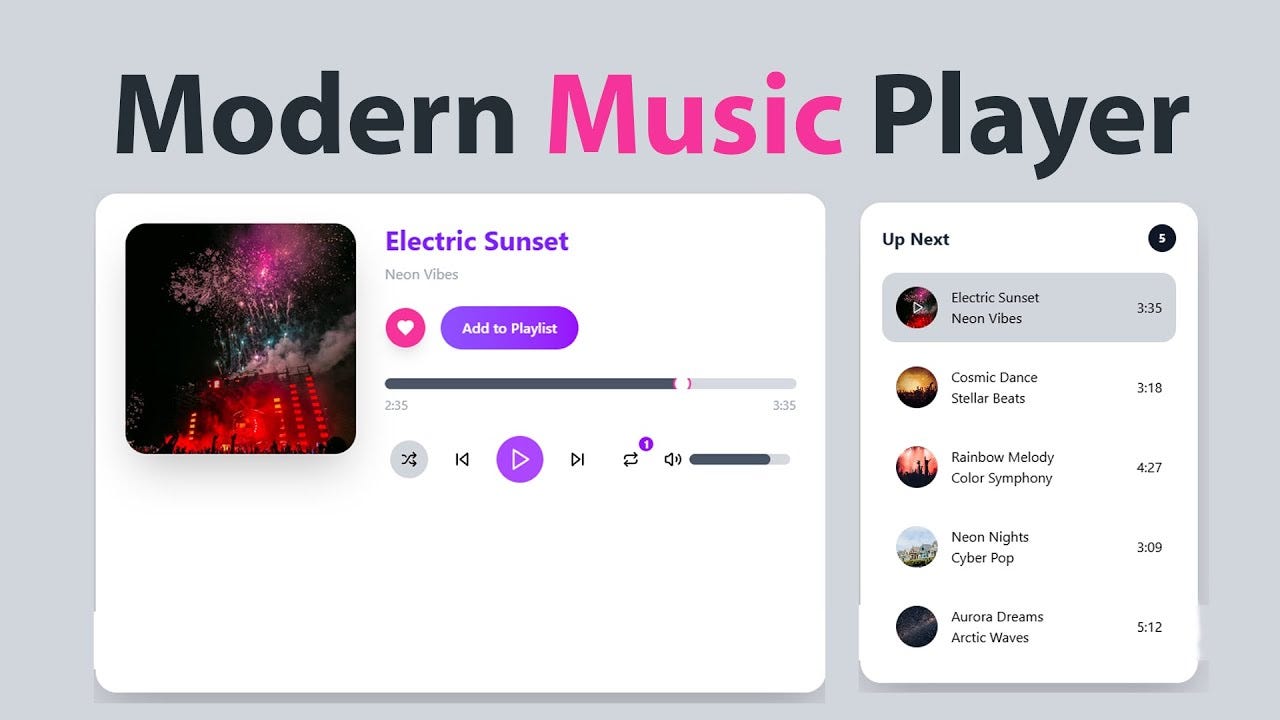
Modern music players require sophisticated user interfaces that respond instantly to user interactions. React’s component-based architecture makes it ideal for building these interactive elements, while Tailwind CSS enables you to create beautiful, consistent designs without writing custom CSS.
Project Overview and Features
Your music player will include essential features that users expect from a modern audio application. The player will support playlist management, allowing users to queue multiple songs and navigate between them seamlessly. Volume control with visual feedback ensures users can adjust audio levels precisely, while a progress bar provides visual representation of playback position with seek functionality.
The interface will feature a clean, minimalist design with smooth animations and transitions. Album artwork display, song information, and intuitive playback controls create an engaging user experience. The responsive design ensures the player works perfectly on desktop, tablet, and mobile devices.
Advanced features include shuffle and repeat modes, keyboard shortcuts for power users, and local storage integration to remember user preferences and playlists across sessions. The player will also include accessibility features to ensure it’s usable by everyone.
Setting Up Your Development Environment
Before diving into development, you’ll need to establish a proper development environment. Create a new React application using Create React App or Vite for faster build times. Install Tailwind CSS following the official installation guide, ensuring you have access to all utility classes and responsive design features.
Consider additional dependencies that will enhance your music player’s functionality. Libraries for audio manipulation, icon sets for player controls, and utility libraries for handling time formatting and local storage operations will streamline your development process.
Set up your project structure with clear separation between components, utilities, and assets. Create folders for components, hooks, utils, and assets to maintain clean code organization as your project grows.
Building the Core Audio Functionality
The foundation of any music player is robust audio handling. React provides excellent support for working with the HTML5 Audio API through refs and hooks. You’ll create custom hooks to manage audio state, including current time, duration, volume, and playback status.
Implementing playlist functionality requires careful state management to track the current song, queue order, and user interactions like shuffle and repeat modes. React’s useState and useEffect hooks work together to create seamless transitions between tracks and maintain consistent playback behavior.
Audio loading and error handling are crucial for a smooth user experience. Your player should gracefully handle network issues, unsupported file formats, and loading states while providing appropriate feedback to users.
Designing the User Interface with Tailwind CSS
Tailwind CSS excels at creating modern, responsive interfaces quickly. Your music player’s design will leverage Tailwind’s utility classes to create a cohesive visual hierarchy. The layout will feature a prominent album artwork area, clearly visible playback controls, and an informative progress section.
Color schemes and typography choices significantly impact user experience. Tailwind’s color palette and typography utilities allow you to create visually appealing designs that maintain excellent readability and accessibility standards. Dark mode support can be implemented using Tailwind’s dark variant classes.
Responsive design ensures your music player looks and functions perfectly across all device sizes. Tailwind’s responsive utilities make it straightforward to adapt your layout for mobile, tablet, and desktop viewports without writing media queries.
Implementing Interactive Controls
[embed]
Interactive controls form the heart of user engagement with your music player. The play/pause button requires careful state management to reflect the current playback status accurately. Volume controls need both visual sliders and keyboard support for accessibility. Progress bars must display current playback position while allowing users to seek to specific timestamps.
Navigation controls for previous and next tracks should work seamlessly with playlist logic, handling edge cases like reaching the end of a playlist or shuffle mode behavior. Visual feedback through animations and hover states creates a polished, professional feel.
Managing Application State
State management in a music player involves coordinating multiple interconnected pieces of data. The current song, playback position, volume level, playlist order, and user preferences all need to work together harmoniously. React’s built-in state management tools are sufficient for most music player implementations.
Consider using the Context API for global state like current playlist and playback status, while keeping component-specific state local. Custom hooks can encapsulate complex audio logic, making your components cleaner and more reusable.
Adding Advanced Features
Once your basic music player is functional, you can enhance it with advanced features. Keyboard shortcuts improve accessibility and user experience for power users. Local storage integration allows users to maintain their playlists and preferences between sessions.
Visualizations like spectrum analyzers or waveforms add visual appeal and can be implemented using the Web Audio API alongside your existing audio handling. Search functionality within playlists improves usability for large music collections.
Performance Optimization
Music players must perform smoothly to provide good user experience. Optimize your React components using memo and useMemo to prevent unnecessary re-renders during audio playback. Lazy loading for playlist items and efficient audio preloading strategies ensure smooth playback transitions.
Consider implementing virtual scrolling for large playlists and optimizing image loading for album artwork to maintain responsive performance regardless of playlist size.
Testing and Deployment
Comprehensive testing ensures your music player works reliably across different browsers and devices. Test audio functionality, playlist management, responsive design, and accessibility features thoroughly. Consider automated testing for critical functionality and manual testing for user experience validation.
[embed]
Deployment considerations include audio file hosting, browser compatibility, and mobile-specific optimizations. Progressive Web App features can enhance the mobile experience significantly.
Conclusion
Building a modern music player with React and Tailwind CSS combines practical learning with creative expression. This project demonstrates important concepts like state management, API integration, responsive design, and user experience optimization. The skills developed while creating this music player apply broadly to other React applications, making it an excellent portfolio project that showcases both technical ability and design sensibility.
Your completed music player will serve as a foundation for future enhancements and demonstrate your ability to create complex, interactive applications using modern web development tools and techniques.
메타데이터
- post_id
- 596f0a2cfd1c
- slug
- build-a-modern-music-player-in-react-js-and-tailwind-css-596f0a2cfd1c
- url
- https://medium.com/@arhaanali/build-a-modern-music-player-in-react-js-and-tailwind-css-596f0a2cfd1c
- canonical_url
- https://medium.com/@arhaanali/build-a-modern-music-player-in-react-js-and-tailwind-css-596f0a2cfd1c
- author_url
- https://medium.com/@arhaanali
- status
- ok
- fetched_at
- 2026-07-24 16:06:45