Signals in React: The Future of State Management or Just Another Hype?
Say goodbye to full component re-renders. Signals offer a new way to manage state — faster, finer, and maybe even smarter
Signals are making waves in the frontend world — and React is quietly paying attention.
Signals in React: The Future of State Management or Just Another Hype?
Say goodbye to full component re-renders. Signals offer a new way to manage state — faster, finer, and maybe even smarter
🎉 Not a Medium member? No worries! Enjoy the full article for free using my **Friend Link →**
👋 Hey React Dev, Have You Heard About Signals?
If you’re like me, you’ve spent years writing useState, useEffect, and battling unnecessary re-renders. Then I came across something that made me pause:
****Signals — reactive values that update UI without triggering re-renders.
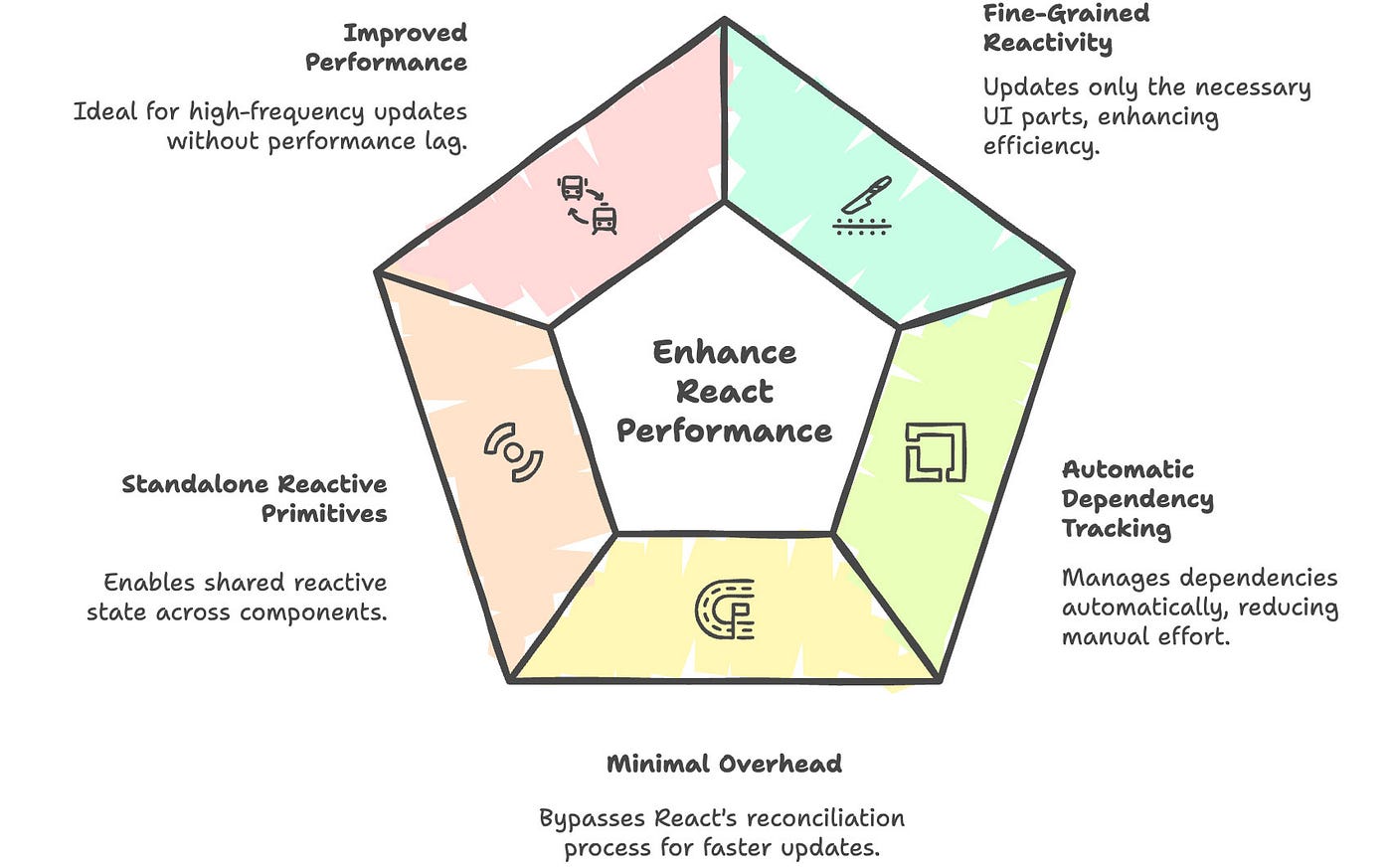
This idea comes from frameworks like **SolidJS, [Qwik](https://qwik.dev/), and [Preact](https://preactjs.com/), where updates are fine-grained** — meaning only what actually changed gets updated in the DOM. Sounds neat, right?
Let’s break down what that means in React terms.
🧪 useState() vs signal() — What’s the Big Deal?
We love useState in React, but every time you update it, the entire component re-renders. Sometimes that’s okay. But in larger apps, this can get expensive fast.
Enter signal() — a reactive primitive from Preact that works with React via a compatibility package. Let’s look at a side-by-side comparison.
🟢 Using useState
function Counter() {
  const [count, setCount] = useState(0);

  return (
    <button onClick={() => setCount(count + 1)}>
      Count: {count}
    </button>
  );
}
What happens here?
- Clicking the button sets new state.
- React re-renders the entire
Countercomponent. - Simple, but comes with some render overhead.
🔁 Using [signal()](https://preactjs.com/guide/v10/signals/) with [@preact/signals-react](https://www.npmjs.com/package/@preact/signals-react)
import { signal } from "@preact/signals-react";

const count = signal(0);

function Counter() {
  return (
    <button onClick={() => count.value++}>
      Count: {count.value}
    </button>
  );
}
What’s different here?
countis a reactive value.- When
count.value++runs, it only updates the DOM text node — no re-render. - The rest of the component stays untouched.
Think of it as surgical updates to the DOM, without React’s reconciliation dance.
🔁 How Are Signals Different From useState?

🔍 A Theme Toggle Example (Signals in Action)
Let’s try a practical example: toggling between light and dark mode.
🔧 Step 1: Define the signal
// theme.ts
import { signal } from "@preact/signals-react";

export const theme = signal("light");
This creates a reactive theme signal that holds the current theme.
💡 Step 2: Toggle the theme
// ToggleButton.tsx
import { theme } from "./theme";

function ToggleButton() {
  return (
    <button onClick={() => {
      theme.value = theme.value === "light" ? "dark" : "light";
    }}>
      Toggle Theme
    </button>
  );
}
Each time the button is clicked, theme.value switches. But here’s the trick: no component is re-rendered. The parts of the UI that rely on theme.value will simply react and update.
🖼 Step 3: Display the current theme
// Header.tsx
import { theme } from "./theme";

function Header() {
  return <h1>Current theme: {theme.value}</h1>;
}
Every time the theme changes, only the text inside <h1> updates, not the entire Header component. This is the real power of signals — super fine-grained updates.
🔄 Wait… No useState? No useEffect?
Yep, that’s the point. With signals, you no longer need to think in terms of:
“When should this component re-render?”
Instead, you start thinking like this:
“This value changed — let’s just update that part.”
And React is okay with it (thanks to Preact’s integration).
⚠️ Are There Any Downsides?
Definitely — and you should know them before jumping in:

- 🧪 Experimental in React — This isn’t official React behavior; it’s enabled via
@preact/signals-react. - 🧠 Different mental model — If you’re used to thinking in re-renders, this feels alien.
- 🔍 Tooling — DevTools don’t yet show signal updates natively.
- 🧩 Integration — Combining signals with React’s Context or hooks may require a careful setup.
🧠 So… Should You Use It in Production?
Honestly? Yes, with purpose.

If you’re building:
- ✅ A component library
- ✅ A real-time dashboard
- ✅ A form with live validation
- ✅ Or anything where performance matters…
Signals are a fantastic drop-in tool that can reduce re-renders and make your app feel snappier.
But if you’re just managing simple form inputs or small state in a side project? useState is still your best friend.
🔮 Is React Itself Moving Toward Signals?
There are signals (pun intended 😄) that the React team is watching this space:
- The new
[use()](https://react.dev/reference/react/use) hook in React 19 - Async context
- Compiler-based optimizations in React Labs
While signal() may not become native, the idea of reactive primitives is gaining traction.
🧩 Wrapping Up
React doesn’t need to re-render everything just to update one number. Signals offer a new lens — one where performance and simplicity can coexist.
You don’t have to pick a side. Use
useStatewhere it shines. Usesignal()when performance demands it.
And hey, exploring these new patterns will only make you a sharper, more versatile frontend engineer. 💪
👋 Thanks for reading all the way through!
📌 Was this helpful?
- Clap 👏 if it sparked a thought or challenged your workflow
- Share 📣 it with your developer network
- Follow 📬 me for deep dives on frontend architecture, React, performance, and AI in dev life

✨ I publish regularly — clean code, real-world architecture, and modern web practices.
📬 Want updates? *Subscribe for email alerts on Medium*
Let’s keep growing together. Happy coding! 💻🚀
메타데이터
- post_id
- 59e093bea229
- slug
- signals-in-react-the-future-of-state-management-or-just-another-hype-59e093bea229
- url
- https://medium.com/web-tech-journals/signals-in-react-the-future-of-state-management-or-just-another-hype-59e093bea229
- canonical_url
- https://medium.com/web-tech-journals/signals-in-react-the-future-of-state-management-or-just-another-hype-59e093bea229
- author_url
- https://medium.com/@rakeshkumar-42819
- status
- ok
- fetched_at
- 2026-07-18 19:31:13