I Tried 100+ Claude Skills. These 6 Actually Changed How I Work.
After testing more than 100 Claude Code skills, only six became part of my daily workflow. Here is what each one does.
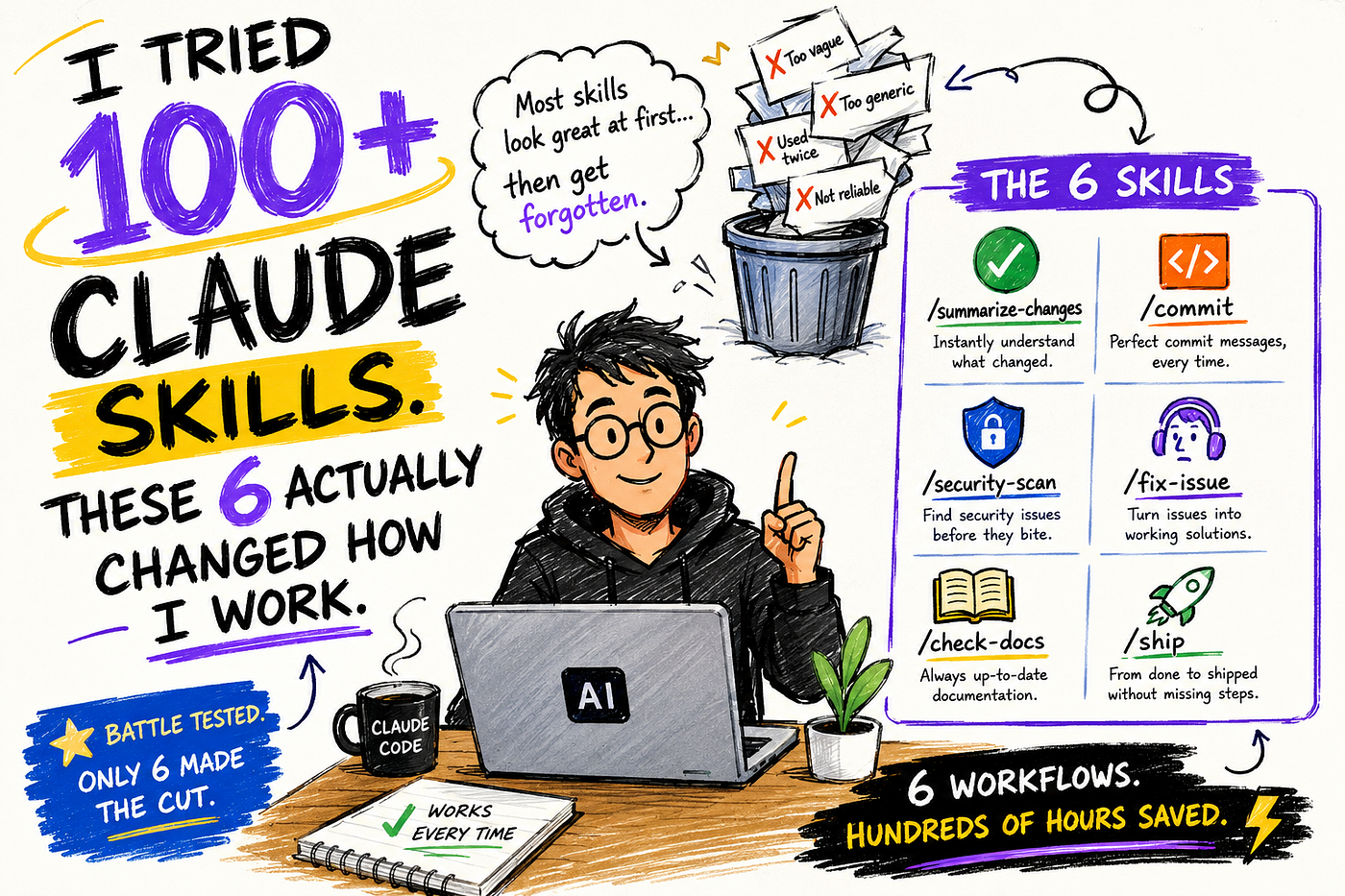
Photo from AI
I Tried 100+ Claude Skills. These 6 Actually Changed How I Work.
After testing more than 100 Claude Code skills, only six became part of my daily workflow. Here is what each one does.

Photo from https://wavespeed.ai/blog/posts/what-is-claw-code/
I built more than 100 Claude Code skills.
Ninety-four of them stopped being useful within two weeks.
Not because they failed. Most ran fine. I just kept re-explaining things to Claude manually anyway, because the skills I had built solved problems I imagined, not the ones I actually had every day.
The six that survived have something in common. It took me an embarrassingly long time to notice what it was.
None of them tries to do more than one thing. Every single one injects real-time data before Claude reads anything. And each one has an explicit instruction about where to stop.
That is the whole pattern. The rest of this article shows what it looks like in practice.
If you want more such information about AI, consider subscribing to my newsletter, where you will get noise-free AI information every week
Link for the newsletter: Newsletter
What skills actually are

photo from link
Claude Skills are reusable, filesystem-based instructions that Claude reads before answering your queries.
A skill is a Markdown file with a bit of YAML at the top. Put it in .claude/skills/your-skill-name/SKILL.md and it becomes /your-skill-name in Claude Code. Claude reads the instructions in the file and executes them.
The built-in /review, /debug, and /simplify commands work the same way. You can override any of them with your own version that knows your specific codebase and conventions.
Skills also have a superpower most tutorials skip: dynamic context injection. Put !git diff HEAD`` inside the file and Claude Code runs that shell command and inserts the output before Claude ever sees the skill content.
The skill always works with current data, not stale instructions.
That detail matters more than most people realize.

Photo from AI
Every skill worth keeping uses this. The ones that do not inject real context are just prompts with extra steps.
You probably shouldn’t copy these skills exactly. The value is in the pattern behind them. Use them as templates and adapt them to the workflows you repeat every week.

Photo from AI
Skill 1: summarize-changes
Before every commit, I type /summarize-changes. In under ten seconds it reads the diff, summarizes what changed in plain English, and flags anything risky: missing error handling, hardcoded values, tests that probably need updating.
It catches two or three things per session that I would have shipped without noticing. It has found a hardcoded secret once. That alone paid for the twenty minutes it took to build.
---
description: Summarizes uncommitted changes and flags anything risky.
Use when the user asks what changed, wants a commit message, or asks to review their diff.
---
## Current changes
!`git diff HEAD`

## Instructions
Summarize the changes above in two or three bullet points.
Then list any risks: missing error handling, hardcoded values, untested paths.
If the diff is empty, say so.
The !git diff HEAD`` line is why this works. Without it, you have a skill asking Claude to describe changes it cannot see. With it, the actual diff gets injected into the skill before Claude reads anything. Fresh every time.
Most people write this skill without the dynamic injection and wonder why Claude gives generic answers.
Skill 2: commit
Every commit message used to take me 30 to 90 seconds to write, longer if I had to remember the Conventional Commits format. Now it takes three seconds. I type /commit, Haiku reads the staged diff, generates the message, and commits.
The model: haiku frontmatter line is what makes this instant and nearly free. Haiku is Anthropic's fastest model. Commit messages do not need Opus-level reasoning. Using a heavy model here is like calling a plumber to change a lightbulb.
---
name: commit
description: Generate a conventional commit message from staged changes.
model: haiku
allowed-tools: Bash(git add:*), Bash(git commit:*)
---## Staged changes
!`git diff --cached`

## Instructions
Generate a commit message following Conventional Commits.
Format: type(scope): short description
Types: feat, fix, chore, refactor, docs, test
Keep the summary under 50 characters.
Add a body paragraph if the change is non-obvious.
Setting the right model per skill keeps your usage limit on tasks that actually need it.
Skill 3: security-scan
The built-in /review catches bugs and style issues. It treats security as an afterthought.
I run /security-scan on any code that touches user input, authentication, file system, or external requests. It looks at the same diff but focuses exclusively on the attack surface. No style feedback, no naming suggestions.
Just the specific line, the severity, and one sentence on how to fix it.
---
description: Deep security review of changed code. Use after implementing features
that handle user input, authentication, file operations, or external requests.
allowed-tools: Read, Grep, Glob
---
## What to review
!`git diff HEAD`

## Security checklist
1. SQL injection and query parameter handling
2. Authentication bypass paths
3. Hardcoded secrets or credentials (even in comments)
4. Unvalidated user input reaching file system or shell
5. Insecure deserialization
6. Overly permissive CORS or headers
For each finding: exact file and line number, severity (critical/high/medium), and one-sentence remediation.
Skip style, naming, and non-security feedback entirely.
The allowed-tools: Read, Grep, Glob line restricts what this skill can touch. A security review should read, not write. Locking the tools means this skill cannot accidentally modify anything while scanning.
The instruction to skip style feedback is equally important. A security review that mentions variable naming is a review nobody finishes.
A skill that tries to do everything does nothing well. Scope matters.
Skill 4: fix-issue
Most people never use the $ARGUMENTS It is the most underused feature in all of Claude Code skills.
When you call /fix-issue 247, the 247 lands in your SKILL.md as $ARGUMENTS. The skill can pass it to shell commands, embed it in instructions, or forward it to an API. You type the issue number. Claude fetches it, reads the codebase for context, and implements the fix.
Small bug fixes that used to take me 30 to 60 minutes now take 10 to 15. Not because Claude is magic. Because I no longer spend half the time switching between GitHub, the terminal, and my editor re-reading the same issue description.
The stop condition is what makes this safe:
---
name: fix-issue
description: Fix a GitHub issue by number. Fetches the issue description,
finds relevant code, implements a fix following project conventions.
allowed-tools: Bash(gh issue view:*), Read, Glob, Grep, Edit, Write
---
## Instructions
1. Run: gh issue view $ARGUMENTS --json title,body,labels
2. Read the issue description carefully
3. Search the codebase for code related to the issue
4. Implement the fix following the conventions in CLAUDE.md
5. Add or update tests if applicable
6. Summarize what you changed and why
Do not close the issue or create a PR unless explicitly asked.
Requires the GitHub CLI installed and authenticated with gh auth login.
Without $ARGUMENTS, this skill would need you to paste the issue number or description manually inside the prompt. With it, the skill is a proper function call.
Skill 5: check-docs
Claude suggested a Dexie.js API pattern to me that was removed in version 4. It wrote the code confidently. Looked correct. Broke at runtime.
The problem is structural: Claude’s training data has a cutoff, and fast-moving libraries like ORMs and frameworks change faster than models get updated. You can prompt Claude to “use the latest docs,” but it cannot fetch what it does not know to fetch.
This skill fetches the actual docs first. Libraries that support AI tooling publish an llms.txt file at their root, a machine-readable index of documentation pages. The skill pulls it, reads the relevant pages, and only then answers your question.
---
name: check-docs
description: Answer questions about a library using its current documentation.
Use when the user asks about an external library and needs accurate, up-to-date information.
allowed-tools: WebFetch, Read
---

## Instructions
1. Fetch the documentation index: https://[library].dev/llms.txt
   (Substitute the actual library URL from the user's question)
2. Based on the user's question, fetch the most relevant documentation pages
3. Answer using only what the current documentation says
Do not rely on training data for library-specific APIs or patterns.
State clearly if the documentation does not cover the question.
## User question
$ARGUMENTS
Not every library supports llms.txt yet. For the ones that do (Dexie, Zod, Hono, and a growing list), this skill eliminated wrong API suggestions entirely. For the ones that do not, Claude falls back to training data and tells you so.
That transparency alone makes it more useful than asking Claude a question directly.
Skill 6: ship
Before this skill: six commands in sequence, half of them I had to look up. git add, git status, run tests, write commit message, git push, check the output.
After: one command. /ship. It runs the pre-flight checks, runs tests, commits if they pass, pushes, and reports what happened. If tests fail, it stops and tells you why.
disable-model-invocation: true is the frontmatter line that matters most here. It prevents Claude from running this skill autonomously. You want this triggered only when you type it deliberately. An AI that decides on its own to run your deploy workflow is not a productivity tool.
---
name: ship
description: Full deploy workflow. Reviews diff, runs tests, commits, pushes.
disable-model-invocation: true
allowed-tools: Bash(git *), Bash(npm test), Bash(pytest *)
---
## Pre-flight
!`git status`
!`git diff --cached`
## Instructions
1. Show the staged diff summary
2. Run tests: npm test (or pytest if Python project)
3. If tests fail: stop, report failures, do not commit
4. If tests pass: generate a conventional commit message and commit
5. Push to current branch
6. Report: what was committed, test results, push status
Do not deploy or merge to main unless explicitly told to.
The explicit stop before deployment is the other guard. Commit and push are in. Deployment is a separate decision with a separate approval.
The pattern behind all six
Looking at these together, a pattern emerges that is not obvious until you try and fail at a few skill designs.
Every skill that lasted had three things:
Scope. It does one job, not several. /security-scan only checks security. /commit only commits. When a skill tries to review AND commit AND push, it does all three inconsistently.
Dynamic data. The best skills inject real context using the ! command syntax. They read the actual diff, the actual test output, the actual issue description. Skills that give Claude instructions without data produce generic output.
Explicit stops. Every skill that touches external systems (git, GitHub, APIs) includes a line about what it should NOT do next. Without stop conditions, Claude tries to finish the whole workflow, including steps you did not want.
Skills without these three things are prompts in disguise. They feel like automation but still require you to supervise every step.
What to build first
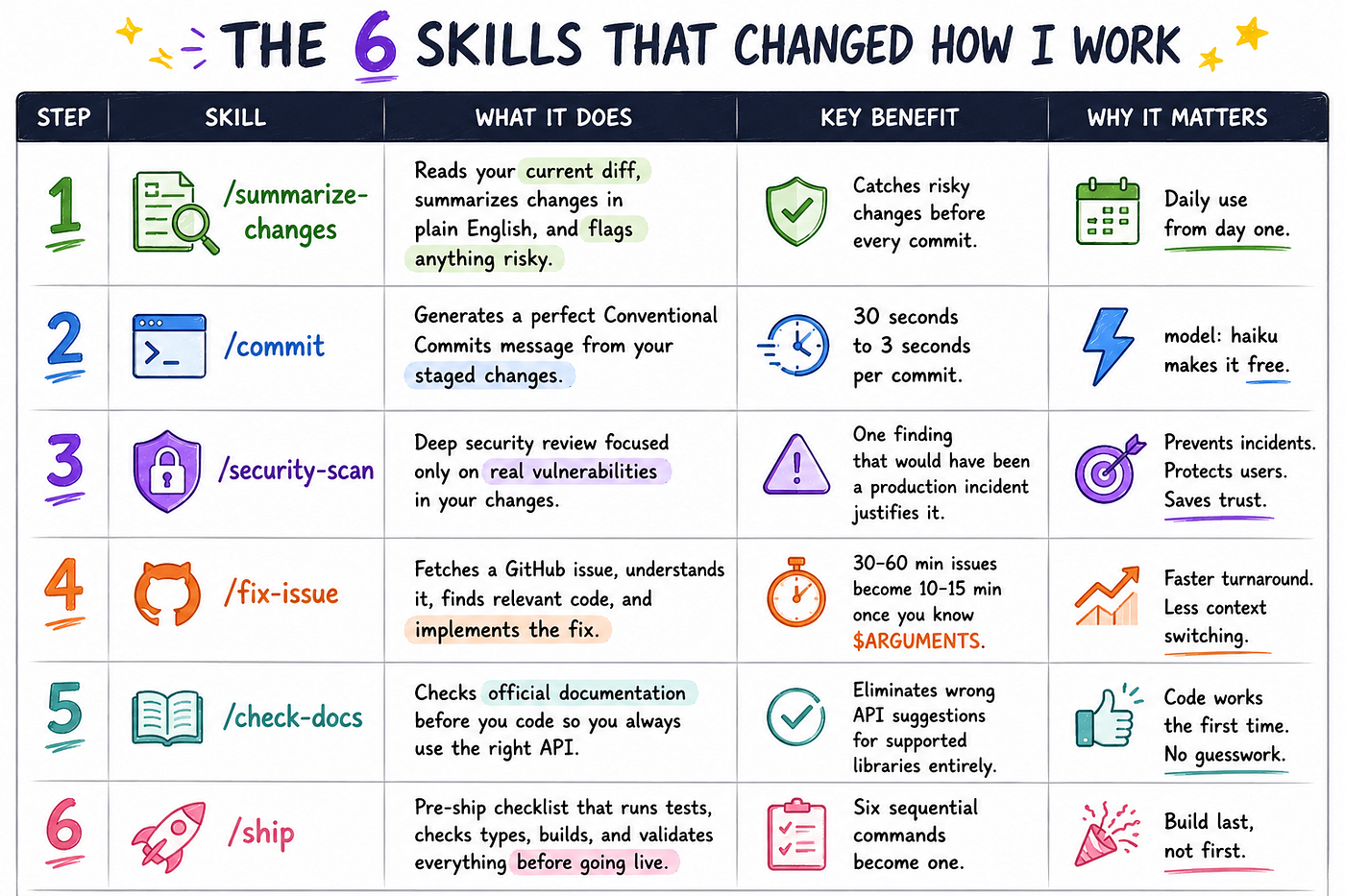
Photo from AI
Do not jump to /ship first. It is the most powerful skill here and the most likely to cause problems if the rest of your workflow is not already solid.
One thing I kept getting wrong
My early skills were too long.
I thought more instructions meant better behavior. The opposite happened. When a SKILL.md gets long, instructions buried at the bottom start getting ignored. The skill file stays in context across turns, and every line is a recurring token cost.
The official guidance now is: state what to do, not how or why. Cut anything that explains the reasoning instead of defining the action.
Every skill I use daily fits on one screen. That is not a coincidence.
References
- Claude Code Skills Documentation (Official) https://code.claude.com/docs/en/skills
- Essential Claude Code Skills and Commands (Bozhidar Batsov) https://batsov.com/articles/2026/03/11/essential-claude-code-skills-and-commands/
- Best Claude Code Skills in 2026 (Toolradar) https://toolradar.com/blog/best-claude-code-skills-2026
- Claude Code Slash Commands: A Complete Guide (alexop.dev) https://alexop.dev/posts/claude-code-slash-commands-guide/
- Complete Claude Code Power User Guide (DEV Community) https://dev.to/numbpill3d/the-complete-claude-code-power-user-guide-slash-commands-hooks-skills-more-6ep
- Claude Code Customization Guide: CLAUDE.md, Skills, Subagents (alexop.dev) https://alexop.dev/posts/claude-code-customization-guide-claudemd-skills-subagents/
메타데이터
- post_id
- 59e180a1c5b2
- slug
- i-tried-100-claude-skills-these-6-actually-changed-how-i-work-59e180a1c5b2
- url
- https://pub.towardsai.net/i-tried-100-claude-skills-these-6-actually-changed-how-i-work-59e180a1c5b2
- canonical_url
- https://pub.towardsai.net/i-tried-100-claude-skills-these-6-actually-changed-how-i-work-59e180a1c5b2
- author_url
- https://medium.com/@yadavdivy296
- status
- ok
- fetched_at
- 2026-06-24 23:31:39