I Built a Free Billing System for a Small ISP Using Google Sheets and Mikrotik API
No server. No hosting cost. No monthly fee. Just Google Apps Script, a spreadsheet, and a router.
I Built a Free Billing System for a Small ISP Using Google Sheets and Mikrotik API
No server. No hosting cost. No monthly fee. Just Google Apps Script, a spreadsheet, and a router.
Managing a small ISP the kind that serves a neighborhood sounds simple until you’re actually doing it. You’ve got dozens of PPPoE users on your Mikrotik router, monthly billing to track, and no budget for a proper billing platform.
The usual answer is to manage everything manually: check who hasn’t paid, log into Winbox, disable their PPPoE secret by hand, then re-enable it when they pay. Every month. For every user.
I’ve seen this workflow first-hand, and it’s exactly the kind of thing that shouldn’t require human intervention at all.
So I built Mikro-Billing Pro — a full billing management system that runs entirely inside Google Sheets, costs nothing to host, and talks directly to the Mikrotik router via REST API.
Problem: Managing PPPoE Users Is a Manual Nightmare
At the start of every month, someone has to:
- Check which users haven’t paid
- Log into Winbox one by one
- Manually disable their PPPoE secret
- Wait for payment confirmation
- Log back in and re-enable them
If you have 30 users, that’s 30 potential Winbox sessions per month just for billing. And that’s before accounting for mid-month changes, new customers, or users who disappear from the router entirely.
There had to be a better way.
Solution: A Web App That Lives Inside Google Sheets
The idea was simple: what if the billing dashboard and the router could talk to each other directly?
Here’s what I ended up building:
- A Google Sheets spreadsheet as the database — storing all customer data, payment status, and history
- A Google Apps Script backend that talks to the Mikrotik REST API
- A web dashboard (HTML + Bootstrap) served directly from Google Apps Script — no hosting needed
- An Auto-Isolir (auto-isolation) trigger that runs on the 1st of every month, disabling all unpaid users automatically
The entire system runs inside Google’s infrastructure. Zero hosting cost. Zero server to maintain.
How the System Works
Here’s the full picture:
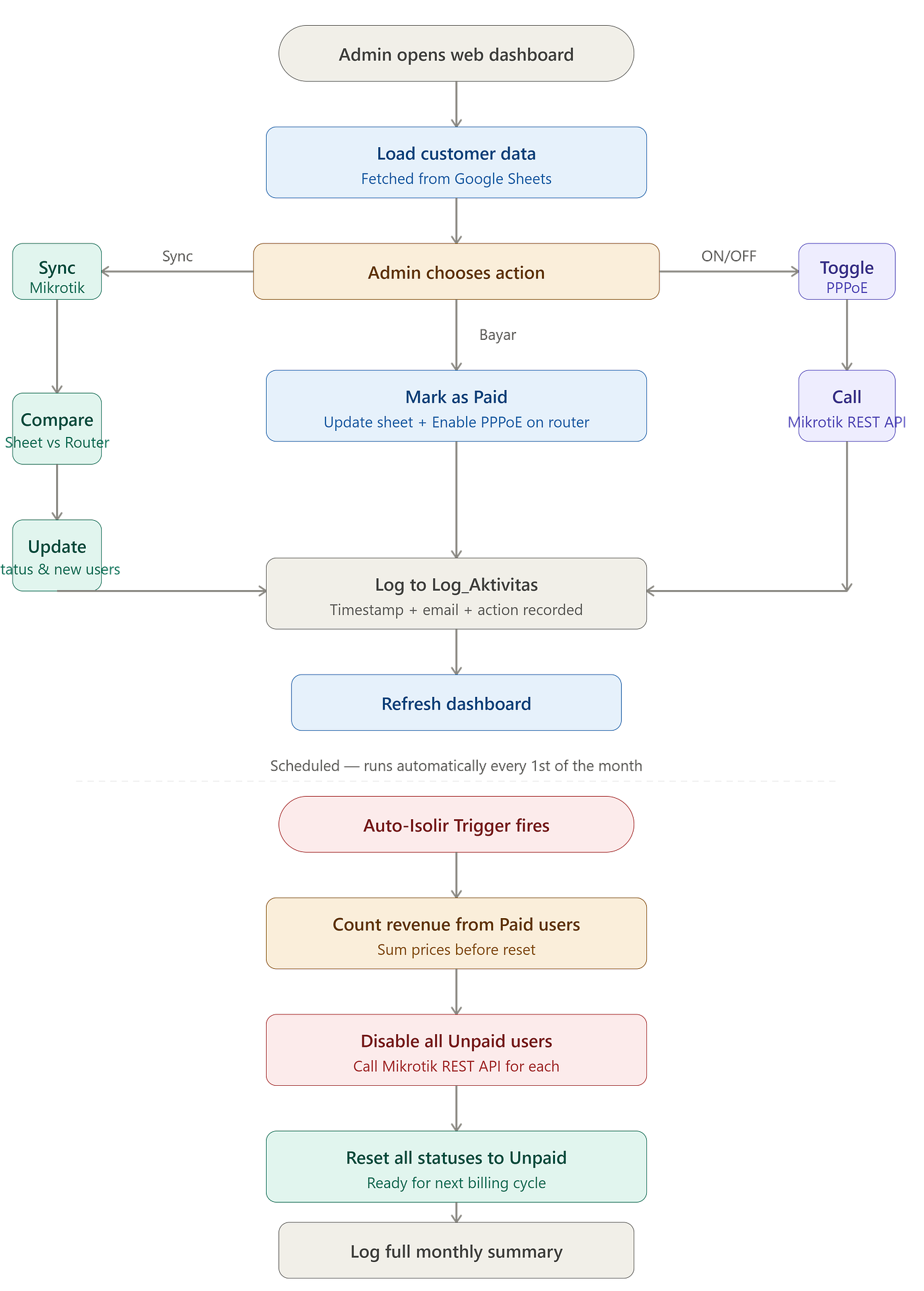
- Admin opens the web dashboard (served by Google Apps Script)
- Dashboard loads customer data directly from Google Sheets
- Admin can mark payments, toggle PPPoE status, add notes, or delete customers
- Every action calls the Mikrotik REST API to apply changes to the router in real time
- On the 1st of every month, Auto-Isolir runs automatically — disabling all unpaid users and logging a full summary
Tech Stack

Total hosting cost: Rp 0.
Building It: Feature by Feature
1. The Dashboard UI
The frontend is a single HTML file served directly by doGet() in Google Apps Script. Bootstrap handles the layout — nothing fancy, but it gets the job done.
function doGet() {
  return HtmlService.createTemplateFromFile('index').evaluate()
    .setTitle('Mikro-Billing Pro')
    .setXFrameOptionsMode(HtmlService.XFrameOptionsMode.ALLOWALL)
    .addMetaTag('viewport', 'width=device-width, initial-scale=1');
}
The table renders customer data with color-coded rows — green for new users, red for users who disappeared from the router. Each row has action buttons: Bayar (mark as paid), ON/OFF (toggle PPPoE), Note (add a note), and Hapus (delete) for users marked as missing.
function renderTable(data) {
  data.forEach(r => {
    let cls = r[6] == 'Baru' ? 'table-success' : (r[6] == 'Hilang' ? 'table-danger' : '');
    let badgeBayar = r[4] == 'Paid' ? 'bg-success' : 'bg-secondary';
    let badgeMk = r[7] == 'Disabled' ? 'bg-danger' : 'bg-info text-dark';
    // render row...
  });
}
2. Sync with Mikrotik (The Heart of the System)
The syncMikrotik() function is what keeps the spreadsheet in sync with the actual router. It fetches all PPPoE secrets from the router via REST API and compares them against the spreadsheet data.
function syncMikrotik() {
  let auth = Utilities.base64Encode(MK_USER + ":" + MK_PASS);
  let res = UrlFetchApp.fetch(MK_URL, {
    "headers": {"Authorization": "Basic " + auth},
    "muteHttpExceptions": true
  });
  let mkSecrets = JSON.parse(res.getContentText());
  // ...
}
Here’s what happens during a sync:
- User exists on router but not in sheet → added automatically with status “Baru” and price based on their profile
- User exists in sheet but not on router → marked as “Hilang” (missing) — meaning they were deleted from Winbox
- User exists in both → their current PPPoE status (Enabled/Disabled) is updated in the sheet
// User in sheet but deleted from router
if (!mkMap[user] && sheetData[i][6] !== "Hilang") {
  sheet.getRange(i + 1, 7).setValue("Hilang");
}

// New user found on router
let harga = mkMap[user].profile.includes("10M") ? "Rp 250.000" : "Rp 150.000";
newData.push([user, comment, profile, harga, "Unpaid", new Date(), "Baru", statusPppoe, ""]);
The price is automatically assigned based on the PPPoE profile name — if it includes “10M”, it’s the higher tier. Otherwise, the lower tier. Simple but effective for a small ISP.
3. Marking Payment — and Re-enabling the Router
When an admin clicks Bayar, two things happen simultaneously: the PPPoE secret is re-enabled on the router, and the payment status in the sheet is updated to “Paid”.
function markAsPaid(username) {
  let auth = Utilities.base64Encode(MK_USER + ":" + MK_PASS);

  // Re-enable PPPoE on the router
  UrlFetchApp.fetch(MK_URL + "/enable", {
    "method": "POST",
    "headers": {"Authorization": "Basic " + auth, "Content-Type": "application/json"},
    "payload": JSON.stringify({"numbers": username})
  });

  // Update sheet status
  sheet.getRange(i + 1, 5).setValue("Paid");
  sheet.getRange(i + 1, 6).setValue(new Date());

  catatLog("Bayar Lunas", username, "Internet diaktifkan, status berubah menjadi Paid.");
  syncMikrotik();
  return "Sukses: " + username + " Lunas & Aktif.";
}
One click. Router updated. Spreadsheet updated. Done.
4. Toggle ON/OFF — Manual Override
Sometimes you need to manually disable or enable a specific user outside the normal billing cycle — maybe they’re going on a long trip, or there’s a dispute. The ON/OFF button handles this:
function togglePPPoE(username, currentStatus) {
  let action = currentStatus === "Enabled" ? "/disable" : "/enable";
  let statusBaru = currentStatus === "Enabled" ? "Disabled" : "Enabled";

  UrlFetchApp.fetch(MK_URL + action, {
    "method": "POST",
    "headers": {"Authorization": "Basic " + auth, "Content-Type": "application/json"},
    "payload": JSON.stringify({"numbers": username})
  });
  catatLog("Ubah Status", username, `Berhasil diubah paksa menjadi ${statusBaru}`);
  syncMikrotik();
}
The current status is passed from the frontend, so the backend always knows whether to enable or disable — no ambiguity.
5. Auto-Isolir — The Star Feature
This is the main reason I built the system. Auto-Isolir runs automatically on the 1st of every month via a Google Apps Script time-based trigger. It goes through every customer, disables the PPPoE of anyone who hasn’t paid, and generates a full monthly summary.
function autoIsolir() {
  let userTerisolir = [];
  let countIsolir = 0;
  let totalUang = 0;

  for (let i = 1; i < data.length; i++) {
    let user = data[i][0];
    let status = data[i][4]; // "Paid" or "Unpaid"
    let harga = parseInt(String(data[i][3]).replace(/[^0-9]/g, "")) || 0;

    if (status === "Unpaid" && user !== "") {
      // Disable PPPoE on router
      UrlFetchApp.fetch(MK_URL + "/disable", {
        "method": "POST",
        "headers": {"Authorization": "Basic " + auth, "Content-Type": "application/json"},
        "payload": JSON.stringify({"numbers": user})
      });
      logIsolir.appendRow([new Date(), user, "TERISOLIR", "Otomatis Akhir Bulan"]);
      userTerisolir.push(user);
      countIsolir++;
    } else if (status === "Paid") {
      totalUang += harga; // Count monthly revenue
    }

    // Reset all statuses to Unpaid for next month
    if (status === "Paid") sheet.getRange(i + 1, 5).setValue("Unpaid");
    // Reset "Baru" label after first month
    if (data[i][6] === "Baru") sheet.getRange(i + 1, 7).setValue("Normal");
  }

  // Log full summary
  catatLog("Trigger Awal Bulan", "Sistem Auto-Isolir",
    `Isolir: ${countIsolir} user. Pendapatan: Rp ${totalUang.toLocaleString('id-ID')}`
  );

  syncMikrotik();
}
A few things worth noting here:
- Revenue is calculated automatically — by summing the price of all “Paid” users before the reset
- All statuses reset to “Unpaid” after the run, ready for the next billing cycle
- “Baru” labels are cleared — new customers from last month become “Normal”
- A full log is written to both the
Log_Isolirsheet and the centralLog_Aktivitassheet
6. Activity Logging — Full Audit Trail
Every action in the system — sync, payment, toggle, delete, auto-isolir — gets logged to a Log_Aktivitas sheet with a timestamp and the email of whoever triggered it.
function catatLog(aksi, target, detailHasil) {
  let logSheet = ss.getSheetByName("Log_Aktivitas") || ss.insertSheet("Log_Aktivitas");
  let userEmail = Session.getActiveUser().getEmail() || "Admin/System";
  logSheet.appendRow([new Date(), userEmail, aksi, target, detailHasil]);
}
This means if something goes wrong — or if there’s a dispute about whether a customer was disabled — there’s always a paper trail.
The Result

What I Learned
1. Google Apps Script is more powerful than people think. Most developers dismiss it as “just macros for Sheets.” But it can serve web apps, call external APIs, run scheduled jobs, and handle authentication — all for free. For small internal tools, it’s genuinely underrated.
2. Building on zero-cost infrastructure is a real engineering constraint — and a fun one. Every design decision was shaped by “how do I do this without spinning up a server?” It pushed me toward creative solutions I wouldn’t have found otherwise.
3. Auto-reset logic needs to be carefully ordered. The Auto-Isolir function first counts revenue from “Paid” users, then resets everyone to “Unpaid”. Get that order wrong, and you count zero revenue every month. Small detail, big consequence.
4. An audit log is not optional for billing systems. The first version had no logging. The moment I imagined a customer disputing whether they were charged correctly — I added catatLog() to every function immediately.
What’s Next
- Auto-send payment reminders via Telegram or WhatsApp before the 1st, so customers get a heads-up before being isolated
- Invoice generation — export a simple PDF or image receipt when payment is marked
- Multi-router support — currently hardcoded to one Mikrotik, could be extended to manage multiple routers from one dashboard
- Dashboard analytics — monthly revenue chart, churn rate, new vs returning customers
This project was built with assistance from AI tools
Thanks for reading! If you’re running a small ISP and have questions about the implementation, drop a comment — happy to discuss.
메타데이터
- post_id
- 59e2ff927b9d
- slug
- i-built-a-free-billing-system-for-a-small-isp-using-google-sheets-and-mikrotik-api-59e2ff927b9d
- url
- https://medium.com/@roffyvaldy/i-built-a-free-billing-system-for-a-small-isp-using-google-sheets-and-mikrotik-api-59e2ff927b9d
- canonical_url
- https://medium.com/@roffyvaldy/i-built-a-free-billing-system-for-a-small-isp-using-google-sheets-and-mikrotik-api-59e2ff927b9d
- author_url
- https://medium.com/@roffyvaldy
- status
- ok
- fetched_at
- 2026-07-21 19:35:56