BPMN for Absolute Beginners: Your First Step to Visual Process Modeling
No jargon. No overwhelm. Just clear, practical guidance to get you started with Business Process Model and Notation.
BPMN for Absolute Beginners: Your First Step to Visual Process Modeling
No jargon. No overwhelm. Just clear, practical guidance to get you started with Business Process Model and Notation.
What Is BPMN, and Why Should You Care?
Imagine you need to explain how your team handles a customer order — from the moment it arrives to the moment it ships. You could write pages of text. Or… you could draw a simple, visual diagram that anyone — from a business analyst to a developer to a manager — can understand at a glance.
That’s the power of BPMN (Business Process Model and Notation).
A business goal is a target that an organization aims to achieve by performing correctly the related business process. A business process consists of a set of activities that are performed in coordination in an organizational and technical environment. These activities jointly realize a business goal.
BPMN gives you a standardized, visual language to map those activities — so everyone speaks the same process language.
Why BPMN Exists: Bridging the Gap
The primary goal of BPMN was simple but powerful: create a notation that is readily understandable by all business users.
- Business analysts who draft the first version of a process
- Technical developers who build the systems to run it
- Business leaders who manage and monitor it
BPMN is based on familiar flowcharting techniques. It uses intuitive shapes — rectangles for work, diamonds for decisions, circles for events — so you don’t need to learn a new visual language from scratch.
And here’s the best part: BPMN can scale. Start simple. Add complexity only when you need it.
A Quick History of BPMN
Understanding where BPMN came from helps you trust where it’s going.
- Originally developed by the Business Process Management Initiative (BPMI)
- BPMN 1.0 released to the public in May 2004
- OMG took over and released the official specification in February 2006
- Version 2.0 launched in 2010, with the current spec (2.0.2) published in December 2013
- Today, BPMN is an ISO standard: ISO/IEC 19510:2013

This evolution means BPMN is stable, widely supported, and built for the long term.
The 4 Core Building Blocks of BPMN
Every BPMN diagram is made of just four types of elements. Master these, and you can model almost any process.
1. Flow Objects: The Heart of Your Process
These are the three core shapes you’ll use most often.
Event (circle) Something that happens — like a customer submitting an order or a system sending a confirmation. Events start, interrupt, or end your process.

Activity (rounded rectangle) Work that gets done. This could be a single task (“Approve Invoice”) or a sub-process (“Handle Returns”) marked with a small plus sign.

Gateway (diamond) A decision point. Gateways control how your process flows — does it split? Merge? Wait for multiple paths?

- Exclusive Gateway: Follow only one path (like an “if/else” decision)

- Inclusive Gateway: Follow one or more paths based on conditions

- Parallel Gateway: Follow all paths at once (like starting multiple tasks simultaneously)

2. Connecting Objects: How Everything Flows Together
Flow objects don’t live in isolation. These three connectors show how they relate.
Sequence Flow (solid line with arrow) Shows the order of activities. “First do this, then do that.”
Message Flow (dashed line with open arrow) Shows communication between different participants — like a customer sending an email to your support team.
Association (dotted line) Links artifacts (like notes or data) to activities. Great for adding context without cluttering your main flow.

3. Swimlanes: Who Does What?
Processes rarely happen in a vacuum. Swimlanes help you show who is responsible for what.
Pool Represents a participant — like “Customer,” “Sales Team,” or “Payment System.” Pools separate different organizations or systems.
Lane A sub-division inside a Pool. Use lanes to show roles or departments — like “Manager,” “Analyst,” or “QA.”

4. Artifacts: Adding Helpful Context
Artifacts don’t change how your process runs — but they make your diagram clearer and more useful.
Data Object Shows what data an activity needs or produces — like “Order Form” or “Invoice PDF.”

Data Store Represents a database or system where data persists — like “Customer Database” or “CRM.”

Group A dashed rectangle to visually group related activities — useful for documentation or analysis.

Annotation A note to explain something to your readers. Keep it short and helpful.

Simple or Complex? BPMN Scales With You
One of BPMN’s superpowers: it stays simple when you need it to, and grows with your needs.
Start with basic shapes and flows. When you’re ready, add markers, event types, or advanced gateways — all without changing the core look and feel of your diagram.
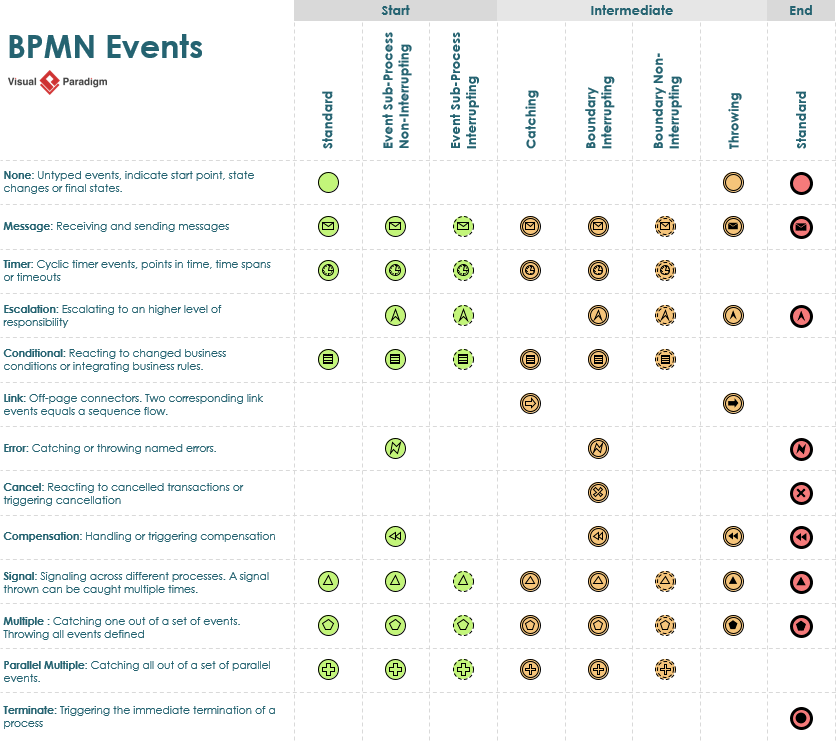
This flexibility means you can use BPMN for:
- Quick whiteboard sketches with your team
- Detailed documentation for compliance or training
- Executable models that drive real software workflows
Real-World Use Cases for BPMN
BPMN isn’t just theory. Here’s where it shines in practice:
- Onboarding new employees: Map every step from offer letter to day-one access.
- Handling customer support tickets: Visualize escalation paths and SLA timers.
- Processing insurance claims: Show approvals, rejections, and handoffs between departments.
- Launching a marketing campaign: Coordinate tasks across creative, legal, and digital teams.
- Automating invoice approvals: Connect people, systems, and decisions in one clear flow.
If it involves steps, decisions, and handoffs — BPMN can model it.
Getting Started: Visual Paradigm BPMN Tool
Ready to draw your first diagram? We recommend **Visual Paradigm** — a powerful, beginner-friendly BPMN tool.
Why Visual Paradigm?
- Drag-and-drop interface with all BPMN 2.0 shapes
- Real-time collaboration for remote teams
- Export to PDF, PNG, or even executable BPEL for developers
- Free community edition to get started
How to begin:
- Download Visual Paradigm (free version available)
- Create a new “BPMN Diagram”
- Drag a Start Event onto the canvas
- Add an Activity, then an End Event
- Connect them with a Sequence Flow
- Save, share, and iterate
That’s it. You’ve just modeled your first business process.
Your Next Steps
- Pick one simple process you know well (like “Request Time Off”)
- Sketch it using just Start Event → Activity → End Event
- Add one Gateway to show a decision point
- Share it with a colleague and ask: “Does this make sense?”
BPMN isn’t about perfection. It’s about clarity. Start small. Learn by doing. And remember: every complex process was once a simple diagram.
Welcome to the world of visual process modeling. You’ve got this.
메타데이터
- post_id
- 5a10c8d7cbbd
- slug
- bpmn-for-absolute-beginners-your-first-step-to-visual-process-modeling-5a10c8d7cbbd
- url
- https://medium.com/@warren2lynch/bpmn-for-absolute-beginners-your-first-step-to-visual-process-modeling-5a10c8d7cbbd
- canonical_url
- https://medium.com/@warren2lynch/bpmn-for-absolute-beginners-your-first-step-to-visual-process-modeling-5a10c8d7cbbd
- author_url
- https://medium.com/@warren2lynch
- status
- ok
- fetched_at
- 2026-07-13 22:38:36