What’s Next? #01| Next.js Project structure
A well-organized project structure helps a Next.js application stay maintainable, scalable, and easy to understand.
What’s Next? #01| Next.js Project structure
A well-organized project structure helps a Next.js application stay maintainable, scalable, and easy to understand.

Example:
src/
├─ app/
│ ├─ layout.tsx
│ ├─ page.tsx
│ ├─ globals.css
│ │
│ ├─ (public)/
│ │ ├─ login/
│ │ │ ├─ page.tsx
│ │ │ └─ _components/
│ │ │   └─ LoginForm.tsx
│ │ └─ register/
│ │    └─ page.tsx
│ │
│ ├─ (dashboard)/
│ │ ├─ layout.tsx
│ │ ├─ dashboard/
│ │ │ ├─ page.tsx
│ │ │ ├─ loading.tsx
│ │ │ ├─ error.tsx
│ │ │ ├─ _components/
│ │ │ │ ├─ DashboardCard.tsx
│ │ │ │ └─ DashboardChart.tsx
│ │ │ ├─ _lib/
│ │ │ │  └─ getDashboardData.ts
│ │ │ └─ _types/
│ │ │    └─ dashboard.ts
│ │ │
│ │ ├─ users/
│ │ │ ├─ page.tsx
│ │ │ ├─ [id]/
│ │ │ │  └─ page.tsx
│ │ │ ├─ _components/
│ │ │ │  ├─ UserTable.tsx
│ │ │ │  └─ UserForm.tsx
│ │ │ └─ _lib/
│ │ │    └─ getUsers.ts
│ │ │
│ │ └─ settings/
│ │    └─ page.tsx
│ │
│ └─ api/
│    └─ users/
│      ├─ route.ts
│      ├─ _lib/
│      │  └─ getUsers.ts
│      └─ _validators/
│         └─ userValidator.ts
│
├─ components/
│ ├─ ui/
│ │ ├─ Button.tsx
│ │ ├─ Input.tsx
│ │ └─ Modal.tsx
│ └─ layout/
│   ├─ Header.tsx
│   └─ Sidebar.tsx
│
├─ lib/ -----(global usage without"_")
│ ├─ auth.ts
│ ├─ db.ts
│ └─ utils.ts
│
├─ hooks/
│ └─ useAuth.ts
│
├─ types/
│ └─ common.ts
│
└─ constants/
  └─ routes.ts
React Pain Point- why Next.js?
Traditional React Project Structure (Without Next.js)
In a traditional React application using React Router, routing is configured manually. A common project structure looks like this:
src/
components/
pages/
utils/
services/
How It Works
**pages/** contains the page components.**components/** contains reusable UI components.**utils/** contains helper functions and utility methods.**services/** contains business logic, API calls, and data-fetching functions.
Example:
import { BrowserRouter, Routes, Route } from "react-router-dom";
<BrowserRouter>
  <Routes>
    <Route path="/" element={<HomePage />} />
    <Route path="/users" element={<UsersPage />} />
    <Route path="/dashboard" element={<DashboardPage />} />
  </Routes>
</BrowserRouter>
The router maps each URL to a React component. The folder structure is purely for organization and has no effect on routing.
As the application grows, feature-related files often become scattered across multiple folders. For example, a Users feature might be split between:
pages/UsersPage.tsxcomponents/UserTable.tsxservices/userService.tsutils/userHelper.ts
This separation can make it more difficult to locate all the code related to a specific feature.
Unlike Next.js, folders do not automatically create routes. Instead, routes are explicitly defined in the router configuration.
Next.js -Organizing Without Exposing
# Feature 1 — Colocation
*page.tsx /`route.ts`*
Colocation is the practice of placing related files close to the route or feature that uses them.
This is made possible by the Next.js App Router. Unlike traditional routing systems, folders do not automatically become routes.
Instead, A route is only created and made publicly accessible when a folder contains a special file such as page.tsx or route.ts.
app/
└── dashboard/
    ├── page.tsx
    ├── fetchUsers.ts
    ├── validation.ts
    ├── UserTable.tsx
    └── types.ts
All files related to the Dashboard feature are placed together. This approach is known as Colocation.
This works because:
fetchUsers.tsdoes not become a route.validation.tsis not publicly accessible.UserTable.tsxcannot be accessed directly from the browser.- Only the output returned by
page.tsxis sent to the client.
# Feature 2 — Private folders
_folderName
Private folders can be created by prefixing a folder with an underscore.
This marks the folder as private. Neither the folder nor any of its subfolders are considered routes by Next.js.
# Feature 3 — Route Groups
(folderName)
Route groups can be created by wrapping a folder in parenthesis.
This folder is used for organization only and does not affect the route’s URL path.
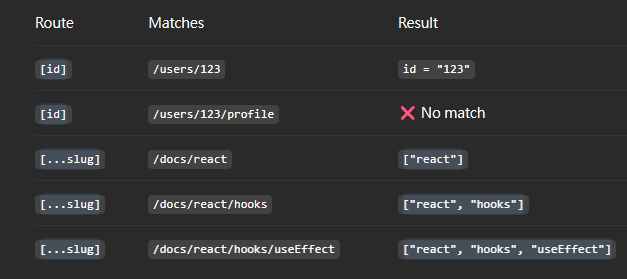
# Feature 4 — Dynamic routes
[id]
app/
└── users/
    ├── page.tsx
    └── [id]/
        └── page.tsx
how it works :
export default async function UserPage({
  params,
}: {
  params: Promise<{ id: string }>
}) {
  const { id } = await params;

  return <h1>User {id}</h1>;
}

//"id" can be anything, ex:123,John-chart-02,...
advanced:
[...slug], [[...slug]]
example:
app/docs/[...slug]/page.tsx[...slug]One or more URL segmentsstring[]
[[...slug]]Zero or more URL segments string[] | undefined
Before you go
- Please take a moment to like the post and follow the writer!
- Did you know that over 400,000 developers share what they’re building, learning, and discovering across our platforms every month? Learn how you can contribute here
메타데이터
- post_id
- 5a73436d2b53
- slug
- whats-next-01-next-js-project-structure-5a73436d2b53
- url
- https://javascript.plainenglish.io/whats-next-01-next-js-project-structure-5a73436d2b53
- canonical_url
- https://javascript.plainenglish.io/whats-next-01-next-js-project-structure-5a73436d2b53
- author_url
- https://medium.com/@chaoyiwen7
- status
- ok
- fetched_at
- 2026-07-10 06:45:42







