How I Would Set Up A Replica Set In MongoDB If I Was A Beginner.
In DevOps, we have a common enemy: the Single Point of Failure. It’s that one server that, if it goes down, takes the whole app with it. To…
How I Would Set Up A Replica Set In MongoDB If I Was A Beginner.
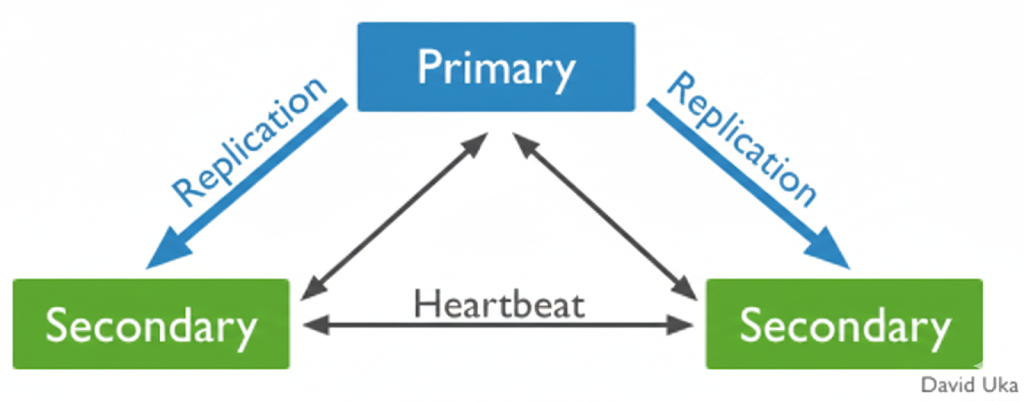
In DevOps, we have a common enemy: the Single Point of Failure. It’s that one server that, if it goes down, takes the whole app with it. To sleep better at night, we use High Availability.
In MongoDB, High Availability is achieved through Replica Sets. Think of it like a backup band — if the lead singer (the Primary) loses their voice, one of the backup singers (the Secondaries) immediately grabs the mic so the show can go on.
The Checklist
Before we dive in, here’s what I used:
- The Tools: MongoDB 8.0 (installed ).
- The Editor: A little bit of
vim(don't worry, I'll show you the commands). - The Shell:
mongosh—our command center.
Step 1: Configure the MongoDB Instance
The first step is telling MongoDB that it belongs to a replica set. We do this in the configuration file.
- Open your config file:
sudo vim /usr/local/etc/mongod.conf- Add or update the
replicationsection:
replication:
  replSetName: "rs0"
Note: I used rs0 as my set name,because it is the default name, but you can choose any name that fits your project.
Step 2: Restart the Service
For the changes to take effect, you need to restart the MongoDB service. Since I’m on a Mac, brew services makes this easy:
brew services restart mongodb-community@8.0Step 3: Initialize the Replica Set
Once the service is back up, jump into the MongoDB Shell:
mongoshAt this point, your instance is “replica set aware” but not yet initialized. Run the following command:
JavaScript
rs.initiate()If successful, you’ll see { ok: 1 }. Notice how your prompt changes from test> to rs0 [direct: secondary] > and finally to rs0 [direct: primary] > as the node elects itself as the leader.

Final Step : Verifying Health with rs.status()
As a DevOps engineer, monitoring is everything. The rs.status() command gives you a deep dive into the cluster's health.
rs.status()
Conclusion
Setting up a replica set is the first step toward building resilient infrastructure. Even with a single-node replica set, you gain the ability to use features like Transactions and Change Streams that aren’t available in a standalone instance.
Fun Fact
I will be writing on how to “Add a second node and an Arbiter to see a real-time failover in action” next.
Coactus sum, sed amo.
메타데이터
- post_id
- 5aa9002602bc
- slug
- how-i-would-set-up-a-replica-set-in-mongodb-if-i-was-beginner-5aa9002602bc
- url
- https://medium.com/@ukadavid25/how-i-would-set-up-a-replica-set-in-mongodb-if-i-was-beginner-5aa9002602bc
- canonical_url
- https://medium.com/@ukadavid25/how-i-would-set-up-a-replica-set-in-mongodb-if-i-was-beginner-5aa9002602bc
- author_url
- https://medium.com/@ukadavid25
- status
- ok
- fetched_at
- 2026-08-09 10:11:39


