Airflow ETL Pipeline from MSSQL/MySQL to PostgreSQL
How we used Apache Airflow to automate data pipelines for reporting, dashboards, and business visibility.
Airflow ETL Pipeline from MSSQL/MySQL to PostgreSQL
How we used Apache Airflow to automate data pipelines for reporting, dashboards, and business visibility.
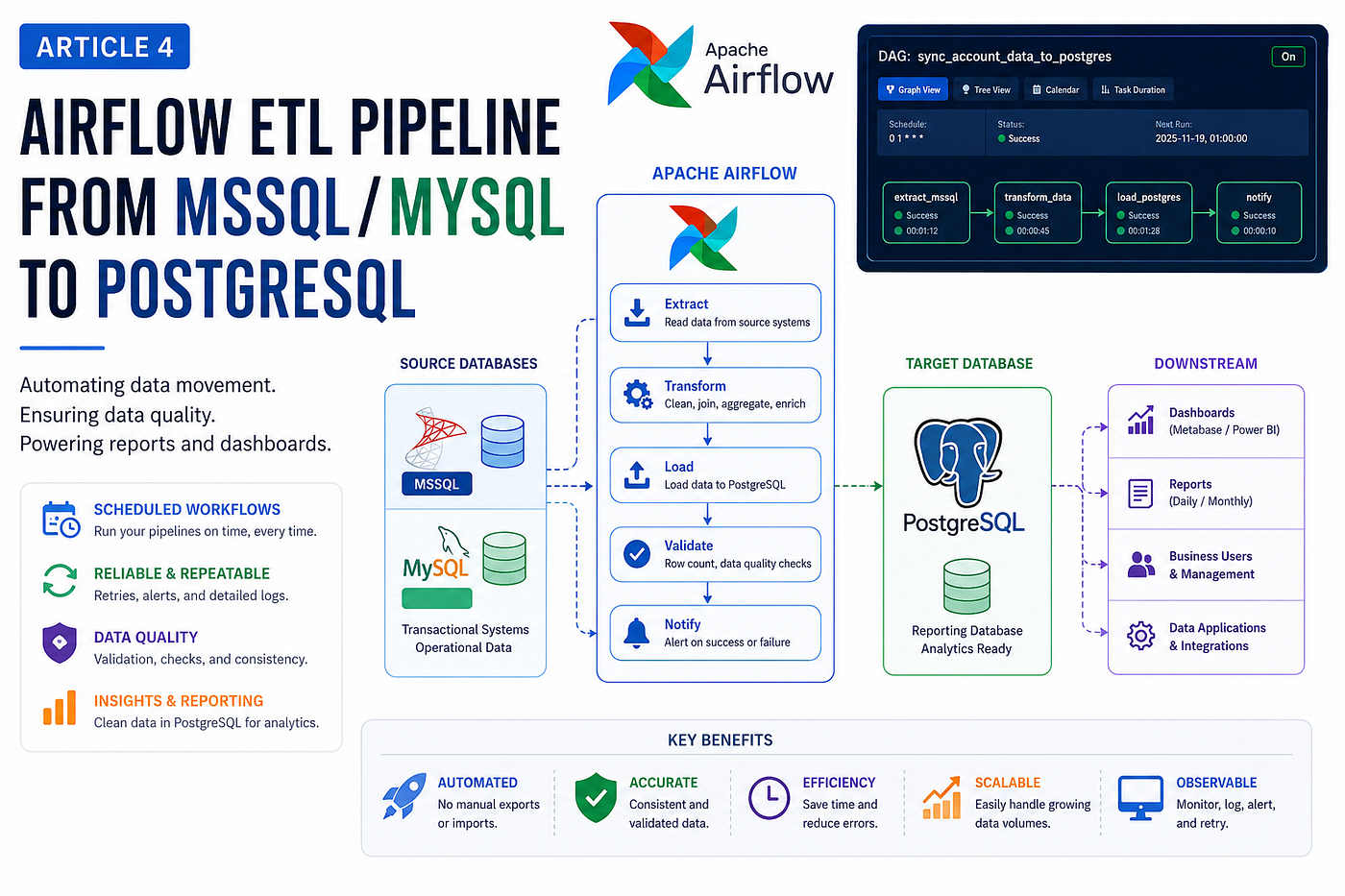
Modern organizations often store data in many different systems.
Some data may be in Microsoft SQL Server. Some may be in MySQL. Some may be in PostgreSQL. Other data may come from internal applications, vendor systems, or reporting databases.
At first, this may not be a big problem.
But when management needs dashboards, reports, analytics, and daily summaries, scattered data becomes difficult to manage.
Manual exports are slow. Manual imports are risky. Reports become inconsistent. Teams start asking different systems for the same information.
To solve this, we used Apache Airflow to automate ETL pipelines from MSSQL and MySQL into PostgreSQL.
Why We Needed ETL
ETL stands for:
Extract
Transform
Load
In simple terms:
Extract data from source systems
Clean or transform the data
Load it into a target database
Our goal was to build a reliable reporting pipeline.
The source systems contained operational data. The target PostgreSQL database was used for reporting and dashboards.
This allowed us to separate daily application workloads from reporting workloads.
The Problem with Manual Data Movement
Before automation, data movement often depends on manual work or custom scripts.
This creates problems:
Hard to monitor
Easy to forget
Difficult to retry
No clear error history
No central dashboard
No dependency control
No automatic failure notification
For production reporting, this is not enough.
We needed a tool that could schedule, monitor, retry, and alert.
That is why we used Airflow.
Why Apache Airflow
Apache Airflow is useful for managing scheduled workflows.
It gives us:
DAG-based workflow design
Scheduled execution
Task retries
Failure alerts
Execution logs
Manual reruns
Dependency management
Web UI monitoring
A DAG is a workflow definition.
For example:
Start
  ↓
Extract data from MSSQL
  ↓
Transform data
  ↓
Load into PostgreSQL
  ↓
Send success/failure notification
Example Architecture
Our simplified ETL architecture looked like this:
MSSQL / MySQL Source Database
        ↓
Apache Airflow DAG
        ↓
Data Transformation Logic
        ↓
PostgreSQL Reporting Database
        ↓
Dashboard / Reports
This design helped us move data into one reporting layer.
Example Airflow DAG
Below is a simplified example of an Airflow DAG that moves data from MSSQL to PostgreSQL.
from airflow import DAG
from airflow.operators.python import PythonOperator
from airflow.providers.microsoft.mssql.hooks.mssql import MsSqlHook
from airflow.providers.postgres.hooks.postgres import PostgresHook
import pendulum
local_tz = pendulum.timezone("Asia/Phnom_Penh")default_args = {
"owner": "airflow",
"start_date": pendulum.datetime(2025, 11, 18, tz=local_tz),
"retries": 1,
}def sync_account_data(**kwargs):
mssql = MsSqlHook(
mssql_conn_id="mssql_source_connection"
) postgres = PostgresHook(
postgres_conn_id="postgres_reporting_connection"
) rows = mssql.get_records("""
SELECT
amount,
account_code,
tran_date,
period,
second_reference
FROM source_account_table
WHERE tran_date >= DATEADD(day, -1, GETDATE())
""") postgres.run("""
CREATE TABLE IF NOT EXISTS account_data (
id SERIAL PRIMARY KEY,
amount NUMERIC,
account_code VARCHAR(100),
tran_date TIMESTAMP,
period BIGINT,
second_reference VARCHAR(100)
);
""") postgres.run("TRUNCATE TABLE account_data;") insert_sql = """
INSERT INTO account_data (
amount,
account_code,
tran_date,
period,
second_reference
)
VALUES (%s, %s, %s, %s, %s)
""" for row in rows:
postgres.run(insert_sql, parameters=row)with DAG(
dag_id="sync_account_data_to_postgres",
default_args=default_args,
schedule="0 1 * * *",
catchup=False,
tags=["etl", "mssql", "postgres"],
) as dag: sync_task = PythonOperator(
task_id="sync_account_data",
python_callable=sync_account_data,
) sync_taskThis DAG runs every day at:
1:00 AM Cambodia timeThe schedule is:
0 1 * * *Why We Used 1:00 AM Scheduling
For ETL jobs, schedule time matters.
We selected night-time execution because:
User traffic is lower
Source systems are less busy
Reports can be ready in the morning
ETL jobs have more time to complete
Failures can be checked early
Running heavy ETL jobs during working hours can affect production systems.
So scheduling them during off-peak hours improves stability.
Handling Full Load vs Incremental Load
There are two common ETL strategies:
Full load
Incremental load
Full Load
A full load means truncating the target table and loading all data again.
Example:
TRUNCATE TABLE account_data;This is simple and useful for small or medium datasets.
But for large datasets, it can become slow.
Incremental Load
Incremental loading only moves new or changed records.
For example:
WHERE updated_at >= last_successful_run_timeThis is more efficient for large datasets.
A production pipeline should move toward incremental loading when data becomes large.
Data Quality Checks
ETL is not only about moving data.
We also need to make sure the data is correct.
Useful checks include:
Row count validation
Null value checks
Duplicate checks
Date range checks
Amount total comparison
Source vs target comparison
Example:
SELECT COUNT(*) FROM account_data;If expected row counts are very different, the DAG should alert the team.
Error Handling and Retry
Production ETL jobs can fail for many reasons:
Network issue
Source database timeout
Target database unavailable
Permission problem
Bad data format
Disk full
Connection failure
Airflow helps by providing retries.
Example:
default_args = {
    "owner": "airflow",
    "retries": 2,
}
But retries alone are not enough.
We also need logging and notification.
Notification on Success or Failure
For production pipelines, the team should know when a DAG fails.
Notifications can be sent by:
Email
Telegram
Slack
Microsoft Teams
Internal alert system
A simple failure notification helps the team respond quickly.
Example concept:
on_failure_callback=notify_dag_failure
on_success_callback=notify_dag_success
This makes the pipeline easier to operate.
Common Airflow Issues We Learned From
While working with Airflow, we faced several common issues.
1. Database Migration Required
Sometimes Airflow shows:
You need to upgrade the database.
Please run airflow db upgrade.
This means the Airflow metadata database schema is not aligned with the installed Airflow version.
The fix is usually:
airflow db upgradeor in newer versions:
airflow db migrate2. Duplicate DAG IDs
Airflow may fail to import DAGs if the same DAG ID exists in multiple files.
Example problem:
same DAG ID found in multiple filesEach DAG must have a unique dag_id.
3. Permission Issues
Sometimes DAGs fail because the Airflow process cannot write logs or create folders.
Example:
Permission deniedFix ownership and permissions carefully:
sudo chown -R airflow:airflow /App/airflow_home4. Timezone Confusion
For Cambodia, we used:
local_tz = pendulum.timezone("Asia/Phnom_Penh")This helps make schedule behavior clearer.
Best Practices for Production ETL
From our experience, these practices are important:
Use clear DAG names
Use unique task IDs
Use timezone-aware start dates
Disable catchup if historical runs are not needed
Add retry logic
Add failure notifications
Validate row counts
Avoid heavy jobs during working hours
Keep logs clean
Monitor DAG duration
Document each pipeline
Final Thoughts
Airflow helped us move from manual data movement to automated, visible, and manageable ETL pipelines.
By using Airflow with MSSQL, MySQL, and PostgreSQL, we created a stronger data foundation for reporting and dashboards.
The biggest benefit was not just automation.
It was control.
We could see what ran, when it ran, whether it failed, how long it took, and what needed attention.
For any organization building reporting or analytics systems, Airflow is a strong tool to consider.
The key lesson is simple:
A good ETL pipeline should not only move data. It should be scheduled, monitored, validated, and trusted.
메타데이터
- post_id
- 5b0838f371e4
- slug
- airflow-etl-pipeline-from-mssql-mysql-to-postgresql-5b0838f371e4
- url
- https://medium.com/@vitchum/airflow-etl-pipeline-from-mssql-mysql-to-postgresql-5b0838f371e4
- canonical_url
- https://medium.com/@vitchum/airflow-etl-pipeline-from-mssql-mysql-to-postgresql-5b0838f371e4
- author_url
- https://medium.com/@vitchum
- status
- ok
- fetched_at
- 2026-06-09 15:37:30





