CKA-28-Kubernetes Pod Affinity
Learn Kubernetes pod affinity and how to place related workloads close together for performance and availability.
CKA-28-Kubernetes Pod Affinity
Learn Kubernetes pod affinity and how to place related workloads close together for performance and availability.
For CKA preparation, do not treat this as a definition to memorize. Treat it as a cluster behavior you should be able to inspect, configure, and verify under time pressure. This guide explains the operational purpose, the important moving parts, and a safe way to reason about it.
What you will learn: how pod affinity fits into workloads and scheduling, what to check first, and the mistakes that commonly lead to failed changes.
Placing related workloads close together when proximity improves performance
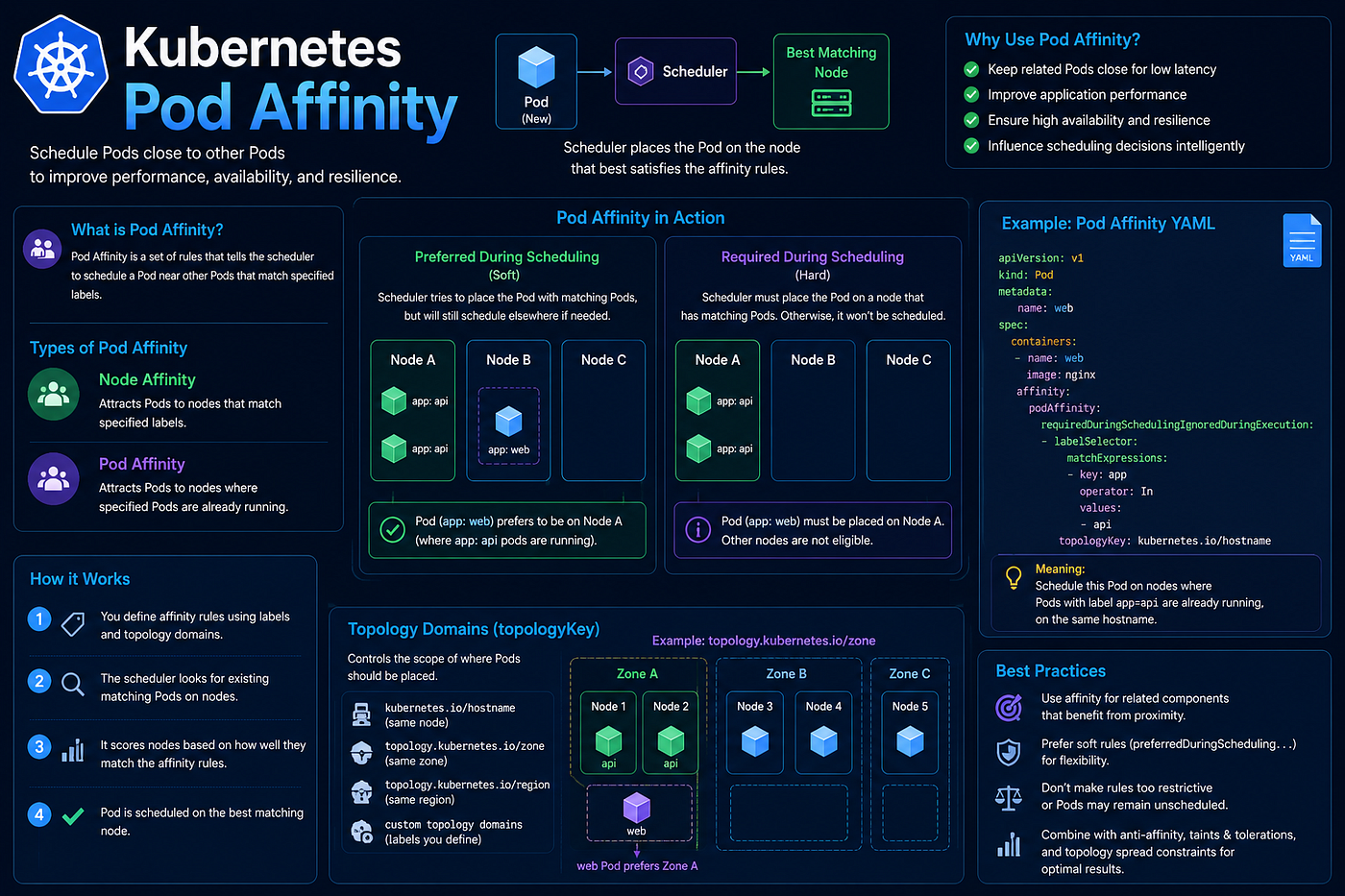
Node affinity uses node labels. Pod affinity uses the labels of other Pods. It lets a workload request placement in the same topology area as related workloads.
Suppose a web application benefits from running in the same availability zone as a cache. The web Pod can express a preference:
spec:
  affinity:
    podAffinity:
      preferredDuringSchedulingIgnoredDuringExecution:
        - weight: 100
          podAffinityTerm:
            labelSelector:
              matchLabels:
                app: cache
            topologyKey: topology.kubernetes.io/zone
The scheduler looks for nodes whose zone already contains a matching cache Pod. Because the rule is preferred, the web Pod can still run elsewhere if necessary.
The topologyKey defines what “close” means. A hostname means the same node; a zone label means the same availability zone. Required affinity turns the condition into a hard scheduling rule.
Namespace scope matters. Depending on the rule, matching Pods may be searched in selected namespaces or the Pod’s own namespace. Always make this intent explicit when designing cross-team placement.
Pod affinity can reduce network latency or data-transfer cost, but it also narrows scheduling choices. Requiring every application replica to share one zone with a dependency may create a single-zone concentration and reduce resilience. A preference often gives a better balance.
Diagnose placement with:
kubectl get pods -o wide
kubectl describe pod <pending-pod>
kubectl get nodes -L topology.kubernetes.io/zone
Affinity rules also add scheduler work in large clusters, especially with broad selectors and complex topologies. Keep them focused and label workloads consistently.
Use Pod affinity when proximity has a measurable benefit, not simply because two services are conceptually related. Logical closeness belongs in architecture diagrams; scheduling closeness should earn its place through latency, cost, or another concrete requirement.
Practical CKA Workflow
When you work with this topic in a live cluster, use a repeatable approach:
- Inspect the workload specification and the events emitted by the scheduler or controller.
- Confirm labels, resource requests, and node-level constraints with kubectl.
- Make one small declarative change, then watch the rollout until the desired state is reached.
Useful starting commands are:
kubectl get pods -A
kubectl get events -A --sort-by=.lastTimestamp
kubectl describe <resource-type> <resource-name> -n <namespace>
Replace the placeholders with the resource relevant to the task. The goal is to use evidence from the API server rather than guessing from a single symptom.
Common Mistakes
- Changing several variables at once and losing the ability to identify the actual cause.
- Using a cluster-wide setting when a namespace- or workload-scoped change is sufficient.
- Applying a manifest without checking labels, selectors, names, and the resulting events.
- Assuming a resource is healthy because it exists; always verify its observed state and its effect on the workload.
CKA Exam Takeaway
In the exam, read the requested outcome carefully, make the smallest declarative change that achieves it, and validate it with kubectl. A correct manifest is only half the task—the cluster must reach the intended state.
Originally published at https://cloudopsblog.com on July 16, 2026.
메타데이터
- post_id
- 5b2df431db2e
- slug
- cka-28-kubernetes-pod-affinity-5b2df431db2e
- url
- https://medium.com/@manojkumarcloud/cka-28-kubernetes-pod-affinity-5b2df431db2e
- canonical_url
- https://medium.com/@manojkumarcloud/cka-28-kubernetes-pod-affinity-5b2df431db2e
- author_url
- https://medium.com/@manojkumarcloud
- status
- ok
- fetched_at
- 2026-07-17 06:11:15