Building a Chat Application From Scratch: High-Level System Design
Building a chat application looks deceptively simple.
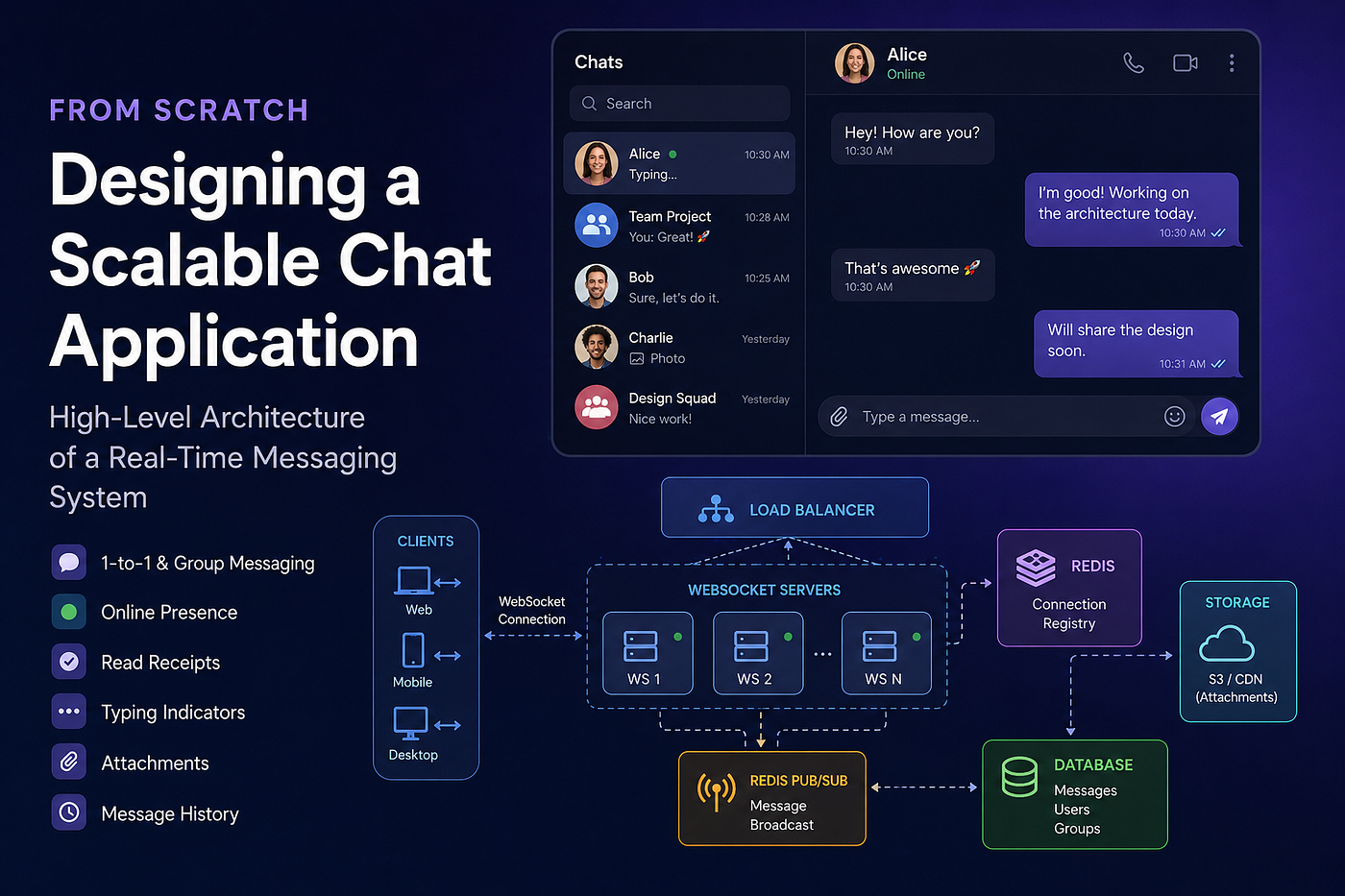
High Level System Design Chat App
Building a Chat Application From Scratch: High-Level System Design
Building a chat application looks deceptively simple.
At first glance, it seems like all we need is a way for users to send messages to each other. In reality, modern chat applications must solve a surprisingly large number of problems: real-time messaging, online presence, read receipts, typing indicators, message persistence, multi-device synchronization, and horizontal scaling.
There are plenty of libraries and managed services that make these problems easier to solve. Tools such as Socket.IO, AWS API Gateway WebSocket, and various real-time platforms can abstract away much of the complexity.
For production systems, that’s often the right decision.
However, the goal of this project is not to build a chat application as quickly as possible. The goal is to understand how chat systems actually work under the hood.
Instead of relying heavily on frameworks and managed services, we’ll use raw WebSockets, Redis, PostgreSQL, AWS infrastructure, and custom application logic. This approach forces us to solve the same challenges that large-scale messaging systems face every day.
In this article, we’ll focus on the high-level architecture. Future articles will cover database design, implementation details, scaling strategies, and the many edge cases that appear when building real-time systems.
Functional Requirements
Before designing the architecture, let’s define the features our chat application must support.
Core Features
- One-to-one messaging
- Group messaging
- Online presence
- Read receipts
- Typing indicators
- Message history
In addition to text messages, users should be able to exchange attachments such as PDFs, images, videos, and other file types.
High-Level Architecture
Rather than jumping directly into implementation details, let’s first understand how each feature works from a system design perspective.
We’ll start with the simplest possible architecture and gradually introduce the components needed to support scaling.

High Level Architecture
One-to-One Messaging
To understand the fundamentals, let’s begin with a single WebSocket server.
In a real-world environment we would eventually run multiple servers behind a load balancer, but starting with a single server makes it easier to understand the core concepts.
Assume two users are connected to our WebSocket server:
- User A
- User B
When a user establishes a WebSocket connection, the server stores a mapping between the user and their active connections.
For example:
{
  "user1": ["conn1"]
}
Notice that we store an array of connections rather than a single connection.
A user may be connected from multiple devices at the same time, such as:
- Mobile
- Web
- Desktop
After User B connects, the server state might look like this:
{
  "user1": ["conn1"],
  "user2": ["conn2"]
}
A sends → server receives → looks up B’s connection → forwards
Now suppose User A sends a message to User B.
The server simply checks its in-memory connection registry, finds User B’s active connection, and forwards the message through that WebSocket connection.
The flow is straightforward:
- User A sends a message.
- The server receives the message.
- The server looks up User B’s connection.
- The server forwards the message to User B.
This works perfectly well for a small application.
The challenge appears when the number of concurrent users grows beyond what a single server can handle.
Scaling Beyond a Single Server
At some point, a single WebSocket server becomes a bottleneck.
To handle more users, we need multiple WebSocket servers running behind a load balancer.
The architecture now looks something like this:

WS1 can’t see User B — cross-server delivery fails without a shared registry
A user’s connection may be routed to any available WebSocket server.
For example:
- User A connects to WS1
- User B connects to WS2
Each server maintains its own in-memory connection registry.
This creates a new problem.
WS1 knows about User A, but it has no knowledge of User B’s connection because User B is connected to WS2.
So how can WS1 deliver a message to User B?
Introducing a Connection Registry
One option is to store connection ownership information in a database.
However, messaging systems perform these lookups extremely frequently. Querying a database for every message would quickly become a performance bottleneck.
Instead, we use Redis.
Redis provides an extremely fast in-memory data store that is ideal for frequently accessed connection data.
Whenever a user connects, we store the server ownership information in Redis.
For example:
{
  "user1": ["WS1"]
}
Because users may connect from multiple devices, each user can be associated with multiple WebSocket servers.
Meanwhile, each WebSocket server stores the actual connection objects locally:
{
  "user1": ["websocket_connection"]
}
This gives us two separate layers:
Redis
User → WebSocket ServerServer Memory
User → WebSocket Connection
Redis knows which server; each server knows which connection
Now any server can determine which WebSocket server owns a user’s active connection.
But we still need a way for servers to communicate with each other.
That brings us to Redis Pub/Sub.
Redis Pub/Sub for Message Routing
A naïve solution would be to connect every WebSocket server directly to every other WebSocket server.
While this may work with a small number of servers, it becomes increasingly difficult to manage as the system grows.
Instead, we can use Redis Pub/Sub.
Each WebSocket server subscribes to a dedicated Redis channel.
For example:
WS1 → channel: server-1
WS2 → channel: server-2
WS3 → channel: server-3
No direct server-to-server connections needed
Suppose User A sends a message to User B.
The flow looks like this:
- WS1 receives the message.
- WS1 checks Redis to determine where User B is connected.
- Redis returns
WS2. - WS1 publishes the message to WS2’s channel.
- WS2 receives the event.
- WS2 looks up User B’s active WebSocket connections.
- WS2 forwards the message.
This approach allows WebSocket servers to communicate without maintaining direct connections to one another.
It also scales much more effectively as the number of servers grows.
Group Messaging
At first glance, group messaging looks very similar to one-to-one messaging.
A user sends a message, and the system delivers it to multiple recipients instead of just one.
However, group messaging introduces a new scaling challenge.
Consider a group with four members:
- User 1
- User 2
- User 3
- User 4
Assume each user is connected to a different WebSocket server.
When User 1 sends a message, WS1 needs to determine where every group member is currently connected.
A straightforward approach would be:
- Fetch all group members.
- Look up each member in Redis.
- Determine which server owns each user.
- Publish messages to the appropriate servers.
For a group of four users, this is trivial.
But what happens when a group contains hundreds of members?
Suddenly, every message requires hundreds of Redis lookups before delivery can begin.

Group chat delivery flow
For small groups, this approach is perfectly acceptable.
For larger groups, we may introduce caching to reduce lookup overhead.
For example, Redis could temporarily store a mapping like:
group:123
├── WS1
├── WS2
├── WS3
└── WS4
This allows the sender’s server to identify which servers are interested in messages from that group without performing individual lookups for every member.
Of course, caching introduces its own challenges.
What happens when:
- A user disconnects?
- A user reconnects to a different server?
- A server crashes?
The cache must eventually reflect those changes.
For that reason, many systems use a short TTL (Time To Live) and periodically rebuild the cache rather than attempting to keep it perfectly synchronized.
We’ll explore those trade-offs in much greater detail later in this series.
Supporting Multiple Devices
Modern chat applications rarely assume a user has only one active device.
A user may be connected from:
- Mobile
- Web browser
- Desktop application
- Tablet
This means a single user can have multiple active WebSocket connections at the same time.
For example:
{
  "user1": ["mobile_conn", "web_conn"]
}
Suppose User 1 sends a message from their phone.
Most chat applications will immediately show that message on the user’s laptop as well.
To achieve this, the server must forward the message not only to the recipient but also to the sender’s other active devices.

Multi Device sync
The only connection we should exclude is the connection that originally sent the message. Otherwise, the sender would receive a duplicate copy on the same device.
This pattern is used extensively by applications such as WhatsApp, Slack, Discord, and Microsoft Teams.
Typing Indicators
Typing indicators are one of the simplest real-time features to implement.
The architecture is almost identical to normal message delivery.
The difference is that typing events are temporary.
They don’t need to be stored in the database.
A typical flow looks like this:
- User starts typing.
- Frontend sends a “typing started” event.
- Backend forwards the event to relevant participants.
- UI displays “User is typing…”
- User stops typing.
- Frontend sends a “typing stopped” event.

Typing Indicator Flow
Because typing indicators are purely a user experience feature, they can be treated as transient events that disappear after a few seconds.
No persistence is required.
Online Presence
Online presence is another feature that appears simple but requires careful consideration.
The most common implementation uses heartbeats.
Every active client periodically sends a signal to the server indicating that it is still connected.
For example:
Every 30 secondsThe server updates the user’s last activity timestamp.
A simplified record might look like:
{
  "user1": {
    "lastActivityAt": "2026-01-01T05:00:00Z"
  }
}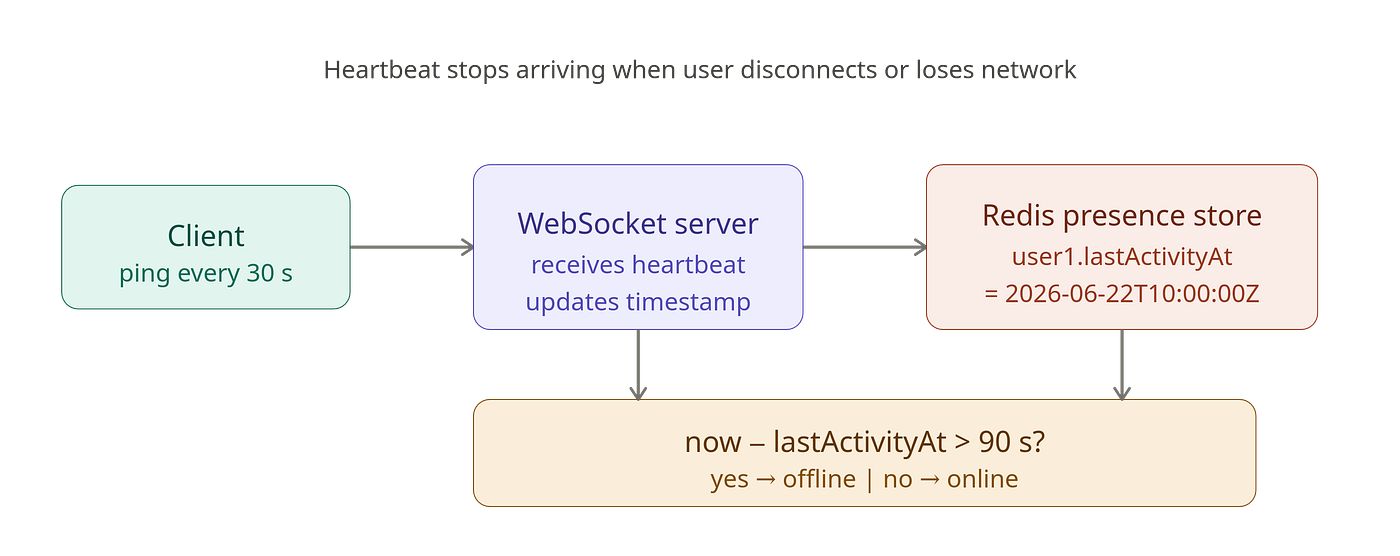
Online presence / Heartbeat Flow
When a user disconnects or loses network connectivity, heartbeats stop arriving.
If the system hasn’t received a heartbeat within a predefined window, the user is considered offline.
For example:
Current Time - Last Activity > 90 secondsThe application can then display:
- Online
- Offline
- Last seen recently
- Last seen 2 hours ago
We’ll discuss storage strategies for presence data in a future article.
Read Receipts
Read receipts provide users with visibility into message status.
A common implementation uses three states:
Sent
The server has successfully received and persisted the message.
Delivered
The message has reached the recipient’s device.
Read
The recipient has opened the conversation and viewed the message.
The flow typically looks like this:
Sent
  ↓
Delivered
  ↓
Read
Read Receipt State TransitionFlow
For one-to-one conversations, tracking these states is relatively straightforward.
Group chats are more complicated.
Imagine a group containing 500 members.
Tracking delivery and read status for every user would require storing a large amount of additional data.
Many messaging platforms either simplify read receipts for large groups or introduce special optimizations to manage storage requirements.
We’ll examine those trade-offs when we design the database schema.
Sending Attachments
So far we’ve focused on text messages.
Attachments follow a very similar flow but introduce one additional component: object storage.
When a user uploads a file, we generally do not send the file itself through the WebSocket connection.
Instead, the process typically works like this:
- User uploads the file via HTTP.
- Backend stores the file in object storage.
- A public or signed URL is generated.
- The URL is included in the chat message.
- Message delivery proceeds normally.
The message payload might look something like:
{
  "type": "attachment",
  "fileUrl": "https://cdn.example.com/file.pdf"
}
Attachment Upload Flow
Using HTTP uploads offers several advantages:
- Better support for large files
- Easier retry mechanisms
- Reduced pressure on WebSocket servers
- Better integration with CDN caching
The actual message delivery process remains unchanged.
Only the payload differs.
What We Haven’t Covered Yet
This article focused entirely on high-level architecture.
Many important topics are still ahead of us, including:
- Database schema design
- Message storage strategies
- Conversation models
- Group membership management
- Read receipt persistence
- Redis data structures
- Authentication and authorization
- Message ordering
- Reconnection handling
- Failure scenarios
- Scaling considerations
Each of these topics deserves its own discussion because they introduce challenges that are not immediately obvious when building a chat application.
Final Thoughts
Building a chat application is much more than opening a WebSocket connection and exchanging messages.
Even a relatively small messaging platform must solve problems related to routing, persistence, presence tracking, synchronization, delivery guarantees, and scalability.
In this article, we explored a high-level architecture using:
- WebSockets for real-time communication
- Redis as a connection registry
- Redis Pub/Sub for server-to-server communication
- Load balancers for horizontal scaling
- Object storage for attachments
In the next article, we’ll move one layer deeper and design the database schema that powers these features.
That’s where many of the interesting trade-offs begin to appear.
If you have any questions please do let me know in the comment section. If you want to support me, *buy me a coffee *here. Thanks for your time and support. Happy Coding.
메타데이터
- post_id
- 5b2e0a77db20
- slug
- building-a-chat-application-from-scratch-high-level-system-design-5b2e0a77db20
- url
- https://medium.com/@jazimabbas/building-a-chat-application-from-scratch-high-level-system-design-5b2e0a77db20
- canonical_url
- https://medium.com/@jazimabbas/building-a-chat-application-from-scratch-high-level-system-design-5b2e0a77db20
- author_url
- https://medium.com/@jazimabbas
- status
- ok
- fetched_at
- 2026-06-26 03:39:16


