Keep Memory Local: Building a Private OpenClaw Memory Hub with mem9 + TiDB
Photo by Tweesak C. on Pexels
Keep Memory Local: Building a Private OpenClaw Memory Hub with mem9 + TiDB

Photo by Tweesak C. on Pexels
The Cost of Memory
When a conversation ends, an AI agent forgets everything.
This is not a metaphor. OpenClaw’s default memory-core writes memories to local .md files. Once hundreds of these accumulate, the agent has no way to scan all of them before each conversation — memory degrades into an archive that requires explicit prompting to retrieve.
The deeper problem is this: memories cannot be shared across agents. Preferences you’ve told the main agent are unknown to the coding agent; each agent lives in its own information silo.
An ideal agent memory system should satisfy four requirements: automatic injection, cross-agent sharing, real-time availability of new memories, and data that stays local.
With these four criteria in mind, I went looking for a solution. This article introduced mem9 as an AI agent memory approach and was a major source of inspiration. However, the original article uses mem9.ai’s cloud service — memory data is stored remotely. Given that an agent’s memory accumulates personal habits, work preferences, and private decisions, this data should not leave the local machine. This article takes that foundation further and moves the entire system to a self-hosted local deployment.
Two Approaches: memsearch vs. mem9
During the research phase, I evaluated two solutions with fundamentally different design philosophies.
**memsearch uses vector indexing: it embeds local .md files and builds semantic search capabilities. The advantage is simple deployment and precise semantic retrieval across historical memory files. But it has a fundamental limitation — injection is manual**. memsearch has no hook mechanism; the agent must actively invoke the CLI to query it, making automatic pre-conversation memory awareness impossible.
**mem9 takes a completely different approach: it is a standalone memory server (mnemo-server) that manages memories via REST API and registers OpenClaw’s before_prompt_build hook. Before each conversation, it automatically extracts context, searches for relevant memories, and injects them into the system prompt** — the entire process is transparent to the agent.
Key differences at a glance:
memsearchmem9InjectionManual invocationAutomatic injectionCross-agent sharingNot supportedGlobal config, auto-inheritedNew memory availabilityRequires re-indexingQueryable immediately after writeSearch typeSemantic vector searchKeyword + optional vector
The final choice was mem9 as primary, memsearch as supplementary. They complement each other: mem9 covers everyday automatic memory, while memsearch handles scenarios requiring deep retrospective search across a large volume of historical files.
Overall Architecture
The final system consists of four layers, with storage backed by TiDB (a distributed database compatible with the MySQL protocol):
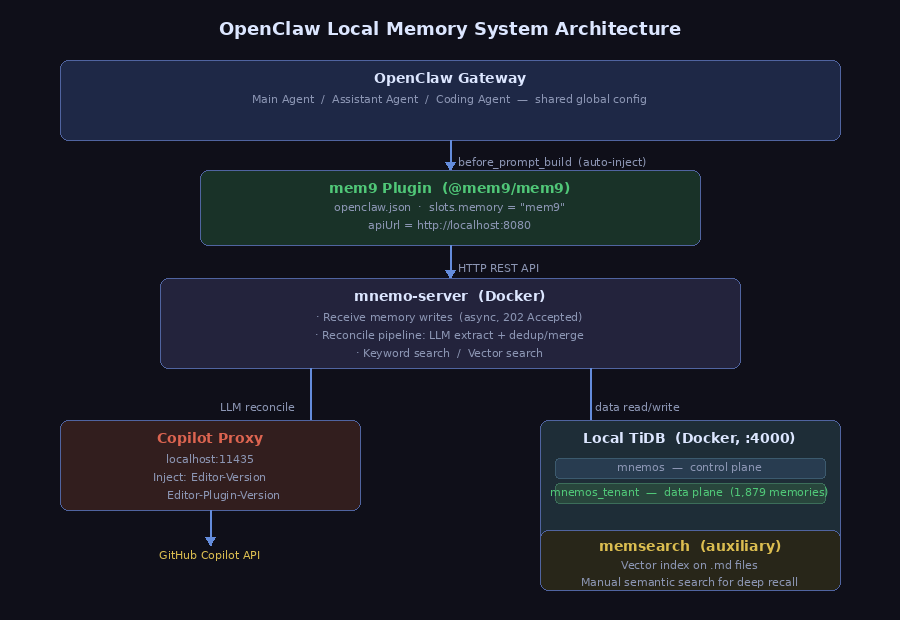
A few key design decisions are worth highlighting:
Global configuration, automatically inherited by all three agents. mem9 is configured in the top-level plugins node of openclaw.json:
{
  "plugins": {
    "slots": { "memory": "mem9" },
    "entries": {
      "mem9": {
        "enabled": true,
        "config": {
          "apiUrl": "http://localhost:8080",
          "tenantID": "your-tenant-id"
        }
      }
    }
  }
}
OpenClaw does not support per-agent plugin overrides, but mem9 internally distinguishes each agent’s memory writes by agent_id, achieving logical isolation equivalent to independent memories.
Separation of control plane and data plane. Two databases are maintained in TiDB, with a SQL update that points the tenant to local storage:
UPDATE mnemos.tenants SET
  db_host = '127.0.0.1',
  db_port = 4000,
  db_name = 'mnemos_tenant',
  provider = 'local'
WHERE id = 'your-tenant-id';
mnemos stores tenant configuration (control plane); mnemos_tenant stores actual memory data (data plane). The two are decoupled — the data plane can be migrated independently without affecting control logic.
Fully local storage. Both TiDB and mnemo-server run as Docker containers on the local machine; no data leaves the host.
mem9 Technical Deep Dive
Memory Write: Automatic Capture via agent_end
The read side is handled by before_prompt_build; the write side is driven by the agent_end hook.
When a session ends, OpenClaw triggers agent_end, and the mem9 plugin automatically:
- Selects the most recent content from the session’s messages (up to 200KB / 20 messages)
- Strips the
<relevant-memories>injection block to prevent circular re-writing of memories - POSTs the selected messages along with
session_idandagent_idto mnemo-server - The server returns
202 Acceptedand asynchronously triggers the reconcile pipeline
Additionally, the before_reset hook saves an extra session summary before /reset clears the context, ensuring that even a manual reset does not lose critical context.
For scenarios requiring explicit recording, the agent can also directly invoke the memory_store tool to write memories.

before_prompt_build: Automatic Injection
When processing each message, OpenClaw fires a series of lifecycle hooks in sequence. before_prompt_build is the most critical — it fires before the system prompt is assembled, allowing plugins to inject additional content into the prompt.
This mechanism is analogous to middleware in a web framework: every plugin registered for this hook has the opportunity to modify the context before the request reaches the LLM. Plugins can append system instructions, inject tool descriptions, or — as mem9 does — insert relevant memories.
The mem9 plugin uses this hook to automatically perform three steps before each conversation:
- Extract keywords from the current message
- Send a search request to mnemo-server to retrieve matching memory fragments
- Append the results to the system prompt
The entire process is completely transparent to the agent. The agent doesn’t experience “someone injected memories” — it experiences “I already know these things” — which is the most essential difference between automatic injection and manual retrieval.
By contrast, memsearch has no hook integration and can only be queried by the agent actively calling the CLI. This requires the agent to consciously “recall,” rather than naturally “remember.”

The Reconcile Pipeline
When new memories are written, mnemo-server doesn’t simply store the raw content — it runs it through a refinement pipeline:
- Calls the LLM to extract “facts” from the content
- Compares against existing memories, merging duplicates or conflicting information
- Stores the refined facts in the database, marking old memories as
superseded_by
The write endpoint is asynchronous (returns 202 Accepted), with reconcile completing in the background. This design ensures the memory store doesn't degrade into noise over time — the system gets more refined with use, not more cluttered.
Multi-Agent Isolation
mem9 uses agent_id to distinguish the memory write source of different agents. All three agents share a single tenant, but each agent's memories are logically isolated. During injection, the plugin only retrieves memories relevant to the current agent, preventing cross-contamination.
Setup Walkthrough
Step 1: Install the mem9 Plugin
openclaw plugins install @mem9/mem9
openclaw gateway restart
After installation, restart the Gateway to activate the plugin.
After completing Step 2 (deploying mnemo-server), you can retrieve the tenantID with:
mysql -h127.0.0.1 -P4000 -uroot -e "SELECT id FROM mnemos.tenants LIMIT 1;"Then edit ~/.openclaw/openclaw.json and add the following to the top-level plugins node:
{
  "plugins": {
    "slots": { "memory": "mem9" },
    "entries": {
      "mem9": {
        "enabled": true,
        "config": {
          "apiUrl": "http://localhost:8080",
          "tenantID": "your-tenant-id"
        }
      }
    }
  }
}
Step 2: Deploy Local TiDB + mnemo-server
Use Docker Compose to manage both containers together:
# docker-compose.yml
services:
  tidb:
    image: pingcap/tidb:v8.5.0
    container_name: mnemos-tidb
    ports:
      - "4000:4000"
    volumes:
      - tidb-data:/var/lib/tidb
    healthcheck:
      test: ["CMD-SHELL", "wget -qO- http://127.0.0.1:10080/status 2>/dev/null | grep -q 'connections' && exit 0 || exit 1"]
      interval: 5s
      timeout: 5s
      retries: 20
      start_period: 20s
mnemo-server:
image: mnemo-server:local # Build from source first: cd mem9/server && docker build -t mnemo-server:local .
container_name: mnemos-server
depends_on:
tidb:
condition: service_healthy
ports:
- "8080:8080"
environment:
- MNEMO_DSN=root:@tcp(tidb:4000)/mnemos?parseTime=true
- MNEMO_PROVIDER=local
- MNEMO_INGEST_MODE=raw
- MNEMO_LLM_API_KEY=dummy
- MNEMO_LLM_BASE_URL=http://172.17.0.1:11435 # Linux host IP; use host.docker.internal on Mac/Windows
- MNEMO_LLM_MODEL=gpt-4o-mini
restart: unless-stoppedvolumes:
tidb-data:docker compose up -ddepends_on ensures mnemo-server only starts after TiDB is healthy; the tidb-data volume ensures data persists across container restarts.
After the first startup, create the databases:
mysql -h127.0.0.1 -P4000 -uroot -e "
  CREATE DATABASE mnemos;
  CREATE DATABASE mnemos_tenant;
"
MNEMO_LLM_BASE_URL points to the local Copilot Proxy described below.
Step 3: Point the Tenant to the Local Database
After mnemo-server starts, it automatically creates a tenant record — but the default points to cloud storage. Update it manually:
UPDATE mnemos.tenants SET
  db_host = '127.0.0.1',
  db_port = 4000,
  db_user = 'root',
  db_password = '',
  db_name = 'mnemos_tenant',
  provider = 'local'
WHERE id = 'your-tenant-id';
Step 4: Copilot Proxy (Copilot Users Only)
mnemo-server’s reconcile pipeline calls an LLM to refine memories. If you’re using a standard OpenAI-compatible API (OpenAI, Ollama, DeepSeek, etc.), simply configure MNEMO_LLM_BASE_URL and MNEMO_LLM_API_KEY and skip this step.
This setup uses a GitHub Copilot subscription with the gpt-4o-mini model. Since reconcile is a background batch task with both speed and cost requirements, gpt-4o-mini is ideal — low consumption and fast within a Copilot subscription.
The issue is that the Copilot API requires two VSCode plugin identifier headers in addition to the standard Authorization header:
Editor-Version: vscode/1.85.0
Editor-Plugin-Version: copilot/1.155.0
mnemo-server’s LLM client cannot add custom headers, so a local proxy (~/.memsearch/copilot-proxy.py) is needed — listening on port 11435, automatically injecting these two headers on forwarded requests, and reading the latest token from OpenClaw's token file.
To ensure it restarts automatically after a reboot, register it as a systemd user service:
systemctl --user enable copilot-proxy
systemctl --user start copilot-proxyAlternative: Instead of writing a proxy script, you can use LiteLLM as a unified LLM proxy layer. LiteLLM supports 100+ model providers and lets you manage headers, authentication, and model mapping in a single config file:
# litellm config.yaml
model_list:
  - model_name: gpt-4o-mini
    litellm_params:
      model: copilot/gpt-4o-mini
      extra_headers:
        Editor-Version: "vscode/1.85.0"
        Editor-Plugin-Version: "copilot/1.155.0"
Then point MNEMO_LLM_BASE_URL to LiteLLM's local port.
Step 5: Migrating Historical Memories
Two types of historical data need to be migrated: local .md memory files and mem9.ai cloud memories.
Gotcha: mem9’s /imports endpoint does not support .md format (returns status: failed). The correct approach is to read each file's content and POST it to the correct tenant-scoped endpoint:
TENANT_ID="your-tenant-id"
for f in ~/.openclaw/workspace/memory/*.md; do
  curl -s -X POST "http://localhost:8080/v1alpha1/mem9s/${TENANT_ID}/memories" \
    -H "Content-Type: application/json" \
    --data-raw "{\"content\": $(jq -Rs . < "$f"), \"source\": \"migration\"}"
done
Cloud data is batch-fetched via a Python script, converted to SQL, and piped into local TiDB. After migration, 1,879 memories were fully landed locally.
Design Reflections
The Value of Separating Control Plane and Data Plane
The dual-database design in mnemo-server may seem redundant at first glance, but it solves a real problem: migration cost.
Before local deployment, memory data lived on mem9.ai’s cloud. To migrate, only a single tenant record in the control plane needed updating — changing db_host from the cloud address to local TiDB — while all other mnemo-server logic remained untouched. An independent data plane means the storage backend can be swapped at any time: local TiDB today, PlanetScale or a self-hosted MySQL tomorrow, with zero impact on the layers above.
Multi-Agent Sharing vs. Physical Isolation
One issue encountered while configuring mem9: OpenClaw does not support per-agent plugin configuration (agents.list[].slots is rejected at the schema level). In other words, it's not possible to configure an independent mem9 instance for each agent.
Digging into the mem9 source code, however, revealed this is not actually a problem: mem9 internally differentiates agent memories by agent_id, and both writes and reads carry this identifier. Shared tenant + agent_id logical isolation is functionally equivalent to independent memories.
True physical isolation (a separate mnemo-server + TiDB stack per agent) is theoretically possible, but the operational cost is high with minimal benefit. Logical isolation is sufficient.
memsearch’s Role
In the end, memsearch was not replaced — it stays as a complement. The division of labor is clear:
- mem9: Everyday memory, automatic injection, covering recent high-frequency information
- memsearch: Deep retrospective search, invoked manually when semantic search across 108 historical
.mdfiles is needed
mem9 stores LLM-refined “fact fragments”; memsearch indexes raw full text. They complement rather than compete with each other.
Keeping Memory Local
The convenience of cloud memory services is real: zero setup, no infrastructure to maintain. But the cost of that convenience is that your most private data — your habits, preferences, decision-making processes, unfinished thoughts — lives on someone else’s servers.
Local deployment is not just about privacy. The deeper motivation is ownership: control over the toolchain, control over the data lifecycle, control over whether “this system will still work in five years.” Cloud services can shut down, raise prices, or change their APIs. A local deployment cannot.
Getting this system up and running was more complex than expected — the Copilot Proxy, control plane migration, batch import of historical data each had their own pitfalls. But once it was all running, with 1,879 memories fully landed locally and mem9 automatic injection working, the feeling was different: this is a memory system that truly belongs to you, dependent on no external service for its continued operation.
The AI agent toolchain is maturing, but “memory” remains far from a standardized answer. What’s documented here is just one viable path. As mem9, OpenClaw, and the surrounding ecosystem evolve, simpler solutions will certainly emerge.
메타데이터
- post_id
- 5b305345b40a
- slug
- keep-memory-local-building-a-private-openclaw-memory-hub-with-mem9-tidb-5b305345b40a
- url
- https://medium.com/@addozhang/keep-memory-local-building-a-private-openclaw-memory-hub-with-mem9-tidb-5b305345b40a
- canonical_url
- https://medium.com/@addozhang/keep-memory-local-building-a-private-openclaw-memory-hub-with-mem9-tidb-5b305345b40a
- author_url
- https://medium.com/@addozhang
- status
- ok
- fetched_at
- 2026-07-12 02:25:03