Canon PowerShot V1 Review From a Working Photographer Who Actually Uses It
When people search “Canon PowerShot V1 review,” what they usually want is simple: Does this compact Canon camera deliver professional…
Canon PowerShot V1 Review From a Working Photographer Who Actually Uses It
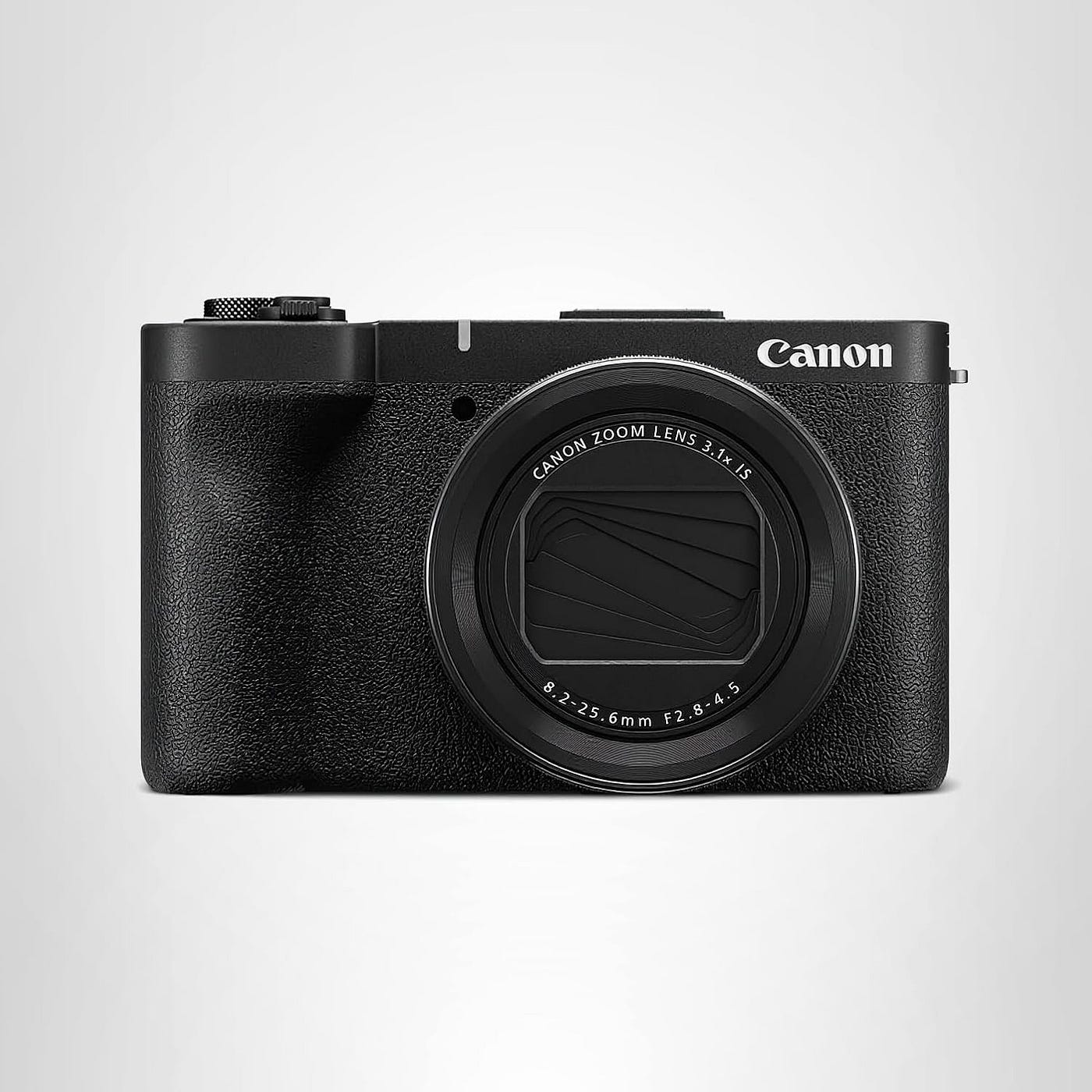
When people search “**Canon PowerShot V1 **review,” what they usually want is simple: Does this compact Canon camera deliver professional looking photos and clean video without turning your shoot into a tech project? I have been shooting professionally for years, and I carry bigger bodies when the job demands it. But I also need a camera that can live in my bag every day, handle quick client moments, and still give me files I can edit confidently.
I have been using the Canon PowerShot V1 as my practical, always with me camera for behind the scenes content, location scouts, quick lifestyle shoots, and travel days when I do not want to haul a full kit. This review is based on real workflow, real deadlines, and the kinds of lighting conditions photographers actually deal with.
If you want the official spec sheet while you read, Canon’s support and product resources are worth keeping open in another tab: Canon USA support.
Who the Canon PowerShot V1 Is For
The **Canon PowerShot V1** makes the most sense for three types of shooters.
First, content creators and vloggers who want Canon color, reliable autofocus, and a camera that stays easy even when you are filming yourself.
Second, travel and street photographers who want a small camera with a real lens and better handling than a phone, especially in challenging light.
Third, working photographers who need a compact backup and a behind the scenes tool that does not slow the day down. I have used it that way many times, and it is where this camera shines.
If you are expecting it to replace a full frame body for heavy commercial work, it is smarter to treat it as a capable compact camera, not a studio replacement.
Affiliate Disclaimer: This guide is reader-supported. If you buy through the links on this page, I may earn a small commission at no extra cost to you.
Build Quality, Handling, and Real World Ergonomics
The first thing I judge on a compact is whether I can operate it without thinking. The V1’s grip and button placement feel designed by someone who actually shoots. I can pull it out one handed, power it up, and start working quickly.
The menu system feels familiar if you have used Canon before. That matters on a job. I do not want to dig through confusing pages when a client is waiting. The camera feels like it was built for speed, not for showing off features.
The screen and controls are also set up in a way that works for self recording, quick focus changes, and fast exposure adjustments. When you are moving between indoor tungsten light and outdoor daylight, that ease matters more than people admit.
Image Quality: Natural Canon Color That Edits Well

Canon’s strength has always been color that looks human. The **PowerShot V1** keeps that tradition. Skin tones look believable, and transitions in highlights feel smooth in normal lighting.
What I care about as a professional is not just how a JPEG looks straight out of camera, but how the file behaves when I edit. I have been able to pull up shadows, tame highlights, and deliver clean social media exports without the files falling apart. The camera gives you that “Canon look” that many clients prefer because it feels natural, not over processed.
If you plan to edit seriously, use a consistent workflow. I bring the files into Adobe Lightroom, apply my base profile, and keep my color work minimal. The V1 does not need heavy correction when exposure is close.
Autofocus and Subject Tracking in the Real World
A lot of compact cameras look great on paper but fall apart when a person walks toward the camera or turns their head. The V1’s autofocus is one of its best working features. For casual portraits, family moments, and behind the scenes video, it tracks confidently and stays calm instead of hunting.
I have used it in crowded environments where backgrounds are busy and contrast is weird. It still stays locked more often than not. For creator work, this is the difference between a usable clip and a frustrating reshoot.
My advice: set it up with a sensible focus mode you can trust, then stop obsessing. The camera works better when you let it do its job.
Low Light Performance: Where It Helps and Where You Still Need Technique
People also search “**Canon PowerShot V1** low light performance” because they want a compact that can handle restaurants, indoor events, and night streets. Here is my honest take.
The V1 does well in mixed light when you expose carefully. You still need good habits. Watch your shutter speed, and do not underexpose expecting miracles later. If you give it a solid exposure, noise stays controlled enough for real use.
In very dark situations, you will hit the limits that all small cameras face. That is not a failure. It is physics. The win is that the V1 stays usable longer than most phones once the lighting gets tricky, and it holds color better in ugly mixed light.
Lens and Zoom Range: Practical, Not Pretend
A compact camera lives or dies by its lens. What I like about the V1 is that it feels built around a realistic, everyday shooting range. I can shoot a quick wide establishing shot, then tighten up for portraits or detail frames without swapping anything.
The look is clean, and the lens performs like it belongs on a camera meant for creators and working shooters, not a toy. I have used it for quick product and food frames on scouting days, and it holds up well when you pay attention to light.
One tip from my workflow: when I need a more polished look, I step back and zoom slightly rather than shooting too wide. Faces and objects usually look better with a bit of compression.
Video Quality: A Creator Tool That Fits a Pro Workflow
If you are searching “**Canon PowerShot V1** for vlogging” you are looking at the right style of camera. What matters in video is not just sharpness. It is autofocus behavior, skin tone, and whether the camera is easy to keep rolling.
In my use, the V1 produces video that looks clean and natural without a lot of tweaking. The autofocus transitions look smooth enough for talking head and walk and talk clips, and the color is the kind that clients and audiences accept immediately.
If you plan to color grade heavily, shoot with consistent white balance and exposure. If you want fast delivery, the V1 can absolutely support a quick turnaround workflow.
Stabilization and Handheld Use
Most of the time I am using this camera handheld. For quick behind the scenes clips, scouting footage, and travel shots, stabilization is not optional.
The V1 does a solid job smoothing out handheld movement in normal shooting. You still get the best results when you use smart technique: elbows in, gentle steps, and do not whip pan unless you mean to.
For creators, I still recommend a small tripod grip for repeatable framing. Something simple can change your results overnight.
Audio: The Make or Break Detail for Video
A lot of people buy a compact vlogging camera and then wonder why their videos feel amateur. The answer is usually audio.
If you are filming yourself, use an external microphone when possible. Even a small on camera mic can improve clarity and cut down on room echo. For quick work, I keep my setup minimal so I actually use it.
Battery Life and Storage: What I Do on Real Shoots
Compact cameras can burn through batteries faster than you expect, especially when filming. My routine is simple.
I carry a spare battery and a quality memory card from a reliable brand. Cheap cards are not worth it. For safe choices, I usually point assistants and newer shooters to reputable lines like SanDisk memory cards. The goal is fewer hiccups, not bragging rights.
For quick transfers to a phone, Canon’s app workflow is helpful when you are posting fast. If you need it, start here: Canon Camera Connect.
Four Real Life Shorties From My Own Use
1. The coffee shop scout I walked into a new cafe location with the V1 in my jacket pocket. Ten minutes later I had clean stills, quick video clips, and reference frames that saved me a second trip.
2. The wedding morning backup My main bodies were on the table, but the V1 was what I grabbed for quiet candid moments. Nobody stiffened up, and I got natural frames the couple actually loved.
3. The client behind the scenes reel A client asked for behind the scenes content halfway through the shoot. I switched to the V1, filmed handheld clips, and delivered a polished reel without slowing the crew.
4. The family night street walk Low light, mixed neon, moving kids. The V1 kept focus, kept color believable, and gave me photos that looked like memories instead of mushy phone noise.
What Other Photographers and Creators Have Told Me
I like my own testing, but I also trust what other working shooters report after real use.
One creator friend who posts daily told me the V1 is the first compact camera she has owned that does not make her fight focus when she turns her head.
A wedding photographer I occasionally second shoot with said he likes it as a silent, low profile candid camera, especially when he does not want guests to notice a lens pointed at them.
A small business owner I helped with product content said the biggest improvement over her phone was consistency. Same lighting, same angle, and the V1 produced files that looked more professional with less editing.
A travel photographer buddy told me he likes it because it feels like a camera, not a gadget. That sums up the experience well.
Photo by Andriyko Podilnyk on Unsplash
Photo by Ben Guerin on Unsplash
Photo by Tobias Roth on Unsplash
Pros and Cons From a Pro Perspective
What I Like
Natural Canon color that looks good fast Reliable autofocus for people and creator work Compact size that actually gets carried A practical lens range for everyday jobs Easy menus and quick handling
What I Would Improve
In very dark light you still need careful exposure For serious video work, external audio is still important If you want extreme background blur, compacts have limits
Best Settings and Tips for Better Results
Use a consistent white balance indoors instead of auto when the lighting is mixed Expose a little brighter than you think in low light, then bring highlights down in edit For portraits, zoom in slightly and step back for a more flattering look For video, lock exposure when possible so brightness does not shift mid clip
Canon PowerShot V1 FAQ
Is the Canon PowerShot V1 good for vlogging?
Yes, especially if you want reliable autofocus, natural skin tones, and a compact setup. Pair it with a small microphone and your videos will look and sound more professional.
Is the PowerShot V1 better than an iPhone or Android phone camera?
In good light, phones are strong. The V1 pulls ahead when you want more natural rendering, more consistent results, and better performance in mixed or lower light, plus the flexibility of a real zoom lens.
Can I use the Canon PowerShot V1 as a professional backup camera?
Yes. I do. It is a practical backup and a great behind the scenes camera. Just keep expectations realistic compared to larger sensor systems.
Does the V1 shoot files that are good for editing?
In my workflow, yes. The files respond well to normal color correction and exposure balancing, especially if you expose carefully.
Final Verdict: A Compact Canon Camera That Earns Its Spot in a Pro Bag
The **Canon PowerShot V1** is the kind of camera that quietly makes your life easier. It is not trying to replace a full production setup. It is trying to give you reliable, good looking photos and video in a compact body that you will actually bring with you.
If you are searching for a compact camera for travel, a Canon vlogging camera that does not feel flimsy, or a professional friendly everyday carry camera, the PowerShot V1 is a smart choice based on real use. It has become part of my working routine because it saves time, captures moments that bigger gear can miss, and delivers files I am comfortable handing to clients.
메타데이터
- post_id
- 5b5ab4dfb3f5
- slug
- canon-powershot-v1-review-from-a-working-photographer-who-actually-uses-it-5b5ab4dfb3f5
- url
- https://medium.com/@kashafshahid467/canon-powershot-v1-review-from-a-working-photographer-who-actually-uses-it-5b5ab4dfb3f5
- canonical_url
- https://medium.com/@kashafshahid467/canon-powershot-v1-review-from-a-working-photographer-who-actually-uses-it-5b5ab4dfb3f5
- author_url
- https://medium.com/@kashafshahid467
- status
- ok
- fetched_at
- 2026-07-25 02:22:02