JAVA 8 Features with Industry Based Use Cases (Part 1)
Hello learners, In this series of articles we will learn the new features that were introduced in JAVA 8 with the real industry based use…
JAVA 8 Features with Industry Based Use Cases (Part 1)
Hello learners, In this series of articles we will learn the new features that were introduced in JAVA 8 with the real industry based use cases. Also, we will see best practices while implementing JAVA 8 applications.
A Glance at JAVA SE 7
Before stating with the JAVA SE 8 features, let us look in brief the features introduced in JAVA SE 7.
- Functionality to handle multiple exception in the single catch block.
- Try with resources block.
- Diamond Operator in Collections and Generic Instance Creation.
- Using underscore in Numeric Literals
- String Literals in switch statements.
Brief examples of each of above mentioned features of JAVA SE 7.
- Functionality to handle multiple exception in the single catch block.
As the try block can be associated with any number of catch blocks. Before JAVA SE 7 we need to write each catch block separately. But many times it leads to duplication of code.
// Before JAVA SE 7

try
{
System.out.println(1/0);
// Some other code which may raise other type of exception
}
catch(StringIndexOutOfBoundsException e)    // Catch block 1
{
System.out.println(e.getMessage());
}
catch(ArithmaticException ae)                // Catch Block 2
{
System.out.println(e.getMessage());
}
With JAVA SE7 features we can write the above code as -
// Post JAVA SE 7
try
{
System.out.println(1/0);
// Some other code which may raise other type of exception
}
catch(StringIndexOutOfBoundsException | ArithmaticException e)    // Single Catch block can handle both the cases
{
System.out.println(e.getMessage());
}
This reduces the duplication of code.
2. Try with resources block.
Before JAVA SE 7 we need to close the connections made to databases using JDBC inside the finally block. But From JAVA SE 7 we do not need to do it and JVM will automatically close the connection for us.
// Before JAVA SE 7
Connection con1;
try
{
con1 = DriverManager.getConnection("xyz");
}
catch(abc a)     //catch block
{
}
finally
{
connection.close()
}
// Post JAVA SE 7
try(Connection con1 = DriverManager.getConnection("xyz"))
{
}
catch(abc)
{
}
finally
{
//Here we do not need to close it, JVM will take care of it automatically
}3. Generic Instance Creation.
Before JAVA SE 7, while creating Collections we need to specify the Wrapper Class in both sides but fromJAVA SE 7 specifying the Wrapper Class in Left Hand Side Only is sufficient.
// Before JAVA SE 7
List<Integer> list = new ArrayList<Integer>();

// From JAVA SE 7
List<Integer> list = new ArrayList<>();
The operator <> is called as Diamond Operator.
4. Using underscore in Numeric Literals
From JAVA SE 7 we are able to add underscores (_) in numeric literals. This feature was just added to enhance the readability of code , if in case our code contains long numbers.
Below are the examples -
// All the below numerics are valid
long creditCardNumber = 1234_5678_9012_3456L;        // 1234567890123456
long socialSecurityNumber = 999_99_9999L;            // 999999999
float pi =  3.14_15F;                                // 3.1415
long hexBytes = 0xFF_EC_DE_5E;                       // FFECDE5E
long hexWords = 0xCAFE_BABE;                         // CAFEBABE
long maxLong = 0x7fff_ffff_ffff_ffffL;
byte nybbles = 0b0010_0101;
long bytes = 0b11010010_01101001_10010100_10010010;
But _ is not allowed in the following cases -
- At the beginning or end of a number
- Adjacent to a decimal point in a floating point literal
- Prior to an
ForLsuffix - In positions where a string of digits is expected
Following are the examples of invalid numbers as per Oracle Documentation
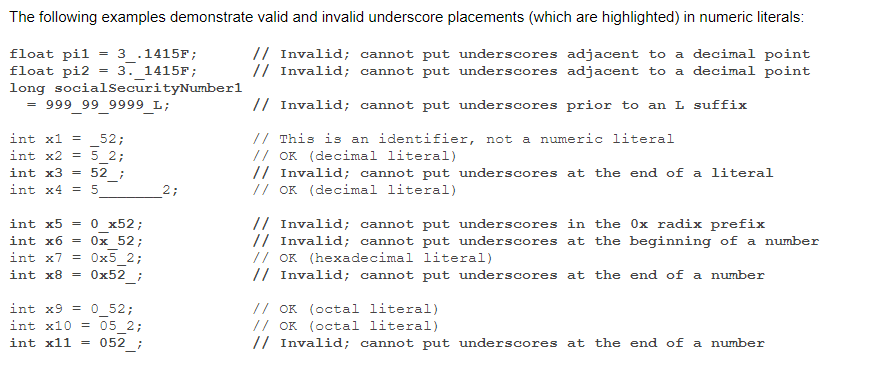
JAVA SE 7 Oracle Documentation
5. String Literals in switch statements.
This was the major add on in JAVA 7. From JAVA 7 onwards, we can use String literals in the switch statements.
  // Before JAVA SE 7 we need to do like this
//assume furniture is a String variable
if(furniture.equals("Chair"))
{
System.out.println("This is the Chair");
}
else if(furniture.equals("Table"))
{
System.out.println("This is the Table");
}
else
{
System.out.println("Unknown Thing");
}
//JAVA SE 7 onwards
switch(furniture) // Assume furniture to be a string variable
{
case "Chair":
System.out.println("This is the Chair");
break;
case "Table":
System.out.println("This is the Table");
break;
default:
System.out.println("Unknown Thing");
}
So , all these were the features of JAVA SE 7 which we must know before starting with JAVA SE 8.
JAVA SE 8 came with very effective features and has ease the work of JAVA Developers. We will start discussing JAVA SE 8 in out next articles.
Happy Learning :)
메타데이터
- post_id
- 5b600bf095fd
- slug
- java-8-features-with-industry-based-use-cases-5b600bf095fd
- url
- https://medium.com/@paraglalwani913/java-8-features-with-industry-based-use-cases-5b600bf095fd
- canonical_url
- https://medium.com/@paraglalwani913/java-8-features-with-industry-based-use-cases-5b600bf095fd
- author_url
- https://medium.com/@paraglalwani913
- status
- ok
- fetched_at
- 2026-07-26 02:59:15