Visualize Product Configuration — Avoid Runtime Errors
Introduction
Visualize Product Configuration — Avoid Runtime Errors
Photo by Franki Chamaki on Unsplash
Introduction
We learnt about product configurations, different settings, and rules in the previous articles here. Because modern product configuration is highly complex, it is incredibly easy to introduce minor setup errors — errors that become incredibly expensive if they slip into production uncaught. Salesforce provides intuitive ways to verify the product configurations. I discovered these recently and shared them here.
Visualize Product Classifications in a Catalog
Product classifications are used to group or classify products based on certain attributes. We learnt about the product attributes in this article.
The products can be associated with multiple attributes. These pre-defined attributes show up as tabs in the ‘Browse Catalog’ page of a quote.
I created a product classification as Cellular Tablets and added a bunch of available attributes like Tablet Storage Size, Graphics, Memory, Storage and Region as shown in the screenshot below.
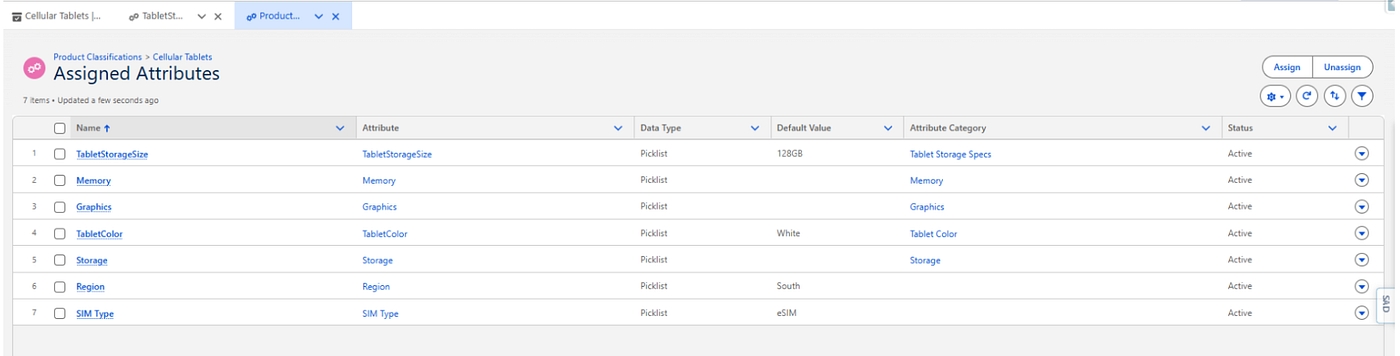
Attributes Assigned to the Product Classification
Now, In order to verify the configuration and the display is correct, we need not configure a test quote. We just open the created/edited product configuration and click preview as shown in the screenshot below.

Product Classification with Preview Option
The system loads a mock screen displaying all the configured attributes for us to verify.

Preview Screen
Whether you are assigning a new variable, unassigning a legacy option, or re-ordering the sequence of the attributes under a classification, the runtime layout can be verified instantly without leaving the page. I updated the sequence of an attribute to 3 and the preview screen immediately reflected the changes as shown in the side-by-side screenshot below.

Side-by-Side Preview of Configuration Change
Conclusion
While a preview button might look like a minor quality-of-life feature on paper, its real-world value is massive. When an enterprise implementation scales to hundreds of custom attributes across dozens of complex product lines, instant visual feedback completely eliminates the frustrating, slow cycle of test-quote debugging.
If you found this article useful, consider subscribing for more such articles.
메타데이터
- post_id
- 5b63a2fc0f63
- slug
- visualize-product-configuration-avoid-runtime-errors-5b63a2fc0f63
- url
- https://medium.com/@snehaskashyap/visualize-product-configuration-avoid-runtime-errors-5b63a2fc0f63
- canonical_url
- https://medium.com/@snehaskashyap/visualize-product-configuration-avoid-runtime-errors-5b63a2fc0f63
- author_url
- https://medium.com/@snehaskashyap
- status
- ok
- fetched_at
- 2026-07-17 11:55:31




