Most UGC Video Agencies Are Dead. Welcome Google Omni! [How To Use]
And Also No More Average UGC AI Slop Videos?
Most UGC Video Agencies Are Dead. Welcome Google Omni! [How To Use]
And Also No More Average UGC AI Slop Videos?
Photo by Maxim Berg on Unsplash
User-Generated Content (UGC) has been a physical logistics nightmare.
And that got us to way too many AI slop companies claiming to make these videos.
If you are still hiring actors, renting studio time, and shipping physical products to influencers for 15-second TikTok videos in 2026 or paying to those AI slop making companies, you decide which is worse?
While I aggregate marketing arbitrage signals for GritGlean, I constantly see founders burning thousands of dollars a month on mediocre UGC content.
The friction is massive:
you write a script, hire an agency, wait two weeks, and hope the performance is decent.
Recently, Google launched Omni.
And claimed exposing how an entire production industry will just collapse!
Using Google’s newly deployed Omni video architecture and their “Google Flow” agent interface, they generated a photorealistic UGC ad in under five minutes using nothing but two static images and a text prompt.
It was wild, for sure.
And when I tested it, it worked like crazyyyy!
So, how are operators configuring Google Omni to automate video production, from voice-cloned avatars to fully agentic product ads?
The Autonomous Avatar (Zero-Shot Cloning)
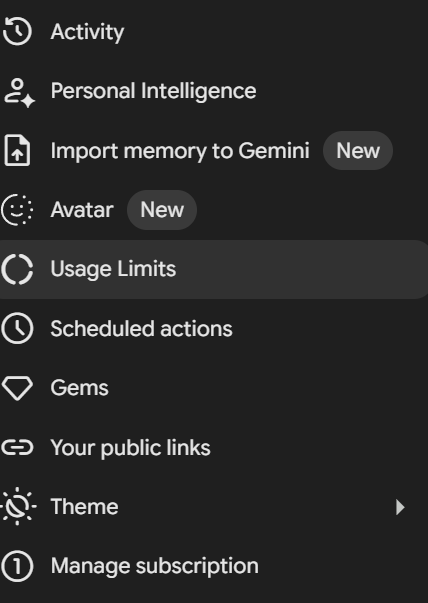
Avatar!
The first pipeline documents the need to ever step in front of a camera again.
Google integrated an aggressive cloning architecture directly into the Gemini interface.
The Ingestion Phase:
You navigate to the Settings and
initialize the Avatar protocol.
The system forces a dual-ingestion loop:
- Audio: You read a sequenced string of numbers into your microphone to map your vocal topography.
- Visual: You execute a series of head movements (left, right, center) to let the system generate a 3D mesh of your face.
The Execution Prompt:
Once the avatar is saved, it becomes an environmental variable you can call using the @ syntax. You do not need complex camera instructions.
“@avatar is walking in China.
Wearing a green jacket, black jeans, white shoes.
Lighting: Golden hour.
And says in a happy tone in English: ‘Welcome to My AI Life!’”
Within seconds, the model renders a high-fidelity video.
Your face, your exact vocal clone, walking through a generated environment with perfect lip-sync.
The Agentic UGC Pipeline (Google Flow)
The Avatar cloning is impressive for personal brands, but the actual B2B leverage lies in the “Google Flow” agent. This is where the unit economics of product marketing structurally break.
The Asset Injection:
You upload exactly two static images to the Google Flow dashboard:
- A photo of a model.
- A clean image of your physical product (in this case, a protein bar).
The Orchestration Prompt:
You activate “Agent Mode,” which transitions the video editor into a persistent conversational loop. You do not use a timeline timeline. You tag the uploaded assets directly in the syntax:
“UGC video. @model holding @product in her hand.
She is looking directly into the lens.
Dialogue: ‘Wow, I thought a macha protein would be weird, but this is actually crazy. I understand why my friends have been crazy and obsessed.’”
The Constraint Settings:
You explicitly lock the environmental constraints:
- Ratio:
9:16(Vertical, TikTok-native). - Render Engine:
Omni Flash(Optimized for speed). - Output:
1x(Limit generation to a single variant to conserve API credits).
The Agent requests mechanical approval (e.g., “This will cost 30 credits. Proceed?”).
You confirm.
The model generates a photorealistic video of the model holding your exact product, speaking the dialogue with native human micro-expressions.
Photo by Annie Spratt on Unsplash
Simple Steps, Right?
The Conversational Memory Advantage
The most critical architectural shift in Google Flow is the memory retention.
Historically, if an AI video generator output a flawed render, you had to re-upload the assets and start from scratch.
The Agent Mode eliminates this. Because the agent maintains a conversational memory buffer, your initial assets remain in the context window.
If the lighting is wrong or the dialogue needs a slight tweak, you do not write a new master prompt.
You just type: “Make the lighting warmer and change the final sentence.”
The agent applies the targeted delta instantly.
It is a highly compressed iteration loop that saves massive amounts of time and compute credits.
This is a Golden Era!
Omni model is currently gated behind paid tiers, but the capital expenditure is a fraction of a human film crew.
If you’re in India, you do have access btw.
The bottleneck in video marketing is no longer production equipment, it is prompt engineering and asset orchestration.
If you are still relying on human logistics to generate 15-second social media clips, you are going to be priced out of your own market.
The translation layer from static image to cinematic video has been fully abstracted.
Load your assets, lock your constraints, and let the agent render the ad.
In case we are meeting for the first time, come over *here, it’ll be worth the roller coaster of articles that are gonna come up in the next few weeks.*
I swear tracking these updates is a job in itself, lately.
Here’s the *list which I’ve built and keep adding on*.
If you’re hunting for your next startup idea, check out ***GritGlean*: it aggregates real demand signals, pain points, and ideas from Reddit, X, HN, Quora, and more. It also finds sellers if you want to get started with an already existing app.
메타데이터
- post_id
- 5bb3c4b2ce13
- slug
- most-ugc-video-agencies-are-dead-welcome-google-omni-how-to-use-5bb3c4b2ce13
- url
- https://medium.com/tech-and-ai-guild/most-ugc-video-agencies-are-dead-welcome-google-omni-how-to-use-5bb3c4b2ce13
- canonical_url
- https://medium.com/tech-and-ai-guild/most-ugc-video-agencies-are-dead-welcome-google-omni-how-to-use-5bb3c4b2ce13
- author_url
- https://medium.com/@shashwatwrites
- status
- ok
- fetched_at
- 2026-06-09 15:37:30




