Nuphy Node75 Low Profile Review — mechanical board with SOCD?!
The Nuphy Node75 is one of those boards you pick up and instantly think, “yeah… this one’s built different.” It’s low-profile, sharp in…
Nuphy Node75 Low Profile Review — mechanical board with SOCD?!
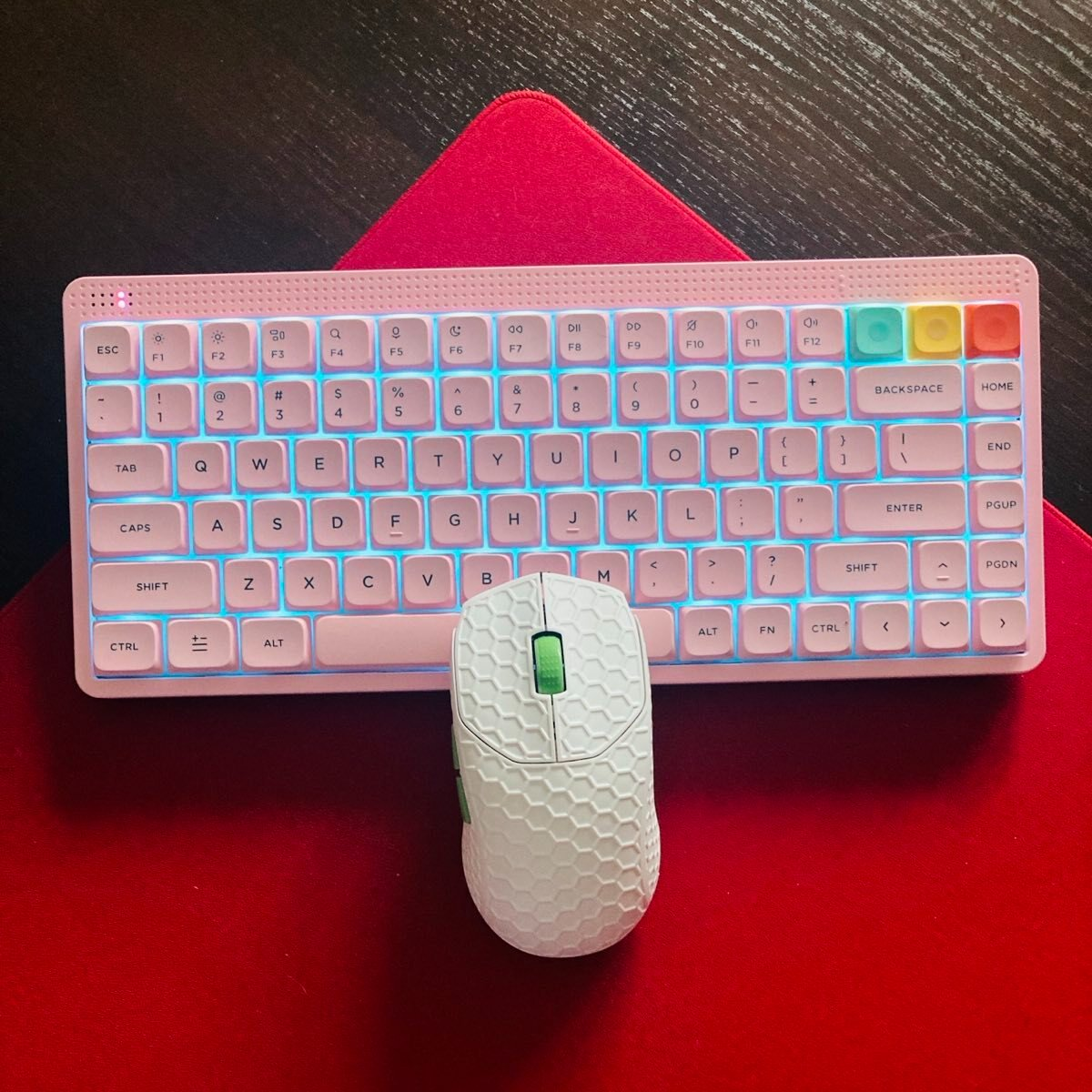
Entering my setup, here’s Node75 low profile
The Nuphy Node75 is one of those boards you pick up and instantly think, “yeah… this one’s built different.” It’s low-profile, sharp in all the right places, and has this weird mix of finesse and toughness that you don’t usually get in a portable board. It looks slick on the desk, but even better when you grab it and move around — light, compact, no drama. I won’t spill everything yet, but let’s say it’s the kind of keyboard that makes you rethink what a travel-friendly 75% can feel like.
Disclaimer: This unit was provided to me for testing purposes, though Nuphy had no sway over the contents of this review.

Image by Nuphy
Specs and Features
- Model: NuPhy Node 75 Low-Profile Wireless Mechanical Keyboard
- Layout: ANSI 75%
- Number of keys: 84
- Mounting style: Gasket mount
- Switch type: Low-profile from Gateron
- Hot-swappable: Full support
- Stabilizers: Plate-mounted
- Backlight: North-facing RGB LEDs, 20 lighting modes
- N-key rollover: Supported
- Compatible OS: macOS, Windows, Android, iOS
The pink box
- Top and bottom case: ABS
- Plate: PC (polycarbonate)
- Width: 317.1 mm (12.48")
- Depth (front-to-back): 137.1 mm (5.40")
- Front height: 13.8 mm (0.54")
- Back height: 22.4 mm (0.88")
- Weight: 659 g (1.45 lb)
- Typing angles: 4°/ 8°/ 11° (two-step feet)
- Wired: USB-C
- 2.4 GHz wireless: via included USB receiver
- Bluetooth: Bluetooth 5.0
- Multi-device: can pair up to 4 devices and switch with a key press
- Polling rates: Wired 1000 Hz, 2.4 GHz: 1000 Hz, Bluetooth: 125 Hz
- Battery capacity: 3000 mAh, working time (RGB on): ~60–100 hours (lab tests), working time (RGB off): up to 1000 hours (lab tests)
With some extra keycaps on
- Compact 75% with F-row, arrows, and nav cluster (84 keys).
- Available colorways: Lunar White, Ink Gray, Light Pink for nano (low-profile) version.
- Design language: mid-century inspired, dot-matrix + concentric detailing (“bridges futurisms between ages”).
- Left side: A vertical array of 10 LEDs that react to keystrokes (rhythm/visual feedback).
- Right side: A touch bar for gesture control of volume, brightness, and lighting — no physical wheel needed.
- Dedicated OS toggle (Mac/Windows) next to the connection-mode switch.
- When switched to macOS, you get Mac-specific function row mappings (Spotlight, Do Not Disturb, etc.).
- The nano (low-profile) version can sit directly on a MacBook keyboard and act as a “top deck” extension.
- Node 75 features a 3D printing interface built into the case, allowing you to mount additional accessories.
- NuPhy provides free 3D models for various products, including pen docks, bar trays, phone stands, display docks, brick mounts, cap mounts, and card rests.
In the box
Box contents
- Node 75 Low-Profile Keyboard
- USB-C to USB-C cable
- USB-C to USB-A adapter
- 2.4 GHz wireless receiver
- Keycap/switch puller
- 6 Extra keycaps
- Quick guide (PDF also available via NuPhy website)
Unboxing
Sound Test
The Node75 low profile with Red Nano switches has a very pleasant typing experience. The stabilizers stay clean, the board feels firm, consistent, and the keystroke quality is surprisingly solid for the price, as you can see in the video. I still make fewer typos on my MacBook, but you can’t really complain.
Design and Build Quality
Top view
The NuPhy Node75 has a clean, non-exploded, and understated design. The Node75 doesn’t try to look like a loud “gamer” keyboard. It’d rather aim for users who prefer a subtle, more refined visual style: a compact 75% layout, gentle color variants (such as Ink Gray, Light Pink, or Lunar White), a minimal top housing, and dot-matrix indicators instead of flashy RGB strips. It uses a gasket-mount design and a polycarbonate plate, which both give the typing feel a cushioned character and avoid the hollow or metallic tone you often hear in cheaper plastic keyboards. The ABS plastic (good quality) is the reason it has such an affordable price, but that doesn’t bother me at all, and I still love it.
The Tri-mode connectivity (USB-C, Bluetooth, 2.4 GHz) lets you switch between multiple devices effortlessly. The low-profile model claims up to around 1000 hours of battery life in its wireless low-power mode, which is genuinely impressive for a mechanical board. The dongle compartment and the back and adjustable feet, mechanical Win/Mac switch, etc, are these details you start to miss when they’re not there, so kudos to Nuphy again.
The touch bar (right top corner) is a clever addition. Rather than using a chunky knob, the Node75 integrates a slim touch strip along the top — great for volume, media controls, brightness adjustments, or custom macro actions. Its placement is deliberate, so you don’t activate it accidentally while typing, and you can customize it all in the software, obviously. The dot-matrix LEDs (top left corner) for the battery indicator, typing space, and the Caps Lock light are also nice to have.
It was designed in a way that Kick75 from Nuphy should have been designed in the first place — no clunky profile switching, just order a version of your choice and you’re good to go. And one more thing: that light pink color is fantastic.
One thing to remember — due to some design choices, the Node75 low profile is not meant to be opened.
Bottom line? Great build quality, thought-out design, cool Touch Bar.
Switches and Keycaps
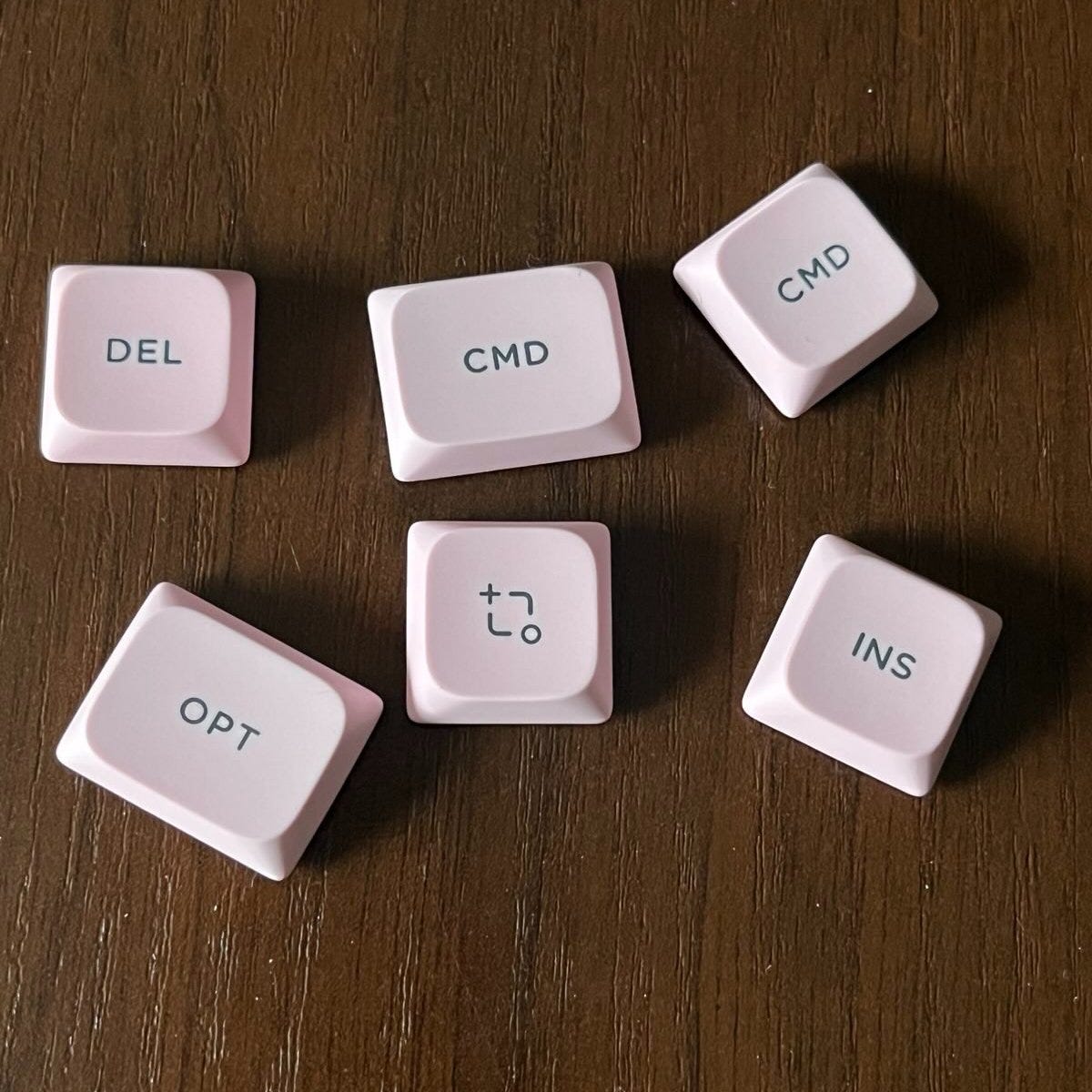
Additional nSa keycaps to replace some of the default ones
Low-profile NuPhy nSA double‑shot PBT keycaps — durable, sleek, and spill-resistant is what I’ve always liked about Nuphy. Their keycaps have always been a pleasure to use, and these are no different. The light pink color is also striking; they seem very durable (although a shine is to be expected, but that’s quite normal).
However, I have found one small thing that I have to point out — the spacebar lets the weird tint through that is not a typical RGB (you can see it in my video of unboxing). It seems that the material thickness is too low there, so Nuphy should fix it.
Switch Options here are Gateron Nano 3.0 Low‑Profile ones:
- Total key travel: 3.5 mm — unusually deep for low‑profile switches
- Switch variants: Red Nano (linear), Brown Nano (tactile), Blush Nano (silent linear with added dampening)
- Construction: full POM build for corrosion-resistance, smoothness, and reduced noise
One nitpick here: you are limited to these switches only. However, they should be more than enough. Just be careful when you swap them; they tend to come off with a keycap.
Bottom line — love the keycaps, like the switches!
Software — mechanical keyboard with SOCD?
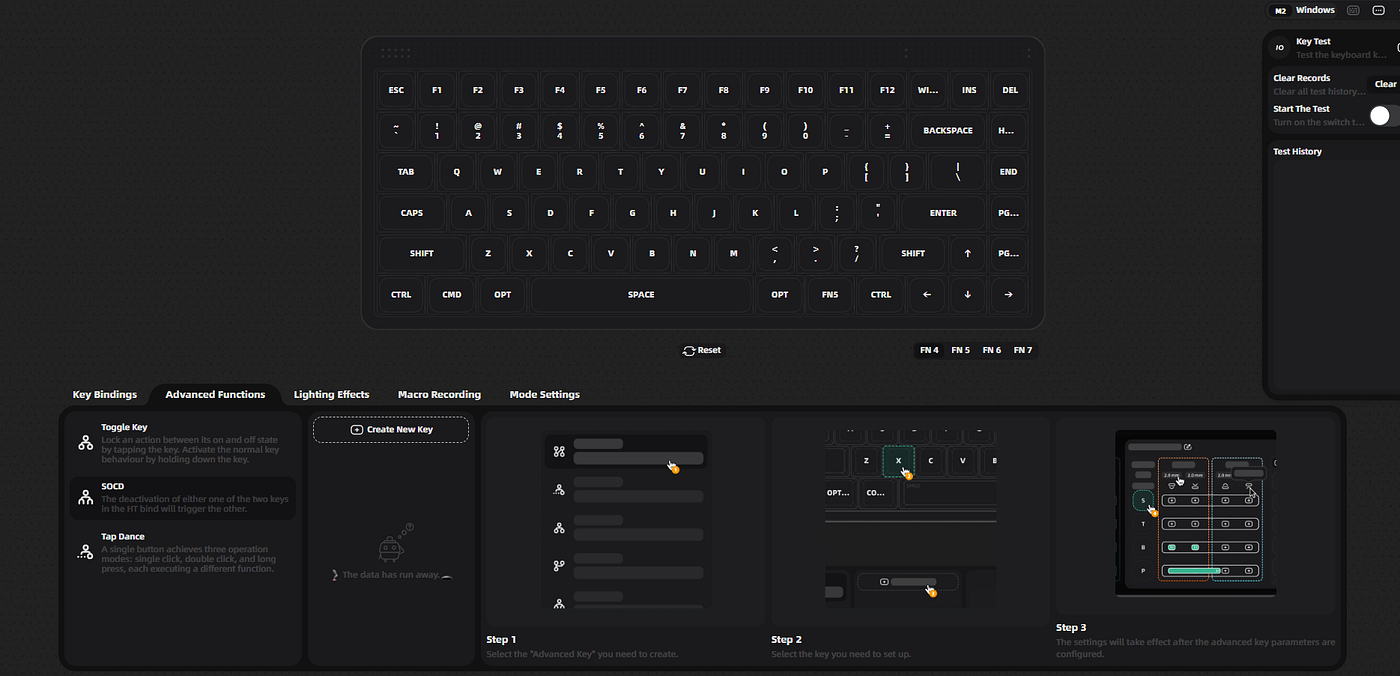
Nuphy.io 2.0
Nuphy has been constantly improving its software — now even their mechanical keyboards have access to the web driver, something not seen before. There’s also been one improvement since I checked their SOCD feature with Air75v3 — it didn’t work well at that time, but it’s been fixed now, and Node75 is equipped with SOCD.
To clear up confusion — yes, the SOCD is not the magnetic keyboard's exclusive feature. It is even possible with older membrane keyboards once you work out your way through some GitHub 3rd party apps. But I am so satisfied it is now also here, and it works really well! Good work, Nuphy.
Apart from that, it’s the supreme Nuphy software as always, still top 3 in the industry if you ask me. It’s built to be straightforward and approachable, allowing you to remap keys, set up macros, customize lighting, and configure the Touch Bar— all without installing any desktop software. For most people, that’s a major quality-of-life improvement. However, power users who are familiar with VIA or QMK may feel that IO 2.0 doesn’t offer the same level of depth or customization.
It’s also worth pointing out the Tap Dance and Toggle Key functions, which are great additions in their own right.
I should add that choosing a browser-based configurator was a smart decision from NuPhy — something Melgeek still hasn’t implemented with the O2 — and it conveniently avoids Apple’s strict software approval process.
Bottom line — SOCD on mechanical boards? Here, hold my beer!
Gaming and Productivity
Nav cluster
This keyboard seems perfect for productivity — people who type a lot (coding, writing, office work, content creation) and value comfort/low noise should be happy. Users who want a more refined, minimalist mechanical keyboard that blends into a professional or creative workspace, and those who use multiple devices (laptop, desktop, tablet) and appreciate tri-mode connectivity and flexibility, will never regret their purchase either. Moreover, this board is perfect for anyone who appreciates some extra conveniences (touch bar, hot-swappable switches, quiet typing) without needing high-end gaming features or massive customizability.
For gaming, the Node75 performs surprisingly well. It offers a 1000 Hz polling rate in both wired and 2.4 GHz modes (Bluetooth stays at 125 Hz), and it includes SOCD and Tap Dance support, which can be particularly helpful in genres like FPS titles, fighters, or rhythm games. Previously, the SOCD implementation still needed refinement — but that’s now fully resolved. Beyond that, the board feels responsive enough for casual play and even some competitive sessions, as long as you’re not aiming for the absolute highest-end specs. It doesn’t feature magnetic switches, Rapid Trigger, adjustable actuation, or other specialized gaming tech, so it’s not positioned as a flagship esports keyboard — nor is it meant to be. NuPhy designed a balanced, low-profile board that merges everyday typing with respectable gaming capability, and in that regard, it succeeds.
Bottom line — top productivity, very decent gaming experience.
Summary
Stunning Node75 in light pink
The NuPhy Node75 feels like a properly refined and much better-realized version of what the Kick75 was supposed to be. This updated model fixes the core issues by giving users an actual choice: low-profile or standard-profile, no awkward profile switching, no compromises. The ABS housing is high quality, the overall construction is classic NuPhy, and the aesthetic is modern and tidy enough to blend into both professional and creative desks. It’s fully Mac-ready out of the box, with a physical toggle and matching keycaps, and the new browser-based NuPhy IO 2.0 software runs smoothly on macOS — even if it’s not as feature-packed as VIA or QMK for heavy customizers.
Typing performance is strong thanks to the gasket-mounted internals, well-made double-shot nSA keycaps, and hot-swappable Gateron low-profile 3.0 switches offered in three flavors, including a silent choice. You also get three adjustable typing angles, a stable 2.4 GHz link with 1000 Hz polling, solid battery endurance, and seamless Bluetooth connections. The north-facing RGB is nicely diffused and bright enough to be useful without being distracting. A standout bonus is SOCD (Simultaneous Opposite Cardinal Direction), rarely seen in mechanical keyboards and genuinely helpful for gaming. The Touch Bar is another neat, eye-catching addition that can be customized to suit your workflow.
Overall, apart from a few minor quirks mentioned in the full review, the Node75 comes through as the most well-rounded and adaptable low-profile mechanical keyboard on the market right now — especially for people who jump between Mac and Windows and want a cheaper alternative to the Air75V3.
This is my favourite low-profile keyboard for now; I can suggest it without hesitation.
Bottom line — the best low-profile keyboard that is not aluminum.
Bullet Points
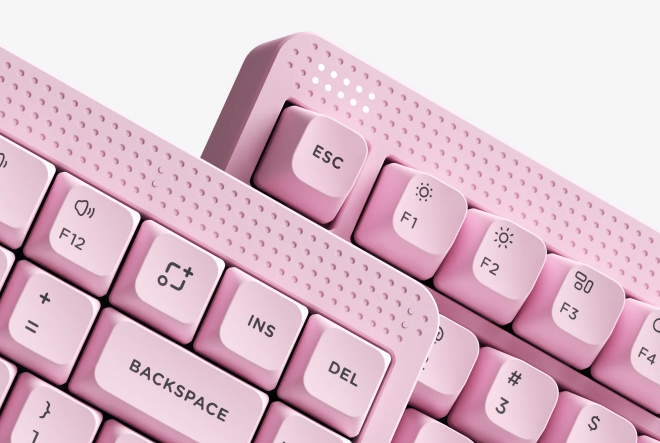
Image by Nuphy
- This is a better version of Kick75
- Initial choice of low/high profile, switches, etc, is how modern keyboards should be offered to the final customer
- The dark pink colorway is surprisingly pretty
- The low-profile version is great for a laptop, as it grabs the keycaps without pressing them
- good typing experience
- The Touch Bar is cool, even though it's more of a gimmick
- Excellent quality ABS material doesn’t make this board cheap
- …even though the price for Node75 is a steal
- Tri-mode works as intended, no issues with connectivity or battery
- This keyboard has SOCD, even though it’s mechanical
- good battery life
- dongle storage, adjustable feet, minimalistic design, light and portable, hot-swap (although limited to Gateron switches), are those little things we all love
- The online software has again improved to be top 3 online software in this industry
- The spacebar material is a bit too thin and emits the underglow tint from the switch underneath it, and one of the feet started to peel off…
- …but these are my only real complaints

Image by Nuphy
**Get Node75 and use my code “airmanthe” for a discount**
More than this, there’s nothing
Disclaimer
This review is not a paid endorsement. I want to ensure transparency and let you know that I am not receiving any monetary or otherwise compensation for evaluating or discussing this tech product. Certain images might have undergone digital enhancement to improve visual clarity. These adjustments do not alter the true appearance, shape, or physical characteristics of the product.
메타데이터
- post_id
- 5bec4d7c1e48
- slug
- nuphy-node75-low-profile-review-mechanical-board-with-socd-5bec4d7c1e48
- url
- https://medium.com/@damiancooper/nuphy-node75-low-profile-review-mechanical-board-with-socd-5bec4d7c1e48
- canonical_url
- https://medium.com/@damiancooper/nuphy-node75-low-profile-review-mechanical-board-with-socd-5bec4d7c1e48
- author_url
- https://medium.com/@damiancooper
- status
- ok
- fetched_at
- 2026-06-26 21:52:29




