I’m Done Watching Agents Pretend to Understand Repos, Here’s the Fix
Understanding a codebase for agents is a search problem pretending to be reasoning.
I’m Done Watching Agents Pretend to Understand Repos, Here’s the Fix
Understanding a codebase for agents is a search problem pretending to be reasoning.
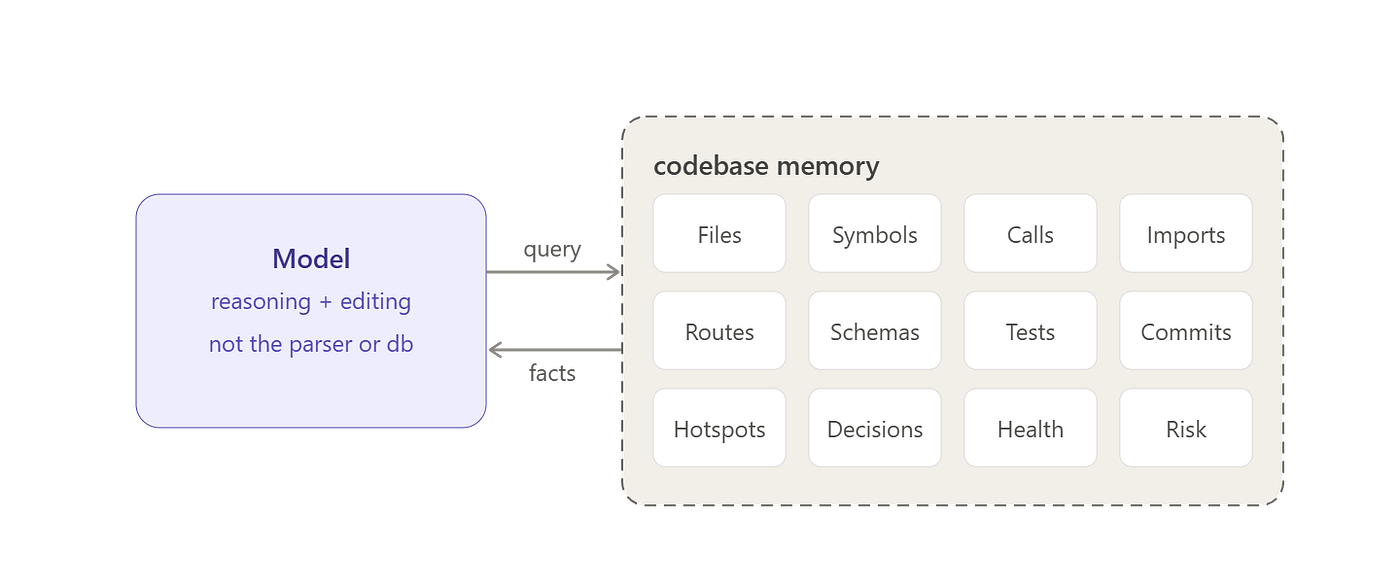
A good engineer carries a mental map: ownership, hotspots, dependency boundaries, historical decisions, dead paths, common failure zones, and the pieces that tend to change together.
Coding agents need the same codebase intelligence layer.
That is the interesting idea behind Repowise (no affliation, several useful ideas here to illustrate the way forward)
Repowise indexes a repository once, builds a graph and analysis layer around it, and exposes that intelligence through a CLI, a local dashboard, and Model Context Protocol tools for agents like Claude Code, Codex, Cursor, Cline, and other MCP-compatible clients.
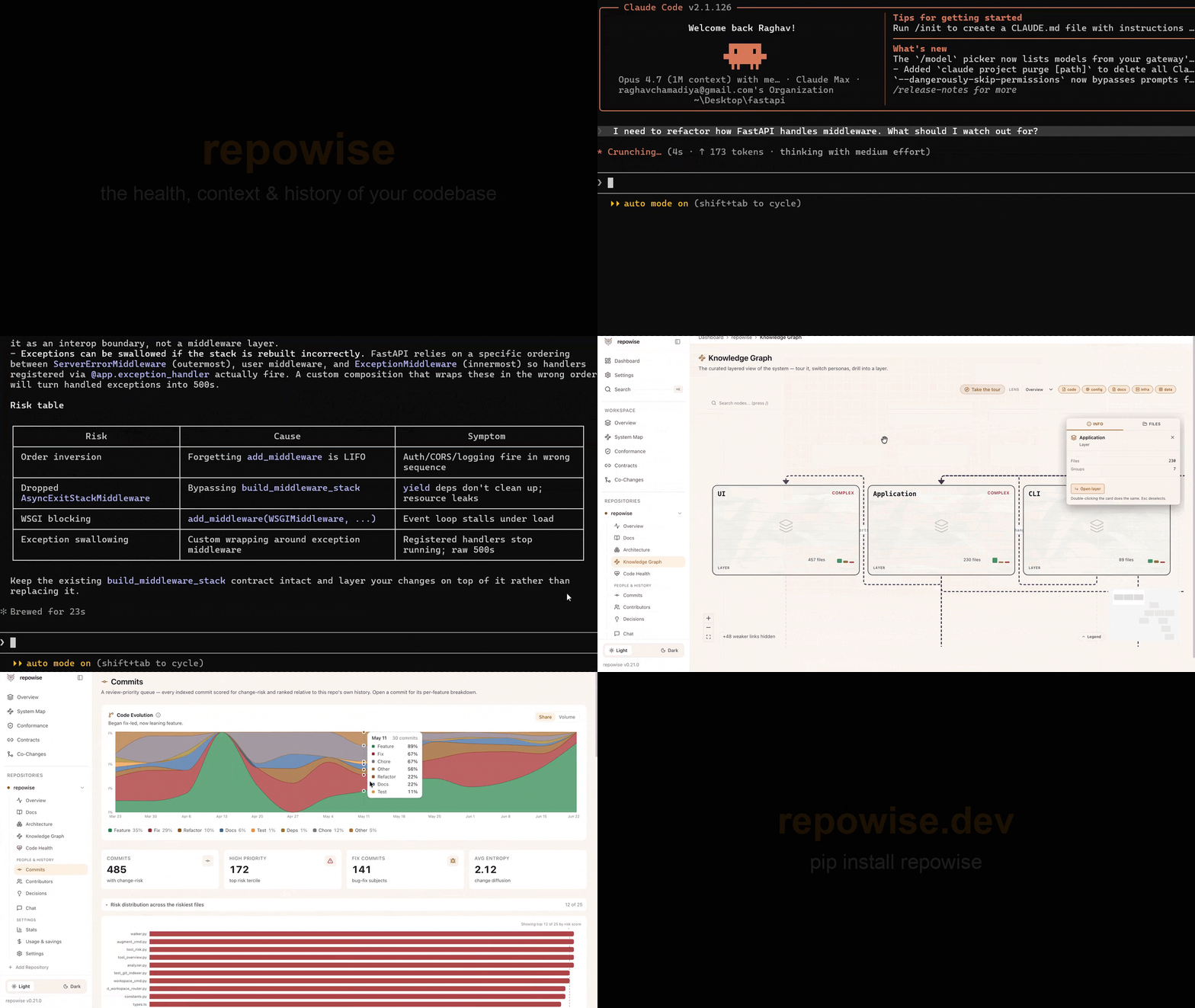
The project positions itself as “the codebase intelligence layer for your AI coding agent.” That sounds like marketing until you look at the design.
Under the hood, it combines graph, git, risk, decisions, docs etc.
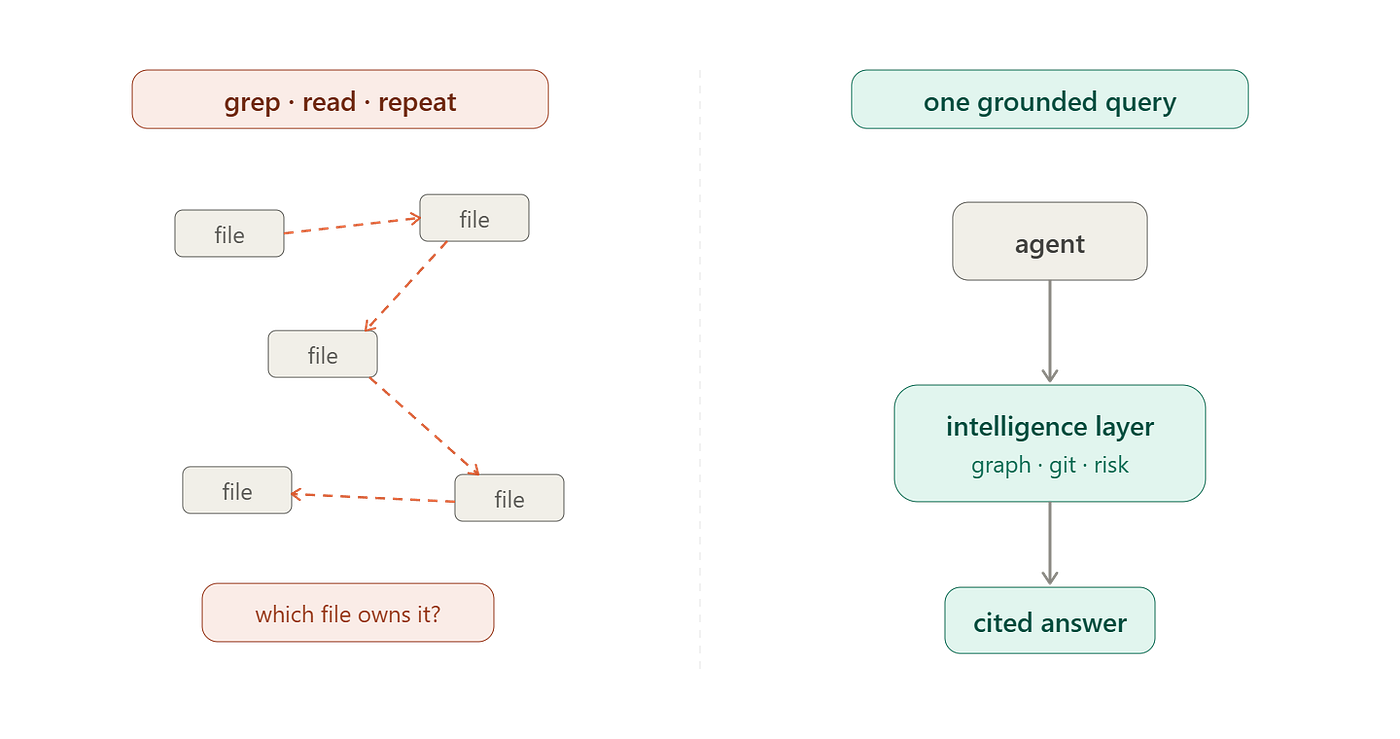
This is the layer missing from most agentic AI products.
Let’s go through Repowise from a developer’s perspective.
We’ll set it up, connect it to an AI coding agent, inspect the architecture, and use code from the repository to understand how the workflow is built.
Agents burn tokens on exploration
A coding agent loop usually looks like this:
User request
-> agent plans
-> agent searches
-> agent reads files
-> agent searches again
-> agent edits
-> agent runs tests
-> agent reads noisy output
-> agent fixes
-> agent repeats
The expensive part is exploration.
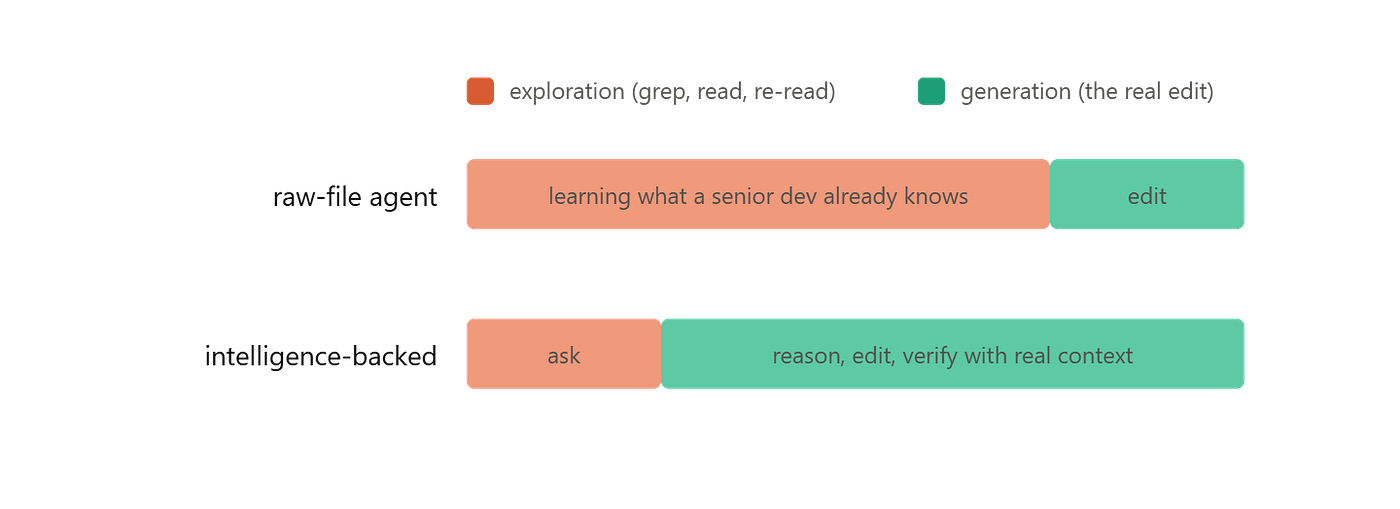
The model spends a large fraction of the session learning what a senior developer already knows:
- Which module owns the behavior.
- Which symbols call into it.
- Which files are risky.
- Which files changed together historically.
- Which architectural decision explains the current shape.
- Which tests matter.
- Which output lines are signal and which are noise.
When this context is missing, the agent compensates by reading more files.
That creates three problems.
- First, cost goes up. Each raw file read loads irrelevant code into the conversation.
- Second, latency goes up. Tool calls become a long chain of guess, read, guess, read.
- Third, accuracy goes down. The model’s answer depends on whatever slice of the repo happened to land in context.
You can increase the context window, but that does not solve the problem because a larger window lets the agent carry more junk and it does not tell the agent what matters.
Repowise takes the opposite approach: index the repository once, then expose task-shaped queries.
Instead of “read these ten files and infer the risk,” the agent asks:
get_risk(target="src/auth/session.ts")Instead of “grep auth and summarize whatever you find,” the agent asks:
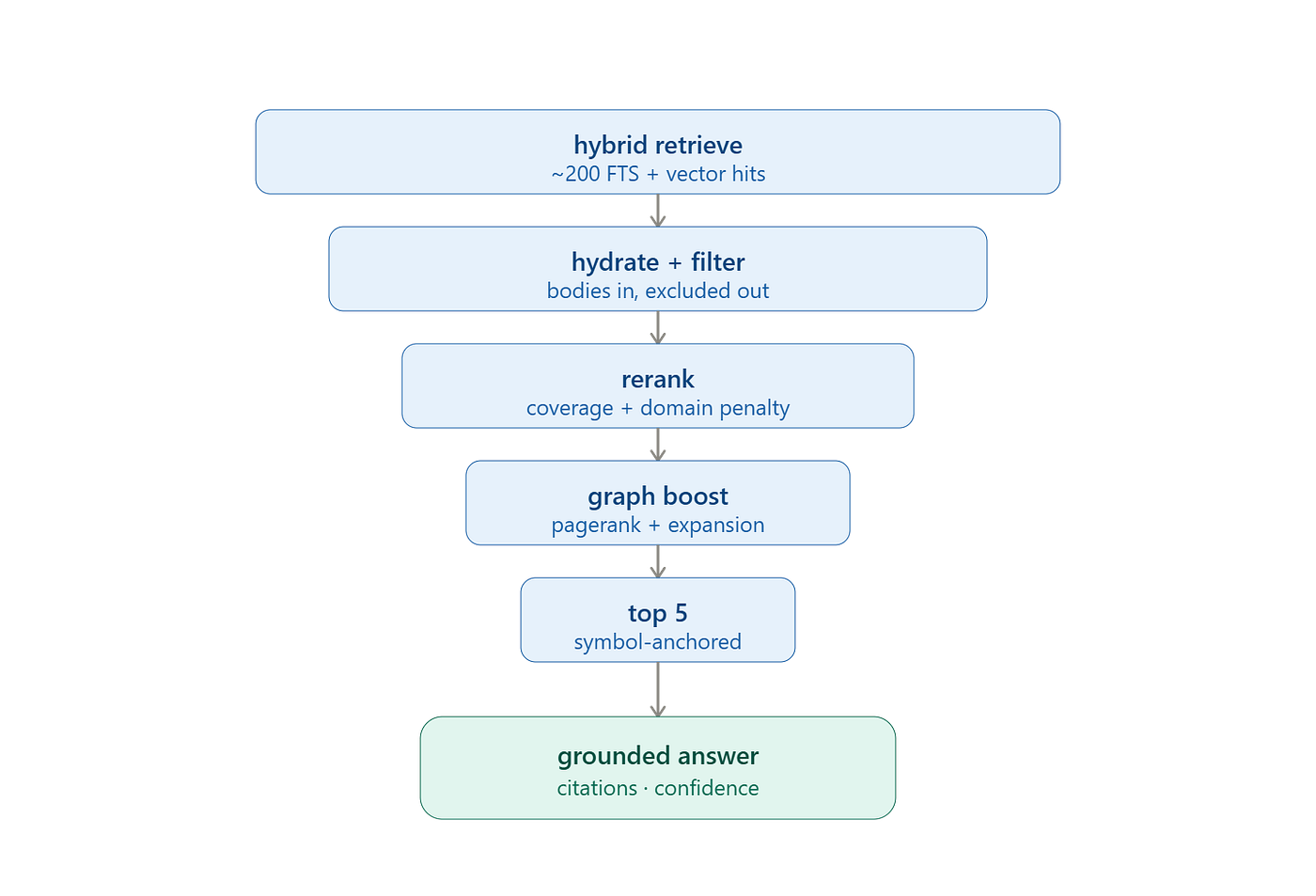
get_answer(question="How does authentication work end-to-end?")**get_answer is search engineering, **the retrieval pipeline funnels ~200 raw candidates down to the 5 that matter through coverage reranking, PageRank bias, graph expansion, and symbol anchoring before a single token of synthesis.
And finally, instead of “read this module before editing,” the agent asks:
get_context(targets=["src/auth"], include=["symbols", "callers", "decisions", "risk"])This abstraction treats codebase context as infrastructure.
Editor’s note: To celebrate reaching 10,000 community members on Medium, who relentlessly design, ship, and iterate on agents every day, we’re also making the full repository available for free, which is part of our Agent Foundry program.
Why MCP matters in this context?
Repowise can run locally and expose tools over MCP.
Claude Code, Codex, Cursor, Cline, and similar clients can then call the same local server.
This is better than building a one-off plugin for every IDE.
It has a curated MCP surface: single-repo mode exposes a default tool set, workspace mode adds cross-repo tools, and extra graph tools can be opted in.
A common MCP mistake is exposing a huge bag of generic tools and letting the model figure it out, which pushes the hard part back into the model.
Repowise’s tools are shaped around developer tasks:
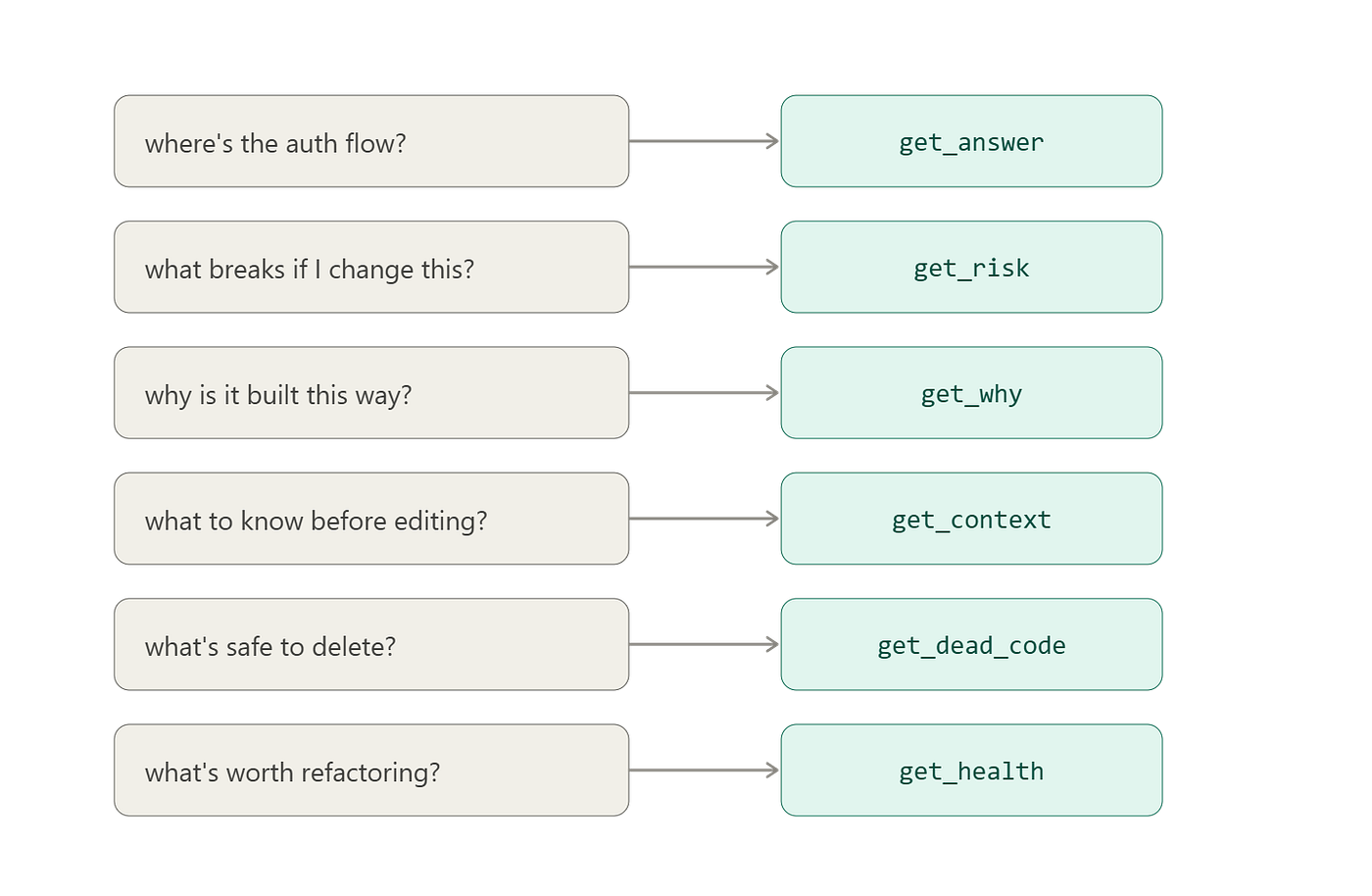
Workspace mode adds cross-repo tools such as get_blast_radius, get_conformance, and get_architecture.
This is the right direction as agents need fewer tools that return complete, grounded answers.
What Repowise is actually doing
At a high level, Repowise turns a repository into a queryable intelligence bundle.
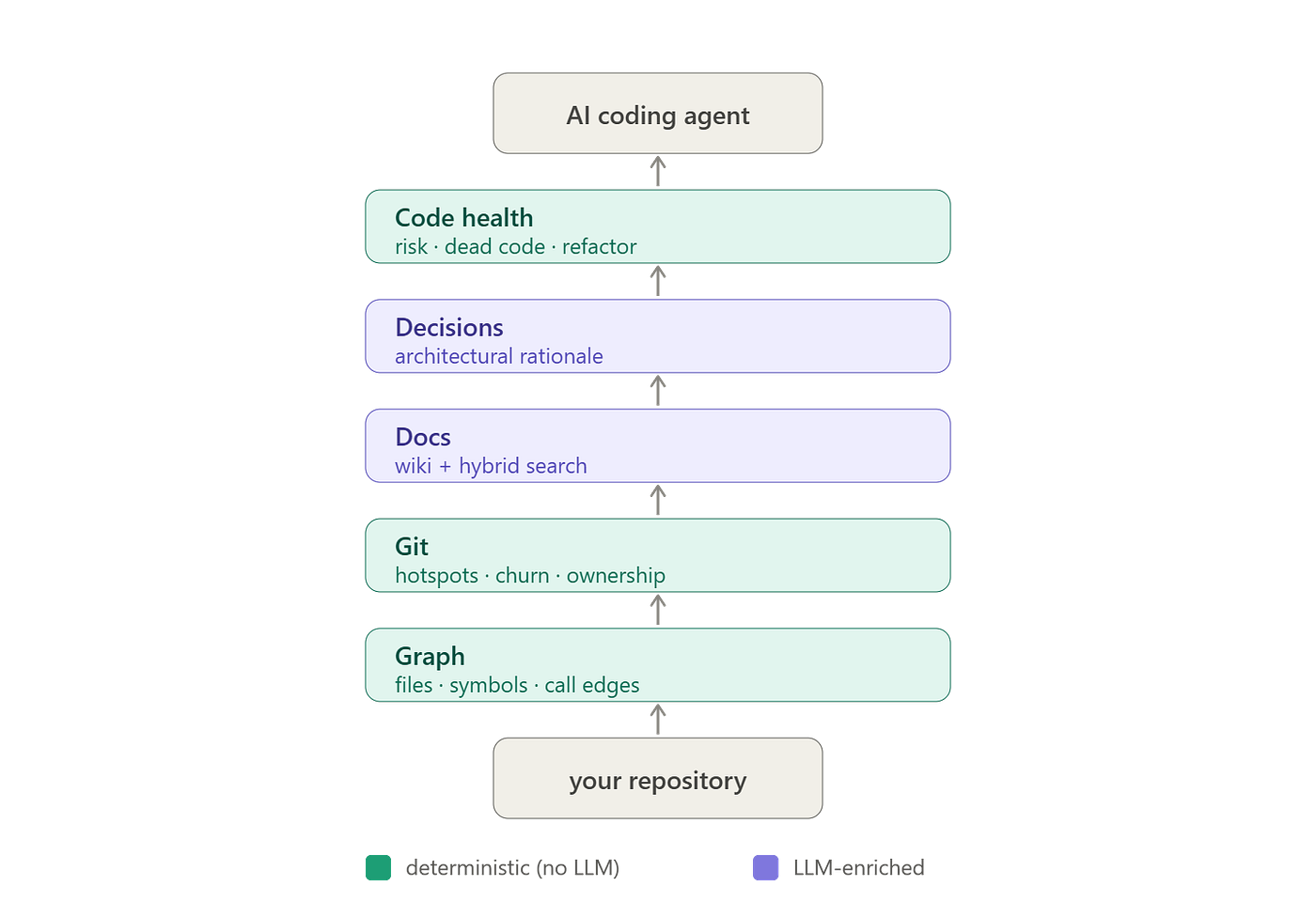
The quickstart is intentionally simple:
pip install repowise
cd your-project
repowise init
repowise serve
For a multi-repo workspace:
cd my-workspace
repowise init .
repowise serve
The init step builds the index and serve step gives you the local dashboard and server surface.
After initialization, the repository gets a .repowise directory with persisted state:
your-repo/
├── .repowise/
│ ├── wiki.db # SQLite database with pages, symbols, graph, git data
│ ├── state.json # sync metadata
│ ├── config.yaml # provider, model, excludes, saved config
│ ├── .env # local API keys, gitignored
│ └── lancedb/ # vector store for semantic search
├── .claude/CLAUDE.md # generated Claude Code context
├── AGENTS.md # generated Codex/agent context when enabled
└── .codex/ # optional Codex config and hooks
The important point is that Repowise can run in two modes:

For most teams, the best first run is index-only.
repowise init --index-onlyThis gets you the deterministic layers quickly without paying for documentation generation.
Then, when you want richer Q&A and generated wiki pages, run full mode with your preferred provider.
export ANTHROPIC_API_KEY="sk-ant-..."
repowise init --provider anthropic --model claude-sonnet-4-6 --yes
Or with OpenAI:
export OPENAI_API_KEY="sk-..."
repowise init --provider openai --model <openai-model> --yes
Or local/offline with Ollama:
repowise init --provider ollama --model <local-model> --embedder ollamaThe exact model names will change over time, but the pattern is stable: Repowise separates repository indexing from model-backed generation.
Installation and quick start
Prerequisites are minimal:
python --version # Python 3.11+
git --version
Install:
pip install repowiseOr isolate it as a tool:
uv tool install repowiseVerify:
repowise --version
repowise --help
Now initialize a repo.
For a first pass, use index-only:
cd /path/to/your-repo
repowise init --index-only
This builds the graph, git intelligence, health scores, and dead-code layer with no LLM calls.
Then inspect the repo:
repowise status
repowise health
repowise dead-code
repowise risk  main..HEAD
repowise search  "authentication"
Start the local dashboard:
repowise serveStart the MCP server directly:
repowise mcpFor HTTP clients:
repowise mcp --transport streamable-http --port 7338For legacy SSE clients:
repowise mcp --transport sse --port 7338For full documentation generation:
export ANTHROPIC_API_KEY="sk-ant-..."
repowise init --provider anthropic --model claude-sonnet-4-6 --coverage 0.20 --yes
A few flags matter in real projects:
# Skip tests and infra files during indexing/generation
repowise init --skip-tests --skip-infra

# Exclude generated/vendor paths
repowise init -x vendor/ -x "src/generated/**"

# Preview generation plan without calling the LLM
repowise init --dry-run

# Quick validation: generate docs for top files only
repowise init --test-run

# Resume an interrupted run
repowise init --resume

# Fast mode for large repos: graph + essential git, no LLM docs
repowise init --mode fast

# Force a full regeneration
repowise init --force
This is the workflow I would use on a production repo:
# 1. Build deterministic index first
repowise init --index-only --skip-infra -x "generated/**"

# 2. Look at the shape of risk before spending LLM money
repowise health
repowise risk main..HEAD
repowise dead-code

# 3. Run a dry plan for docs
repowise init --provider anthropic --model claude-sonnet-4-6 --dry-run

# 4. Generate docs only after exclusions and coverage look sane
repowise init --provider anthropic --model claude-sonnet-4-6 --coverage 0.20 --yes
Run the deterministic index first, use --dry-run , exclude generated files, then enable documentation.
Distill: stop feeding agents noisy terminal output
Agents do not only waste context on files, they also waste context on shell output.
Test runs are the obvious example, e.g., a failing test command often prints hundreds of irrelevant lines and a few important failures.
The model reads all of it.
Repowise’s distill command wraps shell commands and compresses output before the agent sees it.
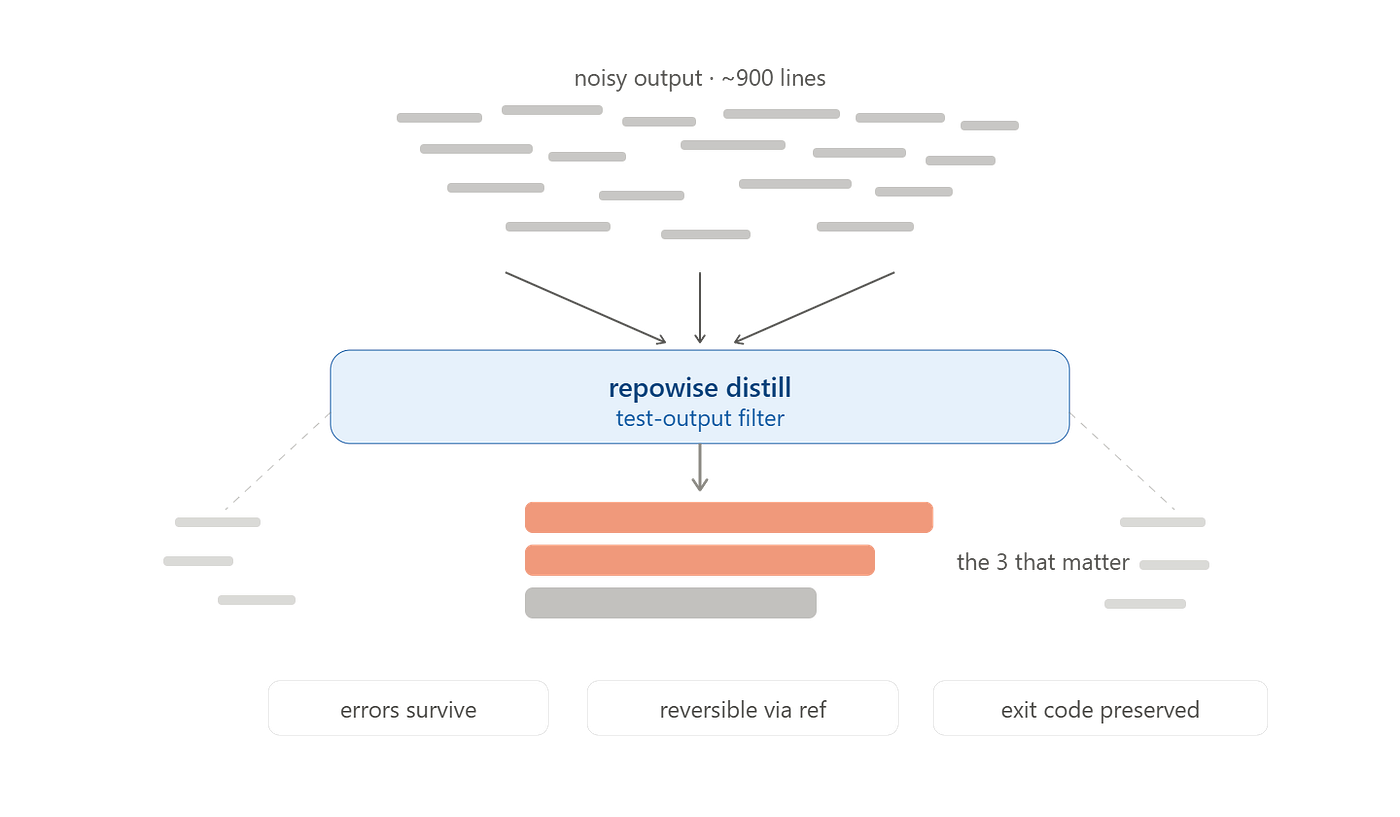
repowise distill pytest -x
repowise expand a1b2c3d4e5f6
repowise saved
The guarantees are the part worth noticing:
- Error lines survive.
- Output is reversible through a reference.
- If distillation fails, raw output is printed.
- Small outputs pass through unchanged.
- Exit codes are preserved.
That makes it safe to use in scripts and agent tool calls.
The filters cover common noisy surfaces:
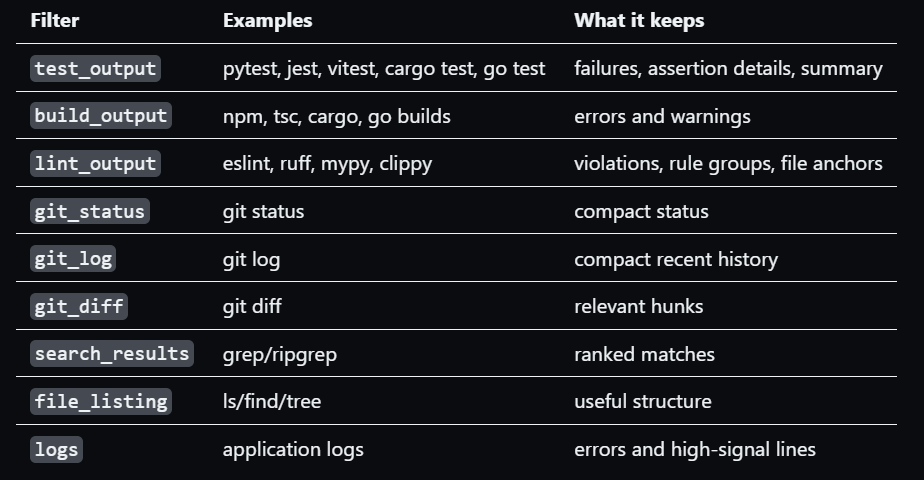
Workspace mode: agentic AI gets harder across repositories
Multi-repo intelligence is where the pattern becomes platform-level.
You may have:
my-workspace/
├── backend/
├── frontend/
├── shared-libs/
├── worker/
└── infra/
Repowise can scan a parent directory, detect repositories, index each one, and build a workspace layer.
cd my-workspace
repowise init .
repowise serve
repowise workspace list
repowise workspace diagnostics
repowise workspace metrics
The workspace layer adds cross-repo capabilities:
- Cross-repo co-change.
- API contract extraction.
- Package dependency mapping.
- Workspace dashboard.
- One MCP server serving all repo aliases.
- Cross-repo blast radius.
- Architecture conformance.
- System coupling score.
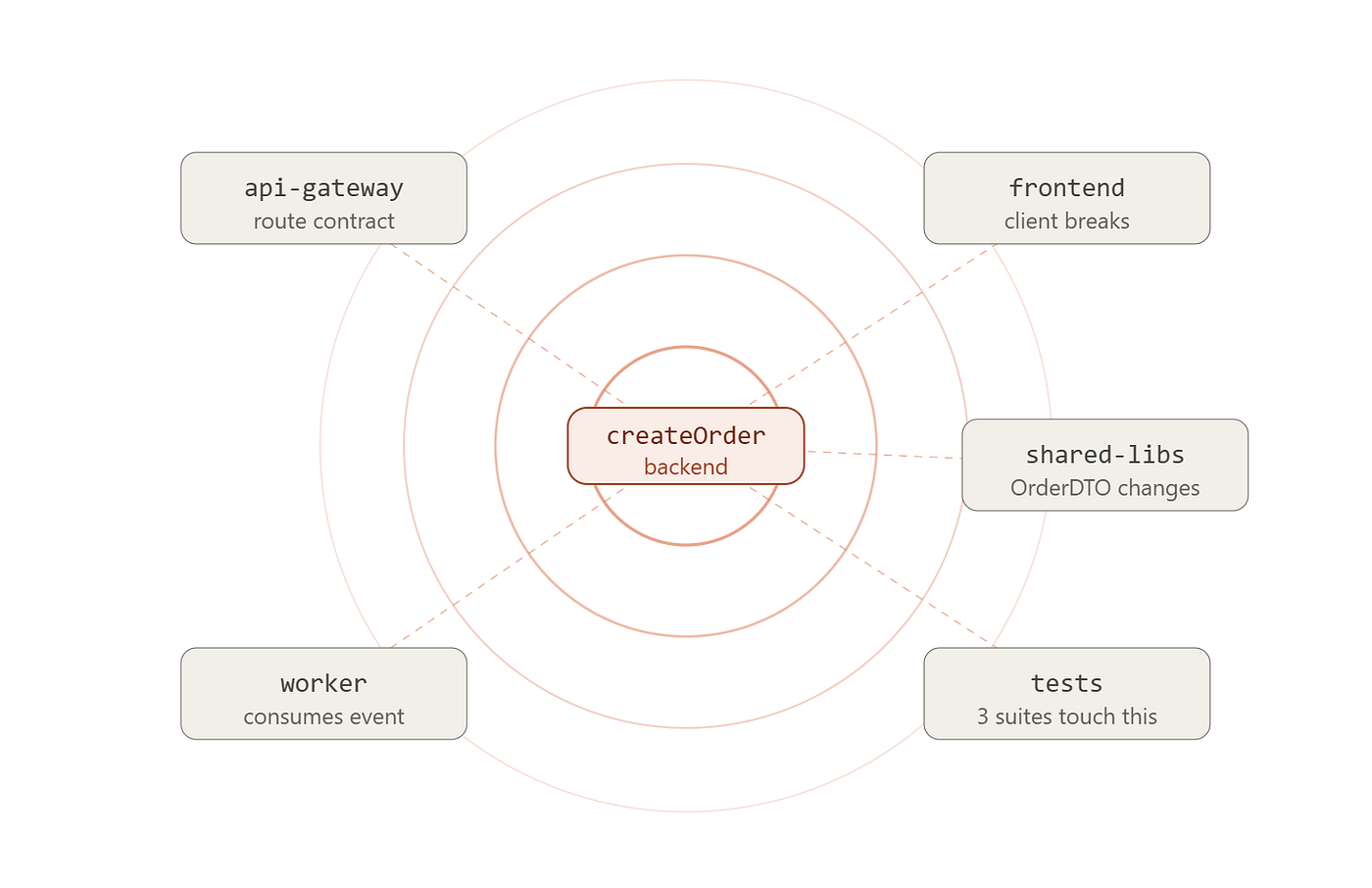
The agent can then ask questions like:
get_blast_radius(target="backend:api.orders.createOrder")Or:
get_conformance(rule="frontend must not import backend internals")Or:
get_architecture(repo="all")Workspace graph makes the coupling visible.
Code intelligence is only as good as language support
Repowise supports many languages through tree-sitter grammars and additional parsers, but language depth varies.
A Python/TypeScript/Go/Rust/Java service will likely get richer results than a framework-heavy dynamic system with reflection and generated runtime registration.
That is not a Repowise-specific problem but a static analysis reality.
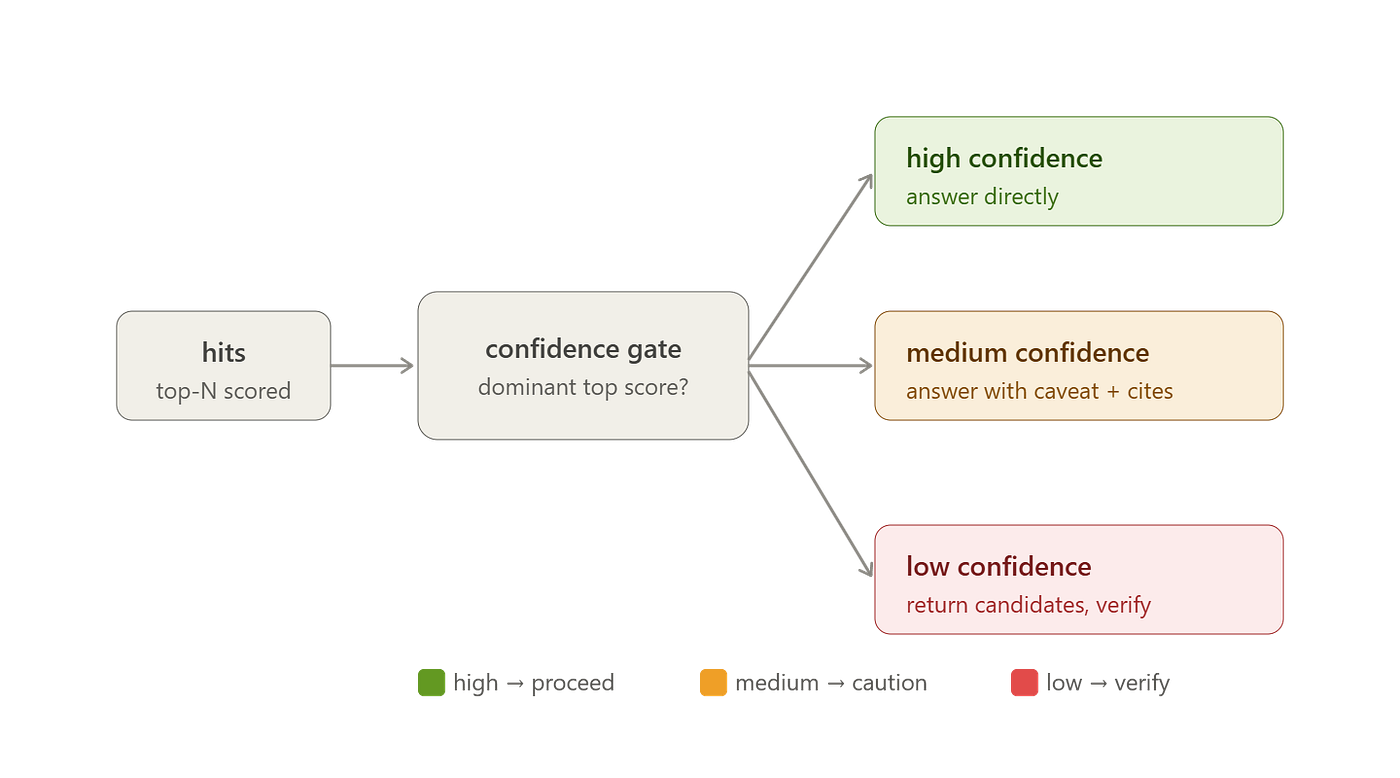
So use confidence levels and do not delete medium-confidence dead code blindly.
Where this fits in the agentic AI stack
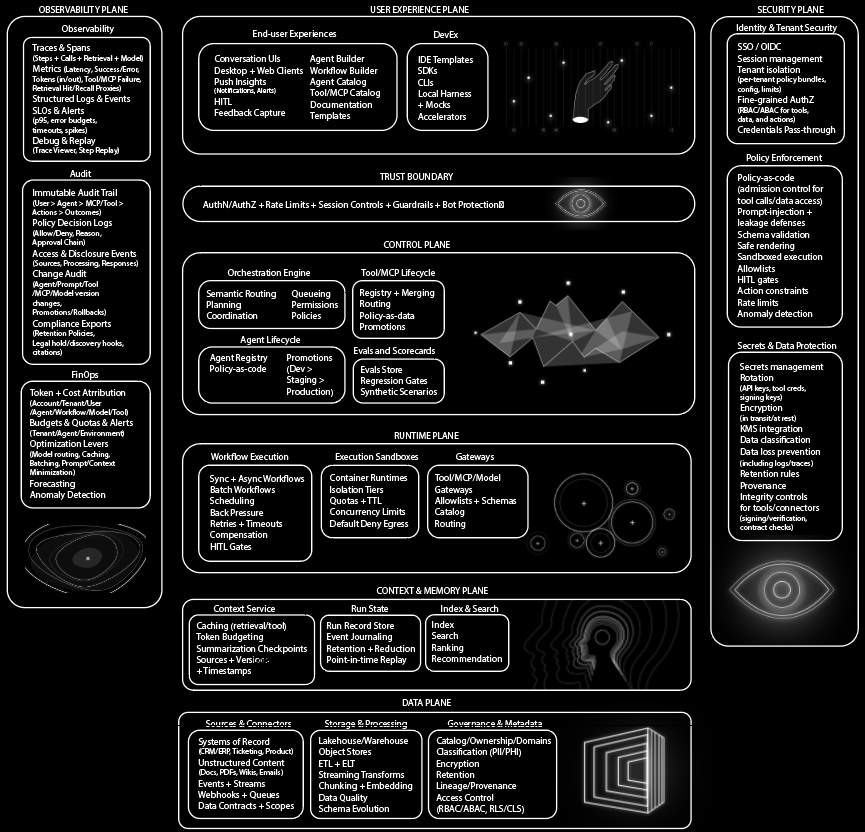
I would place Repowise in the context infrastructure layer.
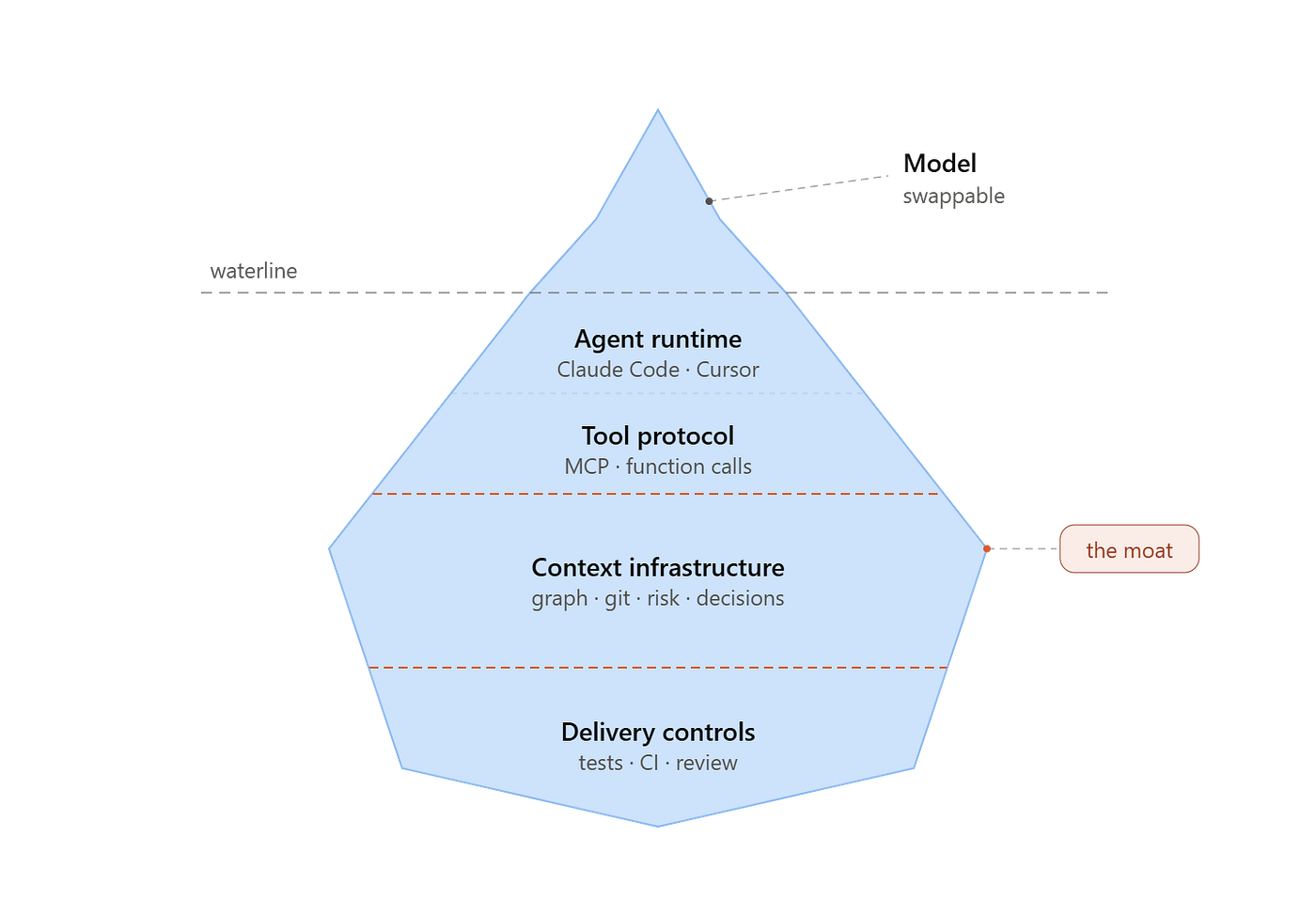
Your repository graph, ownership history, hotspots, architectural constraints, and tests are your moat.
Agent quality depends on how well those signals reach the model, and Repowise is interesting since it makes that layer explicit.
Bonus Articles
메타데이터
- post_id
- 5c5e4807a9ba
- slug
- im-done-watching-agents-pretend-to-understand-repos-here-s-the-fix-5c5e4807a9ba
- url
- https://medium.com/@agentnativedev/im-done-watching-agents-pretend-to-understand-repos-here-s-the-fix-5c5e4807a9ba
- canonical_url
- https://medium.com/@agentnativedev/im-done-watching-agents-pretend-to-understand-repos-here-s-the-fix-5c5e4807a9ba
- author_url
- https://medium.com/@agentnativedev
- status
- ok
- fetched_at
- 2026-08-01 00:47:05