MDX: the visual editor for people who write in Markdown
There is a format that, over the years, has become almost invisible because it has become part of the daily workflow of developers…
MDX: the visual editor for people who write in Markdown

There is a format that, over the years, has become almost invisible because it has become part of the daily workflow of developers, technical bloggers, and documentation writers: Markdown.

Markdown was created in 2004 by John Gruber, with an important contribution from Aaron Swartz in designing the syntax, testing, and refining the idea. The name itself is a play on the word “markup”: while HTML and other markup languages make tags and formatting instructions visible, Markdown tries to do the opposite, that is, “lower” the markup until it becomes almost invisible.
The goal was to allow people to write formatted documents that would still remain readable as plain text. A Markdown file should not look like a document full of code or tags, but like normal text, understandable without special tools.
Markdown does not completely replace HTML. Rather, it simplifies it for the most common uses. In fact, a Markdown file is very often processed and converted directly into HTML. This makes it especially useful for people writing content for the web who do not want to manually manage every HTML tag.
Its explosive adoption comes from a very practical need: writing structured content without interrupting the workflow. This is why Markdown has effectively become a standard in many technical environments: from README.md files on GitHub to API documentation, from static site generators to corporate knowledge bases, all the way to AI workflows based on LLM language models, where it is often used to organize responses, prompts, documents, and structured content in a clear and readable way.
Among all examples, the **README.md** file is probably one of the best known. When opening a GitHub repository, the README content is automatically interpreted and displayed as a formatted page. It is written as plain text, but the result is rendered as an organized page with headings, links, lists, code, and images.
Markdown combines simplicity, readability, and compatibility. An .md file can be written with any text editor, versioned with Git, converted into HTML, and easily published online. For this reason, it is still one of the essential tools for anyone writing code, documentation, or technical content.
When Markdown becomes less convenient
Markdown is simple, but not everything in Markdown is convenient to write manually.
For basic formatting, the syntax is straightforward. A heading is written with **#**, bold text with ****text****, inline code with backticks, and lists with dashes or numbers.
The problem appears when the document becomes more complex. Some structures, while supported by Markdown or its variants, are less practical to manage manually. Tables, images, mathematical formulas, long code blocks, and diagrams require more attention to symbols, delimiters, and formatting conventions, making the writing process less fluid.
At that point, many users end up choosing between two options: using a plain text editor with a separate preview, or returning to a traditional word processor, while losing the advantages of plain text files.
And this is where **MDX** comes in.
MDX: the Markdown WYSIWYG editor
**MDX presents itself as a Markdown WYSIWYG editor, meaning an application that lets you write while looking at an already formatted document, without relying on proprietary formats, while still saving a normal plain text .md file to disk. In fact, the core idea is very clear: like Word, but saves as Markdown**.
MDX therefore tries to occupy a very interesting middle ground. On one side there is the convenience of a visual interface, with buttons, toolbars, tables, images, formulas, diagrams, and export functions. On the other side, the open nature of Markdown remains intact: readable, portable, versionable files that can also be opened with other editors.
In other words: if Markdown remains the format, MDX is the writing environment that makes that format more convenient to use every day.
Tables and mathematical formulas
The first case where Markdown starts requiring more attention to syntax than to content is with tables.
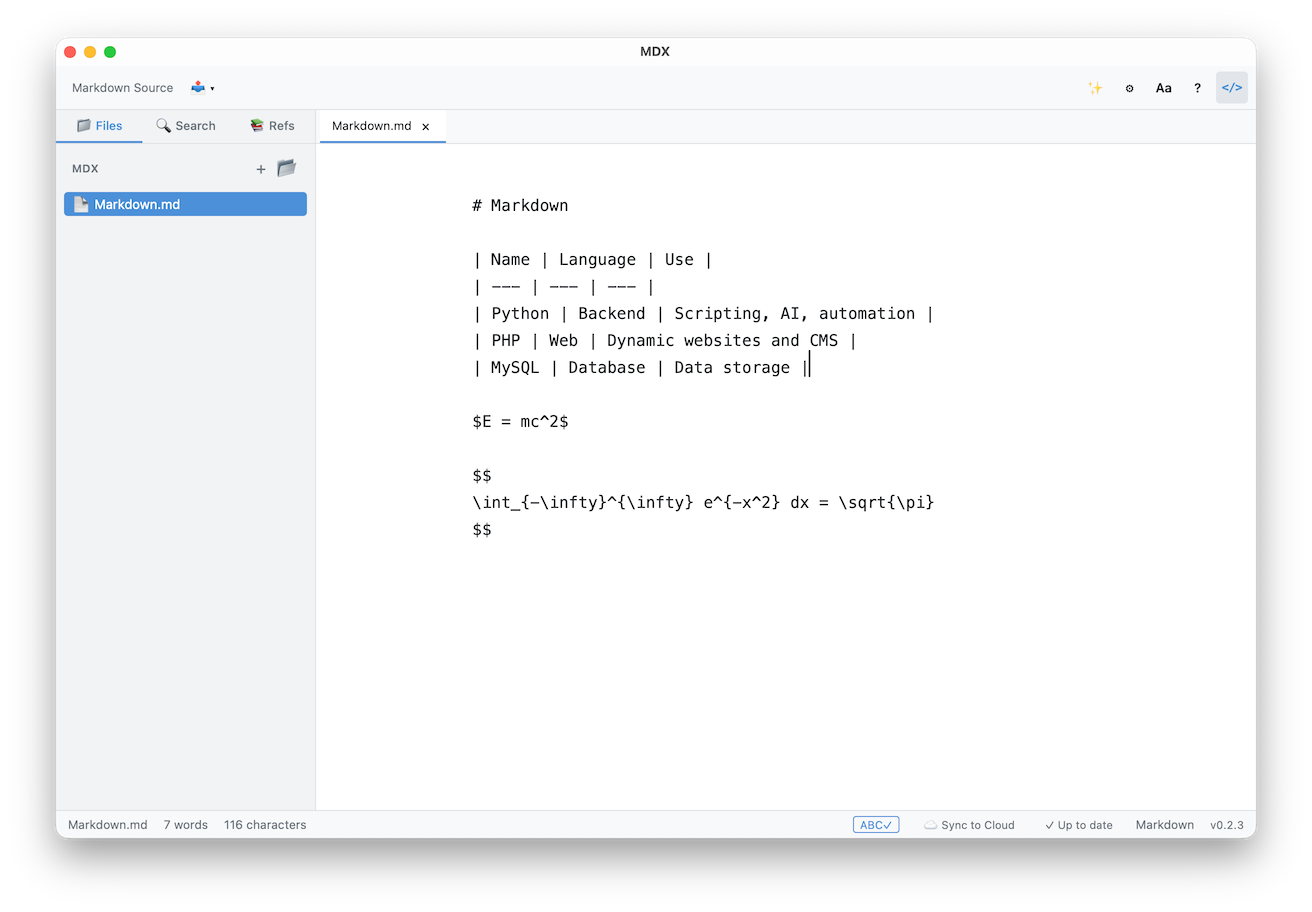
| Name | Language | Usage | | — -| — -| — -| | Python | Backend | Scripting, AI, automation | | PHP | Web | Dynamic websites and CMS | | MySQL | Database | Data storage |
In Markdown they work well, at least as long as they remain simple. But as soon as you need to add columns, align content, edit rows, or fix cells, writing becomes less fluid.
Another case where MDX becomes useful involves mathematical formulas. Markdown, in its simplest form, is perfect for technical texts, lists, links, and code blocks. However, when entering the world of mathematics, things become less immediate. Formulas are not part of the core Markdown syntax in the same way headings, lists, or bold text are.
They are usually handled through extensions, rendering engines, or LaTeX-compatible syntax. For example, Einstein’s famous equation for mass-energy equivalence can be written like this:
$E = mc²$.
If instead you need to insert a more complex formula, such as a Gaussian integral, the syntax immediately becomes less intuitive:
$$ \int_{-\infty}^{\infty} e^{-x²} dx = \sqrt{\pi} $$
For people used to LaTeX, this syntax is normal. For many technical writers, bloggers, or developers who simply want to insert a formula into an article, it can instead become an obstacle.
In recent versions, MDX also addresses this issue and includes support for both inline and block mathematical formulas, with visual insertion through an editor, without forcing the user to manually write LaTeX. This is especially useful in articles about algorithms, machine learning, statistics, physics, mathematics, data science, or advanced technical documentation.
Here is how MDX renders both the table and the two formulas inside the editor:
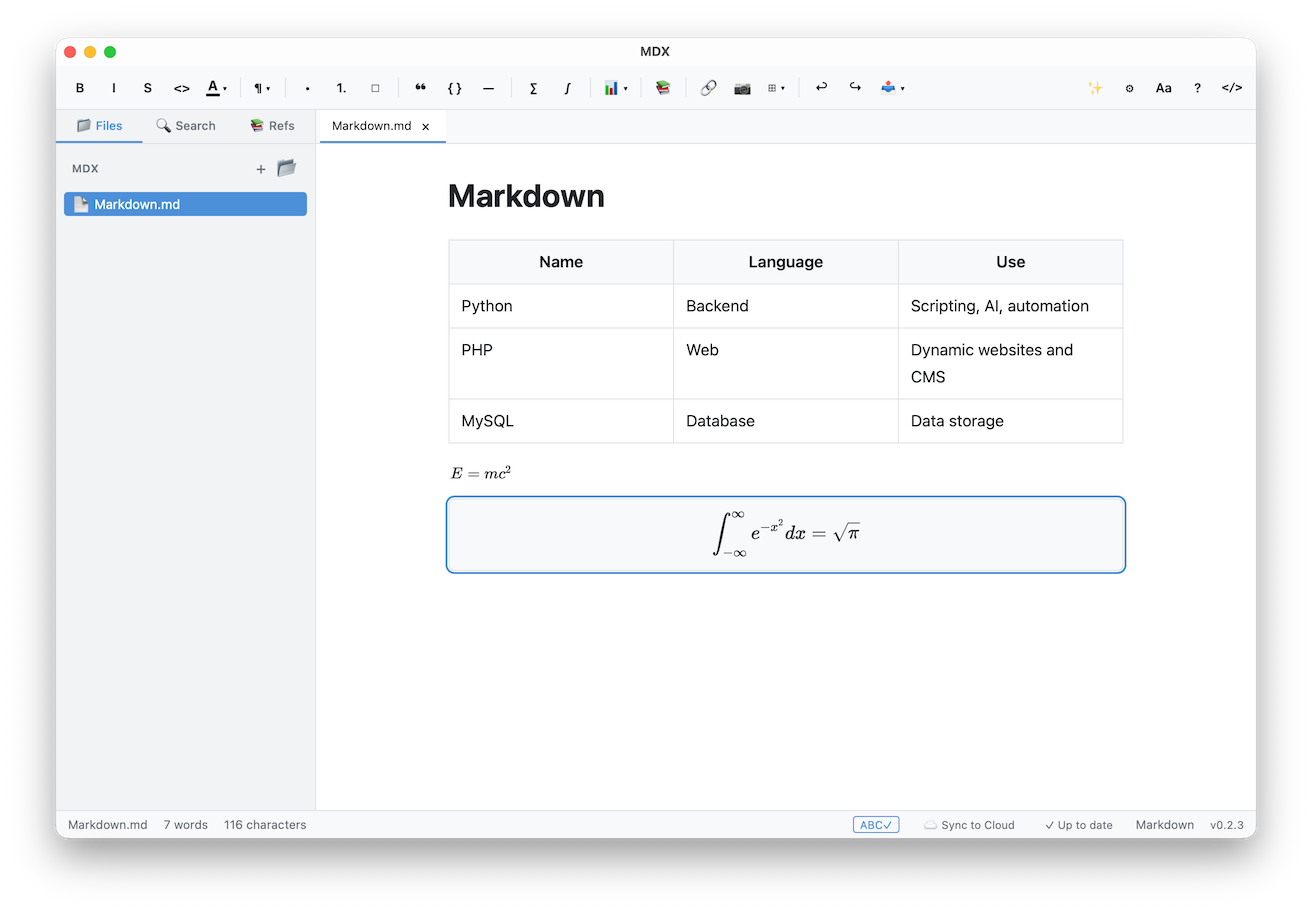
Inside the app, both the table and the formulas are already displayed as formatted content. Under the hood, however, everything still remains in a text format: normal Markdown syntax for the table and LaTeX-compatible mathematical syntax for the equations.
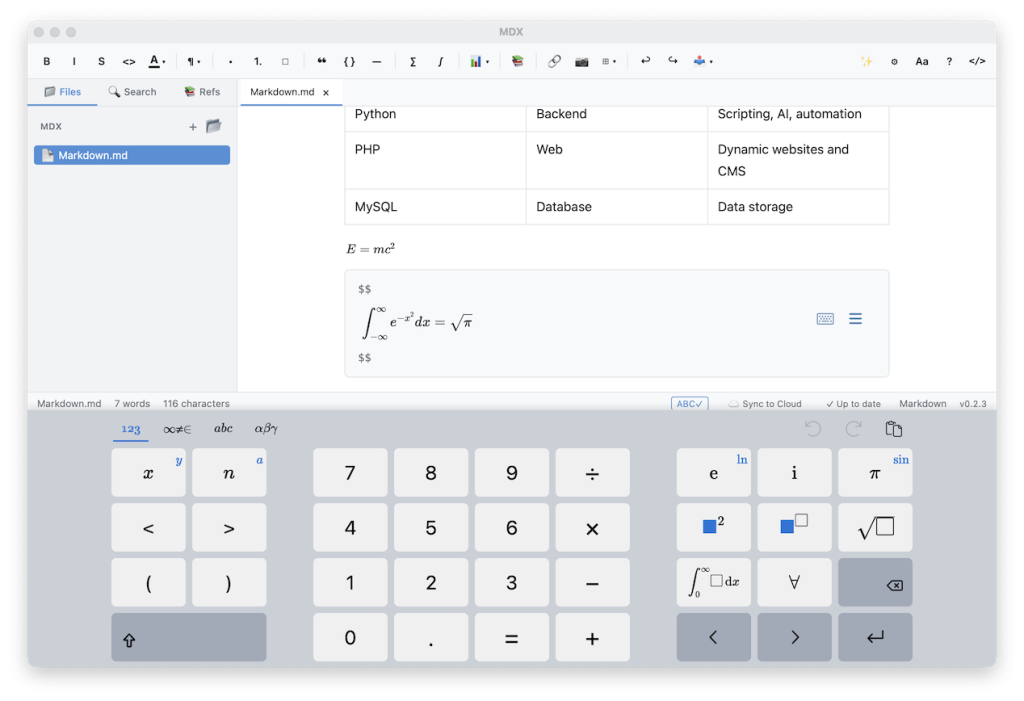
For mathematical formulas, MDX provides a mathematical input panel, effectively a virtual math keyboard, with symbols, operators, and predefined structures, making it easier to write equations even for people who do not use LaTeX every day:
In addition, there is a formula palette that collects some ready-made mathematical structures, useful for composing equations without manually writing the entire syntax. From here, users can quickly insert absolute values, n-th roots, logarithms with custom bases, derivatives, n-th derivatives, integrals, summations, products, and symbols related to complex numbers, such as modulus, argument, real part, imaginary part, and conjugate.
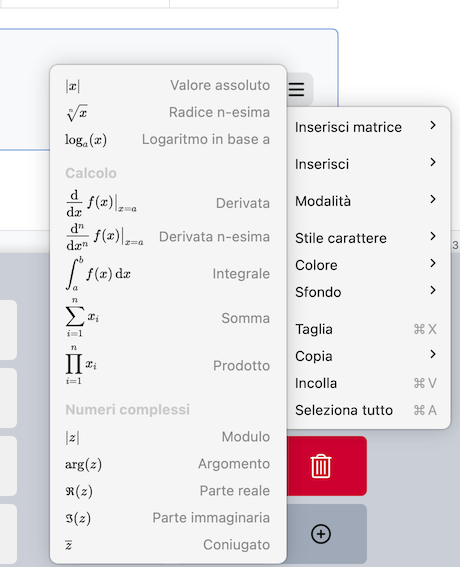
These are all functions designed to make mathematical writing more accessible: instead of remembering every LaTeX command, the user can start from a ready-made visual structure and complete it directly in the editor.
To insert a table, instead, MDX shows a small visual grid: simply move the mouse over the cells to quickly choose the desired number of rows and columns, for example 2 × 3, and the editor automatically creates the table in the document.

This is a much more convenient solution compared to manually writing Markdown syntax, especially because it avoids having to manually build pipes, dashes, and alignments. The user chooses the table size visually and can then fill in the cells directly in the editor.
The principle is the same as with tables: MDX does not change the format, it changes the way the format is written. The document remains a normal .md file, compatible with Git, GitHub, static blogs, and technical workflows, but the editor reduces friction in the most repetitive or complex operations, allowing users to work with buttons and visual tools instead of manually handling syntax every time.
Main features
First launch and vault creation
On first launch, MDX shows a very simple screen that lets you immediately choose where to create or open your workspace. The app uses the concept of a vault, meaning a folder that contains Markdown documents and any linked resources, such as images or other files.

From here, you can quickly get started with Quick Start, creating a vault in the Documents folder, choose a custom location with Custom Location, or open an existing folder and use it as a vault. This is an important detail, because it immediately confirms the app’s philosophy: MDX does not force you to save documents inside a proprietary service, but works with normal folders on your computer.
The screen also offers the option to create a vault in iCloud Drive and shows any vaults already available in cloud folders, so they can be reopened and synced across multiple devices. In practice, users can decide whether to use MDX as a purely local editor or rely on a synced folder, while still keeping direct control over their .md files.
After creating the vault, MDX presents itself with a clean and fairly familiar interface. On the left there is a sidebar with the Files section, Search, and Refs. In the center is the writing area, while at the top there is the toolbar with the main tools for formatting text, inserting elements, and working on the document.

If the vault is empty, the app shows a message inviting you to open a file from the sidebar or create a new one with the + button. At the bottom of the interface, some useful information is visible, such as the word and character count, sync status, Markdown format, and app version.
Overall, the first impression is that of an editor designed not to put too many obstacles in front of the user: you choose a folder, create a file, and start writing. The logic remains that of plain text, but the environment feels much closer to a traditional visual editor.
Visual writing
MDX allows users to write in a WYSIWYG interface, meaning they can see the document already formatted. This makes the experience closer to a traditional word processor, but without turning the document into a closed format. The saved file remains Markdown and can also be opened with other editors.
MDX includes a toolbar for formatting text without constantly remembering syntax. Users can manage headings, bold, italics, strikethrough, lists, quotes, code blocks, tables, mathematical formulas, diagrams, images, or screenshots.

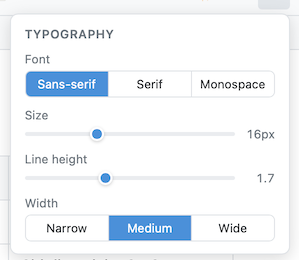
The application also includes a dedicated typography panel, useful for adapting the writing environment to personal preferences. From here, users can choose the font type between Sans-serif, Serif, and Monospace, adjust text size, modify line spacing, and set the writing area width to narrow, medium, or wide.
Code, diagrams, and images
The editor supports code blocks, diagrams, images, and screenshots pasted directly into the text.
For diagrams, MDX provides a dedicated menu where users can start from ready-made templates such as: mind map, pie chart, sequence diagram
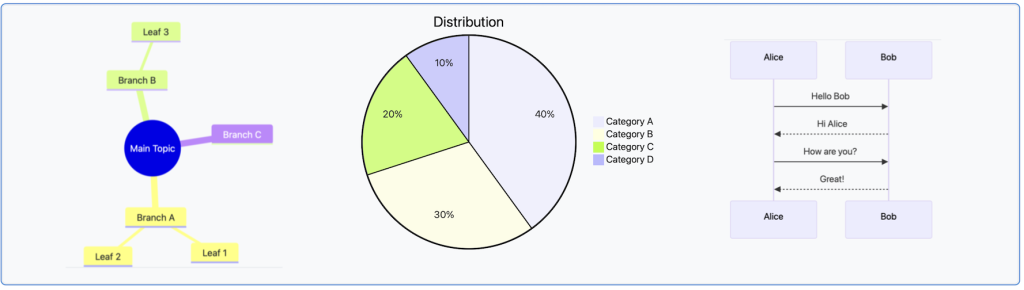
but also gantt chart, flow chart, or create an empty blank diagram to fill freely.
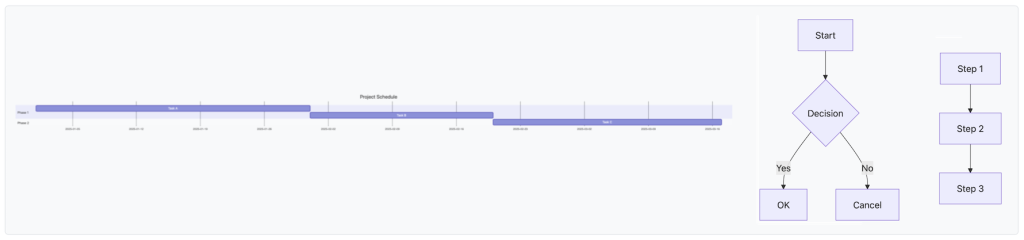
These are all operations that are also possible in a traditional Markdown workflow, but MDX tries to make them more immediate by bringing them into a visual interface instead of forcing the user to write or remember the correct syntax every time.
Finally, image insertion also becomes more immediate. Instead of manually writing Markdown syntax which, at first glance, may look somewhat cryptic:

users can use the toolbar button, drag an image into the document, or paste it directly into the editor.

Export
On the export side, MDX declares support for PDF, HTML, and DOCX.
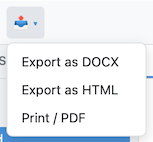
This is an important feature for people who want to write in Markdown but then need to deliver the result to people expecting a Word document or a PDF. In this way, the source file remains .md, while the output can be adapted to the recipient.
Local-first: documents remain owned by the user
One of the most interesting choices in MDX is not just the WYSIWYG interface. It is the fact that the app is presented as local-first.
Documents remain on the user’s computer, or inside folders synchronized with already used services such as iCloud Drive, Google Drive, Dropbox, OneDrive, or a simple local folder. According to the website, there is no MDX server in the middle, and synchronization happens through the provider chosen by the user.

In recent years, many productivity tools have chosen the opposite approach: beautiful interfaces, but data locked inside remote services. MDX instead tries to combine two needs that are often treated as alternatives: the convenience of a visual editor and the freedom of plain text. The advantage is that documents remain on the user’s computer, inside normal Markdown files: even if MDX disappeared one day, they would still be readable, editable, and reusable with any other editor.
The AI component: bring your own key
A modern editor obviously could not miss an AI component. In MDX this feature is called Ghost-writer and allows users to receive suggestions while writing, quickly accepted using the Tab key. The technical choice is BYOK, meaning bring your own key: the user configures their own key and pays the model provider directly. The website mentions OpenAI, Anthropic, Gemini, Ollama, or local models, plus OpenAI-compatible endpoints.
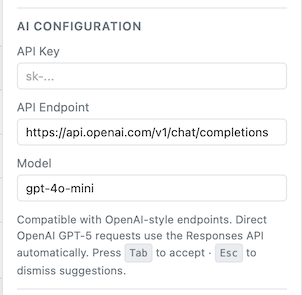
This setup is very different from many modern editors that sell AI credits inside the subscription. Here MDX does not claim to act as a proxy: the connection happens between the editor and the provider configured by the user.
The API key is stated to be saved in the system keychain and not sent to MDX.
One important note is obvious but worth remembering: if the AI feature is enabled, the text needed for generation is sent to the selected external AI provider, unless a local model is used.
Conclusions
**MDX* is a small, focused, and coherent product: a desktop Markdown editor that works on local files, does not require mandatory accounts or subscriptions, has a one-time price, integrates user-configurable AI functions, and offers direct email support*.
I feel comfortable recommending it especially for one reason: it reduces friction when writing Markdown documents. Tables, formulas, code blocks, and diagrams remain inside a normal .md file, but they can be managed through visual tools without constantly interacting with syntax.
For people who frequently write documentation, technical articles, READMEs, or operational guides, this combination can truly make a difference. Markdown remains under the surface: the document continues to be plain, readable, and versionable text, but during writing the focus returns to the content, not the syntax.
Where to find the app

**MDX can be downloaded from the official website: https://hellomdx.com. The app is available for macOS, Windows, and Linux. For macOS there are separate downloads for Apple Silicon and Intel. For Windows, there is an installer for 64-bit Windows 10 and 11, with an MSI alternative. For Linux, AppImage, .deb, and .rpm** packages are available.
The business model is simple: a 14-day free trial without a credit card, followed by a one-time payment of $15. No account or subscription is required, and updates are free and included for the same major version. Sales are handled by Paddle.
A purchased license can be activated on up to 3 devices owned or primarily used by the user.
Originally published at *Levysoft.*
메타데이터
- post_id
- 5c7eb57b5e8f
- slug
- mdx-the-visual-editor-for-people-who-write-in-markdown-5c7eb57b5e8f
- url
- https://medium.com/@levysoft/mdx-the-visual-editor-for-people-who-write-in-markdown-5c7eb57b5e8f
- canonical_url
- https://medium.com/@levysoft/mdx-the-visual-editor-for-people-who-write-in-markdown-5c7eb57b5e8f
- author_url
- https://medium.com/@levysoft
- status
- ok
- fetched_at
- 2026-06-09 15:37:30






