Mastering Sendmail Configuration in Linux
Complete Guide to Mail Server Configuration, SMTP, POP3/IMAP, Architecture, Security, and Spam Protection (Production Ready)
Mastering Sendmail Configuration in Linux
Complete Guide to Mail Server Configuration, SMTP, POP3/IMAP, Architecture, Security, and Spam Protection (Production Ready)
📌 What This Article Covers
This guide provides a complete and beginner-friendly deep dive into Sendmail, one of the most widely used Mail Transfer Agents (MTA) in Linux systems.
You will learn:
- How Sendmail works internally
- Key configuration files and their purpose
- Mail flow and queue processing
- SMTP configuration and testing
- POP3/IMAP setup using Dovecot
- Mail routing, aliases, and access control
- Spam filtering using DNSBL and SpamAssassin
- Real-world production architecture
This is a practical, production-oriented guide for Linux administrators and DevOps engineers.
🎯 Goal of This Guide
By the end of this article, you will be able to:
- Understand Sendmail architecture and workflow
- Configure Sendmail to send and receive emails
- Enable external email communication
- Implement access control and security
- Set up POP3/IMAP services
- Configure spam filtering mechanisms
- Debug and monitor mail flow
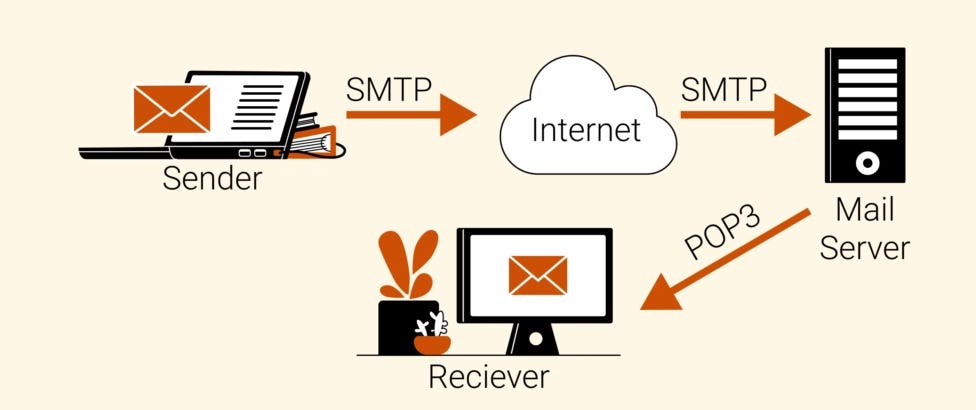
Sendmail Architecture Overview

Real-World Mail Flow
- User sends mail → Local queue (
/var/spool/clientmqueue) - Sendmail daemon accepts SMTP connections (Port 25)
- Queue runner processes pending emails
- Mail delivered to:
- Local mailbox (
/var/spool/mail/user) - Remote mail servers via SMTP
- POP3/IMAP (Dovecot) allows users to read emails
What is Sendmail?
Sendmail is a monolithic Mail Transfer Agent (MTA).
It handles:
- Receiving emails (SMTP)
- Routing emails
- Routing messages between servers
- Delivering emails locally or remotely
- Managing mail queues
It works closely with:
- Procmail → Local mail delivery
- Dovecot → POP3/IMAP access
- SpamAssassin → Spam filtering
Core Sendmail Components
📁 Important Configuration Files
| ---------------------------- | ----------------------------- |
| File                         | Purpose                       |
| ---------------------------- | ----------------------------- |
|  /etc/mail/sendmail.mc       | Main macro configuration file |
|  /etc/mail/sendmail.cf       | Compiled configuration file   |
|  /etc/mail/access            | Access control rules          |
|  /etc/mail/access.db         | Compiled DB file              |
|  /etc/mail/local-host-names  | Local domains                 |
|  /etc/mail/aliases           | Mail alias mapping            |
|  /var/spool/mail/            | User mailboxes                |
|  /var/spool/clientmqueue     | Mail queue                    |
|  /etc/mail/virtusertable     | Virtual domain mapping        |
|  /etc/mail/helpfile          | SMTP help commands            |
| ---------------------------- | ----------------------------- |
Sendmail uses m4 macro language to simplify configuration.
Mail Storage and Queues
📂 Mailbox Storage
/var/spool/mail/Each user has a mailbox:
/var/spool/mail/usernameThis uses the traditional Unix mbox format.
📂 Mail Queue
/var/spool/clientmqueue- Stores outgoing mail
- Processed by queue runner daemon
- Runs every minute
Sendmail Daemons
Sendmail runs two main processes:
- SMTP Listener
- Accepts connections on port 25
2. Queue Runner
- Processes queued emails periodically
This ensures reliable email delivery even during failures.
Sendmail Configuration (Step-by-Step)
By default, Sendmail listens only on localhost.
To allow network access:
Step 1: Enable Sendmail to Accept External Mail
vi /etc/mail/sendmail.mcFind and comment this line:
dnl DAEMON_OPTIONS(`Port=smtp,Addr=127.0.0.1, Name=MTA')dnlStep 2: Generate Configuration File
cd /etc/mail
make
or
m4 sendmail.mc > sendmail.cfStep 3: Restart Sendmail Service
service sendmail restartNow Sendmail accepts external emails.
Step 4: Verify Port 25
Test SMTP manually:
telnet localhost 25
netstat -antp | grep :25

Expected OutPut:

0.0.0.0:25
Mail Testing (SMTP) Commands:
telnet localhost 25
helo domain.com
mail from:<user@domain.com>
rcpt to:<receiver@domain.com>
data
Test mail - message content
.
quit
Mail Aliases Configuration
vi /etc/aliasesExample:
user5: user2Apply changes:
newaliasesConfigure Mail Relay (Access Control — ACL)
Control who can send mail:
vi /etc/mail/accessExample:
@domain.com RELAY
192.168.10 RELAY
@spamdomain.com REJECT
Update DB:
postmap /etc/mail/accessRestart:
service sendmail restartConfigure Local Domains
vi /etc/mail/local-host-namesAdd:
@domain.comConfigure POP3/IMAP (Dovecot)
Install Dovecot and configure:
yum install dovecot

vi /etc/dovecot.conf    # Edit

protocols = pop3 imap   # Enable protocols:

service dovecot restart # Start service:

chkconfig dovecot on    #enable service
Test POP3
telnet localhost 110
user username
pass password
Virtual Domains Configuration
vi /etc/mail/virtusertable # Edit

@domain.com localuser      # Example:  This maps domain emails to local users.

service sendmail restart   # Restart Sendmail
Enable SSL for IMAP (IMAPS)
Generate certificate:
cd /usr/share/ssl/certs
make dovecot.pem
Provide details:
- Country: IN
- State: Maharashtra
- City: Mumbai
- Common Name: your-domain
Enable Secure Protocols
vi /etc/dovecot.conf

protocols = imap imaps pop3 pop3s
Restart:
service dovecot restartSpam Protection in Sendmail
DNS Blacklist (DNSBL)
Add in sendmail.mc:
FEATURE(`dnsbl', `bl.spamcop.net')
FEATURE(`dnsbl', `sbl.spamhaus.org')
Rebuild config:
make
service sendmail restart
SpamAssassin Setup
Install
yum install spamassassinEnable Service
chkconfig spamassassin on
service spamassassin start
Configure Procmail
cp /etc/mail/spamassassin/spamassassin-spamc.rc /etc/procmailrcEdit Config
vi /etc/mail/spamassassin/local.cfKey settings:
required_hits 5.0
rewrite_subject 1
subject_tag *****SPAM*****
use_bayes 1
auto_learn 1
Key Points:
- Spam threshold
- Subject tagging
- Bayesian filtering
- Language filtering
Validate Config
spamassassin --lintMonitoring and Debugging
Useful commands:
mail -v user
mailq
sendmail -q
tail -f /var/log/maillog
Check open ports:
netstat -antp | grep :25Test Configuration
spamassassin --lint🙌 Thank You..! 😊👏
If you found this article helpful:
👉 Click the clap button 👉 Drop a comment with your questions 👉 Follow for more DevOps, Linux & Cloud tutorials
메타데이터
- post_id
- 5cbeea7e3870
- slug
- mastering-sendmail-in-linux-5cbeea7e3870
- url
- https://blog.devops.dev/mastering-sendmail-in-linux-5cbeea7e3870
- canonical_url
- https://blog.devops.dev/mastering-sendmail-in-linux-5cbeea7e3870
- author_url
- https://medium.com/@tushar.jadhav29
- status
- ok
- fetched_at
- 2026-06-17 12:58:54