Watch Your Mac Performance at a Glance
When your Mac is working hard, you want to see what is happening.
Watch Your Mac Performance at a Glance
Watch Your Mac Performance at a Glance
When your Mac is working hard, you want to see what is happening.
A build is running. A video is exporting. A large batch job is processing. A game or 3D app is using the GPU. Memory starts filling up. The fans get louder.
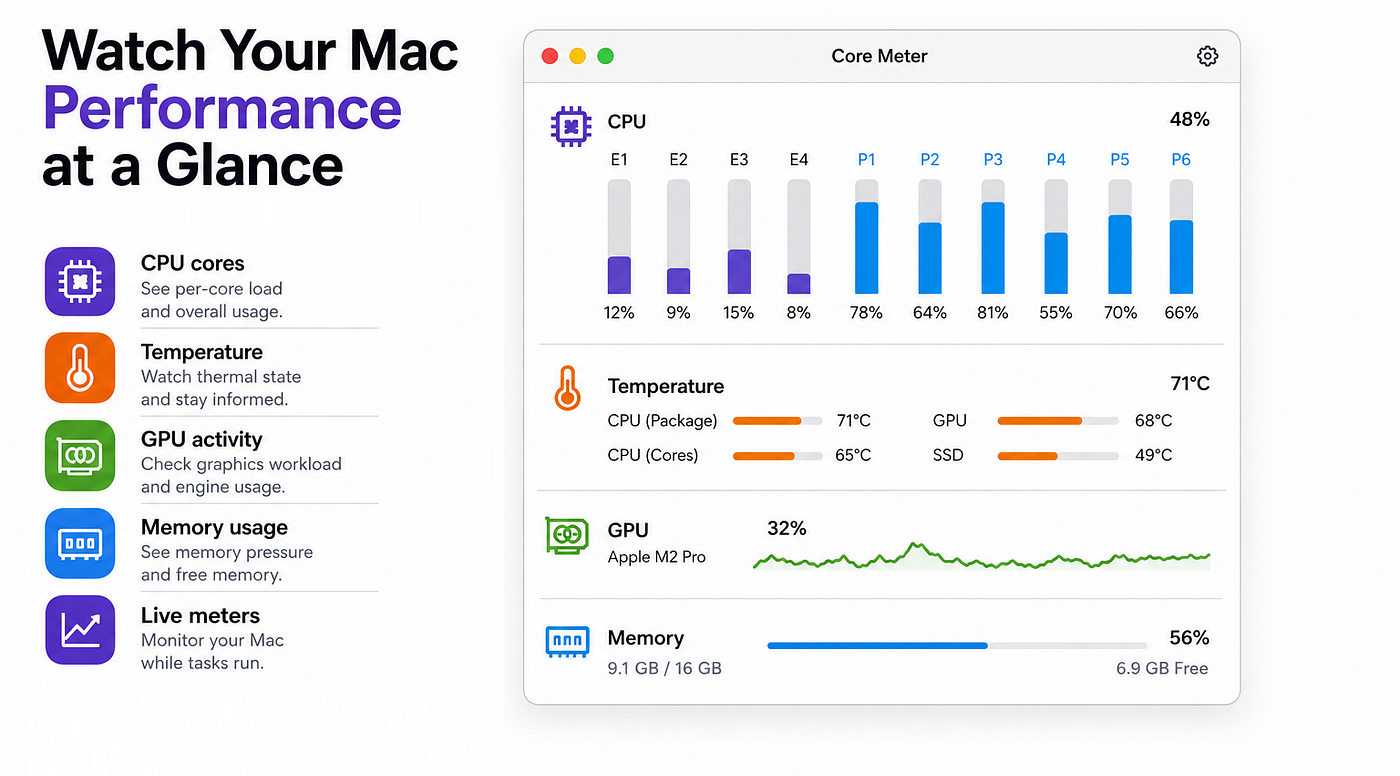
Core Meter gives you a quick view of the important performance signals on your Mac.
See CPU core usage, per-core load, temperature, GPU activity, and memory usage in one focused utility.
CPU cores, GPU, temperature, memory
Core Meter is built for people who want to understand how their Mac is behaving while work is running.
Use it when you want to:
- watch CPU core usage
- see per-core load
- monitor temperature
- check GPU activity
- keep an eye on memory usage
- understand whether your Mac is idle, busy, hot, or under pressure
Core Meter
Core Meter is part of Beaver Tools, a collection of small Mac utilities focused on solving one clear problem at a time.
More tools are available at:
Core Meter is available on the Mac App Store:
메타데이터
- post_id
- 5ceb147bbcf9
- slug
- watch-your-mac-performance-at-a-glance-5ceb147bbcf9
- url
- https://medium.com/@chris.ahrweiler/watch-your-mac-performance-at-a-glance-5ceb147bbcf9
- canonical_url
- https://medium.com/@chris.ahrweiler/watch-your-mac-performance-at-a-glance-5ceb147bbcf9
- author_url
- https://medium.com/@chris.ahrweiler
- status
- ok
- fetched_at
- 2026-07-29 23:21:03