Beyond the Modern Data Stack: Implementing CDC in Relational Databases
We hear about Change Data Capture (CDC) everywhere these days. Usually, it’s pitched alongside massive data platforms like Databricks or…
Beyond the Modern Data Stack: Implementing CDC in Relational Databases
We hear about Change Data Capture (CDC) everywhere these days. Usually, it’s pitched alongside massive data platforms like Databricks or Snowflake, or complex streaming architectures involving Kafka and Debezium.
But let’s ground ourselves in reality: the vast majority of core production systems still run on classic relational databases like PostgreSQL, MySQL, and Oracle. In these transactional engines, tracking the history of data isn’t just a compliance check — it’s a critical operational requirement.
How do we build a robust audit trail without relying on expensive, third-party data stacks?
Enter the Audit Table pattern. It’s a battle-tested, conceptually elegant way to handle CDC directly inside your database using Triggers and Dynamic SQL.
The Core Concept: How Audit Tables Work
The premise is straightforward: for every production table (e.g., users), we maintain a parallel history table prefixed with audit_ (e.g., audit_users).
The audit table mirrors the exact data columns of the source table, but appends a few critical pieces of metadata to track state changes over time:
**audit_id**: A unique, auto-incrementing primary key for the audit log itself.**audit_operation**: A single character representing the action (Ifor Insert,Ufor Update,Dfor Delete).**audit_timestamp**: The exact clock time the database executed the change.
Capturing State Correctly
To ensure your audit trail is structurally sound, the trigger logic must handle the data lifecycle properly based on what the data used to be versus what it is now:
- INSERT (
I): Capture the NEW row. The audit table records the birth of the data. - UPDATE (
U): Capture the OLD row. Because your source table will now hold the newest values, saving the old state in the audit table ensures you have a continuous chronological history of what the data looked like before the change. - DELETE (
D): Capture the OLD (deleted) row. This ensures that even if data vanishes from your production table, its last known state is preserved forever.
The Automation Engine: Eliminating Manual Overhead
The fatal flaw of the manual audit table pattern is human error. Writing triggers manually for dozens of tables is tedious, error-prone, and guaranteed to break the moment a developer runs a migration to add a column.
We can solve this completely by writing an automated Database Procedure. This script loops through your database schema, automatically handles three critical jobs:
- Creates missing audit tables.
- Synchronizes schema drift (automatically adds missing columns to audit tables if the source table changes).
- Generates and binds the required triggers dynamically.
Production-Ready Implementation (PostgreSQL PL/pgSQL)
This comprehensive procedure automates the entire infrastructure. Unlike naive implementations, it explicitly maps columns by name to prevent ordering mismatches, and dynamically synchronization missing columns.
CREATE OR REPLACE FUNCTION sync_and_generate_audit_infrastructure()
RETURNS VOID AS $$
DECLARE
    target_table RECORD;
    audit_table_name TEXT;
    source_cols TEXT;
    audit_cols TEXT;
    missing_col RECORD;
    col_names_list TEXT;
    trigger_func_sql TEXT;
BEGIN
    -- Loop through all base tables in the public schema that are NOT audit tables
    FOR target_table IN
        SELECT table_name
        FROM information_schema.tables
        WHERE table_schema = 'public'
          AND table_type = 'BASE TABLE'
          AND table_name NOT LIKE 'audit_%'
    LOOP
        audit_table_name := 'audit_' || target_table.table_name;

        -- 1. Create the Audit Table if it doesn't exist
        EXECUTE format('
            CREATE TABLE IF NOT EXISTS %I (
                audit_id BIGSERIAL PRIMARY KEY,
                audit_operation CHAR(1) NOT NULL,
                audit_timestamp TIMESTAMP DEFAULT CURRENT_TIMESTAMP
            );', audit_table_name);

        -- 2. SCHEMA SYNC: Find columns in source that are missing in the audit table
        FOR missing_col IN
            SELECT column_name, data_type, character_maximum_length
            FROM information_schema.columns
            WHERE table_schema = 'public'
              AND table_name = target_table.table_name
              AND column_name NOT IN (
                  SELECT column_name
                  FROM information_schema.columns
                  WHERE table_schema = 'public'
                    AND table_name = audit_table_name
              )
        LOOP
            -- Dynamically add the missing column to the audit table
            IF missing_col.character_maximum_length IS NOT NULL THEN
                EXECUTE format('ALTER TABLE %I ADD COLUMN %I %s(%s);',
                    audit_table_name, missing_col.column_name, missing_col.data_type, missing_col.character_maximum_length);
            ELSE
                EXECUTE format('ALTER TABLE %I ADD COLUMN %I %s;',
                    audit_table_name, missing_col.column_name, missing_col.data_type);
            END IF;
        END LOOP;

        -- 3. Build a comma-separated list of columns present in BOTH tables
        -- This avoids 'SELECT *' column-ordering errors during updates/migrations
        SELECT string_agg(quote_ident(column_name), ', ')
        INTO col_names_list
        FROM information_schema.columns
        WHERE table_schema = 'public'
          AND table_name = target_table.table_name
          AND column_name IN (
              SELECT column_name
              FROM information_schema.columns
              WHERE table_schema = 'public'
                AND table_name = audit_table_name
          );

        -- 4. Build the dynamic Trigger Function
        trigger_func_sql := format('
            CREATE OR REPLACE FUNCTION process_%I_audit()
            RETURNS TRIGGER AS $_$
            BEGIN
                IF (TG_OP = ''DELETE'') THEN
                    INSERT INTO %I (audit_operation, audit_timestamp, %s)
                    SELECT ''D'', NOW(), (OLD).*:%I;
                    RETURN OLD;
                ELSIF (TG_OP = ''UPDATE'') THEN
                    INSERT INTO %I (audit_operation, audit_timestamp, %s)
                    SELECT ''U'', NOW(), (OLD).*:%I;
                    RETURN NEW;
                ELSIF (TG_OP = ''INSERT'') THEN
                    INSERT INTO %I (audit_operation, audit_timestamp, %s)
                    SELECT ''I'', NOW(), (NEW).*:%I;
                    RETURN NEW;
                END IF;
                RETURN NULL;
            END;
            $_$ LANGUAGE plpgsql;',
            target_table.table_name,
            audit_table_name, col_names_list, target_table.table_name,
            audit_table_name, col_names_list, target_table.table_name,
            audit_table_name, col_names_list, target_table.table_name
        );

        EXECUTE trigger_func_sql;

        -- 5. Bind the trigger to the Source Table
        EXECUTE format('DROP TRIGGER IF EXISTS trg_audit_%I ON %I;', target_table.table_name, target_table.table_name);

        EXECUTE format('
            CREATE TRIGGER trg_audit_%I
            AFTER INSERT OR UPDATE OR DELETE ON %I
            FOR EACH ROW EXECUTE FUNCTION process_%I_audit();',
            target_table.table_name, target_table.table_name, target_table.table_name);

    END LOOP;
END;
To run this, simply execute SELECT sync_and_generate_audit_infrastructure(); as part of your CI/CD deployment pipeline right after running your standard table migrations.
Architectural Deep Dive: Trade-offs & Gotchas
While this native SQL approach is beautifully self-contained, implementing it in a highly active production system requires understanding the trade-offs.
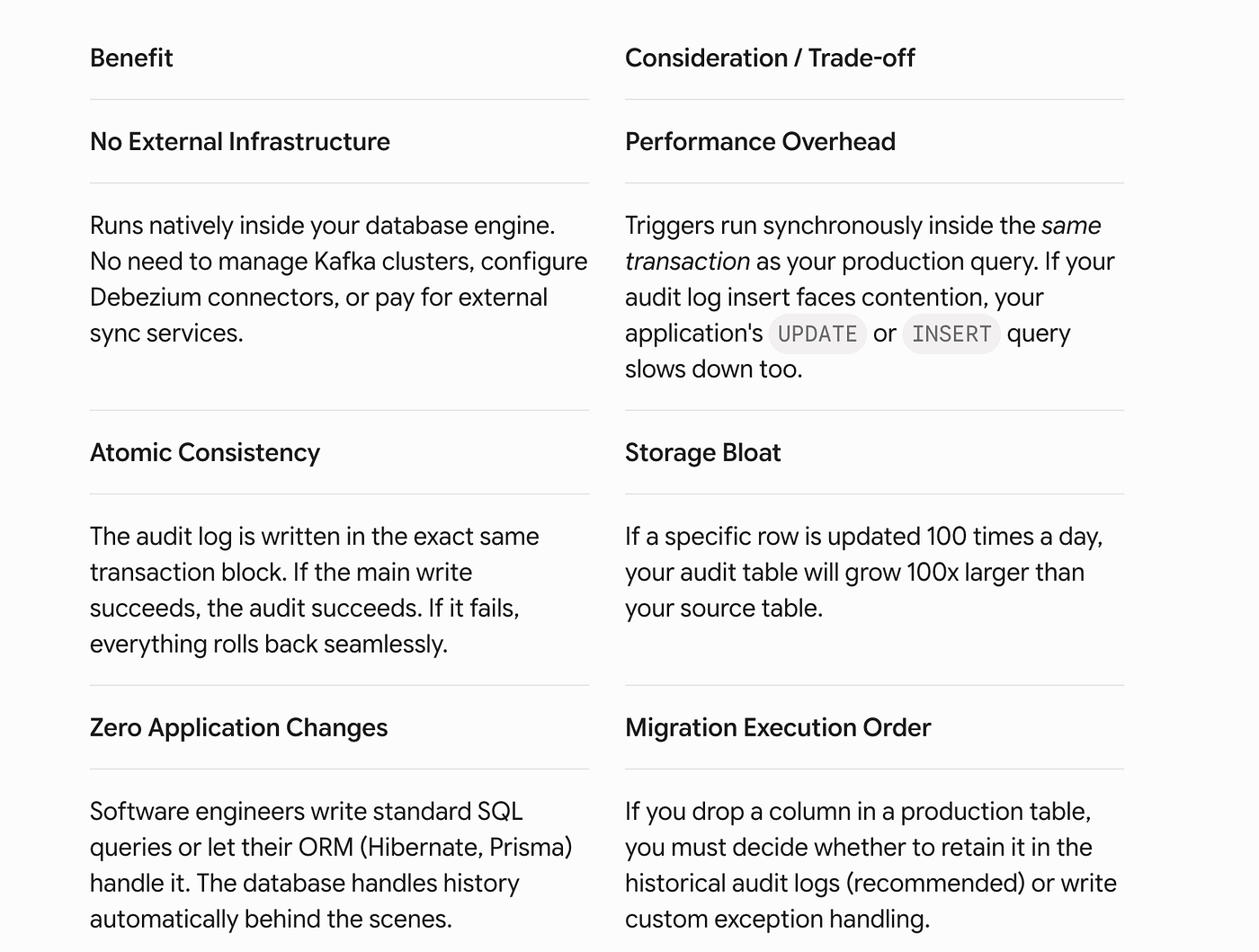
If you deploy this architecture, ensure you implement these defensive database practices:
- Always Use
AFTERTriggers: Never log changes usingBEFOREtriggers. If a subsequent unique constraint or database validation fails, aBEFOREtrigger will have already logged a change that technically never made it to the database. - Partition by Timestamp: Because audit tables scale aggressively, apply database table partitioning based on the
audit_timestampcolumn. - Prune and Archive: Set up a background job to regularly dump historical records older than 90 days or a year out of your operational database and into cold cloud storage (like AWS S3) to preserve database memory and disk performance.
Conclusion
You don’t always need to opt for an over-engineered data lakehouse stack to solve fundamental tracking problems. For core operational auditing, point-in-time debugging, and strict compliance, leveraging the database’s native engine via automated dynamic triggers is an incredibly elegant, low-maintenance approach.
By tying your infrastructure sync script directly into your migration flow, you remove human error entirely — giving you a bulletproof CDC setup that updates itself as your application evolves.
메타데이터
- post_id
- 5d2a2e37a894
- slug
- beyond-the-modern-data-stack-implementing-cdc-in-relational-databases-5d2a2e37a894
- url
- https://medium.com/@krithikasln99/beyond-the-modern-data-stack-implementing-cdc-in-relational-databases-5d2a2e37a894
- canonical_url
- https://medium.com/@krithikasln99/beyond-the-modern-data-stack-implementing-cdc-in-relational-databases-5d2a2e37a894
- author_url
- https://medium.com/@krithikasln99
- status
- ok
- fetched_at
- 2026-06-27 23:56:40



