Why Dynamic Pages Are Harder to Speed Up
Some web pages are easier to make fast than others. A simple blog post, service page, or static landing page usually shows almost the same…
Why Dynamic Pages Are Harder to Speed Up
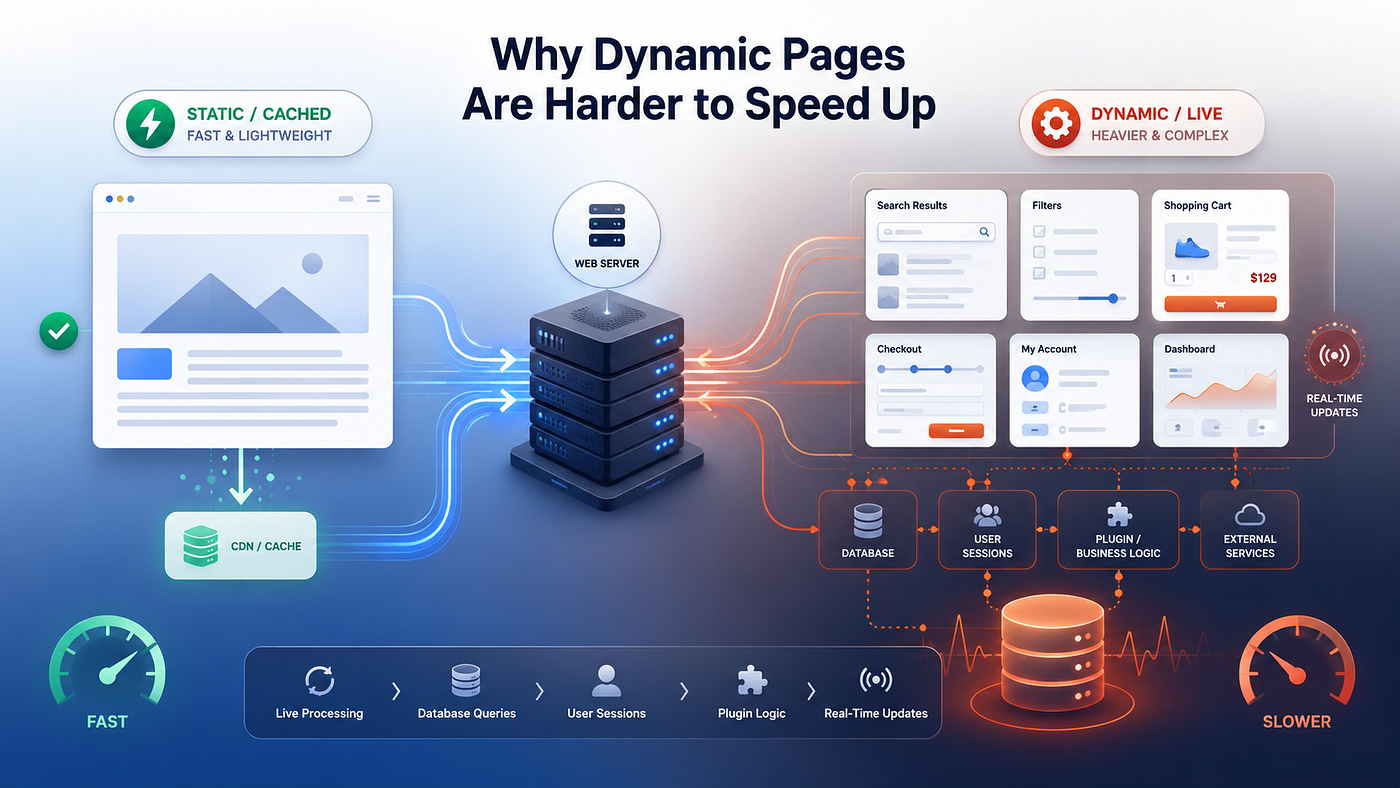
Some web pages are easier to make fast than others. A simple blog post, service page, or static landing page usually shows almost the same content to every visitor. The text, images, headings, and links do not change much from one person to another. Because of that, the page can often be cached, optimized, and served quickly without much live server work.
Dynamic pages are different.
A dynamic page does not simply show the same prepared result to everyone. It may need to build the response based on the current visitor, current session, current action, current product, current cart, current form, or current database result. That means the page often cannot rely only on a stored version. The server has to do real work before the visitor sees the final page.
This is why dynamic pages are harder to speed up. The problem is not only page size or image weight. It is the amount of processing that must happen behind the page. The server may need to run PHP, ask the database for information, check plugin rules, load user-specific data, apply conditions, calculate prices, or prepare a result that did not exist a moment ago.
A cached page is usually about delivery. A dynamic page is often about calculation.
That difference matters. When a cached article loads, the site may only need to send an already prepared version to the browser. When a dynamic page loads, the site may need to decide what the page should contain first. This decision can involve many small operations, and each one adds some pressure to the system.
Static pages are repeatable
Static or mostly static pages are easier to optimize because they are repeatable. If ten visitors open the same article, the page can usually show the same content to all ten people. That makes performance work more predictable. The site owner can compress images, reduce scripts, use caching, improve layout, and serve the same prepared result many times.
This does not mean static pages are always fast. They can still be slowed down by large images, too many scripts, poor themes, bad hosting, or unnecessary plugins. But the basic performance problem is simpler. The page does not usually need to rebuild itself differently for every visitor.
A static page can often benefit from:
- full-page caching;
- CDN delivery;
- browser caching;
- image compression;
- script reduction;
- cleaner templates;
- fewer database calls;
- simpler rendering.
These improvements work well because the page itself is stable. Once the site has prepared a good version, that version can often be reused. This reduces repeated server work and makes the result easier to scale.
That is why public informational pages often score well in speed tools after basic optimization. The page can be tested, cached, and delivered in a fairly controlled way. If the site receives more visitors, caching can absorb a lot of repeated demand.
But this model does not apply equally to every page on a real website.
Dynamic pages must respond to context
Dynamic pages are harder because they need context. They may need to know who the visitor is, what the visitor is doing, what they selected, what they searched for, what is in their cart, or what the database currently contains. The final page is not always a fixed object. It is often the result of a live process.
A search results page is a simple example. The site cannot show the same result for every search. It needs to take the visitor’s query, ask the database for matching content or products, sort the results, apply filters, and build the page. If many visitors search different things at the same time, the workload becomes less predictable.
Product filters work in a similar way. One visitor may filter by price. Another may filter by size, brand, stock status, rating, or category. A third visitor may combine several filters. The page must respond to those choices. It cannot always use one shared cached version for everyone.
This is also why ecommerce, membership sites, booking systems, online courses, directories, and dashboards can feel slower than simple blogs. They are not just displaying content. They are processing actions.
Dynamic pages often include:
- search results;
- product filters;
- cart pages;
- checkout pages;
- account dashboards;
- booking forms;
- calculators;
- member areas;
- admin screens;
- personalized recommendations.
The more a page depends on live context, the harder it becomes to optimize with simple methods. Caching can still help with assets, scripts, images, and some repeated parts of the page. But the main response may still require real-time processing.
That is the core challenge. Dynamic pages are slower not because they are badly designed by default, but because they ask the server to think before it answers.
Why database work becomes more important

Dynamic pages usually depend more heavily on the database. A static page may need a few database calls before it is cached, but a dynamic page may need fresh information every time it loads. This is especially important in WordPress because content, settings, users, products, orders, plugin data, and custom fields often live in the database.
For dynamic pages, the database becomes part of the page-building process. The website may need to ask for matching posts, product variations, user permissions, order details, stock status, coupon rules, shipping options, or form submissions before it can show the final page.
One database query may not be a problem. Many small queries can become a problem when they happen together. The page may look simple on the front end, but behind the scenes it may depend on several plugins, theme functions, custom fields, and WooCommerce logic. Each part may ask the database for something.
This is why two pages with a similar visual design can perform very differently. A simple article and a filtered product page may both have text, images, buttons, and links. But the article may be mostly prepared in advance, while the filtered product page has to build a fresh result based on user choices.
This database layer is one of the reasons dynamic performance often feels inconsistent. A page may load quickly when the database is quiet, then feel slower when more visitors are searching, filtering, adding products to carts, or placing orders at the same time. The page design did not change. The workload behind it changed.
A deeper explanation of this problem is here: https://volodymyrzh.medium.com/why-database-queries-slow-websites-2f93bbdf6917
Sessions make pages harder to reuse
Another reason dynamic pages are harder to speed up is session data. A session helps the website remember something about the current visitor. This can include what is in the cart, whether the user is logged in, what form step they reached, what preferences they selected, or what action they recently completed.
Sessions are useful because they make the website interactive. But they also make caching more complicated. If the page result depends on the current session, the website cannot safely show the same full cached page to everyone.
This is also why caching does not cover every page in the same way. Some pages can reuse a prepared version, while others need a fresh response for the current visitor. This difference is explained in more detail here: https://medium.com/@volodymyrzh/why-caching-does-not-cover-every-page-9f60ab292669
A cart page is a clear example. The site needs to know what the current visitor added. It may also need to calculate totals, apply coupons, check shipping rules, and show the correct next step. If the site reused the wrong cached version, the visitor could see incorrect information.
The same issue appears in account pages, membership areas, booking tools, learning platforms, and dashboards. These pages may need to show private or user-specific data. Speed is important, but accuracy and privacy are more important. That is why many dynamic pages bypass full-page cache or use more careful caching methods.
Session-based pages often need to handle:
- cart contents;
- logged-in user data;
- account details;
- form progress;
- saved preferences;
- recently viewed items;
- private dashboard content;
- user-specific notices.
These pages can still be optimized. The site can reduce unnecessary scripts, clean plugin logic, improve database performance, and cache assets. But the main page response may still need to be generated for the current visitor.
Plugins add another layer of logic
Plugins are one of the biggest reasons dynamic WordPress pages become heavy. Each plugin may add its own checks, settings, database calls, scripts, and conditions. Some of that logic runs only where needed. Some of it runs more broadly than site owners expect.
This matters more on dynamic pages because those pages already need live processing. A contact form plugin may validate fields. A booking plugin may check availability. An ecommerce plugin may calculate cart totals. A membership plugin may check permissions. A pricing plugin may apply special rules. A security plugin may verify requests.
None of these actions are automatically bad. They are often necessary. The problem appears when too many processes run at the same time, especially on pages that cannot be fully cached.
A dynamic page may become slow because several layers work together:
- WordPress loads the page request;
- the theme prepares the layout;
- plugins check their rules;
- the database returns fresh information;
- WooCommerce or another system calculates live data;
- scripts and styles load in the browser;
- the server prepares the final response.
This is why dynamic page speed is not only a design issue. A page can look clean and still be heavy. The visible layout may be simple, but the hidden processing behind it may be complex.
When this happens, adding one more cache plugin is not always the answer. The real question is whether the page is doing too much live work, whether that work is necessary, and whether the hosting environment has enough resources to handle it.
Traffic exposes the real limit
Dynamic pages often feel acceptable when only a few people use them. One visitor searches. Another submits a form. Someone else opens checkout. The server can usually handle these actions when they happen slowly and separately.
The problem becomes clearer when traffic grows. More visitors create more live actions at the same time. Some open filtered pages. Some add products to carts. Some log in. Some use search. Some submit forms. Some reach checkout. These actions are harder to serve from a simple cached version, so the website must process more requests in real time.
This is why a site can look fine during a basic speed test but feel weaker during real use. A test may open one page once. Real traffic creates mixed behavior. Cached pages, dynamic pages, database queries, plugin logic, and user sessions all happen together.
A related explanation of this traffic problem is here: https://volodymyrzh.medium.com/server-response-time-under-load-cca34efdf684
When the server has enough reserve capacity, these live actions may still feel smooth. When resources are limited, dynamic pages become the first places where visitors notice delays. The homepage may still load quickly, but search, checkout, dashboards, and forms may feel slower.
Why optimization has limits

Optimization still matters. A dynamic page should not waste resources. Large images, unnecessary scripts, overloaded themes, duplicated plugin logic, and poorly managed database requests can all make the problem worse. Cleaning these issues can reduce pressure and make the site easier to run.
But optimization does not remove the nature of dynamic work. If the page must calculate something live, the server still has to do that work. If the database must return fresh information, the site still has to wait for that response. If checkout must validate data and prepare an order, that process cannot be treated like a static article.
This is where site owners often reach a confusing point. They improve images, install caching, remove some scripts, and still see weak performance on the pages that matter most. That does not always mean the optimization failed. It may mean the remaining bottleneck is the live work that cannot be fully avoided.
At that stage, the question becomes more practical:
- Which pages are slow only for public visitors?
- Which pages are slow for logged-in users?
- Which pages depend on database queries?
- Which pages bypass full-page cache?
- Which plugins run on dynamic pages?
- Does performance drop when more visitors arrive?
- Does the admin area become slow during normal work?
These questions help separate surface-level speed problems from deeper capacity problems. A slow image is one kind of issue. A slow checkout process under real traffic is another.
When hosting capacity matters
Hosting capacity matters most when the website has many pages that must be processed live. This includes WooCommerce stores, booking websites, membership platforms, online courses, directories, lead generation sites, and larger WordPress projects with many plugins.
A stronger hosting setup does not automatically fix bad website architecture. But it can give the site more room to handle the work that cannot be cached. More stable CPU resources, better memory limits, faster storage, stronger database performance, and better handling of simultaneous requests can all matter when dynamic pages are the bottleneck.
For site owners comparing hosting options, a stronger hosting or VPS setup can be reviewed here: https://host4.biz/cp/?affid=116&affplan=2
Affiliate disclosure: Some of the links in this article are affiliate links. If you choose to purchase through them, the author may receive a commission at no additional cost to you.
Final thought
Dynamic pages are harder to speed up because they are not just files waiting to be delivered. They are often live answers created for a specific visitor, session, search, cart, form, or transaction.
That does not make them bad. It simply means they need a different performance mindset. Caching, image optimization, script cleanup, and cleaner plugins still help. But they do not remove every live operation.
A healthy website needs both sides: optimization to reduce wasted work and enough server capacity for the work that must happen in real time. When dynamic pages stay slow after basic fixes, the problem may no longer be only the page. It may be the system behind the page.
FAQ
Why are dynamic pages slower than static pages?
Dynamic pages often need live processing. They may check sessions, query the database, apply rules, or build a result for the current visitor. Static pages are easier to reuse, cache, and deliver.
Can caching help dynamic pages?
Yes, but only partly. Assets, scripts, images, and some repeated elements can be cached. However, the main page response may still need to be generated live.
Why is WooCommerce checkout hard to speed up?
Checkout needs current cart data, customer details, shipping rules, tax calculations, coupons, payment logic, and order preparation. Much of this work must happen in real time.
When should hosting be reviewed?
Hosting should be reviewed when cached public pages are acceptable, but dynamic pages such as checkout, search, filters, forms, dashboards, or admin screens remain slow under normal use.
메타데이터
- post_id
- 5d40b6fcc552
- slug
- why-dynamic-pages-are-harder-to-speed-up-5d40b6fcc552
- url
- https://medium.com/@wwwebadvisor/why-dynamic-pages-are-harder-to-speed-up-5d40b6fcc552
- canonical_url
- https://medium.com/@wwwebadvisor/why-dynamic-pages-are-harder-to-speed-up-5d40b6fcc552
- author_url
- https://medium.com/@wwwebadvisor
- status
- ok
- fetched_at
- 2026-06-09 15:37:30