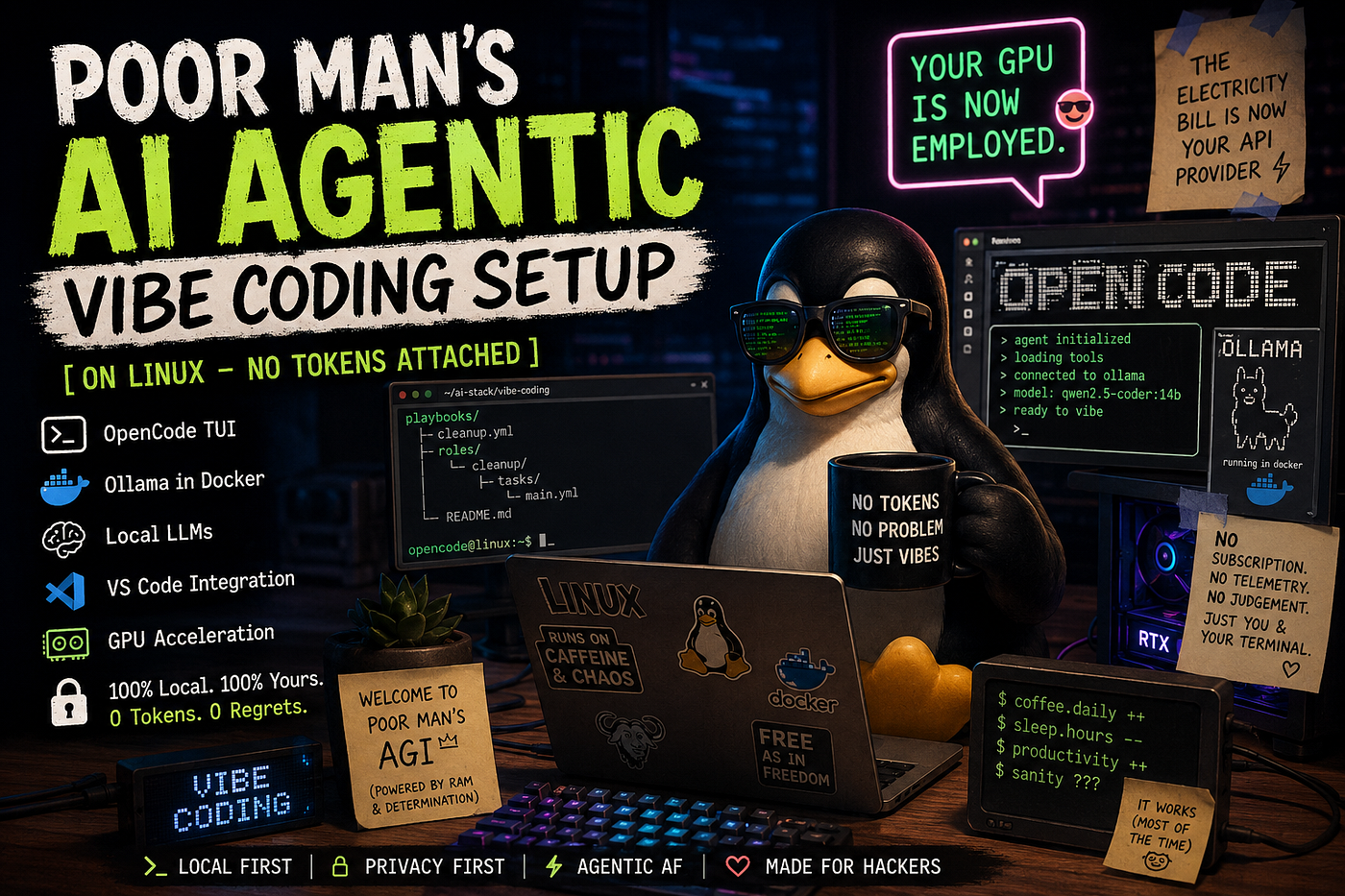
Poor Man’s AI Agentic Vibe Coding Setup on Linux — No Tokens Attached
“Your GPU is now employed…”
Poor Man’s AI Agentic Vibe Coding Setup on Linux — No Tokens Attached
“Your GPU is now employed…”
There was a time when developers feared production outages, merge conflicts, and the phrase “quick sync?”
Now? We fear something worse:
You have exceeded your API quota.
Nothing kills the vibe faster than watching your AI coding assistant burn through tokens like a startup burns VC money.
Boss ask it to “Refactor this Python file.” And suddenly 18 cents gone, context window full, API rate limited, cloud dashboard judging your financial choices.
Meanwhile your GPU enabled laptop has been sitting idle all day rendering exactly zero dragons.
This blog is about fixing that. This is the:
- local-first,
- Linux-powered,
- Dockerized,
- privacy-respecting,
- token-free,
- mildly unhinged setup
for running:
- local LLMs,
- autonomous coding agents,
- OpenCode TUI,
- VS Code integrations,
- and full-blown vibe coding workflows
without selling your kidney to cloud AI subscriptions.
Welcome to:
Poor Man’s AGI™
No subscription. No telemetry. No judgement.
The electricity bill is now your API provider.
Why Local AI Matters
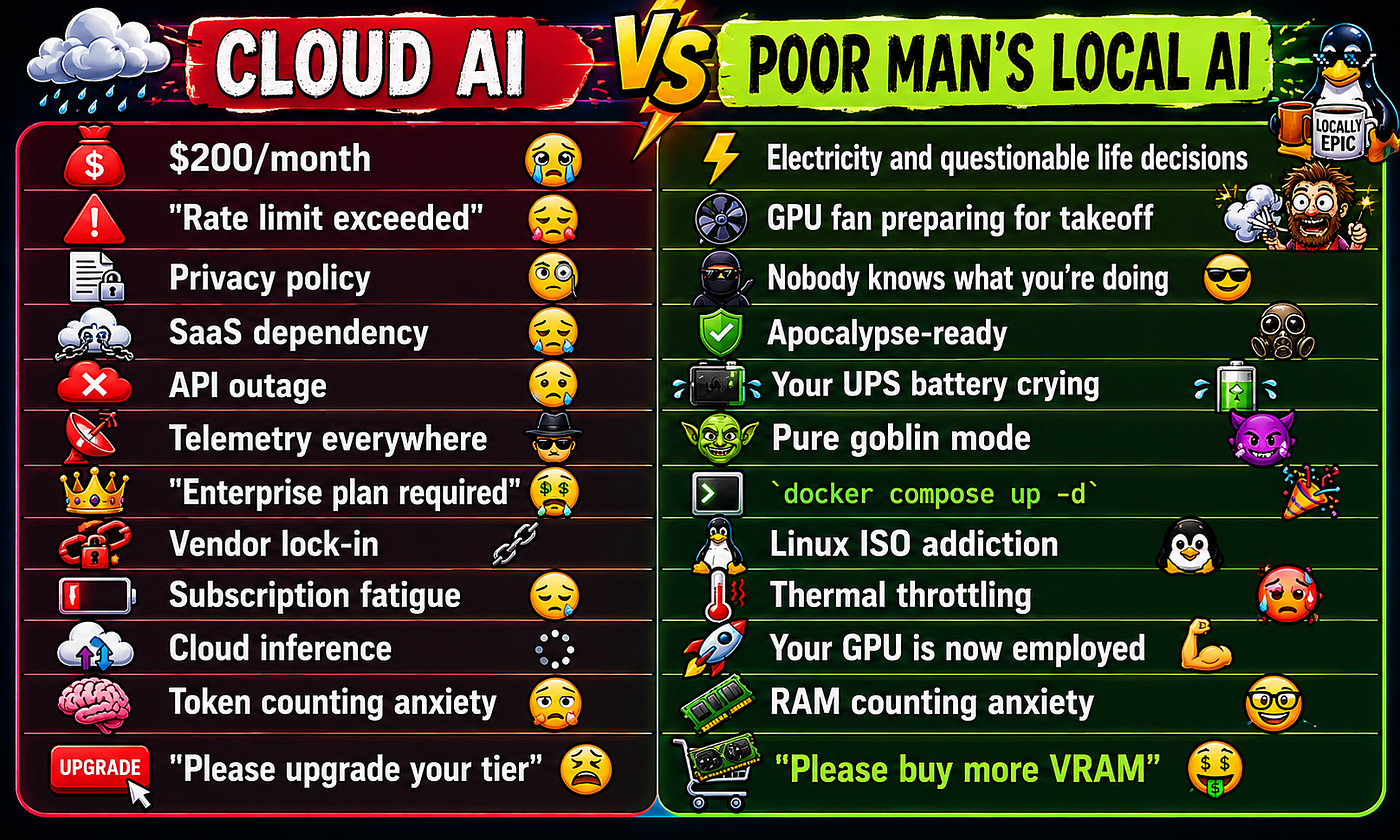
Cloud AI is amazing but it is also expensive, rate-limited, privacy-invasive, internet-dependent, and emotionally manipulative.
You start with:
“I’ll just use the free tier.”
Three days later:
- you’re calculating token usage like a crypto trader,
- your IDE autocomplete costs more than lunch,
- and your side project now has operational expenses.
Meanwhile local AI has evolved from:
“cute toy llama”
to:
“autonomous coding goblin that rewrites Terraform at 2 AM.”
The modern local AI stack is absurdly capable.
Especially for:
- DevOps
- Scripting
- Infra Automation
- Code Generation
- Agentic Workflows
- Homelab Engineering
- Terminal-driven chaos
And Linux? Linux is where this stuff feels correct. Because Linux users already believe:
- terminals are romantic,
- YAML is acceptable human communication,
- and Docker Compose is a personality trait.
Why Agentic Coding Is Exploding
We are no longer in the:
“autocomplete my function”
era.
We are entering:
“go fix the repo while I microwave coffee”
territory.
Modern AI agents can inspect files, execute tools, edit code, run shell commands, iterate on failures, refactor projects, generate infrastructure, and occasionally hallucinate Kubernetes manifests from another dimension.
Agentic coding is basically:
“What if your intern never slept and had infinite confidence?”
Sometimes terrifying, Often useful & Always entertaining.
Why Linux is the Best Playground
Because Linux already has:
- Docker
- GPU tooling
- Terminal ecosystems
- Package managers
- Automation tooling
- Native scripting culture
- Homelab energy
Also:
- Linux users tolerate suffering better. Which helps…
Architecture Overview
Here’s the glorious pile of components.
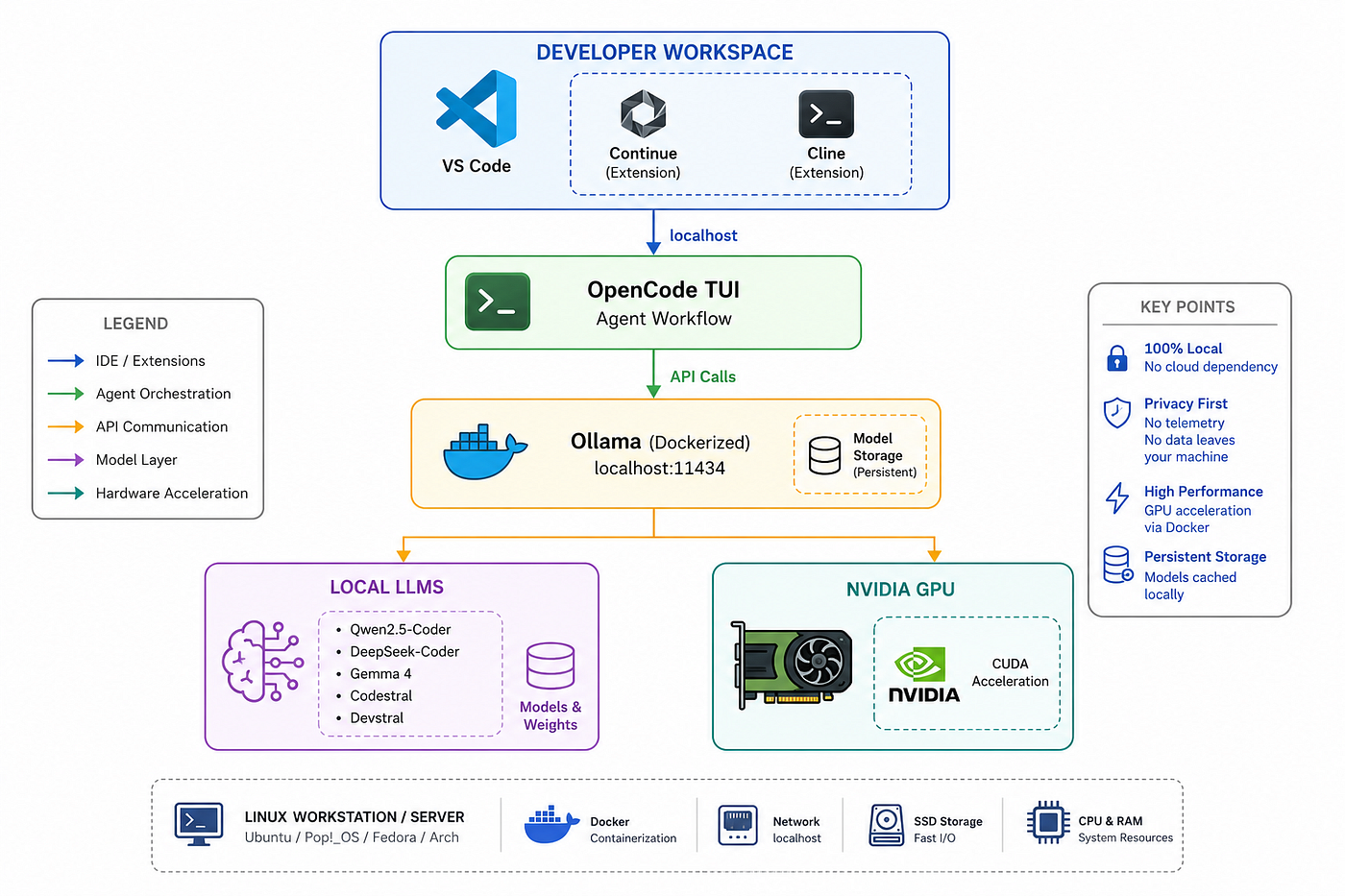
Translation: Your laptop (high-end) becomes the intern.
Cloud AI vs Poor Man’s Local AI
Prerequisites
This setup works beautifully on:
- Ubuntu 24.04
- Pop!_OS (Tested)
- Fedora latest
- Arch (because of course you use Arch)
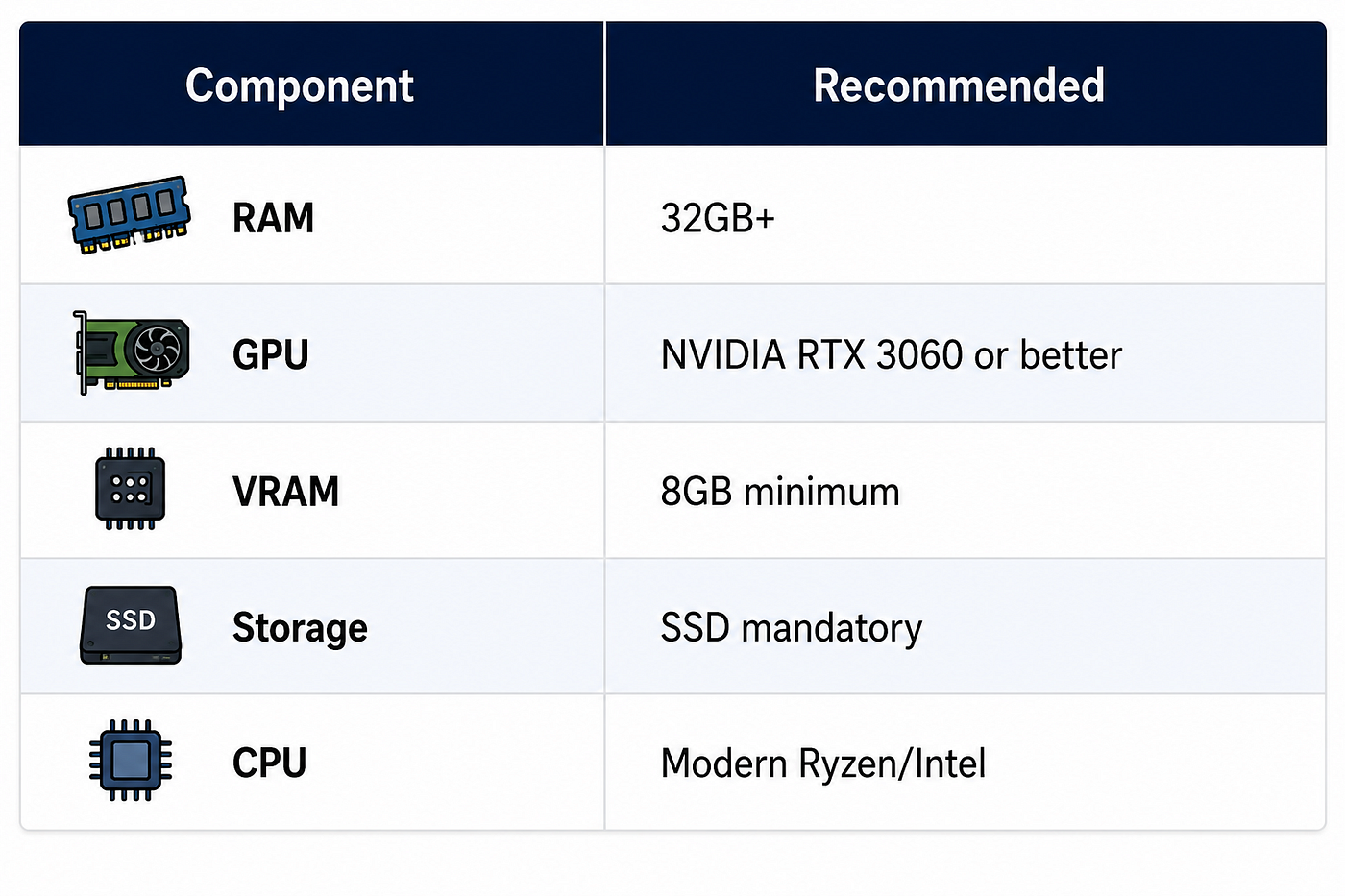
You might ask, is it really poorman’s… IKR!
Can it run on weaker hardware? Yes. Will it become a space heater?Also yes.
Install Docker
sudo apt update

sudo apt install -y \
    ca-certificates \
    curl \
    gnupg \
    lsb-release

curl -fsSL https://download.docker.com/linux/ubuntu/gpg | \
sudo gpg --dearmor -o /usr/share/keyrings/docker-archive-keyring.gpg

echo \
"deb [arch=$(dpkg --print-architecture) \
signed-by=/usr/share/keyrings/docker-archive-keyring.gpg] \
https://download.docker.com/linux/ubuntu \
$(lsb_release -cs) stable" | \
sudo tee /etc/apt/sources.list.d/docker.list > /dev/null

sudo apt update

sudo apt install -y docker-ce docker-ce-cli containerd.io docker-compose-plugin

#Enable docker
sudo systemctl enable docker
sudo systemctl start docker
#Add your user
sudo usermod -aG docker $USER
newgrp docker
Optional: Nvidia GPU Support
Because CPUs deserve retirement too. Install NVIDIA drivers first. Then install NVIDIA Container Toolkit:
curl -fsSL https://nvidia.github.io/libnvidia-container/gpgkey | \
sudo gpg --dearmor -o /usr/share/keyrings/nvidia-container-toolkit-keyring.gpg

curl -s -L https://nvidia.github.io/libnvidia-container/stable/deb/nvidia-container-toolkit.list | \
sed 's#deb https://#deb [signed-by=/usr/share/keyrings/nvidia-container-toolkit-keyring.gpg] https://#g' | \
sudo tee /etc/apt/sources.list.d/nvidia-container-toolkit.list

sudo apt update

sudo apt install -y nvidia-container-toolkit
#Configure Docker
sudo nvidia-ctk runtime configure --runtime=docker
sudo systemctl restart docker
#Test GPU access
docker run --rm --gpus all nvidia/cuda:18.4.1-base-ubuntu24.04 nvidia-smi
If you see your GPU: Congratulations!! Your electricity meter just became a SaaS platform.
Dockerized Ollama Setup
Why Docker?
Because we like reproducibility, clean environments, portability, and pretending we’ll document this later offcourse using DeepWiki Open.
Also: running Ollama in Docker means easier upgrades, easier backups, GPU isolation, cleaner networking, and fewer “works on my machine” rituals.
Let the cooking begin
#Create Project Directory
mkdir -p ~/ai-stack/ollama
cd ~/ai-stack/ollama
#Create docker compose for ollama - nano docker-compose.yml
services:
  ollama:
    image: ollama/ollama:latest
    container_name: ollama

    restart: unless-stopped

    ports:
      - "11434:11434"

    volumes:
      - ollama-data:/root/.ollama

    environment:
      - OLLAMA_KEEP_ALIVE=24h

    deploy:
      resources:
        reservations:
          devices:
            - driver: nvidia
              count: all
              capabilities: [gpu]

    healthcheck:
      test: ["CMD", "ollama", "list"]
      interval: 30s
      timeout: 10s
      retries: 5

volumes:
  ollama-data:
# Start it
docker compose up -d
#Verify Ollama is working
curl http://localhost:11434/api/tags
If JSON appears: The starters are ready to eat!
Pull Your First Models
# Qwen2.5-Coder
docker exec -it ollama ollama pull qwen2.5-coder:14b
# DeepSeek-Coder
docker exec -it ollama ollama pull deepseek-coder-v2
# Gemma 4
docker exec -it ollama ollama pull gemma3:12b
# Codestral
docker exec -it ollama ollama pull codestral
Installing OpenCode — Now we install the terminal wizardry!
# Install Node.js
curl -fsSL https://deb.nodesource.com/setup_22.x | sudo -E bash -

sudo apt install -y nodejs
# Verify
node -v
npm -v
# Install OpenCode
npm install -g opencode-ai
# Now launch
opencode
And suddenly your terminal feels illegal.
Configure OpenCode
# Create Config
mkdir -p ~/.config/opencode
nano ~/.config/opencode/opencode.jsonc

# Example
{
  "provider": "ollama",
  "baseUrl": "http://localhost:11434",
  "model": "qwen2.5-coder:14b"
}
Best Local Models for Agentic Coding
Not all models are equal. Some are brilliant coders, terrible planners, emotionally unstable, or convinced every problem requires Rust. Choose wisely.
Qwen2.5-Coder
Excellent all-rounder.
Best for:
- code editing
- shell scripting
- automation
- DevOps
- agent workflows
Strengths:
- tool use
- instruction following
- strong reasoning
- large context
Weakness: occasionally over-engineers everything. Like senior engineers.
DeepSeek-Coder
This thing punches way above its weight.
Best for:
- refactoring
- code completion
- infra generation
- autonomous edits
Feels surprisingly “agentic.” Sometimes too agentic.
Gemma 4
Google’s surprisingly solid local model.
Best for:
- balanced reasoning
- lightweight setups
- general workflows
Efficient and fast. Like a caffeinated junior engineer.
Codestral
Fantastic coding-focused model.
Best for:
- autocomplete
- repo understanding
- code generation
- developer workflows
Especially good in IDE integrations.
Devstral
Absolute goblin energy.
Best for:
- autonomous workflows
- experimentation
- weird agentic setups
If you’re building:
“AI that manages AI agents” this gets interesting quickly.
VS Code Integration — Now we weaponize productivity.
Recommended Extension
Continue.dev
Use: Continue.dev
Excellent local LLM integration.
Supports:
- Ollama
- local agents
- repo context
- inline edits
- chat workflows
Continue.dev Configuration
Open VS Code settings for Continue.
Example:
{
  "models": [
    {
      "title": "Local Qwen",
      "provider": "ollama",
      "model": "qwen2.5-coder:14b",
      "apiBase": "http://localhost:11434"
    }
  ]
}
Boom. Local AI inside VS Code. No tokens were harmed in this setup.
Launch OpenCode Inside VS Code Terminal — open terminal and type
opencode Now do split-screen, code editor left, AI goblin right. This is peak vibe coding.
Example Workflow — Goal: Ansible playbook to clean disk space
# Step 1 - Open Repo
cd ~/projects/homelab-automation
opencode

# Step 2 - Prompt the agent
Create an Ansible playbook that:
- cleans apt cache
- removes old kernels
- deletes docker dangling images
- truncates system logs
- supports Ubuntu 24.04
- includes tags
- uses idempotent tasks

# Step 3 - Watch the movie
The agent will:
- create YAML files,
- generate handlers,
- write comments,
- probably explain Linux to Linux,
- and occasionally attempt architecture astronautics.

Example Generated Structure
playbooks/
├── cleanup.yml
roles/
└── cleanup/
    ├── tasks/
    ├── handlers/
    └── defaults/

# Step 4: Iterate
  Add dry-run support and logging. Prompt Agent to make it production safe.
Common Problems
Because of course there are problems and that is why we exists… still… alongside with AI agents for few more quarters may be…
GPU not detected
Check:
nvidia-smi Then:
docker exec -it ollama nvidia-smiIf GPU missing: Restart Docker, reinstall toolkit, sacrifice unnecessary browser tabs.
OpenCode Not Writing Files
Usually: Permission issue, sandbox restriction, or AI existential crisis.
Fix:
chmod -R u+w project-directoryDocker Networking Problems
curl http://localhost:11434/api/tagsIf dead:
- check container,
- check ports,
- check firewall,
- question your life choices.
Context Window Too Small
Symptoms: AI forgets earlier instructions, reinvents architecture, becomes spiritually lost.
Fix: Use larger-context models by buying MacBook M5 Max 40 core GPU 128GB RAM 2 TB SSD if you are rich or increase context.
OLLAMA_CONTEXT_LENGTH=32768Ollama Memory Issues — Models are RAM Raakshashas (Vampires)
Fix: Monitor | Observe | Optimize Resources
#htop
or
#nvtop
Use quantized models — q4_K_M. Slightly dumber, dramatically cheaper… Like our management decisions.
Tune Docker Resources
deploy:
  resources:
    limits:
      memory: 30G # If you have 32 GB RAM or setup 60 GB if you have 64
Prevents: Why is my desktop frozen? moments!
Multiple Agents
This is where things get cursed.
Run:
- one planner,
- one coder,
- one reviewer,
- one terminal agent.
Congratulations. You accidentally invented middle management.
Advanced Goblin Mode
Once this setup works, your brain starts escalating.
You begin thinking:
“What if I connect this to Kubernetes?”
Then:
- CI/CD agents,
- self-healing infra,
- autonomous remediation,
- AI SREs,
- AI code reviewers,
- AI documentation bots,
- AI YAML archaeologists.
Soon your homelab becomes:
“Silicon Valley but powered by second-hand GPUs.”
The Psychological Shift
Cloud AI feels rented, Local AI feels owned that changes how you experiment. You stop thinking: “Will this waste tokens?” And start thinking: “Can this automate my entire workflow?” That freedom matters. A lot.
No Strings (Tokens) Attached
This is the real magic, not benchmarks, not hype, not synthetic demos just real Freedom.
With local AI:
- no SaaS dependency,
- no API bills,
- no rate limits,
- no telemetry,
- no vendor lock-in,
- no cloud panic attacks.
You can work offline, experiment recklessly, automate aggressively, run weird agents, and build things cloud providers would absolutely put behind enterprise pricing.
And honestly? That’s fun again.
Final Thoughts
You came for vibe coding.
You stayed because your local AI agents started doing actual work.
Now your Linux machine writes scripts, edits configs, debugs code, generates infrastructure, and occasionally gaslights itself into recursive automation loops.
Beautiful. Your GPU is finally employed. Your laptop became the intern. The electricity bill became your API provider. And somewhere in the distance: a cloud AI pricing dashboard sheds a single tear.
Welcome to poor man’s AGI.
Social Responsibility Corner — Because Even AI Goblins Need a Soul
Before I spent the rest of my Sunday convincing local LLMs to write YAML and consume VRAM like an industrial furnace, I attended GoSundays by GoPals this morning at **Bangalore Gowrakshana Shala **behind our office.
And honestly?
It was one of the most grounding experiences I’ve had in a while. In a world where we optimize GPUs, benchmark inference speed, argue over quantization, and accidentally create autonomous terminal gremlins…sometimes it’s important to reconnect with something real.
Like serving cows. Yes. Actual cows. Not Kubernetes pods named after cows.
The experience of seva (service) to Gomata was peaceful, humbling, and strangely therapeutic after spending too much time staring at terminal windows pretending to understand CUDA memory allocation.
I also highly recommend checking out the “Gramodaya to Rashtrodaya” initiative and products from GoPals GoChetana.
These are produced by Indian farmers, handcrafted using pure and natural ingredients, rooted in Bharatiya traditions, and centered around the sacred Desi Cow (Gomata).
In a weirdly beautiful way, it feels like the exact opposite of modern internet culture — slow instead of hyperactive, rooted instead of algorithmic, authentic instead of optimized for engagement metrics.
And honestly? That balance matters.
If you’d like to explore or support them:
GoPals GoChetana — Gramodaya to Rashtrodaya Products

Because while we’re busy building poor man’s AGI…
…we should probably also remember how to stay human.
메타데이터
- post_id
- 5d4a8f82447e
- slug
- poor-mans-ai-agentic-vibe-coding-setup-on-linux-no-tokens-attached-5d4a8f82447e
- url
- https://medium.com/tech-learners-journal/poor-mans-ai-agentic-vibe-coding-setup-on-linux-no-tokens-attached-5d4a8f82447e
- canonical_url
- https://medium.com/tech-learners-journal/poor-mans-ai-agentic-vibe-coding-setup-on-linux-no-tokens-attached-5d4a8f82447e
- author_url
- https://medium.com/@VinayUmesh
- status
- ok
- fetched_at
- 2026-06-09 15:37:30