eSIM Provisioning for IoT: What Actually Happens — and Where Deployments Stall
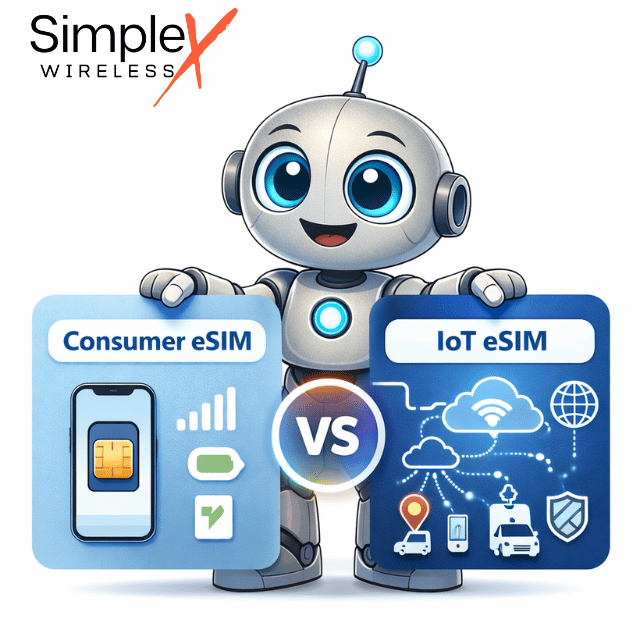
Consumer eSIM activation takes two minutes. IoT eSIM provisioning takes planning. Here’s the difference.
eSIM Provisioning for IoT: What Actually Happens — and Where Deployments Stall
Source
Consumer eSIM activation takes two minutes. IoT eSIM provisioning takes planning. Here’s the difference.
You’ve activated an eSIM on a smartphone before. Scan a QR code, wait thirty seconds, done. It’s reasonable to expect IoT eSIM provisioning to work the same way. It doesn’t — and teams who carry that assumption into a fleet deployment find out the hard way, usually when the support queue fills up with devices that show “connected” but can’t pass data.
This is how eSIM provisioning actually works for IoT, what the common failure points are, and what to standardize before your first device ships.
What You’re Actually Dealing With
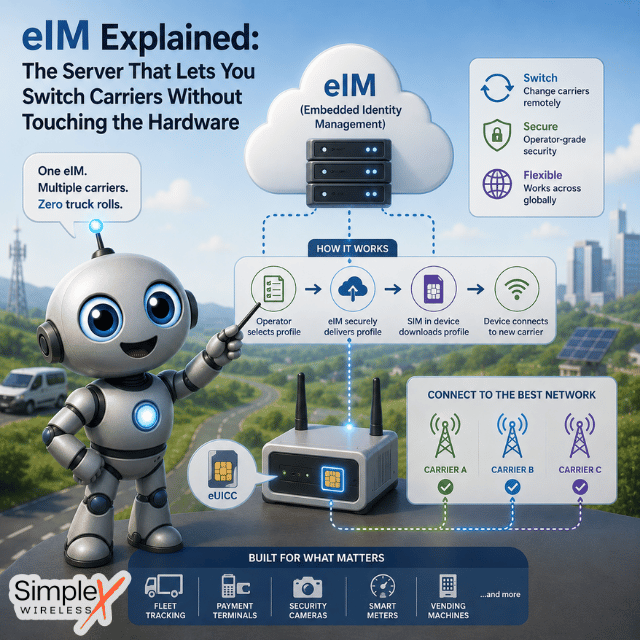
An eSIM (embedded SIM) is a SIM chip soldered directly onto the circuit board rather than inserted as a removable card. The chip — formally called an eUICC (embedded Universal Integrated Circuit Card) — can store one or more connectivity profiles that are downloaded and managed remotely, without physical access to the device.
For IoT, this matters practically: devices in sealed enclosures, remote field locations, or high-volume manufacturing lines can’t be easily accessed for a physical SIM swap. eSIM removes that constraint and eliminates the mechanical failure risk that comes with SIM trays and removable cards.
What eSIM doesn’t change is the need for correct provisioning. A chip soldered to a board is inert until a carrier profile is loaded, the right APN (Access Point Name) is configured, and the device is told to use it. The chip being embedded doesn’t make that setup automatic.

Source
he Three-Step Sequence That Has to Go Right
Every IoT eSIM activation follows the same sequence, regardless of hardware vendor or carrier.
Profile delivery. When you purchase an eSIM plan, the carrier generates a connectivity profile — credentials that tell the network who the device is and what it’s authorized to access. For IoT eSIMs, this profile typically arrives as a QR code to your account email, or is provisioned directly via an SM-DP+ server (the infrastructure that manages profile downloads). If your order involves multiple eSIMs, each gets a unique credential tied to a specific eUICC identifier (EID). These cannot be interchanged between devices.
Profile installation and activation. On devices with a display and operating system, you scan the QR code through cellular settings and the device downloads the profile from the SM-DP+ server. On headless IoT devices — no screen, no UI — profile installation happens through an over-the-air management platform or during manufacturing, before shipment. Once the profile is installed, it needs to be explicitly activated: automatically on some devices, manually or via API call on others.
APN configuration. The APN is a gateway identifier that routes the device’s data traffic through the correct carrier infrastructure. IoT SIM APNs are provider-specific and won’t be auto-populated the way consumer carrier APNs are. Skipping or misconfiguring this is the single most common reason a device appears activated but produces no data connection — the device associates with a tower, but traffic has nowhere to route. Set the APN exactly as the provider specifies, enable data roaming, restart the device.
The Dual-IMEI Question
A question that surfaces in nearly every IoT eSIM deployment: why does the device show two IMEI numbers?
The IMEI (International Mobile Equipment Identity) is assigned to a radio interface, not to the device as a whole. A device with both a physical SIM slot and an embedded eSIM has two radio interfaces and therefore two IMEIs — one tied to the physical SIM slot, one to the eSIM. The labeling order varies by hardware manufacturer and is typically printed on the packaging or accessible through device settings under “About” or “Device Information.”
When registering an eSIM with a carrier or logging it in a device management platform, use the IMEI tied to the eSIM interface specifically. Capture both IMEIs at intake alongside the EID. Associating profiles to devices retroactively — after they’re deployed in the field — is significantly harder than doing it before they leave the warehouse.

Source
IoT eSIM vs. Consumer eSIM: The Differences That Matter…
Continue reading the full article →
This article was created by Jan Lattunen, CCO Simplex Wireless
Jan Lattunen manages Sales and Marketing for Simplex Wireless. Jan has 20+ years’ experience in working with SIM card technology and was involved in launching the eSIM in North America with major carriers and OEMs. His expertise in telecommunications is around SIM cards. You can connect with Jan on https://linkedin.com/in/JanLattunen or send us an email as sales@simplexwireless.com for more information.
메타데이터
- post_id
- 5d4f854efaf0
- slug
- esim-provisioning-for-iot-what-actually-happens-and-where-deployments-stall-5d4f854efaf0
- url
- https://medium.com/@simplexwireless/esim-provisioning-for-iot-what-actually-happens-and-where-deployments-stall-5d4f854efaf0
- canonical_url
- https://medium.com/@simplexwireless/esim-provisioning-for-iot-what-actually-happens-and-where-deployments-stall-5d4f854efaf0
- author_url
- https://medium.com/@simplexwireless
- status
- ok
- fetched_at
- 2026-06-26 06:47:43