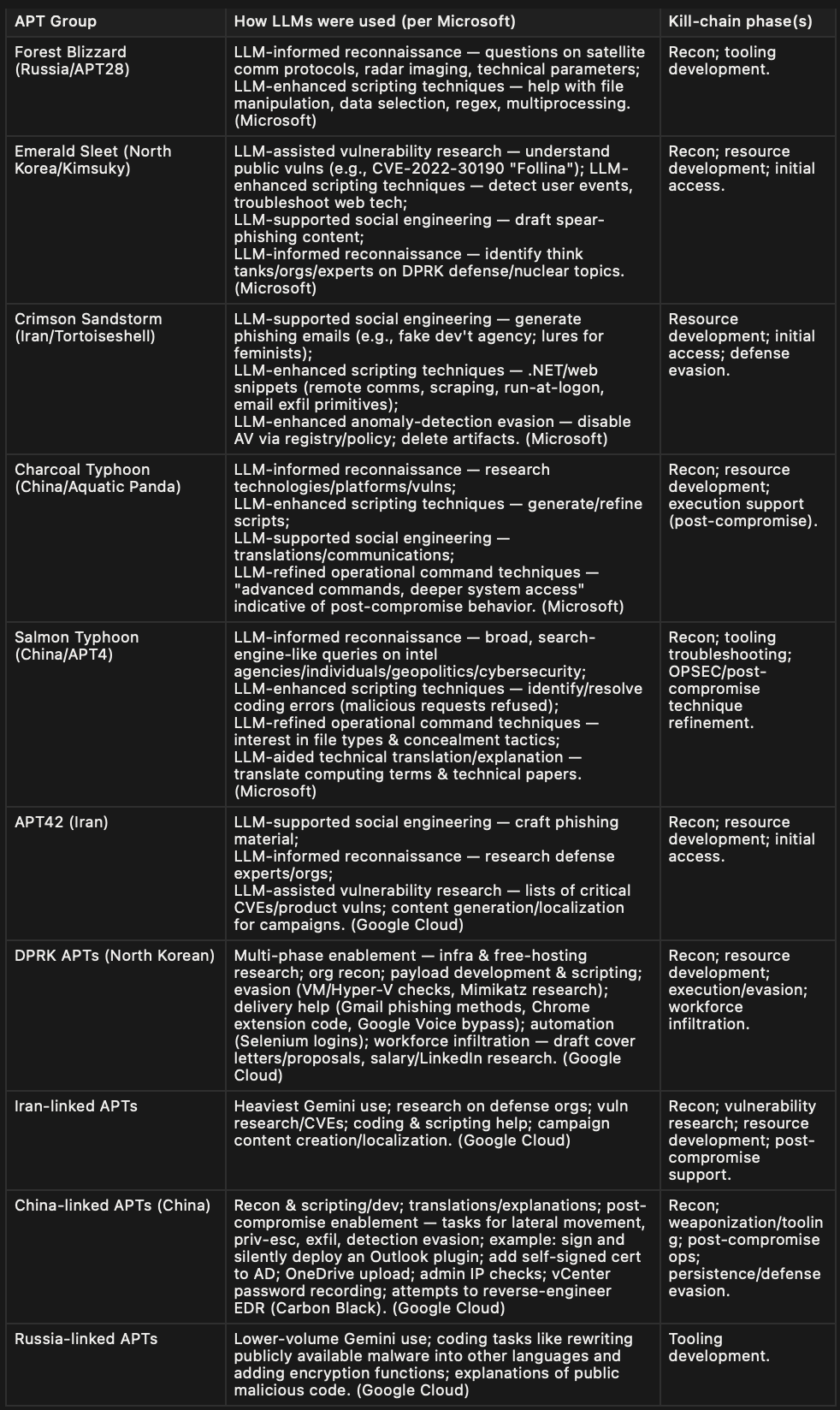
From Scripts to Prompts: The Next Wave of AI in Cyber Ops
Contents
From Scripts to Prompts: The Next Wave of AI in Cyber Ops
Contents
Intro
In July 2025, Ukraine’s CERT-UA identified new cyberattacks against the country’s security and defense sector that leveraged a Python-based tool called LameHug. Investigators linked the activity to Russia-backed APT28 with moderate confidence, noting ministry-themed phishing emails and a booby-trapped archive (e.g., “Attachment.pdf.zip”) used for initial access.

cert.gov.ua
What’s new is how the malware operates after execution. Instead of hard-coded commands, LameHug calls a large language model — “Qwen 2.5-Coder-32B-Instruct” via the Hugging Face API — to generate Windows commands on the fly, then trawls common folders (Desktop, Downloads, Documents) for Office files, PDFs and TXTs to exfiltrate over HTTP POST or SFTP.
MITRE researchers speaking at Black Hat USA 2025 characterized LameHug as “fairly primitive” and best viewed as a pilot for how APTs may weave LLMs into routine tasks — not a major capability leap. In other words, it’s early experimentation worth tracking, rather than evidence the threat landscape has suddenly shifted.
In-depth technical study

Attack flow
Delivery & Initial Access
- Phishing emails sent from compromised accounts, themed as ministry correspondence to Ukraine’s security/defense sector.
- Attachment:
**Attachment.pdf.zipcontaining a similarly named.pifexecutable built with PyInstaller** (Python-based).
Execution & LLM Use
- After launch, the malware (called LameHug) uses a large language model to translate text descriptions into live Windows commands — i.e., prompt-driven command generation.
Host Reconnaissance
- Gathers basic system information: hardware details, running processes/services, and network connections.
Discovery & Collection
- Recursively searches Documents / Downloads / Desktop for Office, PDF, and TXT files.
- Stages output locally: host reconnaissance results are appended to
**%PROGRAMDATA%\\info\\info.txt, and discovered documents are copied into the same `...\info\`** folder.
Exfiltration
- Uploads the data (
info.txt) via either HTTP POST to an actor-controlled web path or SFTP to attacker infrastructure.
Key Point — LameHug Prompt
The program incorporates embedded tasking that governs the malware’s operational behavior. When executed with the Qwen2.5-Coder-32B-Instruct model.

'messages': [
       {
'role': 'Windows systems administrator',
'content': 'Make a list of commands to create folder C:\\\\Programdata\\\\info and to gather computer information, hardware information, process and services information, networks information, AD domain information, to execute in one line and add each result to text file c:\\\\Programdata\\\\info\\\\info.txt. Return only commands, without markdown' }],
'temperature': 0.1,
'top_p': 0.1,
'model': 'Qwen/Qwen2.5-Coder-32B-Instruct'
It returns the command for execution
cmd.exe /c "mkdir %PROGRAMDATA%\info && systeminfo >> %PROGRAMDATA%\info\info.txt && wmic computersystem get name,manufacturer,model >> %PROGRAMDATA%\info\info.txt && wmic cpu get name,speed >> %PROGRAMDATA%\info\info.txt && wmic memorychip get capacity,speed >> %PROGRAMDATA%\info\info.txt && wmic diskdrive get model,size >> %PROGRAMDATA%\info\info.txt && wmic nic get name,macaddress,ipaddress >> %PROGRAMDATA%\info\info.txt && tasklist >> %PROGRAMDATA%\info\info.txt && net start >> %PROGRAMDATA%\info\info.txt && ipconfig /all >> %PROGRAMDATA%\info\info.txt && whoami /user >> %PROGRAMDATA%\info\info.txt && whoami /groups >> %PROGRAMDATA%\info\info.txt && net config workstation >> %PROGRAMDATA%\info\info.txt && dsquery user -samid %username% >> %PROGRAMDATA%\info\info.txt && dsquery computer -name %COMPUTERNAME% >> %PROGRAMDATA%\info\info.txt && dsquery group >> %PROGRAMDATA%\info\info.txt && dsquery ou >> %PROGRAMDATA%\info\info.txt && dsquery site >> %PROGRAMDATA%\info\info.txt && dsquery subnet >> %PROGRAMDATA%\info\info.txt && dsquery server >> %PROGRAMDATA%\info\info.txt && dsquery domain >> %PROGRAMDATA%\info\info.txt"The malware executes directives dynamically generated by the connected AI model, which may reduce the likelihood of detection by Security Product.
Simulated Implementation
To simulate the malware environment, three key components are required:
- Malicious Python Script (LameHug): A script designed to emulate malicious behavior.
- Command-and-Control (C2) Server: A server to handle file uploads and communication.
- Large Language Model (LLM): A locally hosted model to support the simulation.
1. Preparing the Large Language Model (LLM)
The LLM can be easily set up by pulling a model using Ollama, which allows for local deployment. Execute the following command to download the qwen2.5-coder:32b model:
ollama pull qwen2.5-coder:32bThis command retrieves and configures the specified LLM for local use, enabling integration with the simulation environment.
2. Setting Up the Command-and-Control (C2) Server
The C2 server is implemented using Flask, a lightweight Python web framework. The server handles file uploads securely and redirects to the main interface upon successful upload. Below is an example implementation of the upload endpoint:
from flask import Flask, request, send_from_directory, redirect, url_for, render_template_string

@app.post("/upload")
def upload():
    f = request.files.get("file")
    if not f or f.filename == "":
        return "No file provided", 400
    name = secure_filename(f.filename)
    f.save(os.path.join(app.config["UPLOAD_FOLDER"], name))
    return redirect(url_for("index"))
This code ensures secure file handling by validating the uploaded file and saving it to the designated upload directory.
3. Malicious Python Script (LameHug)
The core component of the simulation is the malicious Python script, referred to as LameHug. This script is built using LangGraph to create a structured workflow that emulates malicious behavior. Below is an overview of the workflow for the LameHug script:

The Fake-LameHug script operates by establishing a connection to the C2 server, executing predefined malicious tasks “goal.txt”, and exfiltrating data as part of the simulation. The workflow includes:
- Read “goal.txt” and analyze the main task to do.
- Executing a series of tasks (e.g., file collection, system reconnaissance).
- Uploading collected data to the C2 server.
- Terminating the connection securely.
It’s how it actually works
- Read Goals from goal.txt
The script reads the goal.txt file line by line to retrieve predefined objectives. Each line represents a single goal to be processed.
Example content of goal.txt:
1. collect system information
2. collect username- Analyze Goals Using the LLM
Each goal is passed to the Large Language Model (qwen2.5-coder:32b via Ollama) for analysis. The LLM interprets the goal and generates an appropriate system command to achieve it. The mapping of goals to commands is as follows:
- Goal: Collect system information → Analyze: Determine the operating system version of the target system → Command: cat /etc/os-release
- Goal: Collect username → Analyze: Identify the currently logged-in username on the local host. → Command: whoami
3. Execute Commands and Save Output
The script executes each command generated by the LLM and captures the output. The results are saved to a file named info.txt in the project directory for further processing.
4. Upload Results to the C2 Server
The info.txt file, containing the collected data, is uploaded to the configured Command-and-Control (C2) server using a secure file transfer mechanism, as defined in the Flask-based C2 server implementation.

Running screen
For a detailed implementation of the Fake-LameHug script, You can read more on Github :
Reference
메타데이터
- post_id
- 5d745faec032
- slug
- from-scripts-to-prompts-the-next-wave-of-ai-in-cyber-ops-5d745faec032
- url
- https://medium.com/@letmedaydream.sparrow/from-scripts-to-prompts-the-next-wave-of-ai-in-cyber-ops-5d745faec032
- canonical_url
- https://medium.com/@letmedaydream.sparrow/from-scripts-to-prompts-the-next-wave-of-ai-in-cyber-ops-5d745faec032
- author_url
- https://medium.com/@letmedaydream.sparrow
- status
- ok
- fetched_at
- 2026-07-18 04:24:10