WorkManager, AlarmManager, and BroadcastReceiver — The Complete Guide: Every Type, Every Use Case…
Your banking app needs to sync transactions every 15 minutes. Your chat app needs to upload images even after the user closes it. Your…
WorkManager, AlarmManager, and BroadcastReceiver — The Complete Guide: Every Type, Every Use Case, Every Constraint, Scheduling, Chaining, Retry, Progress, Foreground Services, Exact Alarms, Boot Persistence, and When to Use Which in Production Android Apps
Your banking app needs to sync transactions every 15 minutes. Your chat app needs to upload images even after the user closes it. Your reminder app needs to fire an alarm at exactly 8:00 AM tomorrow. Your fitness app needs to detect when the user connects to their gym’s WiFi.
Four different problems. Four different solutions. And choosing the wrong one means your work silently stops, your alarms never fire, or your app gets killed by the system.
This article covers the ENTIRE background processing landscape in Android — WorkManager (guaranteed work), AlarmManager (exact timing), BroadcastReceiver (system events), and ForegroundService (ongoing visible work). Every type, every constraint, every edge case, every API change through Android 15 — with production code for a banking app.
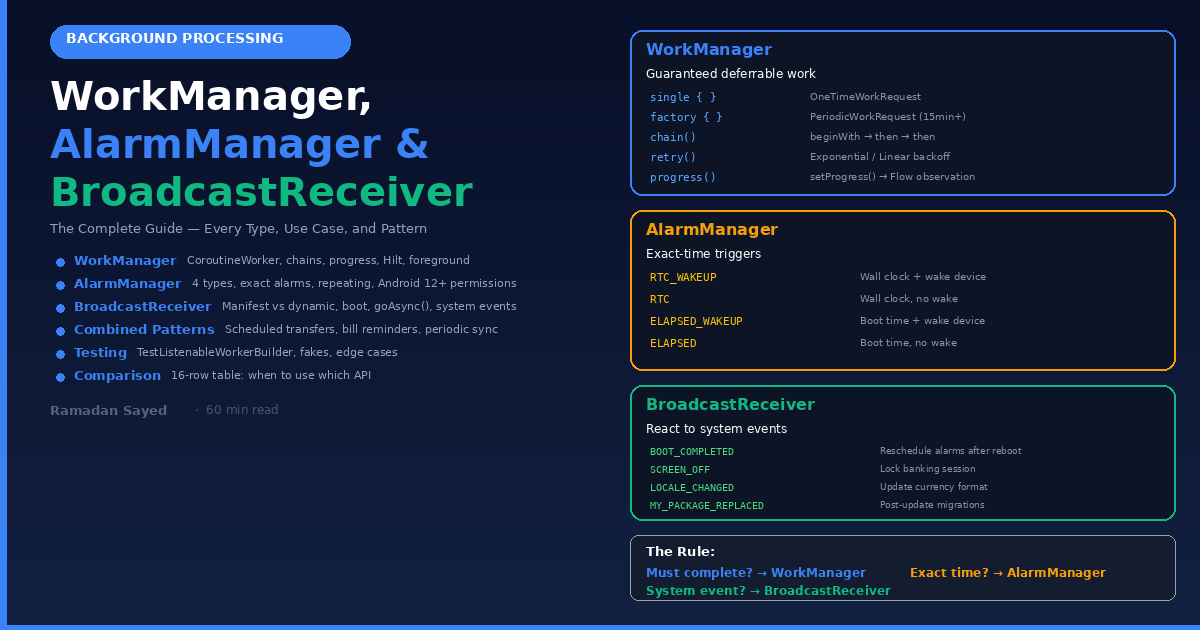
Part 1: The Background Processing Landscape
Why Background Work Is Hard on Android
Android aggressively kills background apps to save battery. Every Android version since Marshmallow (6.0) added more restrictions:
Android 6 (Marshmallow): Doze mode — delays background work when screen is off
Android 7 (Nougat):      Background broadcast limitations
Android 8 (Oreo):        Background service limitations — can't start services from background
Android 9 (Pie):         App standby buckets — less-used apps get fewer execution slots
Android 10:              Background location limits
Android 11:              Foreground service type required
Android 12:              Exact alarm permission needed (SCHEDULE_EXACT_ALARM)
Android 13:              Notification permission required
Android 14:              Foreground service type restrictions — must declare in manifest
Android 15:              Further FGS restrictions — short-service type, timeout enforcement
The fundamental rule: The system WILL kill your background work unless you use the right API. A coroutine in a ViewModel? Dead when the Activity dies. A background Service? Dead within minutes. A Thread.sleep() loop? Dead immediately.
The Decision Tree
What kind of work are you doing?

├── MUST happen at EXACT time? (alarm, reminder, scheduled notification)
│   └── AlarmManager (setExactAndAllowWhileIdle)
│
├── MUST complete eventually? (upload, sync, cleanup)
│   ├── User is watching? (upload progress, music playback)
│   │   └── Foreground Service
│   └── User doesn't need to see it?
│       └── WorkManager ← USE THIS FOR MOST THINGS
│
├── REACT to system event? (boot, connectivity, battery)
│   └── BroadcastReceiver
│
├── SHORT task while app is visible? (API call, save to DB)
│   └── Coroutine in ViewModel scope
│
└── ONGOING user-visible task? (navigation, music, call)
    └── Foreground Service
Part 2: WorkManager — The Complete Guide
What WorkManager Is
WorkManager is Android’s recommended API for deferrable, guaranteed background work. “Deferrable” means the system decides WHEN to run it (could be immediately, could be in 15 minutes). “Guaranteed” means it WILL run eventually — even if the app is killed, the device restarts, or the user force-stops the app.
WHAT WORKMANAGER GUARANTEES:
  ✅ Work survives app process death
  ✅ Work survives device reboot
  ✅ Work respects constraints (network, battery, charging)
  ✅ Work retries on failure (with backoff)
  ✅ Work chains execute in order
  ✅ Work is de-duplicated (unique work names)

WHAT WORKMANAGER DOES NOT GUARANTEE:
  ❌ Exact execution time (it's DEFERRABLE)
  ❌ Immediate execution (system decides when)
  ❌ Execution during Doze deep sleep (unless expedited)
  ❌ Running if user force-stops the app (Android 14+: stopped state)
WorkManager Under the Hood
WorkManager decides which backend to use based on API level:

API 23+ (most devices): JobScheduler
API 14-22 (legacy):     AlarmManager + BroadcastReceiver
Your code doesn't change. WorkManager abstracts the backend.
Execution flow:
1. You enqueue a WorkRequest
2. WorkManager saves it to an internal SQLite database
3. System schedules execution based on constraints
4. When constraints are met → Worker.doWork() runs
5. If app is killed before completion → re-scheduled on next launch
6. If device reboots → re-scheduled after boot (persistent)
Dependencies
// build.gradle.kts
dependencies {
    // WorkManager with Kotlin coroutines support
    implementation("androidx.work:work-runtime-ktx:2.10.0")

    // Testing
    androidTestImplementation("androidx.work:work-testing:2.10.0")

    // Optional: Hilt integration
    implementation("androidx.hilt:hilt-work:1.2.0")
    ksp("androidx.hilt:hilt-compiler:1.2.0")
}
Worker Types
// ═══════════════════════════════════════════
// TYPE 1: Worker (synchronous — runs on background thread)
// ═══════════════════════════════════════════
class SyncWorker(
    context: Context,
    params: WorkerParameters
) : Worker(context, params) {

override fun doWork(): Result {
        // Runs on a background thread managed by WorkManager
        // BLOCKING - this thread is occupied until you return
        try {
            val data = api.fetchTransactionsSync()  // Blocking call
            database.insertTransactionsSync(data)
            return Result.success()
        } catch (e: Exception) {
            return if (runAttemptCount < 3) Result.retry()
                   else Result.failure()
        }
    }
}
// ═══════════════════════════════════════════
// TYPE 2: CoroutineWorker (suspend - recommended for Kotlin)
// ═══════════════════════════════════════════
class TransactionSyncWorker(
    context: Context,
    params: WorkerParameters
) : CoroutineWorker(context, params) {
    // Runs on Dispatchers.Default by default
    // You CAN use suspend functions directly
    override suspend fun doWork(): Result {
        return try {
            val transactions = api.fetchTransactions()  // suspend fun
            database.insertTransactions(transactions)   // suspend fun

            // Return output data (passed to next worker in chain)
            val output = workDataOf(
                "sync_count" to transactions.size,
                "last_sync" to System.currentTimeMillis()
            )
            Result.success(output)
        } catch (e: CancellationException) {
            throw e  // NEVER catch cancellation
        } catch (e: HttpException) {
            if (e.code() == 401) {
                // Token expired - don't retry, it'll keep failing
                Result.failure(workDataOf("error" to "unauthorized"))
            } else if (runAttemptCount < 3) {
                Result.retry()
            } else {
                Result.failure(workDataOf("error" to e.message))
            }
        } catch (e: IOException) {
            // Network error - retry with backoff
            if (runAttemptCount < 5) Result.retry()
            else Result.failure()
        }
    }
}
// ═══════════════════════════════════════════
// TYPE 3: RxWorker (for RxJava projects)
// ═══════════════════════════════════════════
class RxSyncWorker(
    context: Context,
    params: WorkerParameters
) : RxWorker(context, params) {
    override fun createWork(): Single<Result> {
        return api.fetchTransactionsRx()
            .flatMap { database.insertRx(it) }
            .map { Result.success() }
            .onErrorReturn { Result.retry() }
    }
}
// ═══════════════════════════════════════════
// TYPE 4: ListenableWorker (advanced - full control)
// ═══════════════════════════════════════════
// For cases where you need to control the threading yourself
// Most apps don't need this - use CoroutineWorker instead
Result Types
override suspend fun doWork(): Result {
    return when {
        // ═══════════ SUCCESS ═══════════
        // Work completed. Won't be retried.
        // For periodic work: schedules next occurrence.
        success -> Result.success()

        // With output data (passed to next worker in chain):
        success -> Result.success(workDataOf("key" to "value"))

        // ═══════════ FAILURE ═══════════
        // Work failed permanently. Won't be retried.
        // For periodic work: schedules next occurrence anyway.
        // Use when: auth failed, invalid data, unrecoverable error
        failure -> Result.failure()

        // With error data:
        failure -> Result.failure(workDataOf("error" to "reason"))

        // ═══════════ RETRY ═══════════
        // Work failed temporarily. Will retry with backoff.
        // Use when: network timeout, server 500, transient error
        retry -> Result.retry()
        // Respects backoffPolicy (linear or exponential)
    }
}
OneTimeWorkRequest (Run Once)
// ═══════════════════════════════════════════
// BASIC: Run once, immediately (when constraints met)
// ═══════════════════════════════════════════
val syncRequest = OneTimeWorkRequestBuilder<TransactionSyncWorker>()
    .build()

workManager.enqueue(syncRequest)
// ═══════════════════════════════════════════
// WITH INPUT DATA (pass data to the worker)
// ═══════════════════════════════════════════
val uploadRequest = OneTimeWorkRequestBuilder<ImageUploadWorker>()
    .setInputData(workDataOf(
        "image_uri" to imageUri.toString(),
        "quality" to 80,
        "max_width" to 1080,
        "upload_type" to "avatar"
    ))
    .build()
// ═══════════════════════════════════════════
// WITH CONSTRAINTS
// ═══════════════════════════════════════════
val constraints = Constraints.Builder()
    .setRequiredNetworkType(NetworkType.CONNECTED)     // Need internet
    // .setRequiredNetworkType(NetworkType.UNMETERED)  // WiFi only
    // .setRequiredNetworkType(NetworkType.NOT_ROAMING) // No roaming
    .setRequiresBatteryNotLow(true)                    // Battery > 15%
    .setRequiresCharging(false)                        // Don't need charging
    .setRequiresDeviceIdle(false)                      // Don't need idle
    .setRequiresStorageNotLow(true)                    // Storage not full
    .build()
val syncRequest = OneTimeWorkRequestBuilder<TransactionSyncWorker>()
    .setConstraints(constraints)
    .build()
// Work runs ONLY when ALL constraints are satisfied
// ═══════════════════════════════════════════
// WITH BACKOFF POLICY (retry behavior)
// ═══════════════════════════════════════════
val request = OneTimeWorkRequestBuilder<TransactionSyncWorker>()
    .setBackoffCriteria(
        BackoffPolicy.EXPONENTIAL,    // 30s → 60s → 120s → 240s ...
        30, TimeUnit.SECONDS          // Initial delay
    )
    // Or: BackoffPolicy.LINEAR → 30s → 60s → 90s → 120s ...
    .build()
// ═══════════════════════════════════════════
// WITH INITIAL DELAY
// ═══════════════════════════════════════════
val request = OneTimeWorkRequestBuilder<CleanupWorker>()
    .setInitialDelay(1, TimeUnit.HOURS)  // Run 1 hour from now
    .build()
// ═══════════════════════════════════════════
// WITH TAGS (for cancellation and observation)
// ═══════════════════════════════════════════
val request = OneTimeWorkRequestBuilder<TransactionSyncWorker>()
    .addTag("sync")
    .addTag("transactions")
    .build()
// Cancel all workers with tag:
workManager.cancelAllWorkByTag("sync")
// Observe all workers with tag:
workManager.getWorkInfosByTagFlow("sync").collect { workInfoList ->
    workInfoList.forEach { info ->
        when (info.state) {
            WorkInfo.State.SUCCEEDED -> log("Sync completed")
            WorkInfo.State.FAILED -> log("Sync failed")
            WorkInfo.State.RUNNING -> log("Syncing...")
            WorkInfo.State.ENQUEUED -> log("Sync queued")
            WorkInfo.State.CANCELLED -> log("Sync cancelled")
            WorkInfo.State.BLOCKED -> log("Waiting for dependency")
        }
    }
}
// ═══════════════════════════════════════════
// EXPEDITED (high priority - runs ASAP)
// ═══════════════════════════════════════════
val urgentRequest = OneTimeWorkRequestBuilder<CriticalSyncWorker>()
    .setExpedited(OutOfQuotaPolicy.RUN_AS_NON_EXPEDITED_WORK_REQUEST)
    // OutOfQuotaPolicy.DROP_WORK_REQUEST → don't run if quota exceeded
    .build()
// Expedited work runs immediately, even in Doze mode (subject to quota)
// Use for: critical financial transactions, security events
// Don't use for: regular sync, analytics upload
PeriodicWorkRequest (Recurring Work)
// ═══════════════════════════════════════════
// PERIODIC: Run repeatedly at intervals
// ═══════════════════════════════════════════

// Minimum interval: 15 MINUTES (Android enforces this)
val periodicSync = PeriodicWorkRequestBuilder<TransactionSyncWorker>(
    repeatInterval = 15, TimeUnit.MINUTES
).setConstraints(
    Constraints.Builder()
        .setRequiredNetworkType(NetworkType.CONNECTED)
        .setRequiresBatteryNotLow(true)
        .build()
).build()
// ═══════════════════════════════════════════
// WITH FLEX INTERVAL (execution window)
// ═══════════════════════════════════════════
// "Run every 1 hour, but within the LAST 15 minutes of each hour"
// This gives the system flexibility for battery optimization
val periodicSync = PeriodicWorkRequestBuilder<TransactionSyncWorker>(
    repeatInterval = 1, TimeUnit.HOURS,
    flexTimeInterval = 15, TimeUnit.MINUTES
).build()
// Timeline:
// Hour 0 ─────────────────── [run window: 0:45-1:00] ──── Hour 1
// Hour 1 ─────────────────── [run window: 1:45-2:00] ──── Hour 2
// System picks the best time within the window
// ═══════════════════════════════════════════
// ENQUEUE AS UNIQUE (prevent duplicates)
// ═══════════════════════════════════════════
workManager.enqueueUniquePeriodicWork(
    "transaction_sync",                        // Unique name
    ExistingPeriodicWorkPolicy.KEEP,           // If already exists: keep running
    // ExistingPeriodicWorkPolicy.UPDATE,      // Replace with new config
    // ExistingPeriodicWorkPolicy.CANCEL_AND_REENQUEUE,  // Cancel and restart
    periodicSync
)
Unique Work (Preventing Duplicates)
// ═══════════ ONE-TIME UNIQUE WORK ═══════════
workManager.enqueueUniqueWork(
    "full_sync",                               // Unique name
    ExistingWorkPolicy.KEEP,                   // If running: keep current
    // ExistingWorkPolicy.REPLACE,             // Cancel current, start new
    // ExistingWorkPolicy.APPEND,              // Run after current finishes
    // ExistingWorkPolicy.APPEND_OR_REPLACE,   // Append, or replace if failed
    syncRequest
)

// USE CASES for each policy:
// KEEP:    "Sync already running? Don't start another one."
// REPLACE: "User pulled to refresh. Cancel old sync, start fresh."
// APPEND:  "Queue multiple uploads. Process in order."
// APPEND_OR_REPLACE: "Queue uploads, but if previous failed, start over."
Work Chaining
// ═══════════════════════════════════════════
// SEQUENTIAL CHAIN: A → B → C
// ═══════════════════════════════════════════

val compress = OneTimeWorkRequestBuilder<CompressImageWorker>()
    .setInputData(workDataOf("uri" to imageUri.toString()))
    .build()
val upload = OneTimeWorkRequestBuilder<UploadWorker>()
    .setConstraints(Constraints.Builder()
        .setRequiredNetworkType(NetworkType.CONNECTED)
        .build())
    .build()
val notify = OneTimeWorkRequestBuilder<NotifyServerWorker>().build()
val cleanup = OneTimeWorkRequestBuilder<CleanupTempFilesWorker>().build()
workManager
    .beginWith(compress)            // Step 1: Compress image
    .then(upload)                   // Step 2: Upload (needs network)
    .then(notify)                   // Step 3: Notify server
    .then(cleanup)                  // Step 4: Delete temp files
    .enqueue()
// If ANY step fails → subsequent steps are CANCELLED
// Output data flows: compress output → upload input → notify input → cleanup input
// ═══════════════════════════════════════════
// PARALLEL + SEQUENTIAL: (A, B) → C
// ═══════════════════════════════════════════
val fetchProfile = OneTimeWorkRequestBuilder<FetchProfileWorker>().build()
val fetchTransactions = OneTimeWorkRequestBuilder<FetchTransactionsWorker>().build()
val updateDashboard = OneTimeWorkRequestBuilder<UpdateDashboardWorker>().build()
workManager
    .beginWith(listOf(fetchProfile, fetchTransactions))  // Parallel!
    .then(updateDashboard)                                // After BOTH complete
    .enqueue()
// fetchProfile runs simultaneously with fetchTransactions
// updateDashboard runs only after BOTH succeed
// If either fails → updateDashboard is cancelled
// ═══════════════════════════════════════════
// UNIQUE CHAIN
// ═══════════════════════════════════════════
workManager
    .beginUniqueWork(
        "image_upload_pipeline",
        ExistingWorkPolicy.APPEND,     // Queue behind existing
        compress
    )
    .then(upload)
    .then(cleanup)
    .enqueue()
Progress Reporting
// Worker reports progress:
class UploadWorker(
    context: Context,
    params: WorkerParameters
) : CoroutineWorker(context, params) {

override suspend fun doWork(): Result {
        val fileSize = inputData.getLong("file_size", 0)
        var uploaded = 0L
        return try {
            api.uploadChunked(
                file = getFile(),
                onProgress = { bytesWritten ->
                    uploaded += bytesWritten
                    val percent = ((uploaded.toFloat() / fileSize) * 100).toInt()

                    // Report progress to observers
                    setProgress(workDataOf(
                        "percent" to percent,
                        "uploaded_bytes" to uploaded,
                        "total_bytes" to fileSize
                    ))
                }
            )
            Result.success()
        } catch (e: Exception) {
            Result.retry()
        }
    }
}
// Observe progress in Compose:
@Composable
fun UploadProgressBar(workId: UUID) {
    val context = LocalContext.current
    val workManager = WorkManager.getInstance(context)

    val workInfo by workManager.getWorkInfoByIdFlow(workId)
        .collectAsStateWithLifecycle(initialValue = null)
    workInfo?.let { info ->
        when (info.state) {
            WorkInfo.State.RUNNING -> {
                val percent = info.progress.getInt("percent", 0)
                Column {
                    Text("Uploading... $percent%")
                    LinearProgressIndicator(
                        progress = { percent / 100f },
                        modifier = Modifier.fillMaxWidth()
                    )
                }
            }
            WorkInfo.State.SUCCEEDED -> {
                Text("Upload complete!", color = Color.Green)
            }
            WorkInfo.State.FAILED -> {
                val error = info.outputData.getString("error") ?: "Unknown error"
                Text("Upload failed: $error", color = Color.Red)
            }
            else -> {
                Text("Waiting to upload...")
            }
        }
    }
}
Hilt Integration
// ═══════════════════════════════════════════
// Worker with injected dependencies
// ═══════════════════════════════════════════

@HiltWorker
class TransactionSyncWorker @AssistedInject constructor(
    @Assisted context: Context,
    @Assisted workerParameters: WorkerParameters,
    private val transactionRepository: TransactionRepository,
    private val notificationManager: SyncNotificationManager,
    private val analytics: Analytics
) : CoroutineWorker(context, workerParameters) {
    override suspend fun doWork(): Result {
        return try {
            notificationManager.showSyncingNotification()

            val result = transactionRepository.syncPendingTransactions()

            analytics.track("sync_complete", mapOf(
                "count" to result.syncedCount.toString(),
                "duration_ms" to result.durationMs.toString()
            ))

            notificationManager.showSyncCompleteNotification(result.syncedCount)

            Result.success(workDataOf(
                "synced_count" to result.syncedCount,
                "timestamp" to System.currentTimeMillis()
            ))
        } catch (e: CancellationException) {
            throw e
        } catch (e: UnauthorizedException) {
            // Token expired - don't retry
            notificationManager.showAuthExpiredNotification()
            Result.failure(workDataOf("error" to "unauthorized"))
        } catch (e: Exception) {
            if (runAttemptCount < 3) {
                Result.retry()
            } else {
                analytics.track("sync_failed", mapOf("error" to (e.message ?: "")))
                Result.failure(workDataOf("error" to e.message))
            }
        }
    }
}
// Setup in Application:
@HiltAndroidApp
class MyApp : Application(), Configuration.Provider {
    @Inject lateinit var workerFactory: HiltWorkerFactory
    override val workManagerConfiguration: Configuration
        get() = Configuration.Builder()
            .setWorkerFactory(workerFactory)
            .setMinimumLoggingLevel(
                if (BuildConfig.DEBUG) Log.DEBUG else Log.ERROR
            )
            .build()
}
Foreground Work (Long-Running with Notification)
// For work that takes > 10 minutes or needs user visibility
// Android 12+ requires specifying foreground service type

class LongUploadWorker(
    context: Context,
    params: WorkerParameters
) : CoroutineWorker(context, params) {
    override suspend fun doWork(): Result {
        // Promote to foreground - shows a notification
        setForeground(createForegroundInfo())

        // Now you have more execution time (up to hours)
        return try {
            uploadLargeFile()
            Result.success()
        } catch (e: Exception) {
            Result.failure()
        }
    }
    private fun createForegroundInfo(): ForegroundInfo {
        val notification = NotificationCompat.Builder(applicationContext, "upload_channel")
            .setContentTitle("Uploading document")
            .setContentText("Please wait...")
            .setSmallIcon(R.drawable.ic_upload)
            .setProgress(100, 0, true)
            .setOngoing(true)
            .build()
        return ForegroundInfo(
            NOTIFICATION_ID,
            notification,
            ServiceInfo.FOREGROUND_SERVICE_TYPE_DATA_SYNC  // Required Android 14+
        )
    }
    companion object {
        private const val NOTIFICATION_ID = 1001
    }
}
<!-- AndroidManifest.xml — Required for foreground workers -->
<uses-permission android:name="android.permission.FOREGROUND_SERVICE" />
<uses-permission android:name="android.permission.FOREGROUND_SERVICE_DATA_SYNC" />
<service
android:name="androidx.work.impl.foreground.SystemForegroundService"
android:foregroundServiceType="dataSync"
android:exported="false" />Part 3: AlarmManager — Exact Timing
When to Use AlarmManager (Not WorkManager)
USE ALARMMANAGER WHEN:
  ✅ You need EXACT timing (alarm clock, medication reminder)
  ✅ The action MUST happen at a specific time, not "sometime soon"
  ✅ The work is SHORT (< 10 seconds — just fire a notification or broadcast)

DO NOT USE ALARMMANAGER WHEN:
  ❌ Work is long-running (use WorkManager)
  ❌ Work needs network (use WorkManager with constraints)
  ❌ Timing is approximate ("sync every 15 min" → WorkManager)
  ❌ Work needs to survive app kill (AlarmManager IS persistent, but WorkManager is better for this)
Alarm Types
// ═══════════════════════════════════════════
// TYPE 1: RTC_WAKEUP — Wall clock time, wakes device
// ═══════════════════════════════════════════
// Use for: Alarms, reminders, scheduled notifications
// "Fire at 8:00 AM tomorrow, even if device is sleeping"

val alarmManager = getSystemService(AlarmManager::class.java)
val calendar = Calendar.getInstance().apply {
    set(Calendar.HOUR_OF_DAY, 8)
    set(Calendar.MINUTE, 0)
    set(Calendar.SECOND, 0)
    if (before(Calendar.getInstance())) {
        add(Calendar.DAY_OF_MONTH, 1)  // If 8AM already passed, set for tomorrow
    }
}
val pendingIntent = PendingIntent.getBroadcast(
    context, REQUEST_CODE,
    Intent(context, AlarmReceiver::class.java).apply {
        putExtra("alarm_id", "morning_reminder")
        putExtra("message", "Time to check your account!")
    },
    PendingIntent.FLAG_UPDATE_CURRENT or PendingIntent.FLAG_IMMUTABLE
)
// Exact alarm - fires at EXACTLY the specified time
alarmManager.setExactAndAllowWhileIdle(
    AlarmManager.RTC_WAKEUP,
    calendar.timeInMillis,
    pendingIntent
)
// ═══════════════════════════════════════════
// TYPE 2: RTC - Wall clock time, does NOT wake device
// ═══════════════════════════════════════════
// Use for: Low-priority tasks that can wait until device wakes naturally
// "Fire at 8:00 AM, but only if device is already awake"
alarmManager.set(
    AlarmManager.RTC,
    calendar.timeInMillis,
    pendingIntent
)
// ═══════════════════════════════════════════
// TYPE 3: ELAPSED_REALTIME_WAKEUP - Time since boot, wakes device
// ═══════════════════════════════════════════
// Use for: "Fire 30 minutes from NOW"
// Not affected by wall clock changes (user changing time zone)
alarmManager.setExactAndAllowWhileIdle(
    AlarmManager.ELAPSED_REALTIME_WAKEUP,
    SystemClock.elapsedRealtime() + 30 * 60 * 1000,  // 30 min from now
    pendingIntent
)
// ═══════════════════════════════════════════
// TYPE 4: ELAPSED_REALTIME - Time since boot, does NOT wake device
// ═══════════════════════════════════════════
// Use for: Low-priority relative timing
alarmManager.set(
    AlarmManager.ELAPSED_REALTIME,
    SystemClock.elapsedRealtime() + 60 * 60 * 1000,  // 1 hour from now
    pendingIntent
)
Alarm Type Summary
TYPE                        CLOCK BASIS    WAKES DEVICE    USE CASE
──────────────────────────────────────────────────────────────────
RTC_WAKEUP                  Wall clock     YES             Alarm clock, reminder
RTC                         Wall clock     NO              Low-priority scheduled
ELAPSED_REALTIME_WAKEUP     Boot time      YES             "X minutes from now"
ELAPSED_REALTIME            Boot time      NO              Low-priority relative
Alarm Precision Methods
// ═══════════ INEXACT (battery-friendly, batched with other alarms) ═══════════

// set() - delivers within a window (can be delayed minutes)
alarmManager.set(AlarmManager.RTC_WAKEUP, triggerTime, pendingIntent)
// setWindow() - delivers within your specified window
alarmManager.setWindow(
    AlarmManager.RTC_WAKEUP,
    triggerTime,
    10 * 60 * 1000,      // 10-minute window
    pendingIntent
)
// "Fire between triggerTime and triggerTime + 10 minutes"
// setInexactRepeating() - repeating with system-chosen intervals
alarmManager.setInexactRepeating(
    AlarmManager.RTC_WAKEUP,
    triggerTime,
    AlarmManager.INTERVAL_HOUR,  // ~every hour (system batches)
    pendingIntent
)
// ═══════════ EXACT (precise, higher battery cost) ═══════════
// setExact() - exact time, but may be deferred during Doze
alarmManager.setExact(AlarmManager.RTC_WAKEUP, triggerTime, pendingIntent)
// setExactAndAllowWhileIdle() - exact time, even during Doze
// THIS IS WHAT YOU WANT for alarms/reminders
alarmManager.setExactAndAllowWhileIdle(
    AlarmManager.RTC_WAKEUP, triggerTime, pendingIntent
)
// Rate-limited: max 1 per 9 minutes during Doze
// setAlarmClock() - for ALARM CLOCK apps only
// Shows alarm icon in status bar, highest priority
alarmManager.setAlarmClock(
    AlarmManager.AlarmClockInfo(triggerTime, showIntent),
    pendingIntent
)
Android 12+ Permission for Exact Alarms
<!-- AndroidManifest.xml -->

<!-- For alarm clock apps (always granted, shows in settings) -->
<uses-permission android:name="android.permission.SCHEDULE_EXACT_ALARM" />
<!-- For non-alarm apps that need exact timing (Android 13+) -->
<uses-permission android:name="android.permission.USE_EXACT_ALARM" />
// Check if you can schedule exact alarms (Android 12+)
if (Build.VERSION.SDK_INT >= Build.VERSION_CODES.S) {
if (!alarmManager.canScheduleExactAlarms()) {
// Direct user to settings
Intent(Settings.ACTION_REQUEST_SCHEDULE_EXACT_ALARM).also {
it.data = Uri.parse("package:${context.packageName}")
context.startActivity(it)
}
return
}
}
// Listen for permission changes
class ExactAlarmPermissionReceiver : BroadcastReceiver() {
override fun onReceive(context: Context, intent: Intent) {
if (intent.action == AlarmManager.ACTION_SCHEDULE_EXACT_ALARM_PERMISSION_STATE_CHANGED) {
val alarmManager = context.getSystemService(AlarmManager::class.java)
if (alarmManager.canScheduleExactAlarms()) {
// Re-schedule all exact alarms
rescheduleAllAlarms(context)
}
}
}
}Repeating Alarms
// ═══════════ EXACT REPEATING (deprecated for exact) ═══════════
// setRepeating() is INEXACT on Android 4.4+
// For exact repeating: schedule one-shot, re-schedule in receiver

// ═══════════ PATTERN: Exact + Self-Rescheduling ═══════════
class AlarmReceiver : BroadcastReceiver() {
    override fun onReceive(context: Context, intent: Intent) {
        val alarmId = intent.getStringExtra("alarm_id") ?: return

        // 1. Do the work (SHORT - < 10 seconds)
        showNotification(context, intent.getStringExtra("message") ?: "")

        // 2. Schedule the NEXT alarm (for daily reminders)
        val nextAlarmTime = calculateNextAlarmTime(alarmId)
        scheduleExactAlarm(context, alarmId, nextAlarmTime)
    }

    private fun calculateNextAlarmTime(alarmId: String): Long {
        val calendar = Calendar.getInstance().apply {
            add(Calendar.DAY_OF_MONTH, 1)  // Tomorrow
            set(Calendar.HOUR_OF_DAY, 8)
            set(Calendar.MINUTE, 0)
            set(Calendar.SECOND, 0)
        }
        return calendar.timeInMillis
    }
}
// ═══════════ INEXACT REPEATING (battery-friendly) ═══════════
// For "roughly every hour" - system batches alarms
alarmManager.setInexactRepeating(
    AlarmManager.ELAPSED_REALTIME_WAKEUP,
    SystemClock.elapsedRealtime() + AlarmManager.INTERVAL_HOUR,
    AlarmManager.INTERVAL_HOUR,  // Predefined intervals:
    // INTERVAL_FIFTEEN_MINUTES
    // INTERVAL_HALF_HOUR
    // INTERVAL_HOUR
    // INTERVAL_HALF_DAY
    // INTERVAL_DAY
    pendingIntent
)
Cancelling Alarms
// Cancel requires the SAME PendingIntent (same request code + intent)
val pendingIntent = PendingIntent.getBroadcast(
    context, REQUEST_CODE,
    Intent(context, AlarmReceiver::class.java),
    PendingIntent.FLAG_NO_CREATE or PendingIntent.FLAG_IMMUTABLE
)

pendingIntent?.let {
    alarmManager.cancel(it)
    it.cancel()  // Also cancel the PendingIntent itself
}
// Check if alarm exists:
val exists = PendingIntent.getBroadcast(
    context, REQUEST_CODE,
    Intent(context, AlarmReceiver::class.java),
    PendingIntent.FLAG_NO_CREATE or PendingIntent.FLAG_IMMUTABLE
) != null
Part 4: BroadcastReceiver — System Events
What BroadcastReceiver Does
BroadcastReceiver listens for system-wide events (broadcasts). When the event occurs, your receiver’s onReceive() is called — even if your app isn't running (for some events).
Registered vs Manifest-Declared
// ═══════════════════════════════════════════
// TYPE 1: MANIFEST-DECLARED (static — always listening)
// ═══════════════════════════════════════════
// Survives app death. Wakes up your app when broadcast arrives.
// RESTRICTED since Android 8: Only a few broadcasts allowed.
<!-- AndroidManifest.xml -->
<receiver
android:name=".receivers.BootReceiver"
android:exported="true"
android:enabled="true">
<intent-filter>
<action android:name="android.intent.action.BOOT_COMPLETED" />
</intent-filter>
</receiver>
<receiver
android:name=".receivers.AlarmReceiver"
android:exported="false" />
<!-- ALLOWED manifest broadcasts (Android 8+):
BOOT_COMPLETED, LOCALE_CHANGED, MY_PACKAGE_REPLACED,
ACTION_TIMEZONE_CHANGED, SCHEDULE_EXACT_ALARM_PERMISSION_STATE_CHANGED,
and a few more system-critical ones -->// ═══════════════════════════════════════════
// TYPE 2: CONTEXT-REGISTERED (dynamic — while app is alive)
// ═══════════════════════════════════════════
// Lives only while the registering component lives.
// No restrictions on which broadcasts to listen for.
class MainActivity : ComponentActivity() {
private val connectivityReceiver = object : BroadcastReceiver() {
override fun onReceive(context: Context, intent: Intent) {
val isConnected = isNetworkAvailable(context)
viewModel.onConnectivityChanged(isConnected)
}
}
override fun onStart() {
super.onStart()
registerReceiver(
connectivityReceiver,
IntentFilter(ConnectivityManager.CONNECTIVITY_ACTION),
RECEIVER_NOT_EXPORTED // Android 14+ security flag
)
}
override fun onStop() {
super.onStop()
unregisterReceiver(connectivityReceiver)
}
}Essential BroadcastReceivers for Banking Apps
// ═══════════ 1. BOOT COMPLETED — Reschedule alarms after reboot ═══════════
class BootReceiver : BroadcastReceiver() {
    override fun onReceive(context: Context, intent: Intent) {
        if (intent.action == Intent.ACTION_BOOT_COMPLETED) {
            // Alarms are lost after reboot — reschedule them
            AlarmScheduler(context).rescheduleAllAlarms()

            // WorkManager work survives reboot automatically
            // No action needed for WorkManager
        }
    }
}

// ═══════════ 2. ALARM RECEIVER - Handle alarm triggers ═══════════
class AlarmReceiver : BroadcastReceiver() {
    override fun onReceive(context: Context, intent: Intent) {
        // onReceive runs on MAIN THREAD - keep it SHORT (< 10 seconds)
        val alarmType = intent.getStringExtra("type") ?: return

        when (alarmType) {
            "bill_reminder" -> {
                val billId = intent.getStringExtra("bill_id") ?: return
                val amount = intent.getDoubleExtra("amount", 0.0)
                showBillReminderNotification(context, billId, amount)
            }
            "transfer_scheduled" -> {
                // For long work, delegate to WorkManager
                val transferId = intent.getStringExtra("transfer_id") ?: return
                val request = OneTimeWorkRequestBuilder<ExecuteTransferWorker>()
                    .setInputData(workDataOf("transfer_id" to transferId))
                    .setExpedited(OutOfQuotaPolicy.RUN_AS_NON_EXPEDITED_WORK_REQUEST)
                    .build()
                WorkManager.getInstance(context).enqueue(request)
            }
        }
    }
}
// ═══════════ 3. LOCALE CHANGED - Update currency formatting ═══════════
class LocaleReceiver : BroadcastReceiver() {
    override fun onReceive(context: Context, intent: Intent) {
        if (intent.action == Intent.ACTION_LOCALE_CHANGED) {
            // Clear cached formatters, update currency display
            CurrencyFormatter.clearCache()
        }
    }
}
// ═══════════ 4. PACKAGE REPLACED - Run migrations after update ═══════════
class UpdateReceiver : BroadcastReceiver() {
    override fun onReceive(context: Context, intent: Intent) {
        if (intent.action == Intent.ACTION_MY_PACKAGE_REPLACED) {
            // App was updated - run post-update tasks
            val request = OneTimeWorkRequestBuilder<PostUpdateWorker>().build()
            WorkManager.getInstance(context).enqueue(request)
        }
    }
}
// ═══════════ 5. SCREEN OFF - Lock banking session ═══════════
// Must be registered dynamically (not in manifest)
class ScreenLockReceiver : BroadcastReceiver() {
    override fun onReceive(context: Context, intent: Intent) {
        when (intent.action) {
            Intent.ACTION_SCREEN_OFF -> {
                // Start auto-lock timer for banking app
                SessionManager.startLockTimer()
            }
            Intent.ACTION_USER_PRESENT -> {
                // Device unlocked - check if banking session expired
                if (SessionManager.isSessionExpired()) {
                    // Require re-authentication
                }
            }
        }
    }
}
goAsync() — Long Work in BroadcastReceiver
// onReceive() has a 10-second limit on the main thread.
// For work > 10 seconds, use goAsync() to get more time,
// then delegate to a background thread.

class SyncReceiver : BroadcastReceiver() {
    override fun onReceive(context: Context, intent: Intent) {
        val pendingResult = goAsync()  // Extends lifetime to ~30 seconds

        CoroutineScope(Dispatchers.IO).launch {
            try {
                // Do work (up to ~30 seconds)
                quickSync(context)
            } finally {
                pendingResult.finish()  // MUST call this
            }
        }
    }
}
// For work > 30 seconds: DON'T use BroadcastReceiver.
// Delegate to WorkManager:
class LongSyncReceiver : BroadcastReceiver() {
    override fun onReceive(context: Context, intent: Intent) {
        // Just enqueue work and return immediately
        WorkManager.getInstance(context).enqueue(
            OneTimeWorkRequestBuilder<FullSyncWorker>().build()
        )
    }
}
Part 5: Combining Them Together (Real-World Patterns)
Pattern 1: Scheduled Transfer (AlarmManager + WorkManager + BroadcastReceiver)
// User schedules a transfer for tomorrow at 10:00 AM

// STEP 1: Schedule an exact alarm
class TransferScheduler(private val context: Context) {
    fun scheduleTransfer(transferId: String, executeAt: Long) {
        val alarmManager = context.getSystemService(AlarmManager::class.java)

        val intent = Intent(context, ScheduledTransferReceiver::class.java).apply {
            putExtra("transfer_id", transferId)
            putExtra("type", "execute_transfer")
        }

        val pendingIntent = PendingIntent.getBroadcast(
            context,
            transferId.hashCode(),
            intent,
            PendingIntent.FLAG_UPDATE_CURRENT or PendingIntent.FLAG_IMMUTABLE
        )

        alarmManager.setExactAndAllowWhileIdle(
            AlarmManager.RTC_WAKEUP,
            executeAt,
            pendingIntent
        )

        // Save alarm info to Room (for rescheduling after boot)
        database.scheduledAlarmDao().insert(
            ScheduledAlarm(
                id = transferId,
                triggerAt = executeAt,
                type = "transfer",
                pendingIntentRequestCode = transferId.hashCode()
            )
        )
    }
}
// STEP 2: BroadcastReceiver fires at exact time
class ScheduledTransferReceiver : BroadcastReceiver() {
    override fun onReceive(context: Context, intent: Intent) {
        val transferId = intent.getStringExtra("transfer_id") ?: return

        // STEP 3: Delegate to WorkManager (needs network, might take time)
        val request = OneTimeWorkRequestBuilder<ExecuteTransferWorker>()
            .setInputData(workDataOf("transfer_id" to transferId))
            .setConstraints(Constraints.Builder()
                .setRequiredNetworkType(NetworkType.CONNECTED)
                .build())
            .setExpedited(OutOfQuotaPolicy.RUN_AS_NON_EXPEDITED_WORK_REQUEST)
            .build()

        WorkManager.getInstance(context).enqueue(request)
    }
}
// STEP 4: Worker executes the transfer
@HiltWorker
class ExecuteTransferWorker @AssistedInject constructor(
    @Assisted context: Context,
    @Assisted params: WorkerParameters,
    private val transferRepository: TransferRepository,
    private val notificationManager: TransferNotificationManager
) : CoroutineWorker(context, params) {
    override suspend fun doWork(): Result {
        val transferId = inputData.getString("transfer_id") ?: return Result.failure()

        return try {
            val result = transferRepository.executeScheduledTransfer(transferId)
            notificationManager.showTransferExecutedNotification(result)
            Result.success()
        } catch (e: InsufficientFundsException) {
            notificationManager.showInsufficientFundsNotification(transferId)
            Result.failure()
        } catch (e: IOException) {
            if (runAttemptCount < 3) Result.retry()
            else {
                notificationManager.showTransferFailedNotification(transferId)
                Result.failure()
            }
        }
    }
}
// STEP 5: Reschedule after boot
class BootReceiver : BroadcastReceiver() {
    override fun onReceive(context: Context, intent: Intent) {
        if (intent.action == Intent.ACTION_BOOT_COMPLETED) {
            val pendingResult = goAsync()
            CoroutineScope(Dispatchers.IO).launch {
                try {
                    val scheduler = TransferScheduler(context)
                    val pendingAlarms = database.scheduledAlarmDao().getAll()
                    pendingAlarms.forEach { alarm ->
                        if (alarm.triggerAt > System.currentTimeMillis()) {
                            scheduler.scheduleTransfer(alarm.id, alarm.triggerAt)
                        }
                    }
                } finally {
                    pendingResult.finish()
                }
            }
        }
    }
}
Pattern 2: Bill Payment Reminders
// User sets a reminder: "Remind me 2 days before every electricity bill"

class BillReminderManager(private val context: Context) {

    fun scheduleReminder(bill: Bill, daysBefore: Int) {
        val reminderTime = bill.dueDate
            .minusDays(daysBefore.toLong())
            .atTime(9, 0)                    // 9:00 AM
            .toInstant(TimeZone.currentSystemDefault())
            .toEpochMilliseconds()

        if (reminderTime <= System.currentTimeMillis()) return  // Already passed

        val intent = Intent(context, AlarmReceiver::class.java).apply {
            putExtra("type", "bill_reminder")
            putExtra("bill_id", bill.id)
            putExtra("bill_name", bill.name)
            putExtra("amount", bill.amount)
            putExtra("due_date", bill.dueDate.toString())
        }

        val pendingIntent = PendingIntent.getBroadcast(
            context,
            "bill_${bill.id}".hashCode(),
            intent,
            PendingIntent.FLAG_UPDATE_CURRENT or PendingIntent.FLAG_IMMUTABLE
        )

        val alarmManager = context.getSystemService(AlarmManager::class.java)
        alarmManager.setExactAndAllowWhileIdle(
            AlarmManager.RTC_WAKEUP,
            reminderTime,
            pendingIntent
        )
    }

    fun cancelReminder(billId: String) {
        val pendingIntent = PendingIntent.getBroadcast(
            context,
            "bill_${billId}".hashCode(),
            Intent(context, AlarmReceiver::class.java),
            PendingIntent.FLAG_NO_CREATE or PendingIntent.FLAG_IMMUTABLE
        )
        pendingIntent?.let {
            context.getSystemService(AlarmManager::class.java).cancel(it)
            it.cancel()
        }
    }
}
Pattern 3: Periodic Sync with Connectivity Awareness
// Sync transactions every 30 minutes when online
// If offline, sync immediately when connection returns

class SyncManager(private val context: Context) {

    fun setupPeriodicSync() {
        val constraints = Constraints.Builder()
            .setRequiredNetworkType(NetworkType.CONNECTED)
            .setRequiresBatteryNotLow(true)
            .build()

        val syncRequest = PeriodicWorkRequestBuilder<TransactionSyncWorker>(
            30, TimeUnit.MINUTES,
            5, TimeUnit.MINUTES  // Flex: run within last 5 min of each 30-min window
        )
            .setConstraints(constraints)
            .setBackoffCriteria(BackoffPolicy.EXPONENTIAL, 1, TimeUnit.MINUTES)
            .addTag("periodic_sync")
            .build()

        WorkManager.getInstance(context).enqueueUniquePeriodicWork(
            "transaction_sync",
            ExistingPeriodicWorkPolicy.UPDATE,
            syncRequest
        )
    }

    fun triggerImmediateSync() {
        val request = OneTimeWorkRequestBuilder<TransactionSyncWorker>()
            .setConstraints(Constraints.Builder()
                .setRequiredNetworkType(NetworkType.CONNECTED)
                .build())
            .setExpedited(OutOfQuotaPolicy.RUN_AS_NON_EXPEDITED_WORK_REQUEST)
            .addTag("immediate_sync")
            .build()

        WorkManager.getInstance(context).enqueueUniqueWork(
            "immediate_sync",
            ExistingWorkPolicy.REPLACE,
            request
        )
    }

    fun cancelAllSync() {
        WorkManager.getInstance(context).cancelAllWorkByTag("periodic_sync")
        WorkManager.getInstance(context).cancelAllWorkByTag("immediate_sync")
    }
}
Part 6: Testing
Testing Workers
@OptIn(ExperimentalCoroutinesApi::class)
class TransactionSyncWorkerTest {

@get:Rule val mainDispatcherRule = MainDispatcherRule()

    private val fakeRepository = FakeTransactionRepository()

    @Test
    fun `sync succeeds with transactions`() = runTest {
        fakeRepository.setPendingTransactions(listOf(testTransaction))

        val worker = TestListenableWorkerBuilder<TransactionSyncWorker>(
            context = ApplicationProvider.getApplicationContext()
        ).build()

        val result = worker.doWork()

        assertIs<Result.Success>(result)
        assertEquals(1, result.outputData.getInt("synced_count", 0))
    }
    @Test
    fun `sync retries on network error`() = runTest {
        fakeRepository.shouldFail = true
        fakeRepository.errorToReturn = IOException("No network")

        val worker = TestListenableWorkerBuilder<TransactionSyncWorker>(
            context = ApplicationProvider.getApplicationContext()
        ).setRunAttemptCount(0)
        .build()

        val result = worker.doWork()
        assertIs<Result.Retry>(result)
    }
    @Test
    fun `sync fails permanently on auth error`() = runTest {
        fakeRepository.shouldFail = true
        fakeRepository.errorToReturn = UnauthorizedException()

        val worker = TestListenableWorkerBuilder<TransactionSyncWorker>(
            context = ApplicationProvider.getApplicationContext()
        ).build()

        val result = worker.doWork()
        assertIs<Result.Failure>(result)
        assertEquals("unauthorized", result.outputData.getString("error"))
    }
}
Part 7: Complete Comparison Table
FEATURE              WORKMANAGER           ALARMMANAGER           BROADCASTRECEIVER
─────────────────────────────────────────────────────────────────────────────────
Purpose              Guaranteed work       Exact timing           React to events
Timing               Approximate           Exact                  Event-driven
Survives reboot      ✅ Automatic          ❌ Must reschedule     ✅ (manifest)
Survives app kill    ✅ Automatic          ✅ (PendingIntent)     ✅ (manifest)
Constraints          Network, battery,     None                   None
                     charging, storage
Chaining             ✅ beginWith().then()  ❌                     ❌
Retry with backoff   ✅ Linear/Exponential  ❌ (manual)            ❌
Progress reporting   ✅ setProgress()       ❌                     ❌
Unique work          ✅ enqueueUniqueWork   ❌ (manual)            N/A
Min interval         15 minutes            None (but rate-limited) N/A
Max execution time   10 min (or unlimited  ~10 seconds            ~10 seconds
                     with foreground)      (in onReceive)         (or ~30s with goAsync)
Hilt injection       ✅ @HiltWorker        ❌ (manual)            ❌ (manual)
Coroutine support    ✅ CoroutineWorker    ❌                     goAsync + scope
API level            14+                   1+                     1+
Backend              JobScheduler (23+)    Kernel timer           Binder IPC
Battery impact       Low (batched)         Medium-High (wakeup)   Low
Testing              ✅ TestWorkerBuilder  Manual                 Manual
Observation          ✅ Flow/LiveData      ❌                     ❌
Part 8: Common Pitfalls
Pitfall 1: Using AlarmManager for Periodic Work
// ❌ Using AlarmManager for "sync every 30 minutes"
alarmManager.setRepeating(RTC_WAKEUP, now, 30 * 60 * 1000, pendingIntent)
// Problems:
// - Drains battery (wakes device every 30 min)
// - Doesn't check network availability
// - No retry on failure
// - No constraint support

// ✅ Use WorkManager for periodic work
PeriodicWorkRequestBuilder<SyncWorker>(30, TimeUnit.MINUTES)
    .setConstraints(networkConstraint)
    .build()
Pitfall 2: Long Work in BroadcastReceiver
// ❌ Doing network call in onReceive (10-second limit!)
class MyReceiver : BroadcastReceiver() {
    override fun onReceive(context: Context, intent: Intent) {
        val data = api.fetchSync()  // Might take 30 seconds → ANR!
        database.insert(data)
    }
}

// ✅ Delegate to WorkManager
class MyReceiver : BroadcastReceiver() {
    override fun onReceive(context: Context, intent: Intent) {
        WorkManager.getInstance(context).enqueue(
            OneTimeWorkRequestBuilder<FetchWorker>().build()
        )
    }
}
Pitfall 3: Not Rescheduling Alarms After Boot
// ❌ Alarms disappear after reboot
// User set a reminder → device restarts → reminder is GONE

// ✅ Reschedule in BOOT_COMPLETED receiver
class BootReceiver : BroadcastReceiver() {
    override fun onReceive(context: Context, intent: Intent) {
        if (intent.action == Intent.ACTION_BOOT_COMPLETED) {
            ReminderScheduler(context).rescheduleAll()
        }
    }
}
Pitfall 4: Not Handling Android 14+ Foreground Service Types
// ❌ Crashes on Android 14+ — no foreground service type declared
setForeground(ForegroundInfo(id, notification))

// ✅ Declare type in manifest AND in ForegroundInfo
setForeground(ForegroundInfo(
    id, notification,
    ServiceInfo.FOREGROUND_SERVICE_TYPE_DATA_SYNC
))
Conclusion
Three APIs, three purposes. WorkManager for guaranteed background work with constraints, retry, chaining, and progress — use it for 90% of your background tasks. AlarmManager for exact-time triggers — use it only when work MUST happen at a specific clock time (reminders, alarms, scheduled notifications). BroadcastReceiver for reacting to system events — boot completed, locale changed, screen off, connectivity changes.
In a banking app, they work together: AlarmManager triggers the scheduled transfer at exactly 10:00 AM → BroadcastReceiver receives the alarm → delegates to WorkManager → WorkManager executes the transfer with network constraint, retries on failure, and shows a notification. BootReceiver reschedules all alarms after device restart.
The golden rule: if your work needs to complete eventually and doesn’t need exact timing → WorkManager. If it needs exact timing → AlarmManager to trigger, WorkManager to execute. If it needs to react to the system → BroadcastReceiver to detect, WorkManager to act.
Connect with Me on LinkedIn
Follow me on LinkedIn
Tags: #WorkManager #AlarmManager #BroadcastReceiver #Android #BackgroundProcessing #Kotlin #JetpackCompose #ForegroundService #Banking #Production
메타데이터
- post_id
- 5d89dc813ec2
- slug
- workmanager-alarmmanager-and-broadcastreceiver-the-complete-guide-every-type-every-use-case-5d89dc813ec2
- url
- https://medium.com/@ramadan123sayed/workmanager-alarmmanager-and-broadcastreceiver-the-complete-guide-every-type-every-use-case-5d89dc813ec2
- canonical_url
- https://medium.com/@ramadan123sayed/workmanager-alarmmanager-and-broadcastreceiver-the-complete-guide-every-type-every-use-case-5d89dc813ec2
- author_url
- https://medium.com/@ramadan123sayed
- status
- ok
- fetched_at
- 2026-07-16 11:16:19