Kubernetes External Secrets: Join the Disjointed
Aeris integrated Kubernetes with the GCP Secret Manager service in order to have a unified secret management system…
Photo by Bryson Hammer on Unsplash
Kubernetes External Secrets: Join the Disjointed
Protecting secrets is no small challenge in software. Database passwords, API keys, and TLS certificates all need to be carefully protected and changed regularly. Fortunately, cloud providers are creating services designed to make this task easier. GCP Secret Manager and AWS Secrets Manager are both good examples.
Here at Aeris (an IoT solution provider, www.aeris.com), we recently integrated Kubernetes with GCP Secret Manager to create a unified secret management system for all of our services both inside and outside of Kubernetes. This blog tells the story of how we did it, and what the results were.
Kubernetes Secrets
Kubernetes (K8s), the de-facto standard for managing container-based deployments, provides a construct called “secrets” that can be used to protect any sensitive information needed within the Kubernetes cluster. This construct is useful, but it does not protect secrets for services running outside of the K8s cluster. Using just the K8s approach would leave us with a disjointed solution to cover all services.
To address the gap, we used an API extension from GoDaddy called ‘Kubernetes External Secrets’ to integrate GCP Secret Manager into Kubernetes. Kubernetes External Secrets extends the Kubernetes Secrets API by adding a Custom Resource Definition (CRD) called “External Secret” which is internally mapped to the native Kubernetes secret. It uses a controller to fetch secrets from the external secret manager service, thereby linking the native K8s secrets with the external secrets.
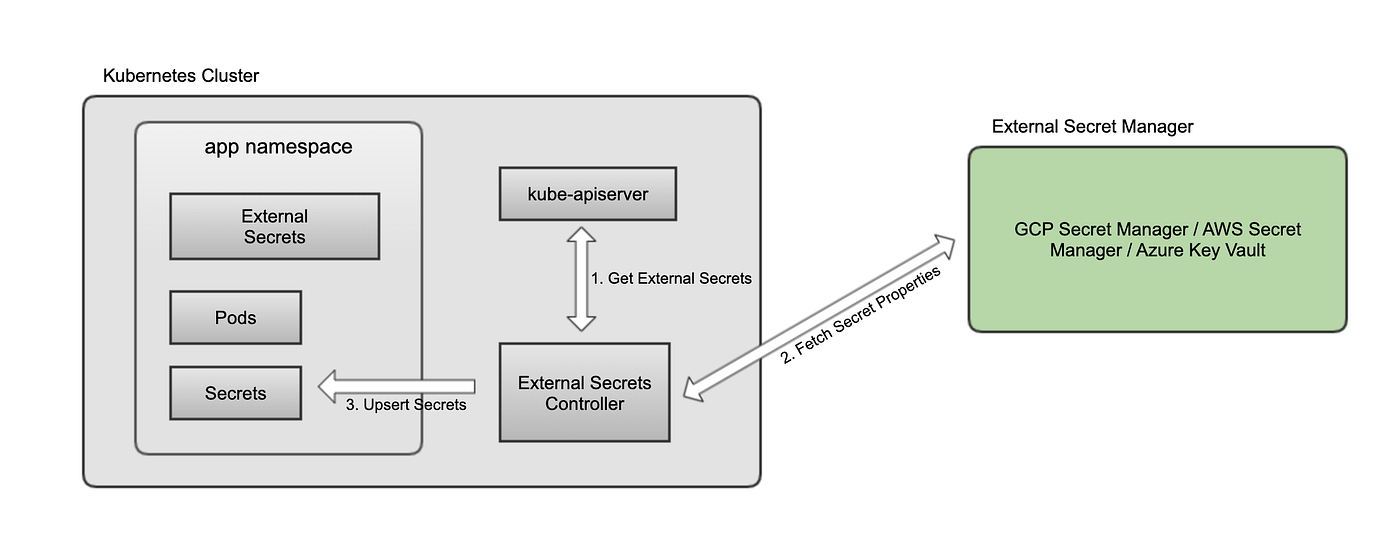
Kubernetes External Secrets Design
To integrate Kubernetes with the GCP Secret Manager service, here are the steps you’ll need to take:
- Create your secrets in the Secret Manager of your GCP project.
- If you are not using GKE Workload Identity, create a Kubernetes native secret (from a file) that will have the JSON key of the service account that will be used to fetch secrets from the GCP Secret Manager.
- In your GKE cluster, install the Kubernetes External Secrets helm chart (https://github.com/godaddy/kubernetes-external-secrets).
- Once the helm chart is deployed, then create external secrets like below.

External Secret Definition
[Note: The “key” in the above example is the secret name as defined in the GCP Secret Manager Service.]
- Once the external secret is defined, a corresponding native secret automatically gets created with the “name” as provided in the metadata.

Kubernetes Native Secret
Nomenclature
At Aeris, we follow the principle that there shall be no sharing of secrets across services, unique instances, or environments. However, the GCP Secret Manager currently supports a very simplistic approach when defining secret keys. There is no support yet for hierarchy or tagging to support the separation we want.
To align with this simplicity and also allow for clear separation of secrets across environments, GKE clusters, and products, we use the following naming convention when defining external secrets:
capsule-id_namespace_consumer-service-name_target-component_secret-key
- capsule-id: The environment. For example, ‘dev’ for Development environment.
- namespace: The K8s namespace where the native secret is used. For services deployed on virtual machine, the namespace is replaced by ‘vm’.
- consumer-service-name: The name of the service or micro-service that will use the secret. For example, ‘authentication_service’ or ‘auth’ for short.
- target-component: The service for which the secret is used to access. For example, ‘user-database’ or ‘user-db’ for short.
- secret-key: The secrete type. For example ‘password’.
This nomenclature convention gives us better security and access control when integrating with GCP Secret Manager.
Deployment Process
For services to start using external secrets, the helm charts need to have an additional ‘External Secret’ yaml file (refer to the image in step # 4 above). To minimize the changes to existing services, the standard nomenclature we used for defining the secrets really helps. We enhanced our existing Jenkins pipeline to intelligently derive the name of the external secret by using the name of the K8s native secret object, its namespace, and the secret keys in that object (all of these were already part of the values.yaml file).
Using this approach, the Jenkins pipeline is able to generate and apply the ‘External Secret’ during the service deployment process without requiring us to make changes to all of the individual services. This dramatically helped accelerate the migration to the GCP Secret Manager.
Refreshing Secrets
In case of a secret version rotation, Kubernetes External Secrets provides a configurable parameter that causes polling of the Cloud Secret Service and fetches the latest version. This ensures that the K8s native secret gets an update automatically. The polling frequency can be controlled via configuration “POLLER_INTERVAL_MILLISECONDS” defined in values.yaml. To disable polling, set the configuration to “DISABLE_POLLING” in values.yaml.
Benefits
This approach to secret management has many benefits.
- Unified storage of secrets: Provides a common location which is independent of deployment model (virtual machine, Docker container, and K8s)
- Easier secret rotation: Makes secret rotation easier by allowing multiple versions of the same secret at the same time.
- Reduced operational complexity: Use standard RBAC / IAM from the cloud vs building an in-house solution.
- Less Expensive: An alternative would be to run a 2-node HashiCorp Vault deployment with a 3-node ZooKeeper cluster. This approach will have a higher cost compared to storing up to 1000 secrets per month in GCP Secret Manager.
Aeris is actively contributing our improvements to the GoDaddy repository (https://github.com/godaddy/kubernetes-external-secrets) to make this feature more robust. You can follow the commits in that repository for the latest updates.
메타데이터
- post_id
- 5dab8910d2c8
- slug
- kubernetes-external-secrets-join-the-disjoints-5dab8910d2c8
- url
- https://medium.com/aeris-things/kubernetes-external-secrets-join-the-disjoints-5dab8910d2c8
- canonical_url
- https://medium.com/aeris-things/kubernetes-external-secrets-join-the-disjoints-5dab8910d2c8
- author_url
- https://medium.com/@karan.kapoor_57640
- status
- ok
- fetched_at
- 2026-07-20 13:14:08