Luba 2 AWD Connection Issue? Here’s the Fix That Worked for Me
1. Introduction: What Went Wrong
Luba 2 AWD Connection Issue? Here’s the Fix That Worked for Me


1. Introduction: What Went Wrong
I’m a user of the Luba 2 AWD 5000X robotic lawn mower, and I recently ran into an unexpected issue that might help others avoid the same frustration. Everything was working fine until I had to move my internet router as part of a home setup change. During the process, the router was temporarily disconnected.
After everything was back in place, I noticed within an hour or two that something was wrong:
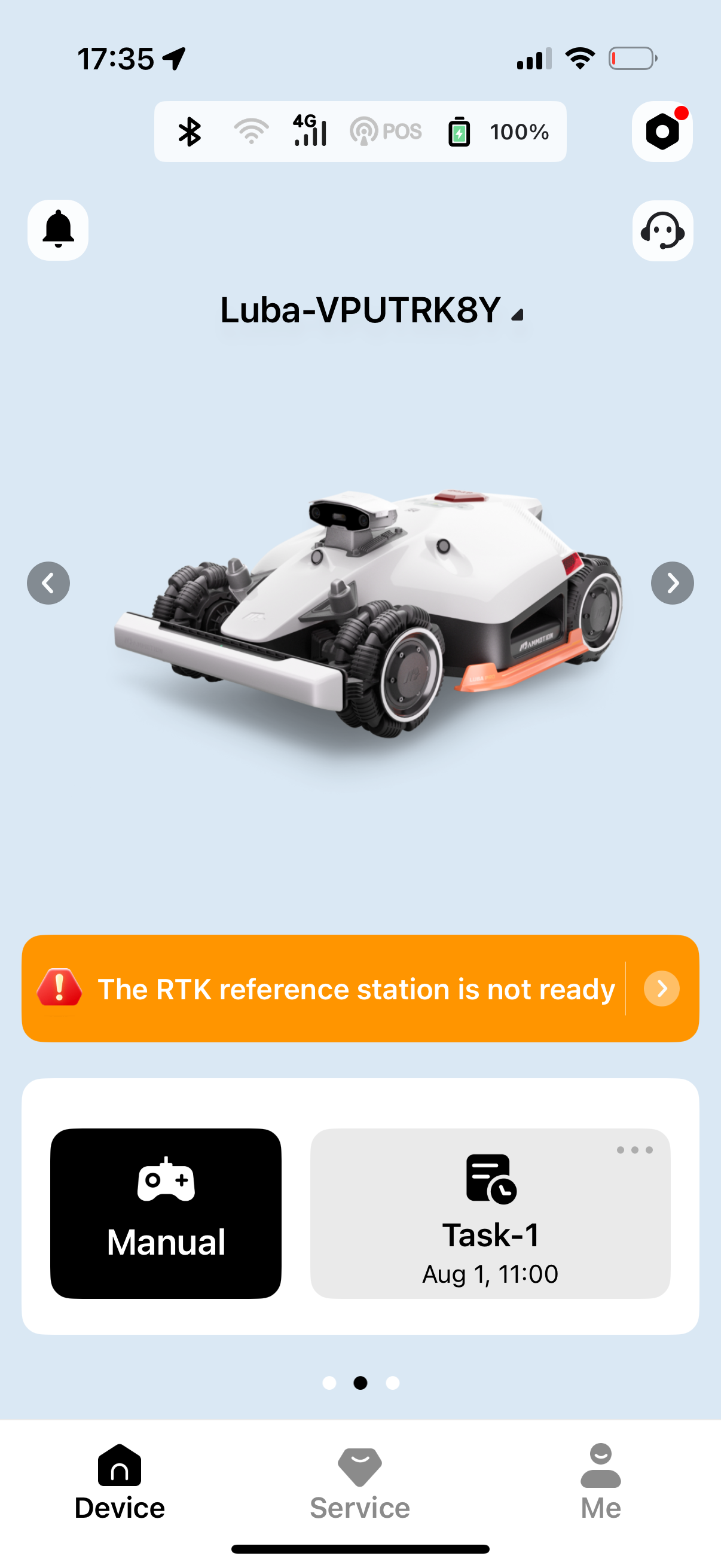
- The robot suddenly couldn’t find the RTK antenna, even though the antenna was powered on and blinking green (which usually means it’s working properly).
- At the same time, the robot lost its Wi-Fi connection, and I couldn’t reconnect it — even though the antenna was nearby and connected to Wi-Fi just fine.
I tried rebooting both the robot and the RTK base, but nothing changed. I wanted to update the firmware, thinking that might help — but the robot required Wi-Fi to do that. Unfortunately, I couldn’t connect to any network. Even when I removed the previously saved Wi-Fi credentials, the robot still didn’t detect any networks at all.
That’s when I reached out to support — hoping for a fix. What followed didn’t really solve the issue, but I eventually found a solution myself.
2. Support Experience
When I contacted Mammotion support through their live chat, I made sure to provide clear, detailed information. I explained that:
- The antenna was placed in an open-sky location.
- The RTK base station was close to the robot.
- The antenna’s green light was blinking, showing that it was functioning.
- I even sent multiple photos showing the setup, including one where the antenna was clearly under open sky.


Despite this, the response I got was generic and didn’t acknowledge the specific evidence I had shared. The repeated suggestion was to move the RTK antenna at least 3 meters away from any walls, fences, or trees — even though I already had it in a compliant location. Here’s a short excerpt from the chat:
“Just a heads-up — walls, trees, or fences can sometimes block the RTK signal. For the best connection, it’s ideal to set up the RTK in a nice open spot.” — Lorelai V, Mammotion Support
Later, I was told:
“Due to RTK’s strict installation requirements (a 3-meter clearance from obstacles like trees, fences, or walls), we recommend reinstalling the RTK module and remapping your area.” — Lorelai V
I also asked about the robot’s network connection, since it was showing no available Wi-Fi and firmware couldn’t be updated without one. But that part of the issue was brushed aside with another RTK-focused answer:
“Even if you use network positioning, RTK is used as the origin of positioning, so the installation of RTK is very important.”
While I understand that support teams handle many requests and try to stick to standard procedures, I felt that my situation was not being assessed based on the specific, documented info I gave. Still stuck, I decided to troubleshoot further myself.
3. The Actual Fix That Worked
After getting nowhere with support, I decided to try solving the issue myself. What finally worked was not related to RTK placement at all — but instead to Wi-Fi settings and resetting the robot. Here’s exactly what I did:
🔄 Step-by-Step Fix:
Split the Wi-Fi bands on my router: — I changed the router settings to create two separate SSIDs — one for 2.4GHz and one for 5GHz.
- For example:
MyNetwork_2GMyNetwork_5G
— Performed a factory reset on the robot.
— After the reset, the robot detected the 2.4GHz network (MyNetwork_2G).
I connected it manually to that one, since Luba robots require 2.4GHz.
— Once connected, I was finally able to update the firmware.
That’s it. Once the firmware update completed, the robot started functioning normally again. The RTK connection came back, and everything was stable.
Unfortunately, the old map was lost during the factory reset, so I had to start fresh and remap the lawn. Still, getting the robot operational again was worth it.
This fix had nothing to do with antenna positioning. The real issue was likely a combination of:
- The robot being stuck on an old Wi-Fi configuration.
- A firmware or software state that couldn’t recover without reset and reconnection.
4. Final Thoughts
The purpose of this article is not to blame support, but to help other users who might find themselves stuck in a similar situation.
I understand that Mammotion support is likely dealing with a large number of users and trying to give safe, general advice. However, sometimes real-world problems require more than scripted answers — especially when the user provides clear diagnostics, photos, and logical explanations.
In my case, the issue wasn’t about RTK antenna placement, despite that being the only advice I received. The actual fix was a Wi-Fi network reset, factory restore, and firmware update — which I discovered on my own.
If you’re facing similar symptoms:
- RTK suddenly not connecting even when it’s powered and nearby.
- Wi-Fi not showing up on the robot.
- Firmware update not possible due to no connection.
Then this guide might help you get things working again — without waiting days for generic advice.
If even a few users save time or frustration because of this, then writing this was worth it. Feel free to share this with others in the community who might be stuck like I was.
메타데이터
- post_id
- 5dd109e1a02f
- slug
- luba-2-awd-connection-issue-heres-the-fix-that-worked-for-me-5dd109e1a02f
- url
- https://medium.com/@pilotaz/luba-2-awd-connection-issue-heres-the-fix-that-worked-for-me-5dd109e1a02f
- canonical_url
- https://medium.com/@pilotaz/luba-2-awd-connection-issue-heres-the-fix-that-worked-for-me-5dd109e1a02f
- author_url
- https://medium.com/@pilotaz
- status
- ok
- fetched_at
- 2026-06-21 07:44:09

