Tableau LOD Calculations Explained with Ranking / Window functions
I started my learning journey with Tableau few months ago.
Tableau LOD Calculations Explained with Ranking / Window functions
I started my learning journey with Tableau few months ago.
So far , it is pretty good. However , I found LOD ( level of detail) expressions are interestingly complex at the first encounter. Reading thru few examples and watching few videos to get a better understanding of these concepts.
Being I come from database background and SQL knowledge , I am hoping , I can provide my understanding of LOD thru ranking/ analytical functions.
There are three LOD keywords ( FIXED , INCLUDE , EXCLUDE) in Tableau. FIXED LOD calculations does not depend on the visuals ( aka viz) , where as visualization impacts how INCLUDE and EXCLUDE are calculated.
In my example , I have created a table in SQL server and populated few records.
To follow along the example , feel free to use the script below.
Create table CourseEnrollment
( StudentName varchar(50) ,
  Department varchar(50) ,
  Subject varchar(50) ,
  EnrollmentDate Date
) ;
GO

Insert into CourseEnrollment values ( 'Zahir Mohideen' ,  'Maths' , 'Pre Calculus' , '1988-03-01') ;
Insert into CourseEnrollment values ( 'Zahir Mohideen' ,  'Maths' , 'Multivariate Calculus' , '2010-05-16') ;
Insert into CourseEnrollment values ( 'Zahir Mohideen' ,  'Statistics' , 'Statistics 101' , '2020-07-25') ;
Insert into CourseEnrollment values ( 'Abdul Hameed' ,  'Maths' , 'Pre Calculus' , '1991-03-01') ;
Insert into CourseEnrollment values ( 'Abdul Hameed' ,  'Physics' , 'Phy101' , '2020-07-25') ;
I have connected Tableau to my underlying table.
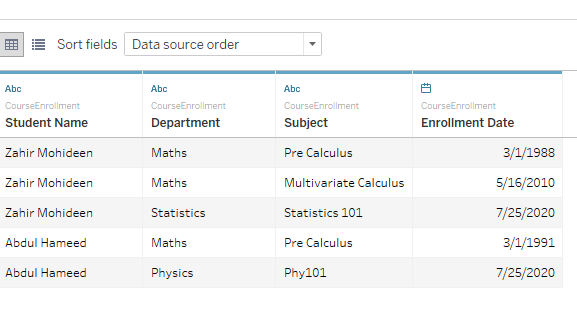
Here , I want to know the very first enrollment of the student no matter what department / course he enrolled into . Also , this value does not change , when the viz is changed.
In the “sheet” tab , I create a calculated field for the FIXED LOD , by clicking on “Create Calculated Field “ as below.

Similarly , create LOD calculations for INCLUDE and EXCLUDE.


Let us bring in these LOD calculations into the sheet.

The value for First Enrollment Date — Fixed is the minimum enrollment date per student , no matter what the dimensions are available in the viz. FIXED by Student Name .
The value for First Enrollment Date — INCLUDE is the minimum enrollment date per student and all other available dimension in the viz . In our case , Department . So , in essence , first enrollment date per student / department.
The value for First Enrollment Date — EXCLUDE is the minimum enrollment date per student and all other available dimension in the viz , except student name as specified in the LOD . In our case , Department . So , in essence , first enrollment date per department.
These results can be derived from SQL using analytical / window functions as

When we remove the department / Student , the FIXED LOD remains the same ; there is a change in Include and Exclude.


Hope , this simple example provides the LOD in the eyes of SQL developer.
I offer support for database maintenance , performance tuning , database development. Please contact for any database related activities.
Originally published at https://zahirmohideen.blogspot.com/2021/08/tableau-lod-calculations-explained-with.html
메타데이터
- post_id
- 5e4d6e3fd463
- slug
- tableau-lod-calculations-explained-with-ranking-window-functions-5e4d6e3fd463
- url
- https://medium.com/@zahirmohideen/tableau-lod-calculations-explained-with-ranking-window-functions-5e4d6e3fd463
- canonical_url
- https://medium.com/@zahirmohideen/tableau-lod-calculations-explained-with-ranking-window-functions-5e4d6e3fd463
- author_url
- https://medium.com/@zahirmohideen
- status
- ok
- fetched_at
- 2026-06-20 20:29:01




