Image to Text API 2
The Image to Text API detects and extracts text from images using state-of-the-art optical character recognition (OCR) algorithms. It can…
Image to Text API 2

The Image to Text API detects and extracts text from images using state-of-the-art optical character recognition (OCR) algorithms. It can detect texts of different sizes, fonts, and even handwriting.
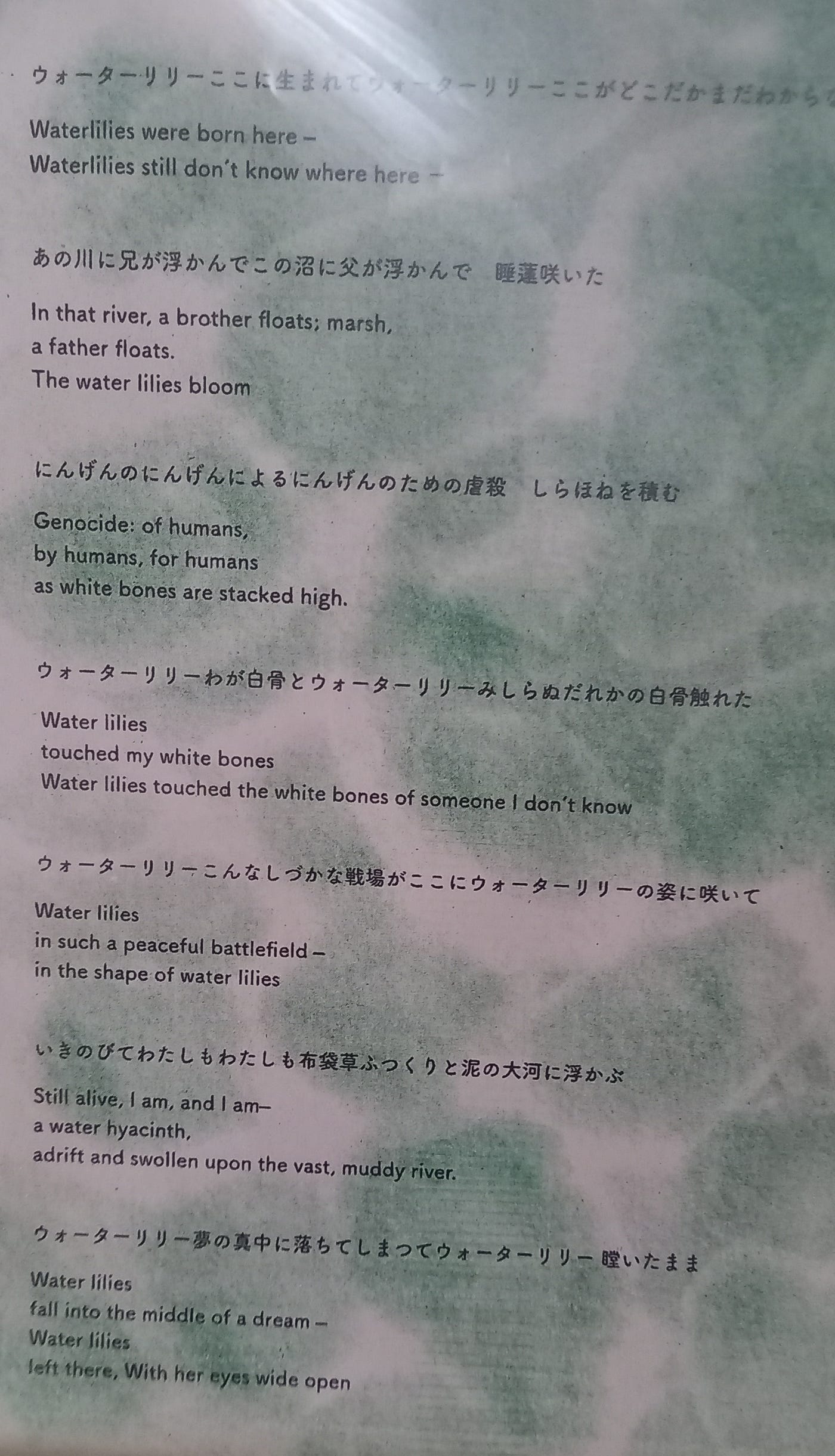
Haiku is a traditional Japanese poetic form
This function sends an HTTP request to an image-to-text API, then returns the server’s response body when the request succeeds. In practice, it looks like a small wrapper around a GET call that passes an API key in a header and returns either the extracted text or an error string.
const
   URL_APILAY='https://api.apilayer.com/image_to_text/url?url=%s'
In short, this is an OCR/image-to-text API client function written in Delphi-style code for maXbox.
function Image_to_text_API3(AURL, url_imgpath, aApikey: string): string;
var httpq: THttpConnectionWinInet;
    rets: TStringStream;
    heads: TStrings; iht: IHttpConnection; //losthost:THTTPConnectionLostEvent;
begin
  httpq:= THttpConnectionWinInet.Create(true);
  rets:= TStringStream.create('');
  heads:= TStringlist.create;
  try
    heads.add('apikey='+aAPIkey);
    iht:= httpq.setHeaders(heads);
    httpq.Get(Format(AURL,[url_imgpath]), rets);
    if httpq.getresponsecode=200 Then result:= rets.datastring
      else result:='Failed:'+
             itoa(Httpq.getresponsecode)+Httpq.GetResponseHeader('message');
  except
    writeln('EWI_HTTP: '+ExceptiontoString(exceptiontype,exceptionparam));
  finally
    httpq:= Nil;
    heads.Free;
    rets.Free;
  end;
end;                 //}
What it does
- Creates an HTTP client object and two helper containers: one for the response text and one for headers.
- Adds a header named apikey with the value aApikey.
- Calls GET on Format(AURL, [url_imgpath]), so AURL is treated as a format string and url_imgpath is inserted into it.
- If the HTTP status code is 200, it returns the raw response content from rets.DataString.
Otherwise, it returns a string starting with Failed: plus the status code and the server’s message response header.
That matches the general pattern of image-to-text/OCR API calls, where the service returns text in the response after being given an image reference and an API key.
The function says: “Call this web API with my image URL and API key, then give me back whatever text the API extracted from the image.” If the call fails, it gives you a failure message instead of crashing.
Important notes
- The request uses GET, which implies the image path is likely passed in the URL, not uploaded as a file.
- The header name apikey is custom; some APIs use different auth headers such as Authorization: Bearer …, so this code is tailored to one specific service or wrapper.
- The except block only writes an error message; it does not set a fallback return value, so the function could end up returning an empty string on exceptions.
- httpq:= Nil; in finally is not the same as freeing the object; normally you would call Free to release it properly.
1176_APILayer_Demo64_latinumtranslate.txt
- If the image path may contain special characters, URL-encode it before inserting it into Format(AURL, [UrlImgPath]).
- Store API keys or tokens outside code, such as environment variables, config files with restricted access, or platform secrets storage.
function GetApiKey: string;
begin
  Result:= GetEnvironmentVariable('IMAGE_TO_TEXT_API_KEY');
  if Result = '' then
    raise Exception.Create('Missing IMAGE_TO_TEXT_API_KEY');
end;
{“lang”:”en”,”all_text “:”ウォーターリリーここに生まれてウォーターリリーここがどこだかまだわから Waterlilies were born here - Waterlilies still don’t know where here - あの川に兄が浮か”}
Haiku (俳句) is a form of short poetry that originated in Japan. It is known for its strict structure, which traditionally consists of three lines with a total of 17 syllables: 5 syllables in the first line, 7 in the second, and 5 in the third. This concise format allows poets to capture a moment in nature or an emotional experience in a few words

Bodensee
Originally published at https://dev.to on June 9, 2026.
메타데이터
- post_id
- 5e539ccc6ebc
- slug
- image-to-text-api-2-5e539ccc6ebc
- url
- https://medium.com/@maxkleiner1/image-to-text-api-2-5e539ccc6ebc
- canonical_url
- https://medium.com/@maxkleiner1/image-to-text-api-2-5e539ccc6ebc
- author_url
- https://medium.com/@maxkleiner1
- status
- ok
- fetched_at
- 2026-06-10 15:53:41






