Inside Claude Code: The Harness, the Model, and the Loop
A practical guide to the context loop, tool calls, and permission system shaping your AI session.
Inside Claude Code: The Harness, the Model, and the Loop
A practical guide to the context loop, tool calls, and permission system shaping your AI session.
You type one request:
Fix the failing session timeout test in tests/auth/test_session.py. Run only that test.
You press Enter.
A few seconds later, Claude has read the failing test, inspected the session code, found the timeout logic, made a small change, run the targeted test, watched it fail once, corrected the edge case, and confirmed it passes.
It feels like one thing happened. It did not.
What happened was a loop between two pieces: a local harness with access to your machine, and a remote model doing the reasoning. Around that loop are the parts that make Claude Code work in real projects: context, permissions, skills, subagents, workflows, hooks, plugins, and model settings.
The first time this clicked for me, the tool got less mysterious. Slow sessions made more sense. Repeated file searches made more sense. Premature “done” messages made more sense. Permission prompts stopped feeling like interruptions and started looking like part of the design.
The loop in one sentence
Claude Code keeps sending the model a growing working context. The model decides what to do next. If it needs action, it asks the harness to use a tool. The harness checks permissions, runs the tool, captures the result, and sends that result back into the next model turn.
That is the loop.
The model has the brain. The harness has the hands.
The two halves
Claude Code is not just “Claude inside your terminal.” It is a partnership between two pieces.
The harness is the Claude Code runtime around your session. It runs locally. It can read files, edit files, execute shell commands, manage permissions, track conversation history, load project instructions, and send tool results back into the loop.
The model is Claude. It reasons over the context it receives and decides what to do next: which file to inspect, which command to run, what edit to make, whether to verify the result, and when to stop.
The important point is that the model does not directly touch your machine. It does not independently open your files, run your tests, or edit your repo. It asks the harness to do those things through tool calls.
A tool call might look roughly like this:
{
  "type": "tool_use",
  "name": "Read",
  "input": {
    "file_path": "tests/auth/test_session.py"
  }
}
The model emits the request. The harness checks whether it is allowed, executes it, captures the result, and sends that result into the next model turn.
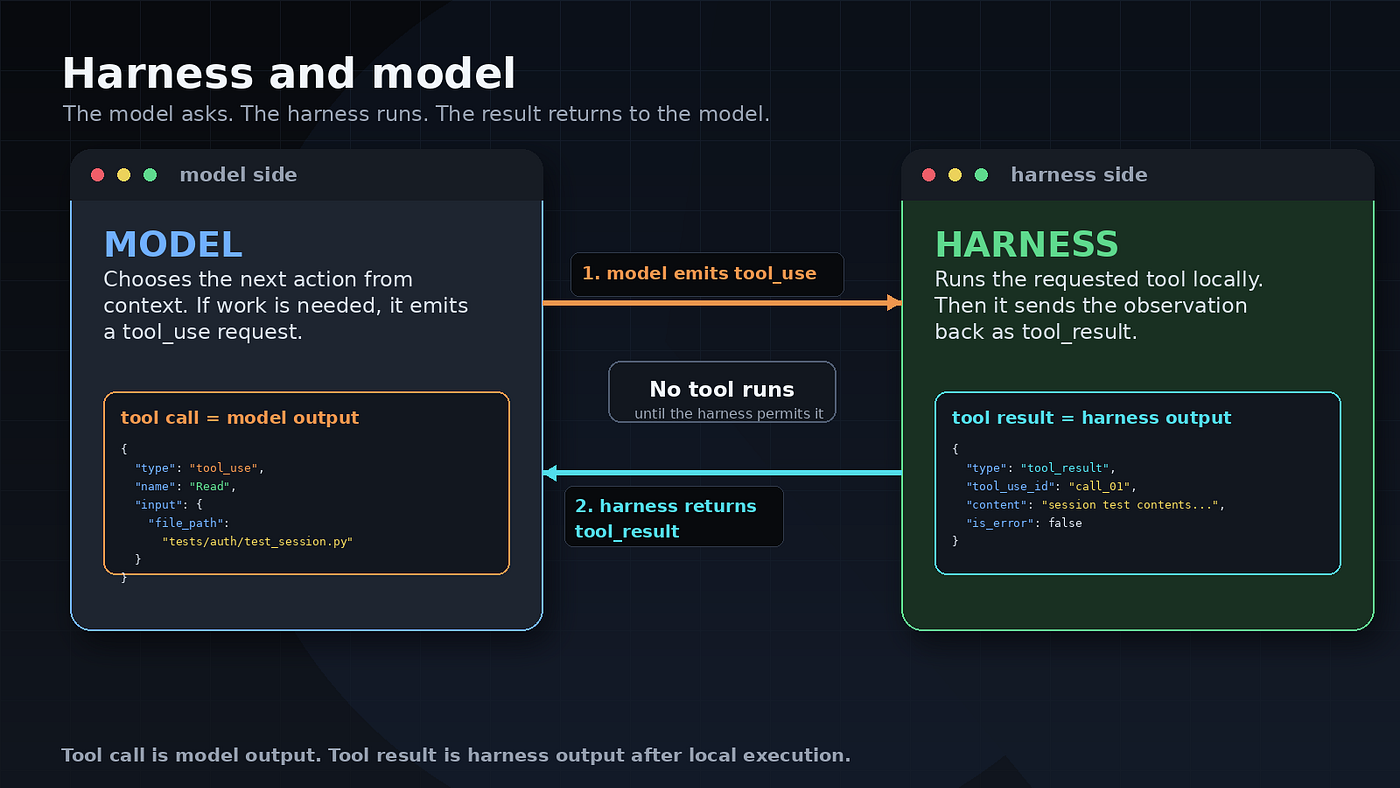
Claude Code feels like one thing, but it is a loop between a local harness and a remote model.
What the harness sends
When you type a prompt, Claude Code does more than forward your sentence.
The harness assembles a request with the working environment the model needs. That can include tool definitions, system and environment context, conversation history, file contents, tool results, CLAUDE.md, memory, loaded skills, configured integrations, and your current prompt.
A simplified version looks like this:
{
  "model": "claude-...",
  "tools": ["Bash", "Jira", "Git", "Read", "Edit"],
  "system": "Claude Code operating instructions and environment context...",
  "messages": [
    {
      "role": "user",
      "content": [
        "CLAUDE.md contents",
        "previous tool_result",
        "Fix the failing session timeout test in tests/auth/test_session.py"
       ]
    }
  ]
}
The real payload is more detailed, and the exact shape changes over time. The mental model is simpler: Claude does not wake up knowing your repo. The harness builds the world Claude sees.


CLAUDE.md is not magic
One of the highest leverage things a Claude Code user can do is write a useful CLAUDE.md.
The framing matters. CLAUDE.md does not configure Claude the way settings.json configures permissions. It gives Claude context it would otherwise have to discover with tool calls.
If Claude does not know your test command, it may inspect package.json, pyproject.toml, a Makefile, CI config, or README files. If it does not know your project structure, it may list directories and grep around. If it does not know your conventions, it may infer them from nearby files.
Every useful fact in CLAUDE.md is a discovery step you may not need later.
Good CLAUDE.md content is specific and operational:
# Project commands

- Run unit tests: `pytest`
- Run type checks: `mypy src`
- Run linting: `ruff check .`

# Conventions

- New behavior should include tests under `tests/`
- Do not edit generated files in `src/generated/`
- Prefer dependency injection over module level globals
Weak CLAUDE.md content is vague:
Be smart.
Write good code.
Think carefully.
Use best practices.
That may sound nice, but it does not save exploration.
Write CLAUDE.md like you are onboarding a competent engineer who is new to the repo. Short, specific, and useful. Every line should earn its place.
The agentic loop by example
Return to the original request:
Fix the failing session timeout test in tests/auth/test_session.py. Run only that test.
Before the turn-by-turn version, here is the shape of the loop.

Tool call out, result back, repeat, until the model stops asking for tools.
The model first realizes it does not know why the test is failing, so it asks the harness to read tests/auth/test_session.py.
The harness reads the file and sends back the contents. The model sees that the failing case is about a session expiring exactly at the timeout boundary. It asks to read the implementation, maybe src/auth/session.py.
The harness returns something like this:
def is_expired(now, expires_at):
  return now > expires_at
The model asks the harness to run the targeted test:
pytest tests/auth/test_session.pyThe harness runs it and returns the failure. The model now has evidence: the test expects a session to be expired when now equals expires_at, but the code only expires it when now is greater.
The model asks the harness to edit the function:
def is_expired(now, expires_at):
  return now >= expires_at
Then it asks the harness to run the same test again. This time it passes.
Then the model returns text:
Fixed the session timeout boundary check in src/auth/session.py and confirmed tests/auth/test_session.py passes.
No tool call. Just text.
That is the normal stopping condition for the model driven loop.
What stops the loop
From the model’s point of view, the loop stops when it returns text instead of another tool call.
The harness receives each model response and asks a practical question: did the model request a tool?
If yes, the harness evaluates the request, executes it if allowed, captures the result, and loops. If no, the harness shows the text to you and waits for the next message.
There are also harness level stops. A session can stop because you interrupt it, a permission is denied, a command fails in a way the model cannot recover from, a timeout happens, or a limit is hit. The harness still owns execution.
In normal flow, though, Claude Code stops doing work when the model stops asking for tools.
This explains two familiar annoyances. Sometimes Claude keeps checking after the useful work is already done. Sometimes it declares victory before running the test you expected.
Both problems stem from the same source: the model decides when it has enough evidence to stop. You can help by defining done:
Add the test, run the targeted test, and do not stop until it passes.
Or:
Make the smallest safe change. Run only the relevant test. Stop after summarizing the result.
Context gets noisy
Every turn adds context.
The model asked to read a file. Now that file content may be in context. The model ran a command. Now the command and output may be in context. The model edited a file. Now the edit and confirmation may be in context.
That gives the model continuity. It also makes the working set larger and noisier.
Claude Code uses prompt caching to make repeated context cheaper and faster to reuse across turns. Static or repeated material, such as tool definitions, system instructions, and earlier conversation prefixes, can be reused instead of fully recomputed each time. That helps with latency and cost. It does not make context free.
The model still has to work with the active context it receives. Old file reads, long command logs, failed attempts, and stale reasoning can compete with the current task. A long context can also bury important details in the middle of the transcript, which is exactly where you least want critical facts to disappear.
This is where a few commands matter.
/context shows what is filling the window.
/compact summarizes the conversation so far and frees space. Use it after one task is finished and before starting the next one. Keep the summary, changed files, test commands, decisions, and unresolved risks. Drop the noisy trail of old reads, failed commands, and dead-end reasoning.
You can also give /compact instructions:
/compact keep the implementation plan, changed files, test commands, and
unresolved risks
/btw is useful for quick side questions that should not become part of the main conversation history.
/doctor is a setup and cleanup check. It can surface issues with skills, MCP servers, plugins, hooks, and other harness side configuration.
A note on /caveman: if you have a terse output skill or plugin installed, treat it as output compression. It may reduce what Claude prints back to you. It does not remove old file reads, command logs, tool results, or stale reasoning from the conversation.

Shorter answers are not the same as cleaner context. Use compaction and better starting context for that.
You can avoid some context bloat by giving Claude the useful facts up front:
The relevant files are tests/auth/test_session.py and src/auth/session.py. Run pytest tests/auth/test_session.py only.
That is not hand-holding. It is saving a search loop.
Permissions are the guardrails
The model can ask for anything. The harness decides what runs.
This is one of Claude Code’s most important safety properties. Prompts and CLAUDE.md influence what the model tries to do. Permissions determine what Claude Code allows.
A simplified .claude/settings.json might look like this:
{
  "permissions": {
    "allow": [
      "Bash(pytest *)",
      "Bash(ruff check *)"
    ],
    "deny": [
      "Bash(git push *)",
      "Read(./.env)",
      "Read(./secrets/**)"
    ],
    "ask": [
      "Bash(rm *)",
      "Bash(mv *)"
    ],
    "defaultMode": "acceptEdits"
  }
}
Allow means Claude Code can run the matching action without asking again. Ask means it pauses. Deny means it blocks the action.
Keep allow rules tight. Bash(pytest ) is useful. Bash() is a footgun.
Settings can also exist at multiple scopes. The current practical precedence is managed settings, command line arguments, local project settings, shared project settings, then user settings. Inside a project, the split is usually:
.claude/settings.json        shared with the team, usually committed
.claude/settings.local.json  personal to you, usually gitignored
Be careful with shared permission files. Do not commit broad auto-approval rules like Bash(*) or dangerous command patterns into a team repo. Put personal convenience rules in .claude/settings.local.json, and keep shared rules narrow.
Permissions and CLAUDE.md both cascade, but they serve different purposes. Permissions are a safety policy so that broader scopes can constrain narrower ones. CLAUDE.md is context, so the file closest to the work is often the most useful one.

Do not use trust as your permission system. Use permissions as your permission system.
Models, effort, and plan mode
Not every task needs the same brain.
Use the normal coding model for normal engineering: feature work, small bug fixes, test writing, refactors, and codebase navigation.
Use a stronger model when reasoning is the bottleneck: subtle failures, conflicting requirements, unclear architecture, or a previous attempt that got stuck for a non-obvious reason.
Use cheaper or faster modes for mechanical work: listing files, extracting information, renaming patterns, formatting, summarizing, or applying a change you already understand.
Effort level follows the same logic. Low is fine for mechanical work. Medium works for normal engineering. High is useful for hard debugging and tradeoffs. Max should be rare.
Plan mode belongs in the same category of control. It is useful when the wrong implementation would be expensive: broad refactors, migrations, new features across unfamiliar code, or security sensitive changes. For a small test or a one file fix, direct execution is usually fine.
The extension spectrum
So far, the article has focused on the core loop: model, harness, context, permissions, compaction, and stopping behavior.
The next question is what to add around the loop.

Use CLAUDE.md when Claude needs standing facts about the repo: commands, conventions, generated folders, known traps, and project-specific language.
Use skills when you keep giving Claude the same procedure. A skill is reusable guidance Claude can follow. It lives in a directory with a SKILL.md file, such as:
.claude/skills/release/SKILL.mdUse subagents when a useful side task would pollute the main conversation. A subagent can search, inspect, review, or analyze in its own context and return a summary.
Use agent teams when multiple Claude Code sessions need to coordinate across roles. That might mean one session implements, another reviews, another tests, and another updates docs. Teams are heavier than subagents, so save them for work that actually needs coordination.
Use workflows when the orchestration itself should be repeatable. A workflow moves more of the plan into a script. The script can fan out work, call subagents, keep intermediate state, and return a final report.
Use hooks when something must happen every time. Formatting after edits, blocking protected files, scanning commands, or re-injecting context after compaction should not depend on the model remembering to do it.
Use plugins when the setup should travel across repos or teammates.
The cost side matters. Every layer adds setup, tokens, or both. A skill nobody uses is clutter. A subagent for a tiny question is overhead. A team for a one-file fix is usually too much. A hook that runs too often can slow the whole session.
That is the rule I keep coming back to: use the smallest layer that gives you the control you need.

What changes in practice
Once you understand the loop, your behavior changes.
You write better CLAUDE.md files. You stop saying “be careful” and start writing concrete project facts: test commands, generated folders, conventions, and known traps.
You give better prompts. A good prompt is not just a goal. It is a goal plus the context that saves useless exploration.
Weak:
Fix the auth bug.
Better:
Fix the auth bug in src/lib/auth/session.py. The failing behavior is covered by tests/auth/test_session.py. Run that test only. Do not change the token format.
You compact at natural task boundaries. When one task is done and the next task is different, carry forward the useful summary instead of the full trail.
You configure permissions deliberately. Approve safe commands. Deny dangerous ones. Ask in the middle.
You match the model and effort to the task. Stronger is not always better. Sometimes it is just slower and more expensive.
You stop treating every weird behavior as a personality flaw. A premature “done” may mean the stop condition was vague. A risky request may mean permissions are too loose. Repeated repo search may mean the context was missing.
That is the point of the mental model. It tells you where to intervene.
A quick checklist for your next session
Before your next long Claude Code session:
- Put real commands and repo rules in CLAUDE.md.
- Tighten permissions before approving broad tool use.
- Give Claude the relevant files and the test command up front.
- Use /compact after each major task boundary.
- Escalate to skills, subagents, workflows, or hooks only when the simple loop stops being enough.
The useful version of the magic
Claude Code feels magical when you treat it like one intelligence living inside your terminal.
It becomes more useful when you see the machinery: a model reasoning over a context window, a harness executing tools, a permission system deciding what is allowed, and a transcript shaping the next turn.
Prompt caching makes the loop practical. /compact helps when the working set gets noisy. Skills, subagents, workflows, hooks, and plugins give you more control when the simple loop is not enough.
The magic is not that Claude can code.
The magic is that the loop, guided well, starts to look like how a thoughtful engineer works: inspect the situation, make a change, verify the result, correct the mistake, and stop when the evidence says the job is done.
메타데이터
- post_id
- 5e9dfdebf7a9
- slug
- inside-claude-code-the-harness-the-model-and-the-loop-5e9dfdebf7a9
- url
- https://medium.com/@vidyameenakshi/inside-claude-code-the-harness-the-model-and-the-loop-5e9dfdebf7a9
- canonical_url
- https://medium.com/@vidyameenakshi/inside-claude-code-the-harness-the-model-and-the-loop-5e9dfdebf7a9
- author_url
- https://medium.com/@vidyameenakshi
- status
- ok
- fetched_at
- 2026-08-09 01:10:26



