Week Four Recap: Mastering Bootstrap
Author: Hassan Bin Waqar | BWT-Frontend Fellow 2024 (Profile)
Week Four Recap: Mastering Bootstrap
Author: Hassan Bin Waqar | BWT-Frontend Fellow 2024 (Profile)
Introduction
As part of my 100 Days of Code challenge at Bytewise Ltd., Week Four has been an exciting journey into the world of Bootstrap. Following my completion of the Netflix Clone project, which focused on HTML and CSS, I transitioned into learning Bootstrap, a powerful front-end framework that simplifies the development of responsive and consistent web designs. Here’s a detailed recap of my progress and key learnings this week.
Project: Netflix Clone — Daily Progress Logs
Live Link
Project Initialization (June 5, 2024):
- Set up a new repository on GitHub.
- Established basic project structure with
index.htmlandstyles.css.
Building the Navigation Bar:
- Developed a
<nav>element with a logo, language selection buttons, and a "Sign In" button. - Utilized Flexbox for a clean and responsive layout.
Designing the Hero Section:
- Created a promotional hero section with a call-to-action.
- Integrated background images with overlay effects.
TV Shows Section:
- Implemented a TV shows section with a video element within an image.
- Used CSS Grid for layout and responsiveness.
Mobile Downloads Section:
- Highlighted the mobile download feature with descriptive text and images.
Watch Everywhere Section:
- Showcased cross-device viewing capabilities with images and videos.
Kids Profiles Section:
- Added a section emphasizing kids’ profiles.
FAQ Section:
- Developed a user-friendly FAQ section with toggle functionality.
Footer Section:
- Implemented a footer with links and contact information.
Final Review and Optimization:
- Conducted a thorough review and optimization for responsiveness and performance.
Documentation and Deployment:
- Created detailed documentation and deployed the project on GitHub Pages.
Screen Recording of Netflix Clone.
[embed]14.07.2024_11.36.56_REC Recorded with ScreenRecscreenrec.com
Learning Bootstrap — Day 01
Day 27: Bootstrap Grid System and Buttons
Learning Objectives:
- Understand and integrate Bootstrap for responsive web design.
- Master the Bootstrap Grid System.
- Explore and implement Bootstrap button styles.
Topics Covered:
Introduction to Bootstrap:
- Explored Bootstrap’s role in front-end development and integration methods.
Bootstrap Grid System:
- Learned about containers, rows, and columns.
- Implemented responsive layouts using breakpoints.
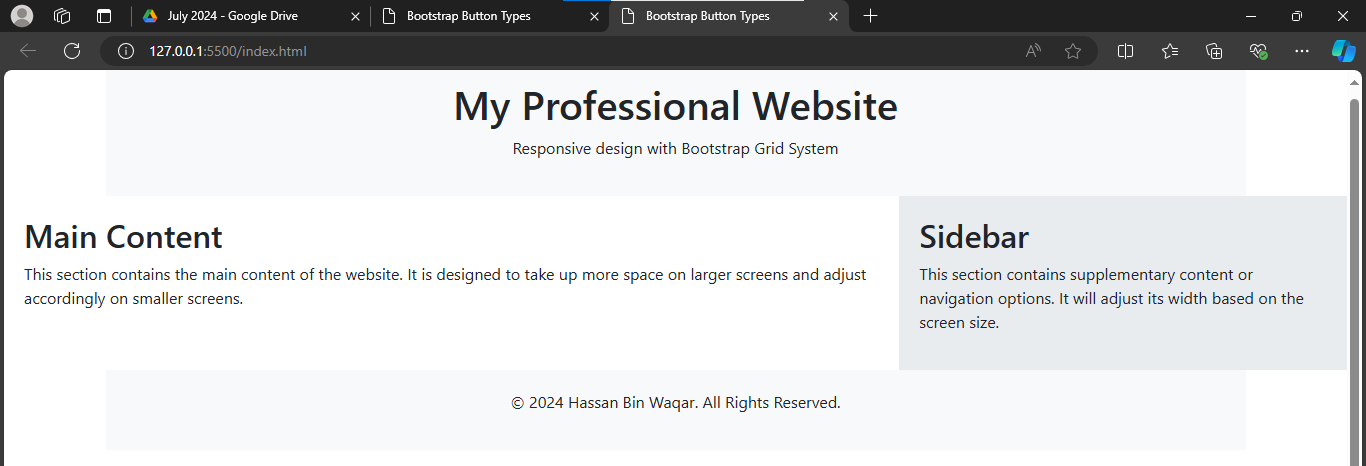
Fig; 1.0 Bootstrap-Grid System
/*Total 12 column in one Grid Row*/
/*md specifies here medium size screen*/
<div class="container">
  <div class="row">
    <div class="col-md-6">Column 1</div>
    <div class="col-md-6">Column 2</div>
  </div>
</div>
Bootstrap Buttons:
- Discovered various button classes and customization options.
- Managed different button states for enhanced user experience.

Fig; 1.1 Buttons in Bootstrap
<button class="btn btn-primary">Primary Button</button>
<button class="btn btn-secondary">Secondary Button</button>
<button class="btn btn-outline-primary">Primary Button</button>
<button class="btn btn-outline-secondary">Secondary Button</button>
Key Highlights:
- Created responsive layouts and visually appealing button styles.
Reflection:
- Gained a deeper understanding of Bootstrap’s core features, improving my ability to create responsive and user-friendly designs.
CodePen Projects:
Day 28: Bootstrap Typography and Utilities
Learning Objectives:
- Enhance web design through Bootstrap Typography.
- Utilize Bootstrap Utilities for consistency and streamlined development.
Topics Covered:
Bootstrap Typography:
- Explored text styles, alignment, and responsive typography.

Fig; 2.0 Bootstrap-Typography
Bootstrap Utilities:
- Applied spacing, color, display, and flex utilities for better layout management.

Fig; 2.1 Bootstrap-Utilities
Key Highlights:
- Styled text using Bootstrap typography options.
- Enhanced layouts using Bootstrap utilities.
Reflection:
- Improved my ability to create polished and professional web designs using Bootstrap’s typography and utility classes.
CodePen Projects:
Day 29: Mastering Bootstrap Tables and Navbars
Learning Objectives:
- Understand and implement Bootstrap Tables and Navbars for organized and navigable web pages.
Topics Covered:
Bootstrap Tables:
- Implemented responsive tables with advanced functionalities like pagination and sorting.
<table class="table table-striped">
  <thead>
    <tr>
      <th>#</th>
      <th>First Name</th>
      <th>Last Name</th>
      <th>Username</th>
    </tr>
  </thead>
  <tbody>
    <tr>
      <th scope="row">1</th>
      <td>Hassan </td>
      <td>Bin Waqar</td>
      <td>@hassanbinwaqar</td>
    </tr>
  </tbody>
</table>
Bootstrap Navbars:
- Created responsive navigation headers with branding, links, and interactive elements.

Fig; 3.0 Bootstrap-Table & navbar
<nav class="navbar navbar-expand-lg navbar-light bg-light">
  <a class="navbar-brand" href="#">Navbar</a>
  <button class="navbar-toggler" type="button" data-toggle="collapse" data-target="#navbarNav" aria-controls="navbarNav" aria-expanded="false" aria-label="Toggle navigation">
    <span class="navbar-toggler-icon"></span>
  </button>
  <div class="collapse navbar-collapse" id="navbarNav">
    <ul class="navbar-nav">
      <li class="nav-item active">
        <a class="nav-link" href="#">Home <span class="sr-only">(current)</span></a>
      </li>
    </ul>
  </div>
</nav>
Key Highlights:
- Developed a sample project integrating tables and navbars for practical application.
Reflection:
- Enhanced proficiency in Bootstrap tables and navbars, improving web page organization and navigation.
CodePen Projects:
Day 30: Bootstrap Components
Learning Objectives:
- Explore Bootstrap components to streamline web development.
Topics Covered:
Alerts:
- Used for feedback messages with contextual classes for different states.
Buttons:
- Explored various button styles and sizes.
Cards:
- Flexible content containers for structured content display.
Carousel:
- Created slideshows for cycling through content.

Fig; 4.0-part 1 Bootstrap-Components

Fig; 4.0-part 2 Bootstrap-Components
Key Highlights:
- Practical application of Bootstrap components in sample projects.
Reflection:
- Gained a comprehensive understanding of Bootstrap components, enhancing web development efficiency and consistency.
CodePen Projects:
Conclusion
Week Four has been a transformative week in my 100 Days of Code journey at Bytewise Ltd. Transitioning from my Netflix Clone project to mastering Bootstrap has equipped me with valuable skills in responsive web design and front-end development. Stay tuned for more updates as I continue to explore and apply new technologies in my ongoing projects.
my latest project using HTML && Bootstrap (Portfolio) website...
Link Hassan Bin Waqar
메타데이터
- post_id
- 5ea9890425a4
- slug
- week-four-recap-mastering-bootstrap-5ea9890425a4
- url
- https://medium.com/@hmisb2000/week-four-recap-mastering-bootstrap-5ea9890425a4
- canonical_url
- https://medium.com/@hmisb2000/week-four-recap-mastering-bootstrap-5ea9890425a4
- author_url
- https://medium.com/@hmisb2000
- status
- ok
- fetched_at
- 2026-08-06 21:52:48