JDBC
We can develop standalone application using core Java. In order to develop web application, we need to use advanced java concepts. Advanced…
JDBC
We can develop standalone application using core Java. In order to develop web application, we need to use advanced java concepts. Advanced java covers jdbc, servlet and jsp. In web application(consider gmail), the pages which user can see(login page, inbox page etc) are part of view components. JSP(Java Server Pages) is used for such kind of presentation layer. The component which processes the logic like verifying user credentials, fetch the mails etc are part of Servlet. If Java class wants to communicate with database then we should use JDBC. Note that the terms core/advance java are used by the developers. Company who owns Java(Sun microsystem) has not defined any such terms, instead they use following terminologies —
- Java Standard Edition (J2SE) — It consists of core java and jdbc. Used to develop standalone applications.
- Java Enterprise Edition (J2EE) — It consists of core servlet and jsp. Used to develop web and enterprise applications.
- Java Micro Edition (J2ME) — Used to develop mobile and embedded applications. JDBC is used to communicate java application with db(oracle, mysql etc). JDBC is specification/guideline defined by java vendor and implemented by db vendors. Implementation provided by db vendor is called Driver software.
Steps to Prepare JDBC application -
- Load and register the Driver class.
- Create connection between java application and database.
- Create Statement object.
- Send and execute sql query.
- Process result from ResulSet.
- Close the connection.
Driver class acts as translator between java application and database. It converts java specific calls in db calls and vice versa. Statement object send the sql query to db and brings the result from db to our application. ResultSet contains the result of the executed query.
Features of JDBC —
- JDBC provides standard api and is database independent technology. It provides standard objects like Statement, Connection, ResultSet etc which can be used with any db and when db is changed then we need not do any major change in the application.
- Mostly the drivers provided by db vendors are developed in java hence it is platform independent technology.
Evolution of JDBC —

Applications before JDBC
When JDBC was not there, every application has to use db specific libraries in order to communciate with db thus making them db depdendent. For resolving this issue, microsoft introduced ODBC(Open database connectivity)


Applications with and without ODBC
This ODBC concept can be used with java application as well but it can be used only for windows and mostly ODBC drivers are developed in C/C++. It has following limitations as pointed out in the image below.


Left image indicates Java application with ODBC and its limitation. Right image indicates java application with JDBC and its advatnages
JDBC Architecture —
Now we know that driver software is responble for communication between java application and db. Application may have multiple db’s and hence will have multiple drivers. Driver Manager is responsible for managing all the db drivers in the application. Driver Manager interacts with driver software and driver software interacts with db. Driver manager is responsible for registering/unregistering any driver in the system. Note that jdbc api provides this driver manager to java application.

JDBC architecture
Note that there is a single java application for communicating with all db’s. Hence java is db independent. Since driver software is responsible for translating java calls in db calls. Driver for oracle will be different, sql will be different and so on, it is db dependent. Every db vendor will have its own driver. Java is db independent because driver is db dependent.
JDBC API defines several classes and interfaces which are used for db communication. Jdbc api contains 2 packages — java.sql and javax.sql java.sql contains basic classes and interfaces like ResultSet, Connection, DriverManager etc. javax.sql contains classes and advanced interfaces like RowSet, ConnectionPooling etc. Driver software vendor can use this api and implement the interfaces to develop driver softwares. Hence driver software is nothing but a collection of classes which are implemented using jdbc api. There is a class which implements Driver interface in driver softwares. Every driver software is identified by this class known as Driver class. These driver softwares can be provided by db vendor(ojdbc6.jar provided by oracle to communicate with oracle 11g db) or 3rd party(Inet-Oraxo provided by Inet to communicate with oracle db). Drivers are categorized in 4 types based on functionality and architecture of drivers.
Types of drivers —
Note that I will be covering only type 4 driver as remaining drivers are not used much. Type 4 driver can communicate with db directly using db provided native protocol to communicate with the db directly. It is pure java driver(driver software is built in java language). It is also known as thin driver(lightweight) as it can communicate directly with db unlike other drivers. It is the most commonly used driver. Advantages of type 4 driver -
- Performance is very good as only one conversion is required i.e. jdbc calls to db specific calls to communicate with db(unlike other drivers).
- It is platform independent driver(As driver is built in java).
Limitation of type 4 driver is that is db dependent as driver is communicating directly with db.


Architecture diagram of type 1,2,3,4 drivers
If our application is using only single db then we should use type-4 driver for development. If our application is using multiple dbs then we should use type-3 driver for development because type-3 driver is database independent. Difference between thick and thin drivers - If driver software requires some extra component to communicate with db then such driver is called thick driver. If driver software does not requires any extra component to communicate with db then such driver is called thin driver.
Steps to Prepare JDBC application -
- Load and register driver class — We know that driver software is responsible for communication of java application and db. This driver software is available in the form of jar and we need to place it in the classpath so that application can access it. Now we need to load this driver class using Class.forName() method.
Class.forName("oracle.jdbc.driver.OracleDriver");Now DriverManager needs to register this driver/class but we need not explicitly register this because upon loading of the class, static block of the class is executed in which DriverManager.register() is called. From java 1.6 version onwards, this step need not be carried out separately because jvm will automatically load the driver class from the classpath based on the url provided in getConnection() discussed below. Hence we just need to place the required jar files in the classpath.
- Create connection between java application and database - DriverManager provides getConnection() method to get the connection object. It takes 3 parameters as input i.e. jdbc url, username and password. Note that jdbc url is fixed for every driver and needs to be remembered for type of the driver(type-1/2/3/4) and db.
Connection con = DriverManager.getConnection(jdbcUrl,userName,password)Note that we are storing result in Connection interface(provided by jdbc api) instead of its implementation class(provided by oracle.jdbc.driver.OracleDriver) so that our application remains unaffected if we plan to change db or type of driver.
- Create Statement object - Connection provides getStatement() to create Statement object.
Statement st = con.createStatement();- Send and execute sql query - Statement interface provides 3 methods to execute sql queries. These are execute(), executeUpdate() and executeQuery().
executeQuery() is used to execute select queries. Since select query returns rows and jdbc provides ResultSet to hold the result of the query hence return type of executeQuery() is ResultSet. Also if any exception occurs during the execution of query then executeQuery() will throw SqlException.
ResultSet executeQuery(String sql) throws SQLException; //prototype
ResultSet rs = st.executeQuery("SELECT * FROM employees");
executeUpdate() is used to execute non-select(insert/update/delete) queries. Since insert/update/delete query returns number of rows affected hence its return type is int.
int executeUpdate(String sql) throws SQLException; //prototype
int x = st.executeUpdate("DELETE FROM employees WHERE salary > 10000");
execute() can execute both select and non-select queries and should be used when the type of query is decided at run time i.e. it is not known in advanced. Return type of execute() is boolean. If output is true then it represents select query was executed else non select query was executed.
boolean execute(String sql) throws SQLException; //prototype
boolean b = st.execute(query);
if(b) ResulSet rs = st.getResultSet();
else int x = st.getUpdateCount();
Note that we are able to call following methods on Statement object - execute(), executeQuery(), executeUpdate(), getResultSet() and getUpdateCount().
- Process result from ResulSet - ResultSet is holding the result of select query. It is a cursor through which we can get data row by row. Consider we have 3 records in the output. ResultSet will initial point to BFR(Before First Record) and after reading all the records, it will point to ALR(After Last Record). It contains next() to check whether next record is available or not.
boolean next(); //prototype
while (rs.next()) {
  // read data from the current record
}
To read the data, result set contains getter method in the form of getXxx(String columnName)/getXxx(int columnIndex) where Xxx is the data type of the column.
while (rs.next()) {
  Integer empId = rs.getInt("empId");
  String name = rs.getString("name");
  String salary = rs.getDouble(3);
}
Note that readability wise getXxx(String columnName) is recommended but in real life applications, performance is preferred hence getXxx(int columnIndex) is used. getXxx(String columnName) uses .equals() to compare the column names hence it is a bit slow.
ResulSet follows iterator design pattern. It is associated with Statement object and per statement only one result set is possible. If we try to open a new result set on statement object then automatically first result set is closed.
ResultSet rs1 = st.executeQuery("SELECT * FROM employees");
ResultSet rs2 = st.executeQuery("SELECT * FROM students");
Note that here we are using same statement object(i.e. st). Since rs2 is created on same statement object hence rs1 is closed and we will not be able to acces it. If we try to acces it then we will get exception.
- Close the connection - We need to close the resources so that any memory or performance issue do not comes in the application. Close those resources first which were opened last. Since ResultSet was opened last hence close it first similarly close statement object before closing connection object.
rs.close(); st.close(); con.close(); ResultSet is associated with Statement, per Statement only one ResultSet is possible. Statement is associated with Connection, per Connection multiple Statement are possible. Hence whenever we close statement object, resultset is closed automatically. Similarly when we close connection object, statement is closed automatically. Hence we just need to use con.close()
try{
  Connection con = DriverManager.getConnection(url, user, pwd);
  Statement st = con.createStatement();
  ResultSet rs = st.executeQuery("SELECT * FROM employees");
}
catch(Exception e){}
finally{
  con.close();
}
Close the resource in finally block. Note that we do not require to close statement and result set object explicitly.
In java 1.7 version, whatever resource are opened in try block are closed automatically once the try block is executed(either with or without exception). Hence finally block is not required.
try(Connection con = DriverManager.getConnection(url, user, pwd)){
   //perform required operation
}
catch(Exception e){}
While performing any operation on db using java application, we need not commit the operation explicitly because by default auto commit is enabled in connection object. Auto-commit can be disabled using
con.setAutoCommit(false);
//required operation
con.commit();
Example of using ResultSet with aggregate function -
try (Connection connection = DriverManager.getConnection(jdbcUrl, username, password)) {
  String sqlQuery = "SELECT COUNT(*) as totalEmployees FROM employees";
  try (
  Statement preparedStatement = connection.prepareStatement(sqlQuery);
  ResultSet resultSet = preparedStatement.executeQuery()
  ) {
      if (resultSet.next()) {
        int totalEmployees = resultSet.getInt("totalEmployees");
        System.out.println("Total Employees: " + totalEmployees);
      }
    }
  } catch(SQLException e) {}
Note that output of sql query is not integer but it is one row with one column.
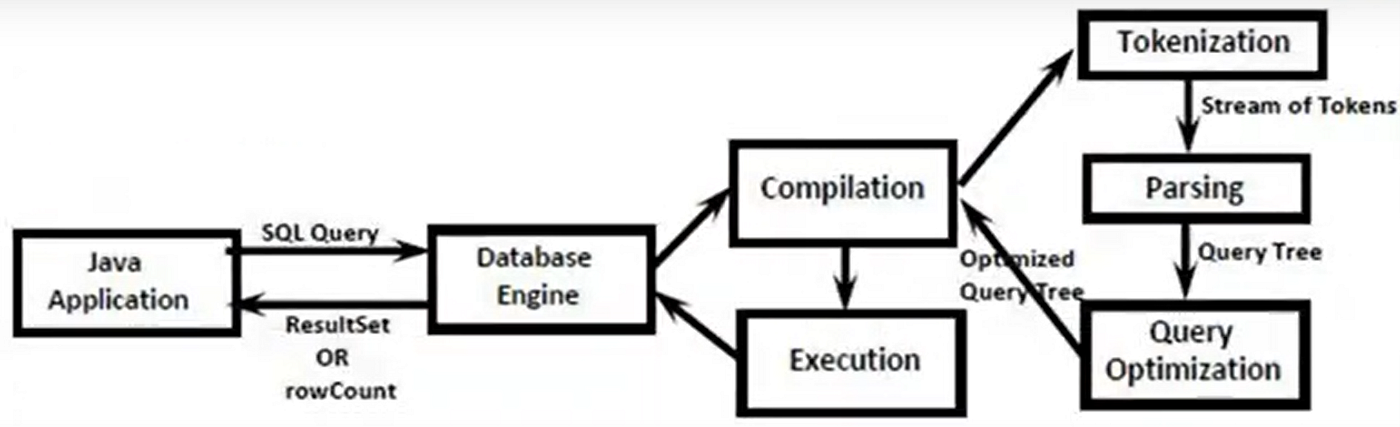
Life cycle of SQL Query Execution -
When application sends query to db, db engine recieves this query and performs compilation and execution and then return the result(ResultSet or number of rows updated) to the application.
Disadvantage of using Statement object -
- Only static queries can be executed using Statement object.(Query with positional parameter is considered as dynamic query)
- It is difficult to use with date values.
- It cannot work with LOB(Large Object).
- It is prone to Sql injection attack. Refer this article to learn about sql injection attack with Statement object.
- On using statement object, query is compiled and executed for every request.

Consider the image shown above. Whenever a query is send to the db, it takes some time to send it from application to db. Then db performs compilation and execution and then it takes some time to return response from db to application. Consider every step takes 1ms then query executed using Statement object will take 4ms for 1 query and 4000ms for 1000 queries. If we need to execute same query even with different parameters then this method is very inefficient.
To overcome all these problems, PreparedStatement should be used.
PreparedStatement
PrepareStatement is child interface of Statement hence all the execute methods provided by Statement can be used with PreparedStatement also. PrepareStatement can work with dynamic query.
Creation of PreparedStatement — PreparedStatement can be created using prepareStatement() of connection.
PreparedStatement pst = con.prepareStatement(query);  //1
pst.executeQuery();   //2
Note that query is passed while creating the prepredStatement.
Upon execution of 1st statement, query will be send to db which will compile it and store the compiled query. Upon execution of 2nd statement, query will not be compiled again.
Even if we execute the same query 1000 times, query will be exexcuted 1000 times thereby saving compilation time for 1000 queries.

Example of PreparedStatement -
String query = "INSERT INTO employee VALUES (?, ?)";  //dynamic query
PreparedStatement pst = con.prepareStatement(query);
pst.setInt(1, 20); //set parameters
pst.setString(2, 'Prakher');
ResultSet myRs = myStmt.executeQuery();
Note that query will be compiled while creation of preparedStatement. Values are not required during compilation, only syntax is required.
Disadvantage of PreparedStatement -
Since we have to pass query while creation of PreparedStatement object hence it is always attached to one query. In order to create a new query, a new PreparedStatement object has to be used. While we could use one Statement object for multiple queries.
Statement st = con.createStatement();
st.executeUpdate("INSERT INTO employees VALUES (100, 'Prakher')");
st.executeUpdate("UPDATE employees SET name = 'Panda' WHERE id = 100");
st.executeUpdate("DELETE FROM employees WHERE id = 100");
CallableStatement is child interface of PreparedStatement. It is used to call StoredProcedures and Functions. I am not covering this topic in this article.
Batch Updates - Instead of sending sql queries one by one to the db, we can group all the sql queries and send them, db engine will execute all the queries and the result will be send to the java appication. By using this concept, performance will improve and network trafiic is reduced. This concept can be used either with Statement or PreparedStatement.

This concept can be implemented using 2 methods - addBatch() and executeBatch(). This concept is applicable only for non select queries. Consider sample program to use batch update with Statement object.
try (Connection connection = DriverManager.getConnection(jdbcUrl, username, password)) {
            Statement statement = connection.createStatement();

            // Add multiple SQL statements to the batch
            statement.addBatch("INSERT INTO employees (employee_id, employee_name, salary) VALUES (101, 'John Doe', 50000)");
            statement.addBatch("INSERT INTO employees (employee_id, employee_name, salary) VALUES (102, 'Jane Smith', 60000)");

            // Execute the batch update
            int[] updateCounts = statement.executeBatch();

            // Process the update counts
            for (int count : updateCounts) {
                System.out.println("Rows affected: " + count);
            }

        } catch (SQLException e) {
            e.printStackTrace();
        }
    }
Return type of executeBatch() is int[] array. Since we are executing 2 sql queries hence size of this array will be 2.
Same program using PreparedStatement -
try (Connection connection = DriverManager.getConnection(jdbcUrl, username, password)) {
            // Create a PreparedStatement for batch updates
            String sqlQuery = "INSERT INTO employees (employee_id, employee_name, salary) VALUES (?, ?, ?)";
            try (PreparedStatement preparedStatement = connection.prepareStatement(sqlQuery)) {

                // Add multiple sets of parameters to the batch
                preparedStatement.setInt(1, 101);
                preparedStatement.setString(2, "John Doe");
                preparedStatement.setDouble(3, 50000);
                preparedStatement.addBatch();

                preparedStatement.setInt(1, 102);
                preparedStatement.setString(2, "Jane Smith");
                preparedStatement.setDouble(3, 60000);
                preparedStatement.addBatch();

                // Execute the batch update
                int[] updateCounts = preparedStatement.executeBatch();

                // Process the update counts
                for (int count : updateCounts) {
                    System.out.println("Rows affected: " + count);
                }
            }

        } catch (SQLException e) {
            e.printStackTrace();
        }
Limitations/Disadvantage of batch update -
- It is applicable only for non-select queries. Exception will be raised on adding select query.
- If any query which is part of a batch gets failed then all the subsequent queries will not be executed.
Large Object (LOB)—
This concept is used if we want to handle large files/objects such as video, image, text, pdf file etc. This is further divided in 2 categories -
- BLOB (Binary Large Object) — Blob represents collection of binary information represented as single entity. eg: image, audio, video.
- CLOB(Character Large Object) — Clob represents collection of text/character information represented as single entity. eg: txt, xml, pdf.
FileInputStream is required to read binary data from file. Similarly to write binary data in file FileOutputStream is required. FileReader is required to read character data from file. Similarly to write character data in file FileWriter is required.
Connection Pooling — Java application has to communicate with db multiple times. For every communication, a connection object will be required and this object is closed once the operation is completed. Creating and closing the resource is very costly operation hence it is not recommended to create and destory this resource for every request instead we maintain a pool of objects. This pool will contain multiple connection objects which are created at the time of application startup. When application needs to connect to db, it can request the connection from the pool and once the requirement is completed, this object can be returned back to the pool instead of destroying it. The advantage of this approach is that performance of the application is improved.
Datasource object is responsible to manage all the connections present inside connection pool.
Connection Pooling can be achieved using following steps -
- Create Datasource object.
- Set jdbc properties to the Datasource object.
- Get connection from this datasource using getConnection() of datasource.
Program for connection pooling -
OracleConnectionPoolDataSource dataSource = new OracleConnectionPoolDataSource();
dataSource.setURL("jdbc:oracle:thin:@localhost:1521:xe");
dataSource.setUser("your_username");
dataSource.setPassword("your_password");

try {
  // Perform database operations using connection pooling
  try (Connection connection = dataSource.getConnection()) {
    String sqlQuery = "SELECT * FROM your_table";
    try (PreparedStatement preparedStatement = connection.prepareStatement(sqlQuery);
      ResultSet resultSet = preparedStatement.executeQuery()) {
        while (resultSet.next()) {
          int id = resultSet.getInt(1);
          String name = resultSet.getString(2);
          System.out.println("ID: " + id + ", Name: " + name);
         }
      }
    }
  } catch (SQLException e) {}
Once connection is closed, it will be retuned back to the connection pool.
Note that this approach is not used in real life instead server level connection pooling is used which is managed by web/application server.
Properties — In all the programs in this article, we are using
Connection connection = DriverManager.getConnection(jdbcUrl, username, password);Here jdbcUrl, username and password are defined in the program itself. It is not recommended to hardcode these values. Consider the password is changes then following activities are required in order to reflect that change - Code needs to be recompiled, application needs to be rebuild(creation of war/ear files), application needs to be redepolyed.
Hence it is recommended to put these values in properties files.(file extension can be anything but recommended is .properties) This file can be read and used in java program. Now if some value from the properties file is changed then we just need to redeploy the application in order for the changes to be reflected. Properties object is used to hold the data of properties file. Properties file use map like structure i.e. data is defined in key-value format in this file.
Consider sample program below —
# database.properties

# Database connection details
database.url=jdbc:mysql://your_database_host:3306/your_database_name
database.username=your_username
database.password=your_password
public static void main(String[] args) {
// Load properties from the file
Properties properties = new Properties();
FileInputStream fis = new FileInputStream("databse.properties");
properties.load(fis);
// Get connection parameters from properties
String url = properties.getProperty("database.url");
String username = properties.getProperty("database.username");
String password = properties.getProperty("database.password");
try {
Connection connection = DriverManager.getConnection(url, username, password);
// perform reqiored operations...
connection.close();
} catch (SQLException e) {}
}load() of properties object is used to copy and load the entire data from file pointed by FIS in properties object.
Transactions - Process of combining the set of logical related work/operation in single unit. Either all the opeartions from unit are executed or non are executed.
There are 2 types of transactions - In Local transaction, all opearations are executed on same db. In Global transaction, all opearations are executed over different db/distributed system. JDBC provides support only for local transactions. EJB or Spring framweork should be used in order to achieve global transation.
Transactions can be implemented using setAutocommit(), commit() and rollback(). Consider 3 operations(op1, op2, op3) are part of transaction. In jdbc auto commit is by default set to true hence result of every operation will be reflected in db. Since we are defining them in transaction hence we need to set autocommit to false before starting the operation. Consider the program shown below -
try {
  connection = DriverManager.getConnection(jdbcUrl, username, password);
  // Disable auto-commit to start a transaction
  connection.setAutoCommit(false);
  try (PreparedStatement pst = connection.prepareStatement(sqlQuery)){
    // first SQL operation
    pst.executeUpdate("INSERT INTO employees (employee_id, employee_name, salary) VALUES (101, 'John Doe', 50000)");
    // second SQL operation
    pst.executeUpdate("UPDATE employees SET salary = 55000 WHERE employee_id = 101");
    // Commit the transaction if everything is successful
    connection.commit();
    System.out.println("Transaction committed successfully.");
    } catch (SQLException e) {
        connection.rollback();  //Rollback the transaction in case of an exception
   }
Refer this article to read about transaction concurrency problem.
Metadata — Metadata means data about data. Database Metadata is an interface and gives information about db product name, db version.
DatabaseMetaData dbmd = con.getMetaData();ResultSet Metadata is an interface and gives information about column names, column types.
ResultSet rs = st.executeQuery("SELECT * FROM employess");
ResultSetMetaData rsmd = rs.getMetaData();
Parameter Metadata is an interface and most of the driver softwares. It gives information about positional parameters used in the query.
PreparedStatement pst = con.prepareStatement("INSERT INTO employess VALUES (?, ?)");
ParameterMetaData pmd = pst.getMetaData();
Type of ResultSet -
By default ResultSets are read only i.e we can just read the data, forward only i.e we can just move in forward direction(that too one row at a time) from top to bottom(BFR to ALR) while iterating through the result and hold cursor over commit.
ResultSet can be categorized in various types —
Based on Operations — Read only - (by default). It can be specified using constant CONCUR_READ_ONLY defined in ResultSet interface. Updatable - Any changes done(insert/update/delete) through the ResultSet will be reflected in the db. It can be specified using constant CONCUR_UPDATABLE defined in ResultSet interface.
Based on Cursor movement — Forward only - (by default). It can be specified using constant TYPE_FORWARD_ONLY defined in ResultSet interface. Scrollable - ResultSet can move in any direction either forward or backward and can jump to any particular row/location. It is again divided in 2 types - Scroll Insensitive - After getting ResultSet, if any modifications in the db are performed then those changes will not be reflected in the ResultSet. It can be specified using constant TYPE_SCROLL_INSENSITIVE defined in ResultSet interface. Scroll Sensitive - After getting ResultSet, if any modifications in the db are performed then automatically the changes will be reflected in the ResultSet. It can be specified using constant TYPE_SCROLL_SENSITIVE defined in ResultSet interface.
Based on Holdability — Hold over commit - Whenever we call commit operation ResultSet will be hold. Close cursor at commit — Whenever we call commit operation ResultSet will be closed.
Advantage of scrollable over non scrollable is that if application wish to move to Nth record then it can directly move but in non scrollable, N iterations will be required hence performance will be slow.
Advantage of scroll sensitive over scroll insensitive is that application will always have updated data but its disadvanatage is that for every fetch operation, ResultSet will check whether there is any update in db hence performance will be slow.
Declaring required ResultSet -
// Create a Statement with scrollable ResultSet
Statement statement = connection.createStatement(ResultSet.TYPE_SCROLL_SENSITIVE);

// Create a Statement with updatable ResultSet
PreparedStatement statement = connection.createStatement(query, ResultSet.TYPE_FORWARD_ONLY, ResultSet.CONCUR_UPDATABLE);
Note that every db does not support all types of ResultSet.
Scrollable ResulSet contains many methods -
boolean previous()- Moves the cursor to the previous row.boolean next()- Moves the cursor to the next row.boolean next()- Moves the cursor to the next row.boolean absolute(int row)- Moves the cursor to the specified row.boolean relative(int rows)- Moves the cursor relative to its current position by the specified number of rows.boolean first()- Moves the cursor to the first row.boolean last()- Moves the cursor to the last row.void refreshRow()- Refreshes the current row. It is used by scrollable sensitive resultSet to get updated values from DB.
Consider sample program for Scrollable sensitive ResultSet below -
try (Connection connection = DriverManager.getConnection(jdbcUrl, username, password)) {
  // Create a PreparedStatement with a scrollable and sensitive ResultSetString sqlQuery = "SELECT * FROM employees";
  PreparedStatement preparedStatement = connection.prepareStatement(sqlQuery, ResultSet.TYPE_SCROLL_SENSITIVE, ResultSet.CONCUR_UPDATABLE);
  ResultSet resultSet = preparedStatement.executeQuery();
  System.out.println("Initial Data:");
  while (resultSet.next()) {
    System.out.println("Name: " + resultSet.getString("employee_name") +
        ", Salary: " + resultSet.getDouble("salary"));
  }

  // Update the data in db
  Systemin.read();

  System.out.println("\nData After Update:");
  while (resultSet.next()) {
    resultSet.refreshRow();
    System.out.println("Name: " + resultSet.getString("employee_name") +
        ", Salary: " + resultSet.getDouble("salary"));
  }
 } catch (SQLException e) {}
Here we are creating a Sensitive scrollable and updatabale result set. We have paused the execution of prgram by using Systemin.read() and have updated the values in the db. Now, we are using refreshRow() so that updated values are obtained from db.
Consider sample program for Updatable ResultSet below -
try (Connection connection = DriverManager.getConnection(jdbcUrl, username, password)) {
  // Create a PreparedStatement with a scrollable and sensitive ResultSetString sqlQuery = "SELECT * FROM employees";
  PreparedStatement preparedStatement = connection.prepareStatement(sqlQuery, ResultSet.TYPE_SCROLL_SENSITIVE, ResultSet.CONCUR_UPDATABLE);
  ResultSet resultSet = preparedStatement.executeQuery();
  System.out.println("Initial Data:");
  displayResultSet(resultSet);

  //delete last row
  resultSet.last();
  resultSet.deleteRow();

  // Insert the new row
  resultSet.moveToInsertRow();  //cursor is now pointing at special row where you can set the values for the columns of the new row.
  // Set values for the new row
  resultSet.updateInt("employee_id", 103);
  resultSet.updateString("employee_name", "New Employee");
  resultSet.updateDouble("salary", 60000);
  resultSet.insertRow();

  // Update the salary of the first row
  resultSet.first();
  resultSet.updateDouble("salary", resultSet.getDouble("salary") + 1000);
  resultSet.updateRow();  //update is commited using updateRow()

  System.out.println("\nData After Update:");
  displayResultSet(resultSet);
 } catch (SQLException e) {}

private static void displayResultSet(ResultSet resultSet) throws SQLException {
  resultSet.beforeFirst();
  while (resultSet.next()) {
    int id = resultSet.getInt("employee_id");
    String name = resultSet.getString("employee_name");
    double salary = resultSet.getDouble("salary");
    System.out.println("ID: " + id + ", Name: " + name + ", Salary: " + salary);
  }
}
Here we are creating a Sensitive scrollable and updatabale result set. Through this, we are deleting last row, inserting a new row and then updating the first row in the db thrugh resultSet. Note that ResultSet cannot be updatable if join/aggregate query is used with ResultSet.
Disadvantage of ResultSet -
- ResultSet is not serializable.
- Result obtained from ResultSet can only be accessed till the db connection is active. Without db connection, resultSet cannot be accessed. Hence ResultSet is connected.
RowSet - It is child interface of ResultSet. It is by default scrollable and updatable. It is serializable i.e. we can send the object over the network. It is disconnected i.e. data from RowSet can be accessed even if the db connection is closed. Note that if any update operations are performed on the RowSet then db connection is mandatory to reflect those changes in db.

JDBCRowSet is connected while remaining rowsets are disconnected
Both ResultSet and JDBCRowSet are disconnected and non-serializable. Only difference is that JDBCRowSet is scrollable and updatable by default.
Way to access rowset -
RowSetFactory rsf = RowSetProvider.newFactory();
JDBCRowSet jrs = rsf.getJDBCRowSet();
//set url
jrs.setUrl("jdbc:mysql://your_database_host:3306/your_database_name");
jrs.setUsername("your_username");
jrs.setPassword("your_password");
jrs.setCommand("SELECT * FROM your_table");
jrs.execute();

while(jrs.next()){...}

OR

CachedRowSet crs = rsf.getCachedRowSet();
Connection connection = DriverManager.getConnection(jdbcUrl, username, password);
PreparedStatement preparedStatement = connection.prepareStatement("SELECT * FROM employees");
ResultSet resultSet = preparedStatement.executeQuery();
crs.populate(resultSet);
while(crs.next()){...}
WebRowSet is used to read/write data from xml files.
JoinRowSet can be used to combine data from 2 RowSets in single RowSet based on some common column.
Reference —
https://medium.com/@prakherjindal1996/transaction-concurreny-problem-515f53d97666
메타데이터
- post_id
- 5f679e1b63f7
- slug
- jdbc-5f679e1b63f7
- url
- https://medium.com/@prakherjindal1996/jdbc-5f679e1b63f7
- canonical_url
- https://medium.com/@prakherjindal1996/jdbc-5f679e1b63f7
- author_url
- https://medium.com/@prakherjindal1996
- status
- ok
- fetched_at
- 2026-08-23 02:52:22





