Amazon S3 Versioning: Overview and Hands-On Guide
Amazon S3 Versioning is a powerful feature that helps protect your data by keeping multiple versions of your objects. This guide will…
Amazon S3 Versioning: Overview and Hands-On Guide
Amazon S3 Versioning is a powerful feature that helps protect your data by keeping multiple versions of your objects. This guide will explain the concept of versioning, its benefits, and a step-by-step hands-on guide to enable and use versioning effectively.
What is Amazon S3 Versioning?
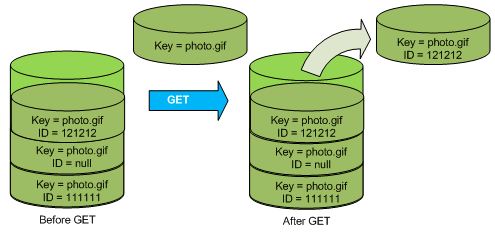
Amazon S3 versioning is a feature that allows you to store multiple variants of an object in the same bucket. When versioning is enabled, Amazon S3 automatically generates a unique version ID for each object stored.
Key Benefits of S3 Versioning:
- Data Protection: Helps recover data from unintended deletions or overwrites.
- Rollback Capability: Easily restore previous versions of your files.
- Retention of Deleted Files: Deleted files are replaced with a delete marker instead of being permanently removed.
Important Notes about Versioning
- Any files uploaded before enabling versioning will have a
nullversion ID. - Suspending versioning does not delete previous versions; it just stops new version creation.
Step-by-Step Guide: Enabling and Using S3 Versioning
Step 1: Enable Versioning
- Sign in to your AWS Management Console.
- Navigate to Amazon S3.
- Select your desired bucket.
- Go to the Properties tab.
- Locate Bucket Versioning and click Edit.
- Select “Enable” and click Save Changes.
Step 2: Upload and Update Files
- Go to the Objects tab in your bucket.
- Upload a file called
index.htmlwith the text "I love coffee." - Refresh the website URL, and you’ll see the content “I love coffee.”
- Now edit your
index.htmlfile to say "I REALLY love coffee." - Upload the updated file with the same name.
- Refresh the website URL again, and you’ll now see “I REALLY love coffee.”
Step 3: Viewing Object Versions
- In the Objects tab, click on Show versions.
- Files uploaded before enabling versioning will have a
nullversion ID. - Files uploaded after enabling versioning will have unique version IDs.
Step 4: Restoring Previous Versions
- To restore the earlier
index.htmlversion with "I love coffee," enable Show versions. - Identify the version you want to delete.
- Select that version and choose Delete.
- Type
permanently deletein the confirmation box and click Delete objects. - Refresh the website URL to see the restored “I love coffee” content.
Step 5: Understanding Delete Markers
- If you delete an object without selecting a version, Amazon S3 places a delete marker instead of permanently deleting the object.
- To confirm this:
- Delete the file
coffee.jpgwithout enabling Show versions. - The file will appear as deleted.
- Enable Show versions to reveal the file’s older versions along with the delete marker.
Step 6: Restoring Deleted Objects (Removing Delete Markers)
- Enable Show versions.
- Locate the delete marker for
coffee.jpg. - Select the delete marker and click Delete.
- Type
permanently deletein the confirmation box and confirm. - Refresh the website URL, and
coffee.jpgwill be restored.
Best Practices for Using S3 Versioning
- Regularly review and manage object versions to avoid excessive storage costs.
- Combine versioning with Lifecycle Policies to automatically clean up older versions.
- Implement proper bucket policies to restrict unauthorized access.
Conclusion
Amazon S3 Versioning is an invaluable feature for safeguarding your data. By maintaining multiple object versions, you can recover from accidental deletions, revert to previous states, and ensure data integrity. Enabling versioning adds an extra layer of protection, making your S3 bucket more resilient and secure.
메타데이터
- post_id
- 5f8f16452cf6
- slug
- amazon-s3-versioning-overview-and-hands-on-guide-5f8f16452cf6
- url
- https://medium.com/@igniteskillset/amazon-s3-versioning-overview-and-hands-on-guide-5f8f16452cf6
- canonical_url
- https://medium.com/@igniteskillset/amazon-s3-versioning-overview-and-hands-on-guide-5f8f16452cf6
- author_url
- https://medium.com/@igniteskillset
- status
- ok
- fetched_at
- 2026-07-13 18:14:32


