Why Pagination Matters: How Amazon, Flipkart, and LinkedIn Efficiently Handle Millions of Records
Understanding Pagination in Spring Boot with Real-World Examples
Why Pagination Matters: How Amazon, Flipkart, and LinkedIn Efficiently Handle Millions of Records
Understanding Pagination in Spring Boot with Real-World Examples
Have you ever searched for “iPhone” on Amazon?
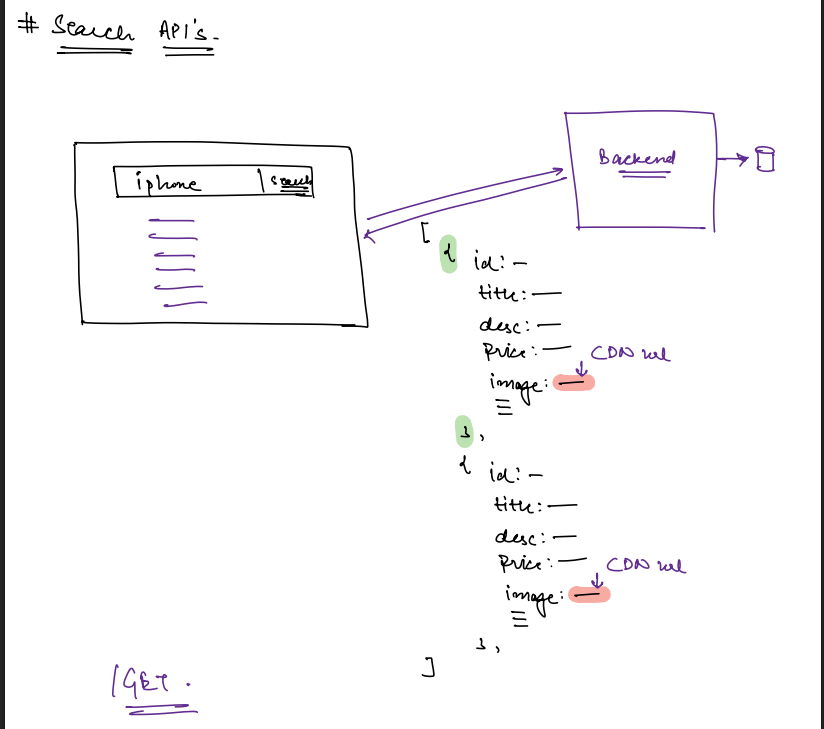
Within milliseconds, Amazon finds thousands of matching products. Yet, instead of showing all of them at once, it displays only the first 20 results.
Have you ever wondered why? If the backend already has all the matching products, why doesn’t it simply return everything?
This seemingly simple question introduces one of the most important concepts in backend engineering — Pagination.
In this article, we’ll understand why pagination exists, how real-world companies implement it, and how we can build it using Spring Data JPA.
The Problem
Imagine you’re building an e-commerce application similar to Amazon or Flipkart.
A user searches for:
iPhoneYour backend searches the database and finds thousands of matching products.
Some examples might be:
- iPhone 14
- iPhone 15
- iPhone 15 Pro
- iPhone 16
- iPhone 16 Pro
- Cases
- Chargers
- Screen Guards
- AirPods
- Earphones
…and thousands more.
Now comes an important question.
Should the backend send all 10,000 matching products in a single API response?
At first glance, it might seem reasonable. After all, the backend already has the data.
But in reality, this would create several serious problems.
Why Returning Everything Is a Bad Idea
1. Huge Network Traffic
Every product occupies some space in the response.
Returning 20 products might generate a response of only a few kilobytes.
Returning 10,000 products could easily result in several megabytes of JSON.
That means:
- More bandwidth consumption
- Slower API responses
- Higher server costs
2. Poor Frontend Performance
Not every user owns the latest MacBook or flagship smartphone.
Many users browse using:
- Entry-level Android devices
- Older laptops
- Slow internet connections
Imagine rendering 10,000 product cards inside the browser. The browser may freeze, consume excessive memory, or even crash.
3. Most of the Data Is Never Viewed
Think about your own shopping habits.
When was the last time you visited page 45 of Amazon search results?
Probably never.
Most users browse:
- First page
- Sometimes the second page
Very rarely do people continue much further.
Returning thousands of products is simply a waste of resources because the majority of that data is never used.
The Solution: Pagination
Instead of returning everything, we divide the data into small pages.
For example:
Page 1Product 1
Product 2
...
Product 20Page 2Product 21
...
Product 40Page 3Product 41
...
Product 60Now the backend only sends the page that the user is currently viewing.
This technique is called Pagination.
Instead of transferring thousands of records, we transfer only the records that are immediately needed.
How Does the Frontend Request a Page?
The frontend sends two important values.
pageNumber = 0pageSize = 20This means:
“Give me the first page containing 20 products.”
When the user clicks Next, the frontend sends:
pageNumber = 1
pageSize = 20
Now the backend returns products 21 through 40.
Simple.
Real-World Example: LinkedIn Feed
Pagination is not limited to e-commerce websites.
Think about your LinkedIn home feed.
When you open LinkedIn, it doesn’t download your entire feed.
Instead, it loads only a handful of posts.
As you continue scrolling, LinkedIn silently sends another request to fetch the next batch.
This technique is called lazy loading, and it’s powered by pagination behind the scenes.
This approach keeps the application:
- Fast
- Responsive
- Memory efficient
Search APIs: GET vs POST
Whenever we build a search API, one common question arises.
Should the API use GET or POST?
Let’s understand both approaches.
Using GET
A simple search request usually looks like this:
GET /search?q=iphonePretty straightforward.
But modern e-commerce applications provide much more than simple text search.
Users also filter products based on:
- Brand
- Price
- Color
- RAM
- Storage
- Battery
- Ratings
Now imagine all these filters becoming part of the URL.
/search?
q=iphone&
brand=Apple&
storage=256GB&
color=Black&
price=50000&
rating=4
The URL becomes extremely long.
In fact, if you’ve ever copied a Flipkart search URL, you’ve probably noticed that it contains a huge number of encoded query parameters.
Although it looks messy, GET requests have some useful advantages.
Advantages of GET
- Easy to bookmark
- Easy to share
- Browser caching
- Works well for simple searches
Using POST
Instead of putting everything inside the URL, we can place the search information inside the request body.
For example:
{
    "query": "iPhone",
    "filters": {
        "brand": "Apple",
        "minimumPrice": 50000,
        "maximumPrice": 100000
    }
}
Using POST makes the request:
- Cleaner
- Easier to read
- More flexible
- Free from URL length limitations
This is why many large companies support both GET and POST for search APIs depending on their use case.
Pagination Inside the Database
Now another question arises.
If there are 10,000 matching products, does the database also fetch all 10,000 records?
Thankfully…
No.
Databases already support pagination.
Conceptually, the query looks something like this:
SELECT *
FROM products
LIMIT 20
OFFSET 40;
This means:
- Skip the first 40 records
- Return the next 20
The database performs the heavy lifting, making the API much more efficient.
Implementing Pagination in Spring Data JPA
Suppose your repository currently looks like this.
public interface ProductRepository extends JpaRepository<Product, Long> {

   List<Product> findAll();
}
The problem?
findAll() returns every product.
Instead, Spring Data JPA provides a much better solution.
Simply change the method to:
Page<Product> findAll(Pageable pageable);That’s all.
Spring automatically understands that you want a paginated query.
No custom SQL.
No complicated logic.
Just one additional parameter.
What Exactly Is Pageable?
Pageable is an interface that tells Spring everything it needs to know about the requested page.
It contains information like:
- Page Number
- Page Size
- Sorting
- Offset
For example:
Page Number = 2Page Size = 20Spring automatically converts this into the appropriate SQL query behind the scenes.
As developers, we don’t have to manually calculate offsets anymore.
Why Return a Page Instead of a List?
Earlier our repository returned:
List<Product>After introducing pagination, it becomes:
Page<Product>Why?
Because the frontend needs much more information than just the products.
It also needs metadata like:
- Total Products
- Total Pages
- Current Page
- Is Next Page Available?
- Is Previous Page Available?
Page<T> contains both:
- The actual list of products
- Useful pagination information
This makes frontend development significantly easier.
What About Third-Party APIs?
Suppose your application consumes a third-party API like FakeStore API.
Can we simply fetch everything and paginate it ourselves?
Technically…
Yes.
But it’s a terrible idea.
Imagine downloading 10,000 products from another service just to return the first 20.
The network cost has already been paid.
The memory has already been allocated.
The API call has already become expensive.
Good third-party APIs expose pagination parameters so that only the required records are transferred over the network.
Key Takeaways
Let’s quickly summarize everything we’ve learned.
✅ Never return thousands of records in a single API response.
✅ Pagination improves performance for both the server and the frontend.
✅ It reduces bandwidth usage.
✅ It decreases database load.
✅ It provides a much better user experience.
✅ Spring Data JPA makes pagination incredibly simple through Pageable and Page.
Final Thoughts
Pagination is one of those concepts that appears simple at first, but it’s a fundamental building block of every scalable backend application.
Whether you’re browsing products on Amazon, scrolling through LinkedIn, watching movies on Netflix, or searching videos on YouTube, you’re constantly interacting with paginated APIs.
The beauty of Spring Data JPA is that implementing pagination requires only a small change in your repository method signature.
By replacing:
List<Product> findAll();with
Page<Product> findAll(Pageable pageable);you immediately gain a powerful feature that’s used by almost every production-grade application.
The next time you click “Next Page” or keep scrolling through an endless feed, you’ll know that there’s a carefully designed pagination system working behind the scenes — fetching only the data you need, exactly when you need it.
메타데이터
- post_id
- 5f9fe2cfa49a
- slug
- why-pagination-matters-how-amazon-flipkart-and-linkedin-efficiently-handle-millions-of-records-5f9fe2cfa49a
- url
- https://medium.com/@ashim.roy120388/why-pagination-matters-how-amazon-flipkart-and-linkedin-efficiently-handle-millions-of-records-5f9fe2cfa49a
- canonical_url
- https://medium.com/@ashim.roy120388/why-pagination-matters-how-amazon-flipkart-and-linkedin-efficiently-handle-millions-of-records-5f9fe2cfa49a
- author_url
- https://medium.com/@ashim.roy120388
- status
- ok
- fetched_at
- 2026-08-06 21:42:47


