JSX in React
JavaScript XML
JSX in React
JavaScript XML
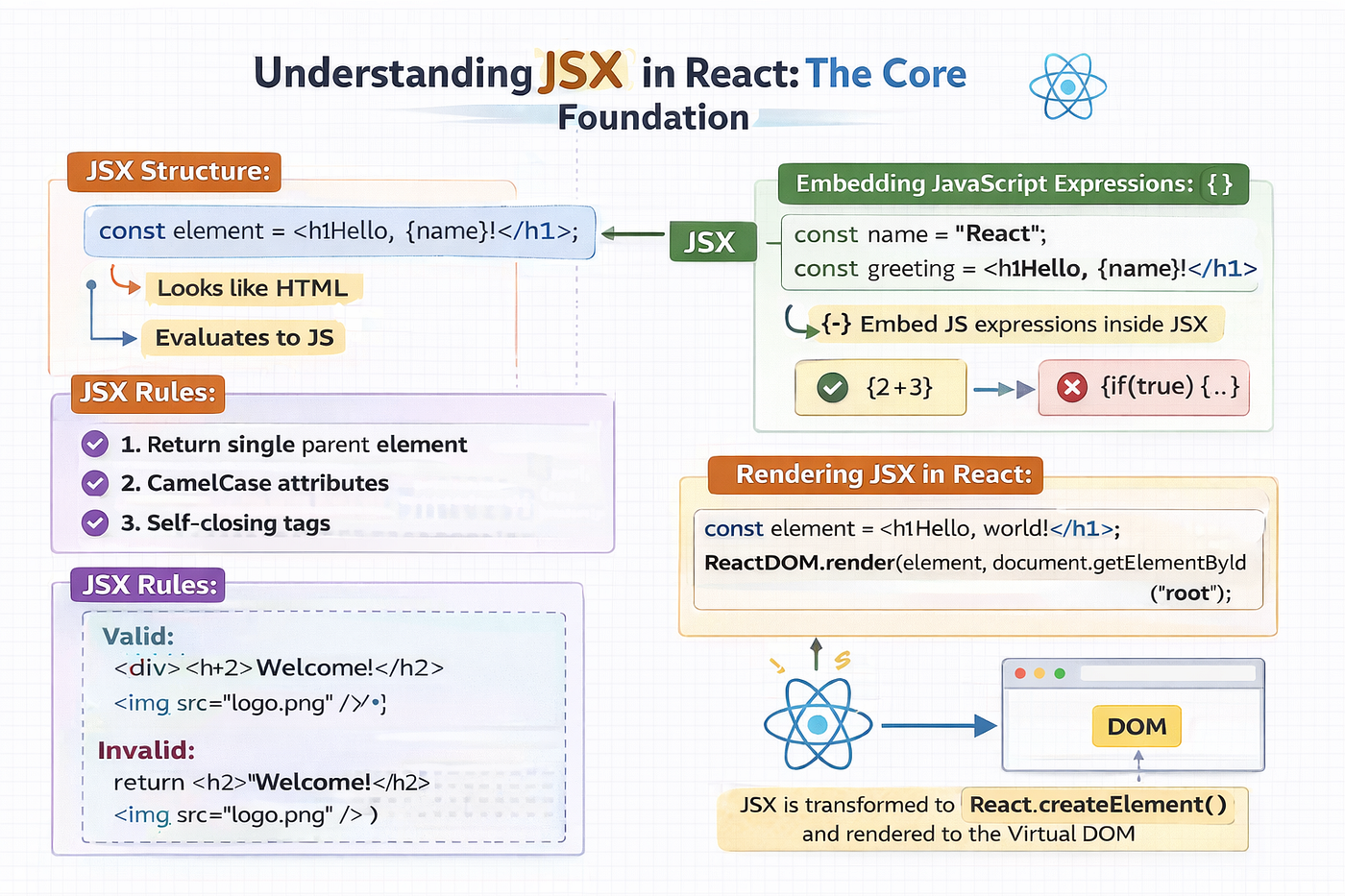
When starting with React, JSX is one of the first concepts you’ll encounter. It’s the foundation that makes building dynamic user interfaces intuitive and readable. Let’s break it down.
What is JSX?
JSX (JavaScript XML) is a syntax extension for JavaScript that lets you write HTML-like code inside your JavaScript. It looks like HTML but has the full power of JavaScript behind it. For example:
const element = <h2>Creating a JSX element representing h2 tag.</h2>;Why Does React Use JSX?
React embraces JSX for several compelling reasons:
- Declarative UI: JSX lets you describe how the UI should look for a given state, making your code easier to read, predict, and maintain.
- Visual Representation: Its HTML-like syntax clearly shows the UI structure directly inside your JavaScript components.
- Component-Oriented Development: JSX defines the structure of reusable, self-contained components while keeping logic and UI together in one place.
- JavaScript Power: Since JSX compiles to JavaScript, you can embed expressions to dynamically render data, apply conditions, and generate lists.
- Compile-Time Optimizations: JSX is pre-processed by tools like Babel. This compilation step allows for static analysis and optimizations, leading to more efficient code.
JSX Syntax: Core rules and features of JSX
- Returning a Single Root Element
A component must return one single parent (root) element. You cannot return multiple sibling elements side by side without wrapping them.
// Invalid
function Profile() {
  return (
    <h1>User Profile</h1>
    <p>This is the bio section.</p>
  );
}

// Valid - wrapped in <div>
function Profile() {
  return (
    <div>
      <h1>User Profile</h1>
      <p>This is the bio section.</p>
    </div>
  );
}

// If you don’t want an unnecessary <div> in your DOM
// use React Fragments: <>...</> syntax is called a Fragment.
function Profile() {
  return (
    <>
      <h1>User Profile</h1>
      <p>This is the bio section.</p>
    </>
  );
}
Under the hood, JSX gets converted into React.createElement() calls.
A component can only return one object, so JSX must have a single root element.
2. Embedding JavaScript inside JSX
JSX allows you to embed JavaScript expressions inside { }. Only expressions can be embedded inside { } — not statements like if, for, or while.
// Valid
const sum = <p>{1 + 2}</p>; // 3

// Invalid
const invalid = <p>{if(true) { "Yes" }}</p>; // Error
Use ternary operators or helper functions for conditional rendering instead.
function StatusMessage({ hasNotifications }) {
  return (
    <p>
      {hasNotifications ? "You have new notifications!" : "No new notifications."}
    </p>
  );
}- CamelCase attributes
HTML attributes in JSX are written in camelCase, especially when they differ from standard HTML attributes. For instance, class becomes className and for becomes htmlFor to avoid conflicts with JavaScript reserved keywords
<div className="container">
  <label htmlFor="nameInput">Name:</label>
  <input id="nameInput" type="text" />
</div>- Self-closing Tags
Just like in XML, tags without children must be self-closed with a / before the closing angle bracket.
<img src="logo.png" alt="React Logo" />
<input type="text" />- JSX is an Expression too
Because JSX is an expression, you can assign it to variables, pass it as arguments, and return it from functions. This flexibility is key to building complex UIs.
function getButton(type) {
  if (type === 'submit') {
    return <button type="submit">Submit</button>;
  }
  return <button type="button">Cancel</button>;
}

const actionButton = getButton('submit');

function App() {
  return (
    <div>
      {actionButton}
    </div>
  );
}- Commenting in JSX
Wrap JavaScript comment (/* */) within curly braces.
<div>
  {/* This is a single-line comment within JSX */}
  <p>Some content</p>
  {/*
    This is a multi-line comment
    within JSX.
  */}
</div>
Rendering Elements
React renders JSX to the DOM using ReactDOM.render().
const element = <h1>Hello, world!</h1>; // Create a JSX element representing an <h1>

// Use ReactDOM to render a React element into the actual DOM
ReactDOM.render(
  element,                               // The JSX element we want to render
  document.getElementById("root")        // The target DOM node with id="root" where the element will appear
);
Behind the scenes, JSX is transpiled to React.createElement(), which React uses to efficiently build the Virtual DOM.
Conclusion
JSX makes your code declarative, readable, and powerful. You can write UI structures like HTML, but inject dynamic JavaScript wherever needed, forming the backbone of React applications.
메타데이터
- post_id
- 5fd94ffc262b
- slug
- jsx-in-react-5fd94ffc262b
- url
- https://medium.com/@nimmikrishnab/jsx-in-react-5fd94ffc262b
- canonical_url
- https://medium.com/@nimmikrishnab/jsx-in-react-5fd94ffc262b
- author_url
- https://medium.com/@nimmikrishnab
- status
- ok
- fetched_at
- 2026-06-11 17:15:47