Adding AppFunctions to your Android App using the skills for AppFunctions
Part 1: https://andresand.medium.com/android-app-functions-a6e7a4f5453e
Adding AppFunctions to your Android App using the skills for AppFunctions
Part 1: https://andresand.medium.com/android-app-functions-a6e7a4f5453e
Google I/O 2026 brought a wave of Android innovations, but one quietly powerful feature stands out for app developers: AppFunctions: a framework that lets your app expose capabilities to AI agents like Gemini. In this post, I’ll walk you through how I integrated AppFunctions into my HappyHours KMP app using a Claude Code skill, going from zero to a working AI-queryable implementation in four clean steps.
What are AppFunctions? They’re a declarative way to expose your app’s functionality: search, navigation, actions so that on-device AI assistants can invoke them on the user’s behalf. Think Siri Shortcuts, but for the Android AI ecosystem.
App Functions skill — https://github.com/android/skills/blob/main/device-ai/appfunctions/SKILL.md
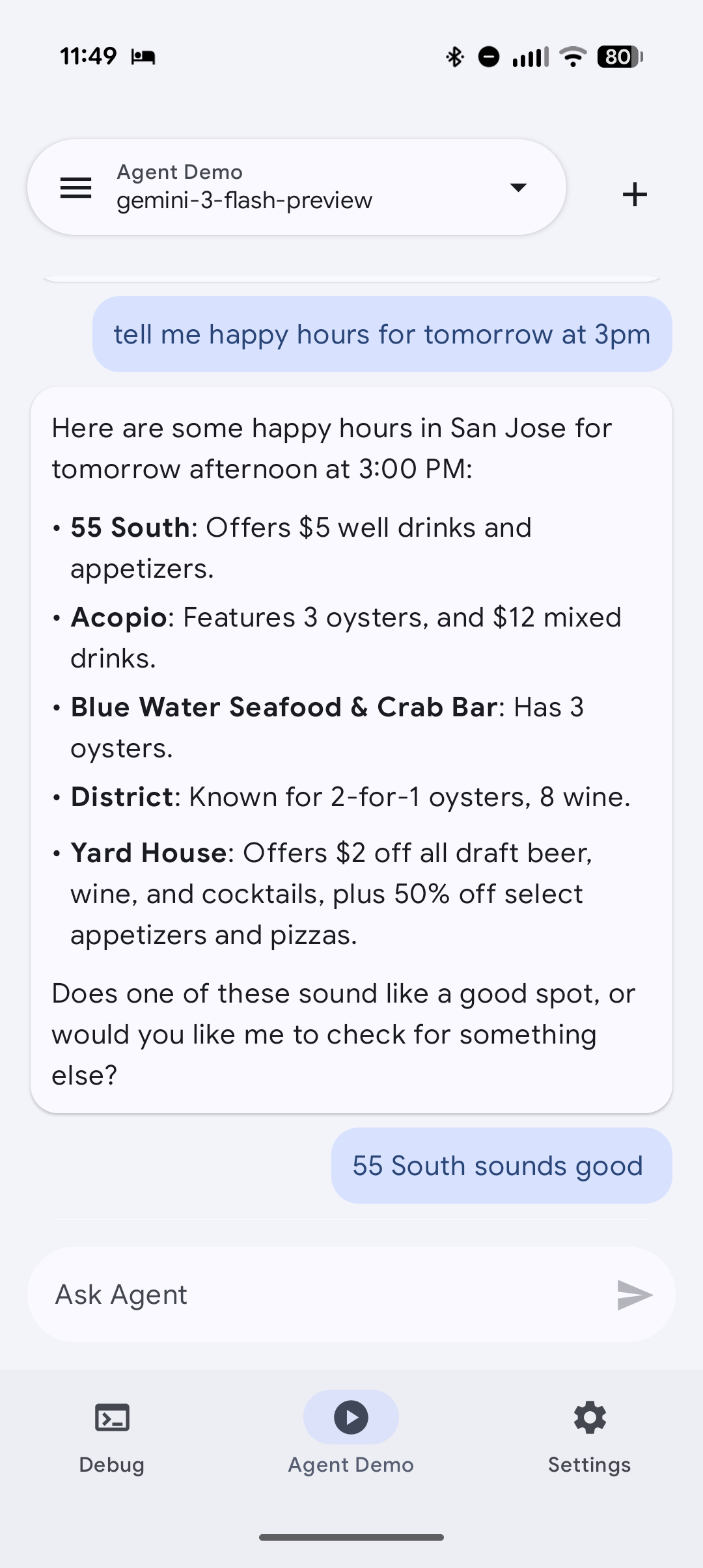
Think of it as an API contract your app publishes to the Android system. A user asks Gemini: “Find me happy hours in San Jose, California.” Gemini discovers that your app has a searchHappyHours function, calls it with structured parameters, gets results back, and can deep-link the user straight into the listing detail page, without the user ever opening your app manually. Integrated into the Happy Hours app https://play.google.com/store/apps/details?id=com.happyhoursglobal
It’s part of a larger shift Google is betting on: AI agents becoming super-apps that orchestrate the other apps on your phone. If you want your app to participate in that future, AppFunctions is the integration point.
Why use a Skill for this?
AppFunctions require a specific setup: KSP annotation processing, a particular Gradle configuration. Rather than figuring it out from scratch every time, Google published an AppFunctions skill for AI agents (example: “Claude Code”). https://github.com/android/skills/tree/main/device-ai/appfunctions A markdown file that gives AI agents deep, structured knowledge of the API. Drop it into your project and AI agent can drive the entire integration.
The four-part workflow
Step 1 — Install the skill
Download the AppFunctions skill and drop it into your project at .claude/skills/app-functions.md. This is the knowledge file Claude will use. Then open a fresh Claude Code session, skills are loaded at session start.

Step 2 — Discovery: understand what’s available
Run the slash command /app-functions Discovery in Claude Code. Claude reads your app's codebase, identifies integration points, and outlines which functions make sense to expose. For HappyHours, it surfaced searchListings and getSearchSuggestions as natural candidates.

Step 3 — Implementation: auto-generate the integration
Run /app-functions Implementation. Claude writes the AppFunction declarations, wires up KSP, and adds all the Gradle config. Heads up: you may hit KSP build errors on the first pass, fix them by cross-referencing the working configuration in the reference repo at github.com/android/appfunctions. Test implementation using the Google’s Agent test app https://github.com/android/appfunctions


Android App Happy Hours https://play.google.com/store/apps/details?id=com.happyhoursglobal
Step 4 — ADB verification: test it end-to-end
Run /app-functions ADB. Claude fires ADB commands to invoke your registered functions directly, so you can verify the AI-callable surface without needing a full Gemini integration. Seeing your app respond to an agent-style query for the first time is genuinely satisfying.

Code snapshot
The generated AppFunction for HappyHours looks roughly like this:
@AppFunction
suspend fun searchListings(
    params: SearchListingsParams
): SearchListingsResult {
    // Delegates to your existing domain layer
    val results = repository.search(
        query = params.query,
        location = params.location
    )
    return SearchListingsResult(items = results)
}
KMP note: The AppFunctions integration is Android-only for now, the
@AppFunctionannotations are Android-specific and live in the:androidAppmodule, not shared code. Your KMP domain layer stays clean and platform-agnostic.
Summary
AppFunctions is early — it’s still in alpha, it requires Android 16, and it needs a non-Play-Store emulator to test properly. But the direction is clear.
Google is building Gemini as an orchestration layer for everything on your device. Apps that expose clean AppFunction contracts will be natively callable from Gemini, from Android AI agents.
If this was helpful, consider following for more posts on AI-assisted Android development, Kotlin Multiplatform, and modern architecture patterns.
References
- 📦 HappyHours PR #80 — AppFunctions integration
- 📖 android/appfunctions — reference implementation
- 📰 17 Things Android developers should know from Google I/O 2026
- https://github.com/android/skills/tree/main/device-ai/appfunctions
- Agent test app https://github.com/android/appfunctions
Thank you for reading. Hope you learn something new.🙌🙏✌.
Don’t forget to clap 👏 50 times to support me and follow me for more such useful articles about Android Development, Gemini AI, Kotlin & KMP.
If you need any help related to Android, Kotlin and KMP. I’m always happy to help you. [Hopefully you will find this useful]
Thank you for reading!
- If you enjoyed this, please follow me on Medium
- Buy me a coffee
Follow me on:
**Medium, [LinkedIn](https://www.linkedin.com/in/andres-sandoval/), GitHub, [Google developer](https://g.dev/andres1)**
Thank you for taking the time to read this. I welcome your feedback on how I can improve or if you have any questions.
— Andres 🙌🏻
Tags
Android AppFunctions Claude Code Kotlin KMP Gemini AI Development
메타데이터
- post_id
- 60486f4b8ecd
- slug
- adding-appfunctions-to-your-android-app-using-the-skills-for-appfunctions-60486f4b8ecd
- url
- https://medium.com/@andresand/adding-appfunctions-to-your-android-app-using-the-skills-for-appfunctions-60486f4b8ecd
- canonical_url
- https://medium.com/@andresand/adding-appfunctions-to-your-android-app-using-the-skills-for-appfunctions-60486f4b8ecd
- author_url
- https://medium.com/@andresand
- status
- ok
- fetched_at
- 2026-07-11 23:52:18






