SQL Basics: Essential Functions for Beginners
Introduction:
SQL Basics: Essential Functions for Beginners
Introduction:
Structured Query Language (SQL) is a powerful tool for managing and manipulating data in relational databases. If you’re new to SQL, understanding the basic functions is key to navigating the world of databases. In this blog post, we’ll explore fundamental SQL functions that every beginner should be acquainted with, providing you with a solid foundation for working with databases.
1. SELECT: Retrieving Data
At the core of SQL lies the SELECT statement, used for retrieving data from one or more tables. The basic syntax looks like this:
SELECT column1, column2
FROM table_name;
For example:
SELECT first_name, last_name
FROM employees;
This query retrieves the first and last names of employees from the “employees” table.
2. WHERE: Filtering Data
The WHERE clause allows you to filter data based on specific conditions. Consider the following example:
SELECT product_name, price
FROM products
WHERE price > 50;
This query retrieves product names and prices from the “products” table where the price is greater than 50.
3. ORDER BY: Sorting Results
To sort the results of a query, you can use the ORDER BY clause:
SELECT product_name, price
FROM products
ORDER BY price DESC;
This query lists product names and prices from the “products” table in descending order based on price.
4. DISTINCT: Eliminating Duplicates
The DISTINCT keyword helps remove duplicate values from query results:
SELECT DISTINCT department
FROM employees;
This query retrieves unique department names from the “employees” table.
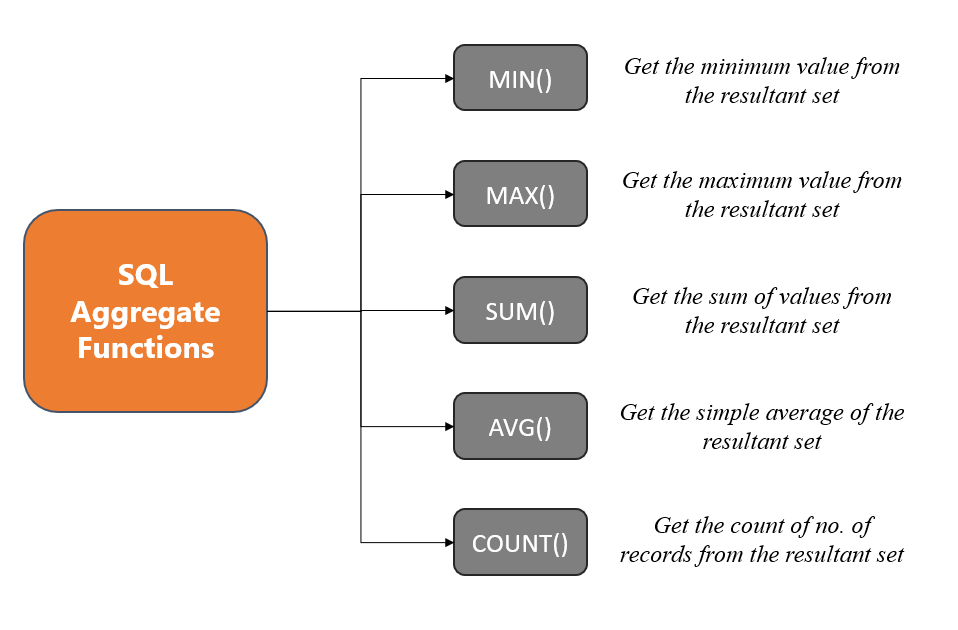
5. COUNT: Counting Rows
The COUNT function tallies the number of rows in a table or meeting a specified condition:
SELECT COUNT(employee_id)
FROM employees;
This query counts the number of rows in the “employees” table.
6. AVG: Calculating Averages
To compute the average value of a numeric column, the AVG function is employed:
SELECT AVG(price)
FROM products;
This query calculates the average price of products in the “products” table.
7. SUM: Adding Values
For summing up values in a numeric column, the SUM function comes into play:
SELECT SUM(quantity)
FROM order_details;
This query determines the total quantity from the “order_details” table.
8. GROUP BY: Aggregating Data
The GROUP BY clause, in conjunction with aggregate functions, is used to group rows based on specified columns:
SELECT department, AVG(salary)
FROM employees
GROUP BY department;
This query groups employees by department and calculates the average salary for each department.
Conclusion: Navigating SQL Functions with Confidence
As a beginner, mastering these fundamental SQL functions empowers you to retrieve, filter, and analyze data efficiently. Practice these queries on sample databases to solidify your understanding, and you’ll soon find yourself confidently navigating the vast landscape of SQL. Stay tuned for more advanced SQL insights in our upcoming posts as you continue your journey into the world of databases!
메타데이터
- post_id
- 60c7e7fd0df9
- slug
- sql-basics-essential-functions-for-beginners-60c7e7fd0df9
- url
- https://medium.com/@katabathina44313/sql-basics-essential-functions-for-beginners-60c7e7fd0df9
- canonical_url
- https://medium.com/@katabathina44313/sql-basics-essential-functions-for-beginners-60c7e7fd0df9
- author_url
- https://medium.com/@katabathina44313
- status
- ok
- fetched_at
- 2026-08-04 02:16:29