Building a Real Time Lakehouse Data Platform (LDP) with Delta Live Tables on Databricks
From Raw Streams to Business Insights: My Hands On Journey with Medallion Architecture
Building a Real Time Lakehouse Data Platform (LDP) with Delta Live Tables on Databricks
From Raw Streams to Business Insights: My Hands On Journey with *Medallion Architecture*
Why I Took This Challenge
I’ve always been fascinated by how modern data platforms handle real time streaming and structured analytics. When I discovered Lakehouse Declarative Pipelines (LDP) in Databricks, I knew I had to try it. My goal was to Ingest streaming data from Azure Event Hub and organize it into the *Medallion Architecture*.
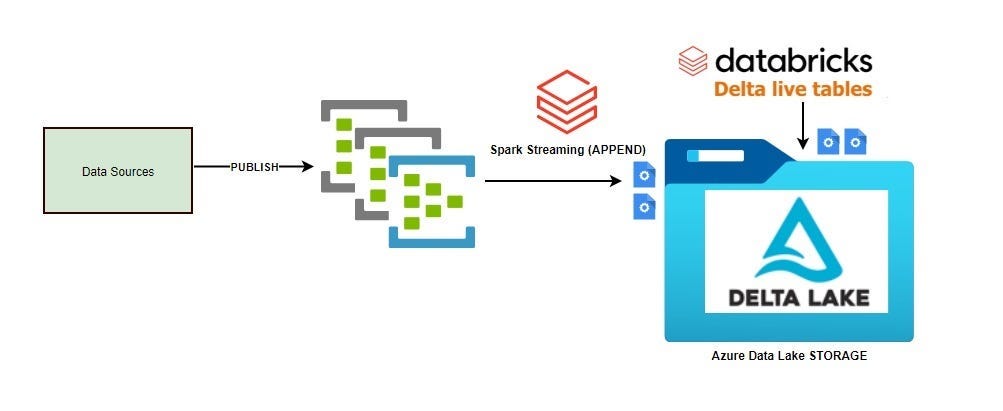
This diagram represents a real-time data ingestion and processing flow using Databricks Lakehouse Declarative Pipelines(LDP) on Azure
What It Means Step by Step
- Data Sources
- These are your producers (IoT devices, apps, logs, etc) that generate raw events.
2. Publish to Event Hub/Kafka
- The green blocks represent a streaming message broker (like Azure Event Hubs or Kafka).
- Data sources publish messages to this broker in real time.
3. Spark Streaming (Append)
- Databricks uses Spark Structured Streaming to read from Event Hubs/Kafka.
- The data is ingested in micro-batches and appended to Delta tables.
4. Databricks Lakehouse Declarative Pipelines(LDP)
LDP orchestrates the pipeline:
- Bronze Layer: Raw data landing zone.
- Silver Layer: Cleaned, validated, enriched data.
- Gold Layer: Business-ready aggregates or curated views.
It applies transformations, expectations (data quality checks), and manages lineage.
5. Delta Lake on Azure Data Lake Storage
- The processed data is stored in Delta format on Azure Data Lake (ADLS).
- Delta provides ACID transactions, schema enforcement, time travel, and streaming compatibility.
The Architecture
Event Hub → Bronze (Raw Data) → Silver (Validated) → Gold (Business ready Data)Step 1: Raw Streaming from Event Hub to Bronze Layer
I started by configuring Kafka options for Event Hub and creating a LDP streaming table:
@dlt.table(
    name="main.dev_table.bronze.ldp_test_table_tharaniesh",
    comment="Raw events from Event Hubs via Kafka Connector"
)
def bronze_eventhub_raw():
    raw = (
        spark.readStream
        .format("kafka")
        .options(**KAFKA_OPTIONS)
        .load()
    )
    return (
        raw
        .withColumn("raw_body", col("value").cast("string"))
        .withColumn("ingest_time", current_timestamp())
        .select("raw_body", "timestamp", "offset", "partition", "ingest_time")
    )
DLT automatically tracks lineage and manages checkpoints
Step 2: Parsing, Validating, Enriching for Silver Layer
DLT lets you declare rules instead of writing imperative logic:
@dlt.table(
    name="main.dev_table.silver.ldp_test_table_tharaniesh",
    comment="Parsed, validated, and enriched IoT events"
)
@dlt.expect("has_deviceId", "deviceId IS NOT NULL")
@dlt.expect_or_drop("valid_temperature", "temperature BETWEEN -50 AND 150")
@dlt.expect_or_drop("valid_humidity", "humidity BETWEEN 0 AND 100")
def silver_iot_events():
    bronze = dlt.read_stream("main.dev_table.bronze.ldp_test_table_tharaniesh")
    parsed = (
        bronze
        .select(from_json(col("raw_body"), payload_schema).alias("payload"),
                "timestamp", "offset", "partition", "ingest_time")
        .select("payload.*", "timestamp", "offset", "partition", "ingest_time")
    )
    parsed = parsed.withColumn("event_time", to_timestamp(col("ts")))
    parsed = parsed.withColumn("status_flag",
        (col("temperature") < 75) & (col("humidity") < 60)
    ).withColumn("status_flag", col("status_flag").cast("string"))
    parsed = parsed.withColumn("ingestion_latency_sec",
        (col("ingest_time").cast("long") - col("event_time").cast("long"))
    )
    return parsed.withWatermark("event_time", "10 minutes")
Expectations = Built in data quality checks
Step 3: Business-Ready Data for Gold Layer
@dlt.table(
    name="main.dev_table.gold.ldp_test_table_tharaniesh",
    comment="Simple filter from silver to gold"
)
def gold_device_simple():
    silver = dlt.read_stream("main.dev_table.silver.ldp_test_table_tharaniesh")
    return silver.filter(col("temperature") > 25)
DLT handles streaming state and incremental updates automatically.
Why This Approach Rocks
- Data quality baked in: Expectations prevent bad data.
- Streaming first design: Perfect for IoT and real time analytics.
- Automatic lineage & monitoring: Visualize dependencies in the DLT UI.
Next Steps
- Add windowed aggregations for metrics.
- Integrate with ML pipelines.
- Explore DLT dashboards for monitoring.
Conclusion
Implementing a Lakehouse Declarative Pipeline (LDP) with Databricks Delta Live Tables, Azure Event Hub, and the Medallion Architecture was a transformative experience. It showed me how declarative data engineering can simplify complexity while delivering real time, high quality insights.
This pipeline isn’t just about moving data . It’s about trust, scalability, and speed. By layering Bronze, Silver, and Gold, I created a system that:
- Handles streaming ingestion.
- Enforces data quality and governance at every stage.
- Prepares business ready datasets for analytics and AI.
The biggest takeaway is Declarative pipelines are the future. They free engineers from boilerplate code and let us focus on what truly matters: data reliability and business impact.
Next, I plan to integrate this pipeline with DLT monitoring dashboards, and advanced aggregations.
메타데이터
- post_id
- 60cda05df376
- slug
- building-a-scalable-lakehouse-declarative-pipeline-lessons-from-my-implementation-60cda05df376
- url
- https://medium.com/@tharaniesh3/building-a-scalable-lakehouse-declarative-pipeline-lessons-from-my-implementation-60cda05df376
- canonical_url
- https://medium.com/@tharaniesh3/building-a-scalable-lakehouse-declarative-pipeline-lessons-from-my-implementation-60cda05df376
- author_url
- https://medium.com/@tharaniesh3
- status
- ok
- fetched_at
- 2026-06-12 07:40:50




