EKS Cost Saving Tips — From Cluster Setup to Microservice Connections, Storage, and Beyond
Running EKS in production is powerful — but expensive if you don’t pay attention. Here are practical cost saving tips from real production…
EKS Cost Saving Tips — From Cluster Setup to Microservice Connections, Storage, and Beyond
Running EKS in production is powerful — but expensive if you don’t pay attention. Here are practical cost saving tips from real production experience, covering cluster setup, AWS service connections, storage, compute, secrets management, and pod resource allocation.
1. EKS Cluster Setup — hidden costs people miss
Control plane cost
Every EKS cluster costs $0.10/hour (~$72/month) regardless of whether you run any workloads. If you have separate dev, staging, and prod clusters, that’s $216/month just for control planes.
💡 Tip — Merge dev/staging into one cluster with namespaces
Use namespace isolation for dev and staging instead of separate clusters. Save $72–144/month on control plane costs. Use RBAC to enforce team separation. Only prod gets its own dedicated cluster.
# Instead of 3 clusters (dev, staging, prod)
# Use 2 clusters: non-prod + prod

# non-prod cluster — namespaces for isolation
kubectl create namespace dev
kubectl create namespace staging

# Apply resource quotas per namespace to prevent runaway costs
apiVersion: v1
kind: ResourceQuota
metadata:
  name: dev-quota
  namespace: dev
spec:
  hard:
    requests.cpu: "4"
    requests.memory: 8Gi
    limits.cpu: "8"
    limits.memory: 16Gi
    count/pods: "20"
EKS add-ons — only install what you need
Every add-on runs pods that consume CPU and memory on your nodes. Common unnecessary add-ons teams leave running:
Audit your add-ons regularly: kubectl get pods -n kube-system — if you see CoreDNS running with 2 replicas on a small cluster, that’s wasted resources. Scale CoreDNS down to 1 replica on non-prod clusters.
# Check running add-on pods and their resource consumption
kubectl top pods -n kube-system --sort-by=memory

# Scale CoreDNS to 1 replica on dev/staging (not prod!)
kubectl scale deployment coredns --replicas=1 -n kube-system

# Remove unused add-ons via Helm
helm list -n kube-system   # audit what's installed
helm uninstall  -n kube-system
2. Node Groups — ARM vs AMD, Spot vs On-Demand
Use ARM (Graviton) instances where possible Save 20–40%
AWS Graviton3 (ARM64) instances are 20–40% cheaper than equivalent AMD/Intel instances and often faster for containerised workloads. If your Docker images support multi-arch (AMD64 + ARM64) — which they should — move non-critical workloads to Graviton.
# Karpenter NodePool — prefer ARM Graviton instances
apiVersion: karpenter.sh/v1beta1
kind: NodePool
metadata:
  name: general
spec:
  template:
    spec:
      requirements:
        - key: kubernetes.io/arch
          operator: In
          values: ["arm64", "amd64"]   # allow both, Karpenter picks cheapest
        - key: karpenter.sh/capacity-type
          operator: In
          values: ["spot", "on-demand"]
        - key: node.kubernetes.io/instance-type
          operator: In
          values:
            - m7g.medium      # Graviton3 — cheapest general purpose
            - m7g.large
            - m7g.xlarge
            - m6g.medium      # Graviton2 — fallback
            - m6g.large
            - m5.large        # AMD fallback if no ARM available
Use Spot instances for non-critical workloads Save 60–90%
# Separate node pools for spot vs on-demand
# Spot — for dev, staging, batch jobs, stateless services
apiVersion: karpenter.sh/v1beta1
kind: NodePool
metadata:
  name: spot-pool
spec:
  template:
    spec:
      requirements:
        - key: karpenter.sh/capacity-type
          operator: In
          values: ["spot"]
      taints:
        - key: spot
          value: "true"
          effect: NoSchedule

# On-demand — for prod stateful services only
apiVersion: karpenter.sh/v1beta1
kind: NodePool
metadata:
  name: ondemand-prod
spec:
  template:
    spec:
      requirements:
        - key: karpenter.sh/capacity-type
          operator: In
          values: ["on-demand"]
Real impact: At Syntizen we ran dev/staging on Spot instances via Karpenter. Combined with right-sizing, this contributed significantly to the 36% cost reduction ($22K → $14K). Spot interruptions in dev/staging are acceptable — design your CI/CD to handle pod restarts gracefully.
3. Pod Resource Requests and Limits — the biggest hidden cost
Incorrect resource requests are the #1 cause of wasted AWS spend on EKS. Over-requesting CPU/memory means you’re paying for resources your pods never use.
The golden rule — requests vs limits
# ❌ BAD — over-provisioned, wastes money
resources:
  requests:
    cpu: "2000m"      # pod uses avg 200m but requests 2000m
    memory: "4Gi"     # pod uses avg 512Mi but requests 4Gi
  limits:
    cpu: "4000m"
    memory: "8Gi"

# ✅ GOOD — right-sized based on actual usage
resources:
  requests:
    cpu: "200m"       # set at p50 actual usage
    memory: "512Mi"   # set at p75 actual usage
  limits:
    cpu: "1000m"      # 5x request — allows burst
    memory: "1Gi"     # 2x request — prevents OOM cascade
How to find actual usage: Run your workload for 1 week, then check Datadog or run kubectl top pods -n production — sort-by=cpu. Set requests at p50 usage, limits at 2–5x requests. Never set requests = limits (this kills bin-packing efficiency).
Memory-optimised vs compute-optimised node selection
# For memory-heavy services (e.g. Java, Elasticsearch, Redis)
# Use r-series Graviton instances
nodeSelector:
  node.kubernetes.io/instance-type: r7g.large  # 16GB RAM, 2 vCPU

# For CPU-heavy services (e.g. video processing, ML inference)
# Use c-series instances
nodeSelector:
  node.kubernetes.io/instance-type: c7g.xlarge  # 8 vCPU, 16GB RAM

# Label nodes by workload type via Karpenter
requirements:
  - key: karpenter.k8s.aws/instance-family
    operator: In
    values: ["r7g", "r6g"]   # memory optimised Graviton
4. Connecting to MongoDB Atlas Data transfer cost
MongoDB Atlas runs outside AWS. Every byte of data between your EKS pods and Atlas crosses the public internet — and AWS charges for outbound data transfer.
💡 Tip 1 — Use Atlas AWS Private Endpoint (VPC Peering)
Enable AWS PrivateLink between your VPC and Atlas. Traffic stays within AWS backbone — no public internet, no NAT Gateway charges, lower latency. Atlas charges a small fee for private endpoints but it saves more on data transfer at scale.
💡 Tip 2 — Deploy Atlas cluster in the SAME AWS region
Cross-region data transfer from us-east-1 EKS to eu-west-1 Atlas costs ~$0.02/GB. If your Atlas cluster is in a different region, evaluate moving it to match your EKS region — especially if you have high read/write volume.
💡 Tip 3 — Connection pooling — don’t open a new connection per request
Each MongoDB connection has overhead. Use a connection pool with a max size appropriate for your pod count. Over-connecting is expensive and causes Atlas to throttle.
# MongoDB connection pool in Node.js — cost-efficient config
const client = new MongoClient(uri, {
  maxPoolSize: 10,        // max connections per pod
  minPoolSize: 2,         // keep 2 connections warm
  maxIdleTimeMS: 30000,   // close idle connections after 30s
  serverSelectionTimeoutMS: 5000,
});
5. Redis on AWS (ElastiCache) — same vs cross-region
💡 Always deploy ElastiCache in the SAME region and SAME AZ as your EKS nodes
Cross-AZ data transfer costs $0.01/GB each way. For a high-traffic Redis cache handling millions of requests, this adds up fast. Deploy your ElastiCache subnet in the same AZ as your primary node group.
# Check which AZ your nodes are in
kubectl get nodes -o wide | awk '{print $7}'

# Deploy ElastiCache in matching AZ via Terraform
resource "aws_elasticache_subnet_group" "redis" {
  name       = "eks-redis-subnet"
  subnet_ids = [aws_subnet.private_us_east_1a.id]  # match EKS node AZ
}
# Use VPC endpoint for ElastiCache - no NAT Gateway needed
# ElastiCache in same VPC = no data transfer charges at all
Same VPC = zero data transfer cost. ElastiCache in the same VPC as EKS incurs no AWS data transfer charges. Cross-region Redis replication is expensive — only do it if you genuinely need multi-region failover.
6. S3 — same vs cross-region access
💡 Tip 1 — Use VPC Gateway Endpoint for S3 Free
By default, S3 traffic from your EKS pods goes through the NAT Gateway — which costs $0.045/GB processed. A VPC Gateway Endpoint for S3 routes traffic within AWS backbone at zero cost. This is free to set up and takes 5 minutes.
# Add S3 VPC Gateway Endpoint via Terraform — FREE
resource "aws_vpc_endpoint" "s3" {
  vpc_id            = aws_vpc.main.id
  service_name      = "com.amazonaws.us-east-1.s3"
  vpc_endpoint_type = "Gateway"
  route_table_ids   = aws_route_table.private[*].id
  # Zero cost — saves NAT Gateway processing charges
}

# After this, S3 traffic from EKS no longer goes through NAT Gateway
💡 Tip 2 — Cross-region S3 access costs money
Accessing an S3 bucket in us-west-2 from EKS in us-east-1 costs $0.02/GB for data transfer. Keep S3 buckets in the same region as your EKS cluster. For multi-region access, use S3 Multi-Region Access Points or replicate buckets.
💡 Tip 3 — Use S3 Intelligent-Tiering for infrequently accessed data
If your pods write logs or backups to S3, enable Intelligent-Tiering. Objects not accessed for 30 days automatically move to cheaper storage tiers. Save 40–68% on storage costs for cold data.
7. SQS / SNS — cost gotchas
💡 Use long polling on SQS — not short polling
Short polling (default) makes an API call every few seconds even when the queue is empty. Each API call costs money. Long polling waits up to 20 seconds for a message — dramatically reduces empty receive calls and cost.
# SQS consumer in your pod — use long polling
import boto3
sqs = boto3.client('sqs')

# ❌ Short polling — expensive, many empty calls
response = sqs.receive_message(QueueUrl=queue_url)

# ✅ Long polling — cost efficient
response = sqs.receive_message(
    QueueUrl=queue_url,
    WaitTimeSeconds=20,      # wait up to 20s for messages
    MaxNumberOfMessages=10,  # batch — process 10 at once
)
💡 Use VPC Endpoint for SQS/SNS
Same principle as S3 — add Interface VPC Endpoints for SQS and SNS so traffic doesn’t route through NAT Gateway. Each endpoint costs ~$7/month but saves NAT Gateway processing at scale.
8. Lambda invocations from EKS pods
💡 Use async invocation where possible
Synchronous Lambda invocation holds your pod thread open waiting for response. For fire-and-forget use cases (sending emails, triggering jobs), use async invocation — your pod is free immediately.
# Sync invocation — pod waits for Lambda response
response = lambda_client.invoke(
    FunctionName='my-function',
    InvocationType='RequestResponse',  # synchronous — pod waits
)

# Async invocation — pod fires and continues immediately
response = lambda_client.invoke(
    FunctionName='my-function',
    InvocationType='Event',            # async — no waiting
)

# Even better — use SQS as trigger instead of direct invocation
# Pod → SQS → Lambda (fully decoupled, no direct connection cost)
💡 Use VPC Endpoint for Lambda — avoid NAT Gateway charges
If your EKS pods invoke Lambda frequently, add an Interface VPC Endpoint for Lambda. Traffic stays within AWS network — no NAT Gateway processing fees.
9. EBS vs EFS as PVC — choose wisely
EBS (gp3) — cheaper, single AZ
# EBS gp3 StorageClass — cheaper than gp2, better performance
apiVersion: storage.k8s.io/v1
kind: StorageClass
metadata:
  name: ebs-gp3
provisioner: ebs.csi.aws.com
parameters:
  type: gp3
  iops: "3000"        # baseline IOPS included free with gp3
  throughput: "125"   # MB/s included free with gp3
reclaimPolicy: Delete
volumeBindingMode: WaitForFirstConsumer  # provision in pod's AZ
gp3 is always cheaper than gp2 for the same size. gp3 starts at $0.08/GB/month vs gp2 at $0.10/GB/month — and gp3 includes 3000 IOPS and 125 MB/s free. Migrate all existing gp2 PVCs to gp3 immediately.
EFS — expensive, use only when you need shared storage
# EFS costs $0.30/GB/month vs EBS gp3 at $0.08/GB/month
# EFS is 3.75x MORE expensive than EBS
# Only use EFS when you need:
# - ReadWriteMany (multiple pods writing to same volume)
# - Cross-AZ access to same volume
# - Shared config files across pods

# If only ONE pod needs the volume — always use EBS gp3
# If MULTIPLE pods need same volume — use EFS (no choice)
10. AWS Secrets Manager (ASM) — API call costs
Every time your pod calls secretsmanager:GetSecretValue it costs $0.05 per 10,000 API calls. Sounds cheap — but at scale with hundreds of pods starting and restarting frequently, it adds up.
💡 Use External Secrets Operator — don’t call ASM from application code
ESO fetches the secret once on a schedule (e.g. every 1hr) and stores it as a Kubernetes Secret. Your pods read the K8s Secret — zero ASM API calls at runtime. Compared to each pod calling ASM on every startup, this reduces API calls by 99%+.
# ❌ EXPENSIVE — every pod startup calls ASM
import boto3
client = boto3.client('secretsmanager')
secret = client.get_secret_value(SecretId='prod/db/password')
# Called on every pod start, every restart, every scale-up event

# ✅ FREE at runtime — ESO syncs once, pod reads K8s Secret
# ExternalSecret refreshInterval: 1h → 1 ASM call per hour
# 100 pods restarting 10x/day = 0 extra ASM calls
env:
  - name: DB_PASSWORD
    valueFrom:
      secretKeyRef:
        name: db-credentials    # K8s Secret managed by ESO
        key: password
💡 Cache secrets in application memory — don’t fetch on every request
If you must call ASM from code, cache the secret in memory with a 1-hour TTL. Never call ASM on every HTTP request — that’s thousands of unnecessary API calls per minute.
11. NAT Gateway — the silent budget killer
NAT Gateway costs $0.045/GB processed + $0.045/hour per AZ (~$32/month). Every pod calling the internet (DockerHub, external APIs, MongoDB Atlas public endpoint) goes through NAT Gateway.
✓ Add VPC Gateway Endpoints for S3 and DynamoDB — free, removes their traffic from NAT
✓ Add VPC Interface Endpoints for ECR, SQS, SNS, Lambda, Secrets Manager — each ~$7/month but saves NAT processing at volume
✓ Use ECR for all images — pulling from DockerHub goes through NAT. ECR in same region uses VPC endpoint = zero NAT cost
✓ One NAT Gateway per region for non-prod — not one per AZ. Cross-AZ NAT traffic costs $0.01/GB but saves $32/month per removed NAT Gateway
# VPC endpoints to add — priority order by cost saving
# 1. S3 Gateway Endpoint — FREE, highest impact
# 2. ECR endpoints — saves DockerHub NAT traffic
# 3. Secrets Manager endpoint — saves ESO sync traffic
# 4. SQS/SNS endpoints — saves message queue traffic

resource "aws_vpc_endpoint" "ecr_api" {
  vpc_id              = aws_vpc.main.id
  service_name        = "com.amazonaws.us-east-1.ecr.api"
  vpc_endpoint_type   = "Interface"
  subnet_ids          = aws_subnet.private[*].id
  security_group_ids  = [aws_security_group.vpc_endpoints.id]
  private_dns_enabled = true
}
Quick savings summary
# Priority order by potential saving:
1. Right-size pod requests/limits        → 20-40% node cost reduction
2. Spot instances for non-prod           → 60-90% node cost reduction
3. ARM Graviton instances                → 20-40% instance cost reduction
4. S3 VPC Gateway Endpoint              → Eliminate S3 NAT charges (FREE)
5. ESO for secrets (not direct ASM)     → 99% reduction in ASM API calls
6. Merge dev/staging clusters           → Save $72/month per removed cluster
7. SQS long polling                     → Reduce empty receive API calls
8. gp3 instead of gp2 EBS              → 20% cheaper storage + free IOPS
9. ElastiCache same AZ as nodes        → Eliminate cross-AZ charges
10. ECR VPC endpoints                   → Eliminate DockerHub NAT traffic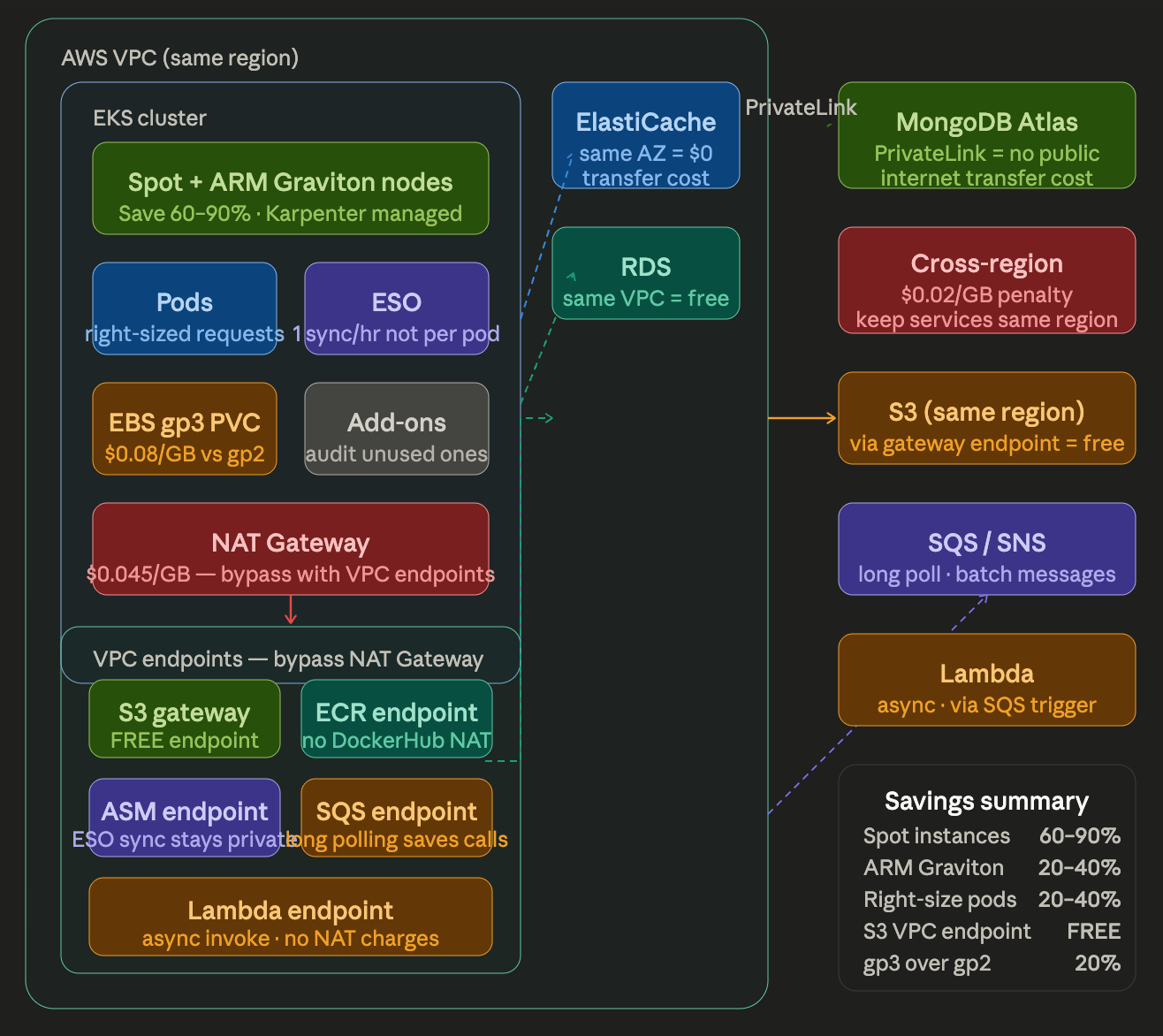
Closing thoughts
AWS costs on EKS are death by a thousand cuts — no single item is catastrophic, but together they compound. The highest-impact changes are almost always pod right-sizing and Spot instances. After those, VPC endpoints and storage class optimisation deliver the next wave of savings with minimal engineering effort.
The 36% cost reduction I contributed to at Syntizen ($22K → $14K) came from applying exactly these principles systematically — right-sizing first, then eliminating idle resources, then optimising data transfer paths. Start with what’s measurable and work down the list.
AWS #EKS #CostOptimisation #Kubernetes #FinOps #Karpenter #DevOps #CloudNative #Terraform
메타데이터
- post_id
- 61f67a50768a
- slug
- eks-cost-saving-tips-from-cluster-setup-to-microservice-connections-storage-and-beyond-61f67a50768a
- url
- https://medium.com/@saipavan-puligadda/eks-cost-saving-tips-from-cluster-setup-to-microservice-connections-storage-and-beyond-61f67a50768a
- canonical_url
- https://medium.com/@saipavan-puligadda/eks-cost-saving-tips-from-cluster-setup-to-microservice-connections-storage-and-beyond-61f67a50768a
- author_url
- https://medium.com/@saipavan-puligadda
- status
- ok
- fetched_at
- 2026-07-08 02:40:31



