On-Device AI Series (Part 3): MediaPipe Tasks
ML Kit gives you Google’s models. MediaPipe gives you the pipeline.
On-Device AI Series (Part 3): MediaPipe Tasks
ML Kit gives you Google’s models. MediaPipe gives you the pipeline.
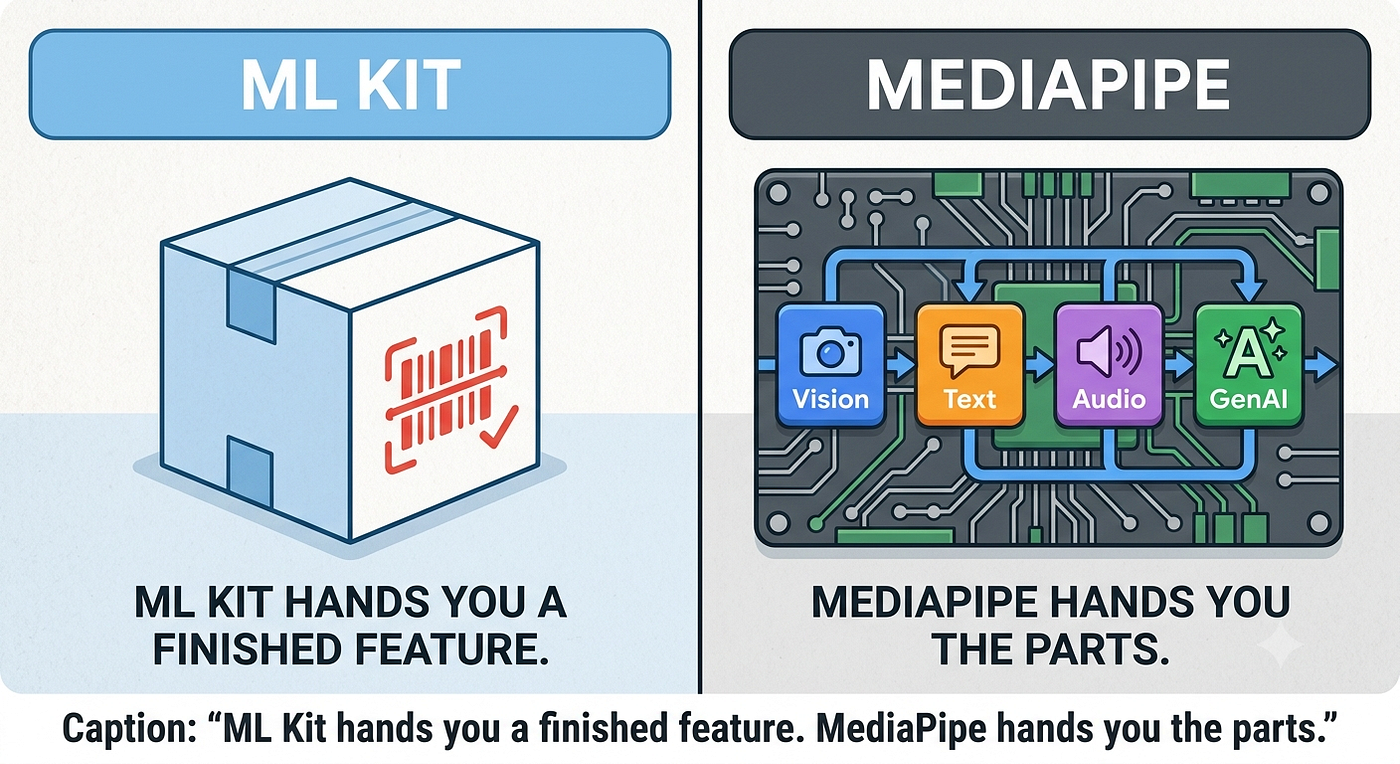
In Part 1 we reached for ML Kit because it’s turnkey: add a dependency, pass an InputImage, get a structured result. That covers a huge slice of everyday mobile AI. But every team eventually hits a wall ML Kit can’t scale past — you need a specific TFLite model, or you need to chain several tasks into one feature that no single ML Kit API exposes.
That’s exactly where MediaPipe Tasks lives. It’s the layer directly beneath ML Kit: still fully on-device, still a clean Gradle dependency, but you supply the model and you own the pipeline. It spans vision, text, audio, and generative AI — and in this article we’ll first map that full toolset, then walk through three concrete Android features that put the vision tasks to work: tap-to-segment, image embedding, and a “find this person across photos” tool that fuses three tasks. We’ll close by scoring MediaPipe with the same framework we used in Series 1 and 2.
The Toolset: What Can MediaPipe Tasks Actually Do?
MediaPipe Tasks is a suite of libraries for deploying ML solutions on-device with minimal code. Each task wraps a model behind an optimized pipeline that leans on hardware acceleration (CPU, GPU, and TPU), runs in real time, and keeps data private by never leaving the device. The catalog is broad, so rather than list every task, here are the domains it spans:
- Vision: the largest family — object detection, image classification and segmentation, interactive segmentation, face detection and 3D face landmarks, hand and pose landmark tracking, gesture recognition, and image embedding for visual similarity.
- Text & Language: text classification (e.g. sentiment), language detection, and text embedding for semantic similarity.
- Audio: audio classification to recognize sound events from a set of trained categories.
- Generative AI: on-device LLM inference, image generation, function calling, and RAG. (Google is steering this domain toward the newer LiteRT-LM stack — a topic for a later entry in this series — so we’ll keep our focus here on the classic tasks.).
Two properties matter across all of them. First, you choose the model — point a task at a bundled or custom .tflite/.task file and swap it out without touching the code above it, and use MediaPipe Model Maker to retrain a task on your own data. Second, the tasks are cross-platform (Android, Web/JS, and Python today, with iOS planned). That model-level freedom is the single biggest thing separating MediaPipe from ML Kit's sealed, Google-only models.
For the hands-on samples below we’ll stay in the Vision domain, since that’s where the on-device, camera-and-photo use cases cluster — but the patterns you’ll see (point at a model, wrap your input, read a structured result) are identical across every task above.
Hands-on Implementation Samples
Every sample below is lifted from our reference app. Each is a self-contained pattern you can drop into your own project.
Tap-to-Segment: Interactive Segmentation
The setup is the standard MediaPipe shape — point BaseOptions at a model in your assets/ folder, then build the task client. Here magic_touch.tflite is the "MagicTouch" segmentation model, configured to return a category mask:
private val segmenter: InteractiveSegmenter? = try {
    val baseOptions = BaseOptions.builder()
        .setModelAssetPath("your_model.tflite")   // your model, in assets/
        .build()

    val options = InteractiveSegmenterOptions.builder()
          .setBaseOptions(baseOptions)
          .setOutputCategoryMask(true)
          .setOutputConfidenceMasks(false)
          .build()

     InteractiveSegmenter.createFromOptions(context, options)
  } catch (e: Exception) {
      ... // gracefully degrade if the model asset isn't present
  }
}
The interesting part is how a user gesture becomes model input. The segmenter doesn’t take a bounding box — it takes a single Region of Interest point. So a Compose tap, in normalized [0, 1] coordinates, maps straight onto the pixel the model should segment around:
// From the tap handler — normalized tap → ROI → mask
val roi = InteractiveSegmenter.RegionOfInterest.create(
    NormalizedKeypoint.create(normX * bitmap.width, normY * bitmap.height)
)
val mpImage = BitmapImageBuilder(bitmap).build()
val mask = segmenter.segment(mpImage, roi).categoryMask().get()
From there, walking the mask’s byte buffer lets us do the fun stuff — paint a neon overlay, or physically separate “the object” from “the background” into two bitmaps.
[embed]
Image Embedding & Cosine Similarity
Embedding is where MediaPipe quietly becomes a search engine. You configure the embedder with L2 normalization on, and each image collapses into a FloatArray you can compare:
val baseOptions = BaseOptions.builder()
    .setModelAssetPath("....tflite")
    .build()

val options = ImageEmbedderOptions.builder()
    .setBaseOptions(baseOptions)
    .setL2Normalize(true)   // makes cosine similarity behave
    .setQuantize(false)
    .build()

suspend fun embed(bitmap: Bitmap): FloatArray = withContext(Dispatchers.IO) {
    val mpImage = BitmapImageBuilder(bitmap).build()
    getEmbedder().embed(mpImage)
        .embeddingResult().embeddings()[0].floatEmbedding()
}
MediaPipe ships a built-in ImageEmbedder.cosineSimilarity(...) for its own Embedding objects, but once you're holding raw float arrays (say, cached from an earlier run), a hand-rolled cosine keeps things simple:
fun compareEmbeddings(a: FloatArray, b: FloatArray): Double {
    var dot = 0.0; var normA = 0.0; var normB = 0.0
    for (i in a.indices) {
        dot += a[i] * b[i]
        normA += a[i] * a[i]
        normB += b[i] * b[i]
    }
    return dot / (sqrt(normA) * sqrt(normB))
}
A similarity above 0.75 means “these look like the same thing.”
[embed]
The Showcase — Face Finder
Before composing anything, it’s worth knowing MediaPipe has its own face detector — and it’s tiny. The BlazeFace short-range model (face_detection_short_range.tflite) weighs just 224 KB and returns, for each face, a bounding box, a confidence score, and six key points: left eye, right eye, nose tip, mouth, and the two ear tragions. The setup is the same three-layer shape as every other task:
private val faceDetector: FaceDetector? = try {
    val options = FaceDetector.FaceDetectorOptions.builder()
        .setBaseOptions(
            BaseOptions.builder()
                .setModelAssetPath("face_detection_short_range.tflite")
                .build()
        )
        .setMinDetectionConfidence(0.5f)
        .setRunningMode(RunningMode.IMAGE)
        .build()
    FaceDetector.createFromOptions(context, options)
} catch (e: Exception) {
    null   // gracefully degrade if the model asset isn't present
}

fun detect(bitmap: Bitmap): FaceDetectorResult? {
    val detector = faceDetector ?: return null
    return detector.detect(BitmapImageBuilder(bitmap).build())
}
One detail that will bite you when drawing the results: the bounding box comes back in image pixel coordinates, but the six key points are normalized (0..1). Mixing them up puts your box in the wrong place while the dots land perfectly — scale the box by canvasSize / bitmapSize and multiply the key points by the canvas size directly.
“Short-range” means what it says: BlazeFace is tuned for selfie-distance faces (roughly within two meters). It won’t replace ML Kit’s full detector for landmarks, contours, or smile/eye-open classification — but when all you need is “where are the faces?”, it’s hard to argue with a quarter-megabyte model.
[embed]
Why Use MediaPipe (When ML Kit Already Exists)?
ML Kit is still the right first choice — start there. You reach past it for three concrete reasons, all of which showed up in the samples above:
- Bring your own model. ML Kit locks you to Google’s pre-trained models. MediaPipe’s
setModelAssetPath(...)means you can ship a domain-specific classifier or embedder and the surrounding code never changes. - Compose tasks into features. Face Finder isn’t an API — it’s three tasks glued together with our own fusion logic. MediaPipe exposes the intermediate results (landmarks, masks, raw embeddings) so you can build on them.
- Fill the gaps ML Kit leaves. There’s a real, unglamorous reason our app uses MediaPipe Face Landmarker instead of ML Kit’s
face-mesh-detection: that library (16.0.0-beta1) has a binary incompatibility withmlkit:common ≥ 18.x, which other ML Kit dependencies in the project already pull in. MediaPipe's landmarker sidestepped the whole conflict and gave us 478 3D points on top. Sometimes the "advanced" tool is just the one that actually links.
Beyond flexibility, you keep every on-device benefit: no network round-trips, no per-call cloud cost, and user images that never leave the phone.
Under the Hood: The Tasks API and Model Delivery
Every MediaPipe vision task follows the same three-layer contract, which is why the four features above look so similar in code:
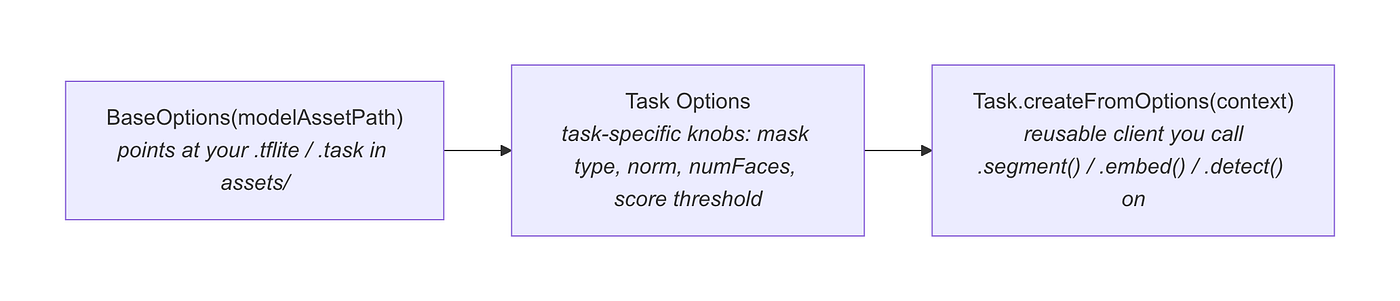
A few practical details worth knowing:
- Models live in
assets/. We bundlemagic_touch.tflite,mobilenet_v3_large.tflite,efficientnet_lite0.tflite, andface_landmarker.taskdirectly. That's the cost of flexibility — these files add real weight to the APK, so for larger models you'll want on-demand download instead of bundling. - Everything speaks
MPImage. You wrap aBitmapwithBitmapImageBuilder(bitmap).build()on the way in, and unwrap masks withByteBufferExtractoron the way out. It's a thin, predictable boundary. - It’s a Java-shaped API in a Kotlin world. Builders,
Optional.get(), no native coroutines. Our use cases wrap each call inwithContext(Dispatchers.IO)and exposesuspendfunctions — a small amount of glue you write once per task. - Hardware acceleration is built in. Tasks delegate to CPU or GPU under the hood, so segmentation and embedding stay real-time on-device without you touching NDK or delegate config.
Alternatives at a Glance
- ML Kit: The turnkey starting point — Google’s models, minimal code, great for the common 80% (Part 1). Reach past it only when you need a custom model or task composition.
- LiteRT (formerly TensorFlow Lite): The layer below MediaPipe — raw model execution with full control over tensors, delegates, and pre/post-processing. Choose it when even MediaPipe’s task wrappers are too opinionated.
- Cloud Vision APIs: For workloads too heavy for mobile silicon, at the cost of latency, network dependency, and sending user images off-device.
A useful rule of thumb — the same one from Series 1 — is to start at the highest level of abstraction that meets your needs. Try ML Kit first. Drop to MediaPipe Vision Tasks when you need your own model or need to fuse several tasks. Drop to LiteRT only when you need tensor-level control. Reach for the cloud only when the model genuinely can’t run on the device.
Rating MediaPipe Vision Tasks: How Developer-Friendly Is It?
Using the same Android On-Device AI Rater framework from Series 1 and 2 — eight weighted criteria, 0–10 each — here’s how MediaPipe Vision Tasks scores:
The Final Score: 8.4 / 10 (A ✅ Excellent)
- Android Integration (9/10): Standard Maven Central dependency, no NDK/CMake. The only friction is managing model assets yourself.
- API Simplicity (7.5/10): The three-layer pattern is consistent and easy to learn, but you do more by hand than with ML Kit — building
MPImage, walking mask byte buffers, and rolling your own similarity math. - Kotlin-First Design (7/10): Java-style builders,
Optional.get(), and no native coroutine/Flow support. You wrap calls inwithContextandsuspendyourself. - Model Compatibility (9.5/10): The headline strength — bring any compatible
.tflite/.taskmodel. This is precisely what ML Kit gives up. - Performance & HW Acceleration (9/10): Real-time on-device inference with automatic CPU/GPU delegation; segmentation and embedding feel instant.
- Documentation & Community (8/10): Solid task guides and official sample apps, though a few task pages and the version churn can leave you guessing.
- Offline Capability (10/10): Fully on-device by design — no network path anywhere in the pipeline.
- Maintenance & Stability (7.5/10): Google-maintained and production-usable, but the ecosystem moves (APIs shift between releases, and the GenAI tasks were deprecated), so pin your versions.
The scores tell a clear story that mirrors Series 1 and 2. Just as ML Kit trades model flexibility for ease of use, MediaPipe trades a little ease of use for model flexibility and task composition. The two lower scores — API simplicity and Kotlin ergonomics — are the price of admission for owning the pipeline. For teams that need a custom model or a feature no single API provides, it’s a price well worth paying.
Conclusion
The on-device toolkit is a ladder, not a single rung. Part 1 covered ML Kit for turnkey, Google-model features. Part 2 covered Firebase AI Logic for cloud-backed Gemini capability. This article covered MediaPipe Vision Tasks for the in-between: when you’re still fully on-device and offline, but you need your own model or your own pipeline.
The tell that you’ve outgrown ML Kit is simple — you find yourself wanting a specific model, or wanting to wire two AI results together into one decision. Face Finder is exactly that: three tasks, one weighted verdict, no cloud, no custom engine. MediaPipe made it a weekend feature instead of a research project.
Start high on the ladder. Drop to MediaPipe the moment ML Kit’s sealed models or single-purpose APIs start to fight you — and enjoy the fact that everything still runs, privately, right there on the device.
References
[embed]MediaPipe Web Task Demo Edit descriptiongoogle-ai-edge.github.io
Love you all.
Stay tune for upcoming blogs.
Take care.
For the hands-on samples below we’ll stay in the Vision domain, since that’s where the on-device, camera-and-photo use cases cluster — but the patterns you’ll see (point at a model, wrap your input, read a structured result) are identical across every task above.
메타데이터
- post_id
- 634bd1fd0692
- slug
- on-device-ai-series-part-3-mediapipe-tasks-634bd1fd0692
- url
- https://proandroiddev.com/on-device-ai-series-part-3-mediapipe-tasks-634bd1fd0692
- canonical_url
- https://proandroiddev.com/on-device-ai-series-part-3-mediapipe-tasks-634bd1fd0692
- author_url
- https://medium.com/@oguzhanaslann
- status
- ok
- fetched_at
- 2026-07-18 11:23:00









