The Hidden Vulnerability in Your Data Stack: 12 Power BI Security Best Practices for Enterprises in…
Enterprise analytics is no longer confined to isolated, specialized business intelligence (BI) teams. Today, data is thoroughly…
The Hidden Vulnerability in Your Data Stack: 12 Power BI Security Best Practices for Enterprises in 2026
Enterprise analytics is no longer confined to isolated, specialized business intelligence (BI) teams. Today, data is thoroughly democratized. Frontline operational managers, HR business partners, supply chain coordinators, and C-suite executives all rely on interconnected dashboards to make real-time decisions.
But this widespread democratization has introduced a major operational challenge: uncontrolled data exposure.
When a single Power BI dashboard aggregates sensitive ERP data, customer CRM records, financial forecasts, and proprietary corporate metrics, a minor misconfiguration can trigger a massive data breach. Security can no longer be treated as a casual, backend IT setting — it has become a core requirement for enterprise governance.
To scale analytics securely without stifling innovation, organizations must move beyond simple workspace configurations. Here is the definitive roadmap to building a layered, enterprise-grade Power BI security architecture.

1. Why Single-Layer Security Fails in Modern Analytics
Many organizations believe they are secure simply because they have enabled multi-factor authentication (MFA) or locked down their workspace access. Unfortunately, this creates a false sense of security.
Consider this common scenario: A financial analyst is granted “Viewer” access to an operational report. The workspace itself is technically secure. However, if the underlying semantic model exposes unencrypted corporate salaries, the report allows unrestricted data exports, and no digital sensitivity labels are applied to restrict downstream usage, the data remains highly vulnerable.
The access was “correct,” but the overall governance model failed.
Modern enterprise environments require a multi-layered, defense-in-depth architecture. If an attacker compromises or bypasses one security control, independent layers must remain in place to protect the core data assets.
2. Fortify Identity and Access Management
Identity compromise remains one of the primary entry points for enterprise data breaches. Because Power BI integrates directly with Microsoft Entra ID (formerly Azure Active Directory), organizations should enforce strict identity boundaries:
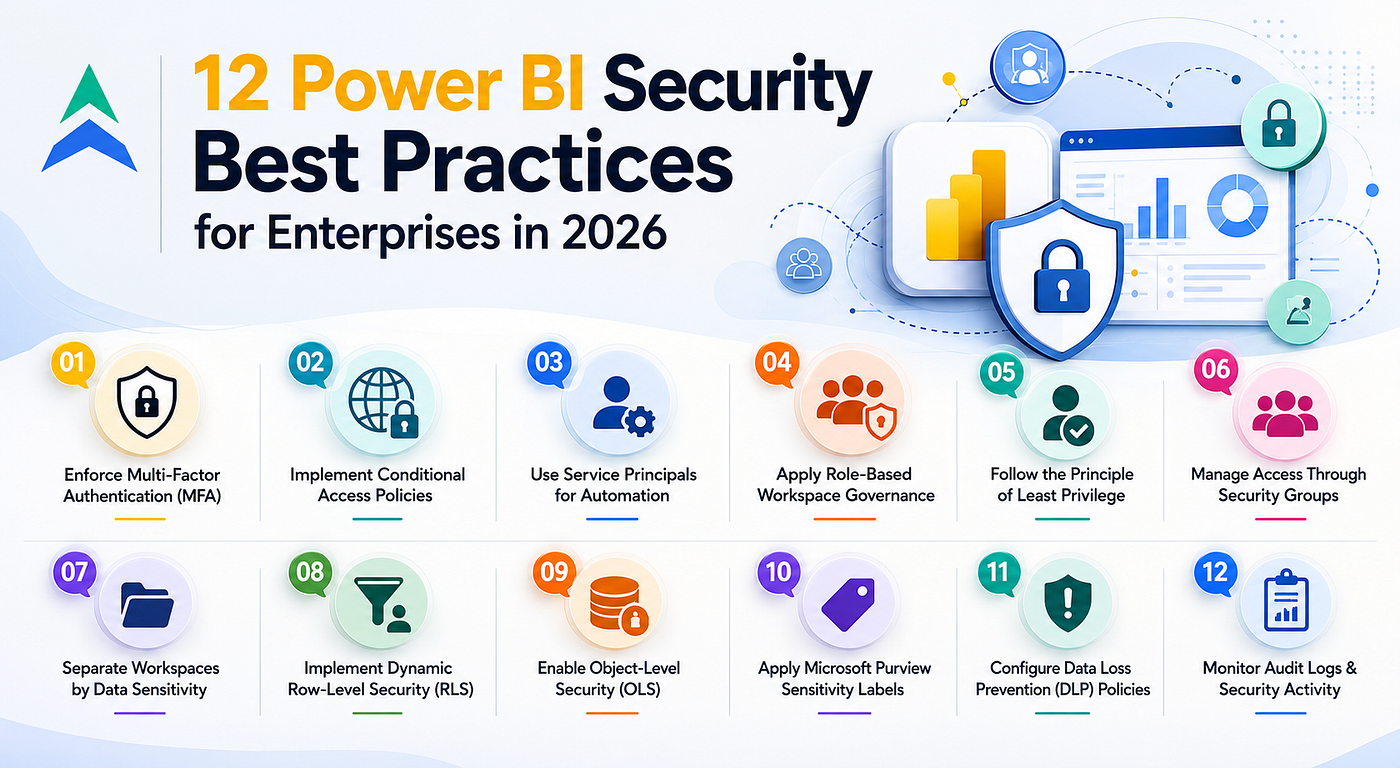
- Mandatory Multi-Factor Authentication (MFA): MFA must be strictly enforced across the board — from internal developers and business analysts to external B2B collaborators and C-suite executives.
- Deploy Conditional Access Policies: Access should adapt dynamically based on risk. Restrict Power BI logins exclusively to company-managed, compliant corporate endpoints, and block connection requests originating from unauthorized geographic regions.
- Adopt Service Principals for Automation: Stop using individual user accounts to run scheduled refreshes, CI/CD deployment pipelines, or REST API scripts. Using dedicated Service Principals isolates administrative permissions and eliminates credential exposure.
3. Implement Strict, Role-Based Workspace Governance
Uncontrolled workspace creation leads to fragmented permissions and hidden security gaps. Establishing a disciplined, role-based workspace framework is essential to maintaining visibility:
- Enforce the Principle of Least Privilege: Strictly limit the Admin and Member roles to the platform architects and senior BI developers who actively manage the environment. General business users should be assigned strict Viewer access to prevent unauthorized structural or sharing changes.
- Never Assign Permissions Directly to Individuals: Manage all workspace access exclusively via Microsoft Entra Security Groups. When an employee changes teams or departs the company, updating their central IT security group instantly revokes or modifies their access across Power BI.
- Isolate Workspaces by Sensitivity Level: Avoid mixing general operational metrics with highly sensitive corporate data. Establish clearly segregated workspace boundaries, keeping executive compensation, product R&D, and regulatory compliance data entirely separate from everyday team dashboards.
4. Protect the Core with Advanced Row-Level Security (RLS)
Securing who can open a report is only half the battle; you must also govern what data they see once inside. Implementing Row-Level Security (RLS) ensures data filtering is handled programmatically at the database layer rather than relying on superficial report filters.
- Transition to Dynamic RLS: Instead of building hundreds of static, hardcoded security roles for every regional office or department, leverage the
USERNAME()orUSERPRINCIPALNAME()DAX functions. This matches the logged-in user against a centralized security mapping table, filtering data dynamically and dramatically lowering long-term maintenance overhead. - Incorporate Object-Level Security (OLS): When specific columns (like gross margins) or entire tables are highly confidential, use Object-Level Security to completely obscure them. For unauthorized users, those specific data fields cease to exist within the model, shielding sensitive data structures without requiring entirely separate reports.
The Path Forward: Treat Analytics as a Strategic Data Product
Securing an enterprise Power BI ecosystem requires moving past treating it as a basic desktop reporting tool. Leading organizations manage their BI deployments with the same operational rigor applied to cloud infrastructure, financial data, and enterprise AI engines. By pairing robust identity controls with dynamic data filtering and clear workspace governance, you can unlock full business agility without compromising data security.
Read the Complete Guide
To explore the remaining strategies — including Microsoft Purview sensitivity labeling, Data Loss Prevention (DLP) frameworks, audit logging, and Microsoft Fabric integration — read our full, in-depth analysis on the Techment blog: 👉 **12 Power BI Security Best Practices for Enterprise Data Protection**
Scale Your Data Architecture Securely
Need help optimizing your Power BI workspaces, building dynamic RLS models, or aligning your BI infrastructure with enterprise security standards? Our data engineering and governance experts are here to help. 👉 **Connect with a Techment Solutions Architect Today**
메타데이터
- post_id
- 637ebd9a3ec5
- slug
- the-hidden-vulnerability-in-your-data-stack-12-power-bi-security-best-practices-for-enterprises-in-637ebd9a3ec5
- url
- https://medium.com/@techment/the-hidden-vulnerability-in-your-data-stack-12-power-bi-security-best-practices-for-enterprises-in-637ebd9a3ec5
- canonical_url
- https://medium.com/@techment/the-hidden-vulnerability-in-your-data-stack-12-power-bi-security-best-practices-for-enterprises-in-637ebd9a3ec5
- author_url
- https://medium.com/@techment
- status
- ok
- fetched_at
- 2026-07-10 08:43:10