I Built a Free Offline LaTeX Editor Because Overleaf Kept Breaking My Flow (And It Might Fix Yours…
SonnetPulse is a zero-config, lightning-fast desktop app for Windows that works without Wi-Fi, accounts, or monthly fees.
I Built a Free Offline LaTeX Editor Because Overleaf Kept Breaking My Flow (And It Might Fix Yours Too)
SonnetPulse is a zero-config, lightning-fast desktop app for Windows that works without Wi-Fi, accounts, or monthly fees.
Research papers consume my days. A familiar, creeping exhaustion sets in after hours of wrestling with web-based LaTeX editors. I’d make a small change and then wait — sometimes minutes — just to see if a single line of code compiled correctly. Every session seemed to hit a wall. I’d need Wi-Fi to fix a typo, and if the signal blinked out, so did my work. That’s when I decided to build something different: a piece of software that runs entirely on your computer, costs nothing, and never makes you wait. SonnetPulse is the result — a high-speed, offline LaTeX forge that puts the focus back on writing.
The Breaking Point: Why the Browser Failed Me
Most LaTeX users today rely on cloud-based platforms. They’re convenient at first, but the cracks show quickly. Compilation queues grow during peak hours, turning a 2-second job into a 30-second staring contest. Offline access is either limited or non-existent. And everything — your chapters, your figures, your half-formed ideas — sits on someone else’s server.
I reached my limit during a conference deadline sprint. The hotel Wi-Fi buckled under the load of other guests, and I was locked out of my own document. I realized then that I needed a tool built with a simple philosophy: your work belongs on your machine, and it should compile the instant you hit save.
Enter SonnetPulse: What It Actually Is
SonnetPulse is a native Windows application that combines a modern code editor, a zero-config compilation engine, and a synchronized vector PDF viewer into a single, clean workspace. There’s no login screen, no subscription popup, and no dependency on a remote server. You download it, open it, and start writing.
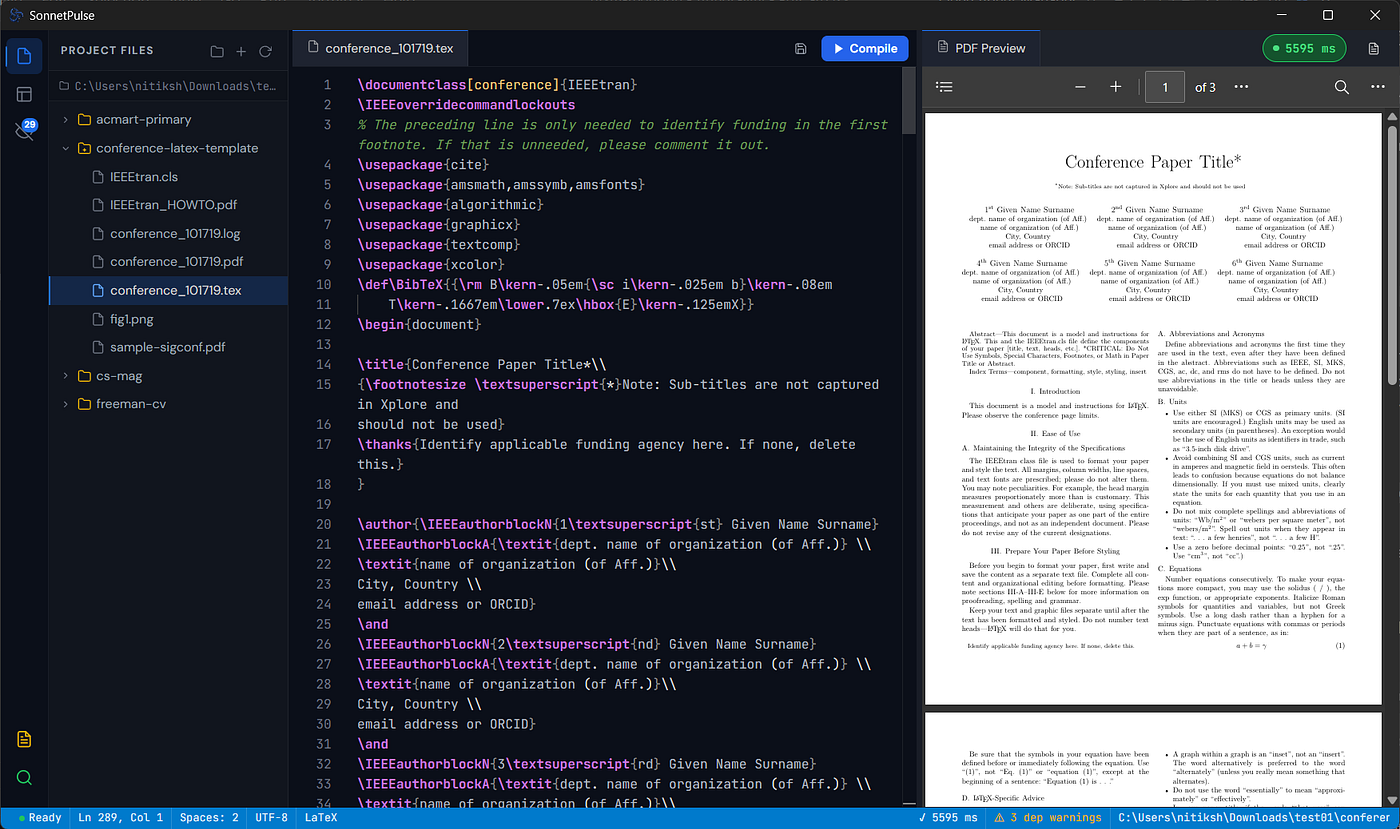
Here’s what makes it different from the alternatives:
- Truly Offline-First: SonnetPulse operates entirely locally. All processing happens on your PC, so your documents remain private and accessible even when you’re completely disconnected.
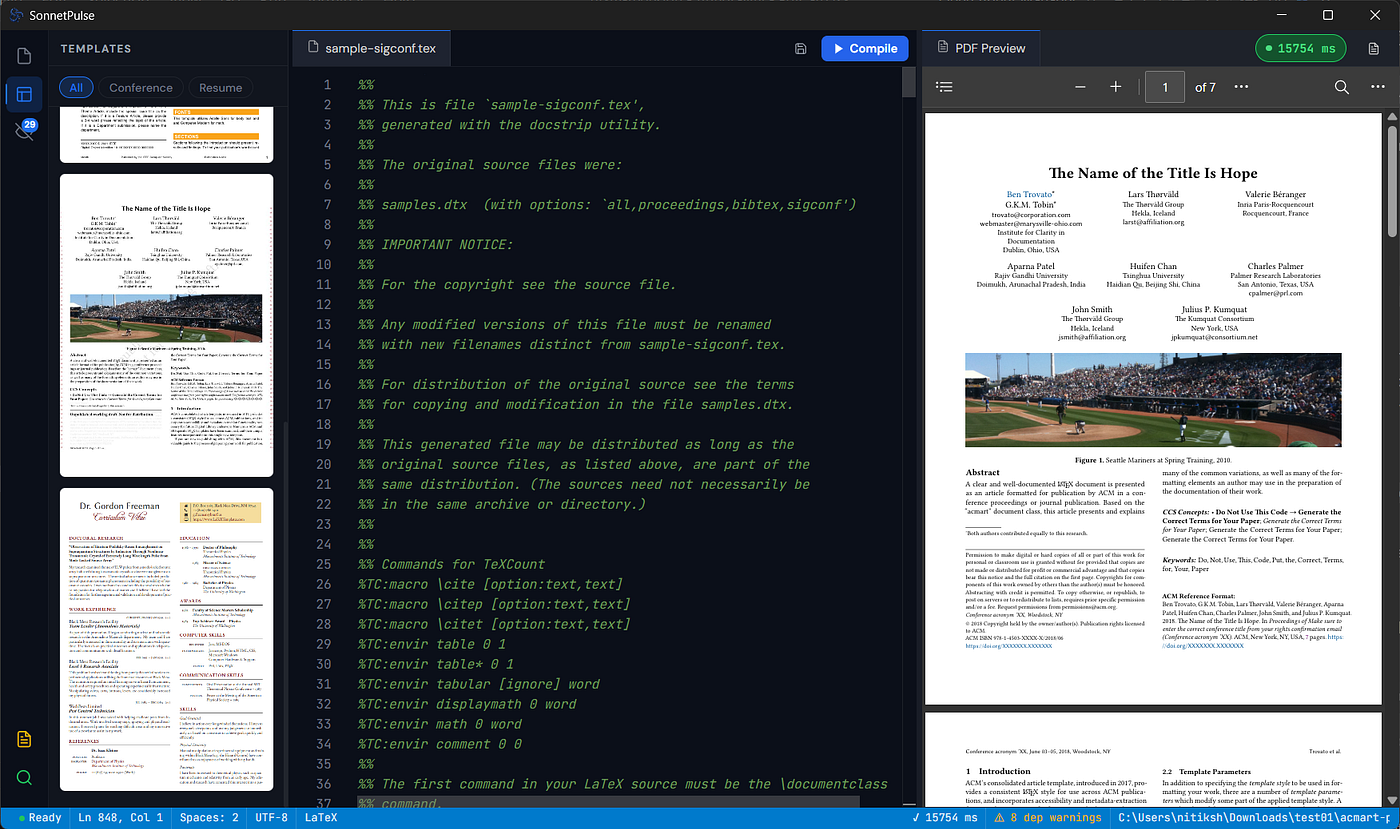
- Zero-Config Tectonic Compiler: The app bundles the Tectonic engine, which automatically fetches and caches LaTeX packages on the fly. You don’t need to install a separate TeX distribution like MiKTeX or TeX Live — it just works out of the box.
- Instant Live PDF Preview: As you type, the built-in PDF viewer updates in real time. The compilation is fast enough that changes appear almost immediately, with no manual rebuild button needed.
- Clean Triple-Panel Layout: The interface splits into a file browser, an editor pane, and the PDF preview. All three panels are resizable, so you can tailor the workspace to your screen and workflow.
A Closer Look at the Features That Matter
1. A Compiler That Doesn’t Fight You
Traditional offline editors require you to install and configure a full TeX distribution before you can compile a single line. SonnetPulse’s embedded Tectonic compiler skips that step entirely. It detects your LaTeX environment, downloads any missing packages automatically, and caches them locally for future use. The result? You open a .tex file and press Ctrl+S—that’s it. The PDF rebuilds in milliseconds.
2. Smooth, Synchronized Preview
The PDF pane isn’t an afterthought; it’s a core part of the experience. Zoom, pan, and scroll through your document while the editor stays in lockstep. The vector rendering keeps equations crisp at any magnification, which is invaluable when you’re debugging complex math or tweaking table layouts.
3. No Accounts, No Fees, No Strings
SonnetPulse is freeware. There’s no paid tier, no “pro” upgrade, and no nag screen. It doesn’t collect usage data, and it doesn’t require an internet connection to activate. If you want to try it, you can grab the installer from the official website or the GitHub repository — both linked at the end of this post.
Who Is This For?
If you fall into any of these camps, SonnetPulse will probably feel like a breath of fresh air:
- Students writing a thesis or dissertation who need a reliable tool that won’t crash during a late-night writing session.
- Researchers who handle sensitive or unpublished data and prefer to keep everything local.
- Developers documenting projects with LaTeX who already live in offline-first workflows and despise unnecessary cloud dependencies.
- Anyone frustrated by Overleaf’s compile timeouts or the clutter of traditional TeX IDEs.
How It Compares to Other Offline Editors
It’s worth acknowledging the landscape. Tools like TeXstudio, Texmaker, and VS Code with LaTeX Workshop are powerful and battle-tested. But they often require significant setup: you pair them with MiKTeX or TeX Live, configure build recipes, and tweak JSON settings files. SonnetPulse takes a different approach. It sacrifices some of the advanced customization those editors offer in exchange for instant usability. You don’t configure anything. You just write.
That tradeoff is deliberate. I built SonnetPulse for the moments when you need to capture an idea before it fades — when the last thing you want to do is debug a compilation chain.
The Philosophy: Frustration Turned Into Software
I didn’t set out to build a LaTeX editor. I set out to solve a personal problem that I knew others shared. The frustration of slow compile times, the anxiety of losing work to a dropped connection, the constant friction of cloud-based tools — these weren’t just annoyances. They were stealing hours of productive time from researchers and writers who already had enough on their plates.
That frustration pushed me deeper into computer science, into the internals of TeX engines and the Windows presentation framework, and eventually into shipping something real. SonnetPulse is the result of that push. It’s not perfect, and it’s still evolving, but it’s already doing the job I built it for: letting people write without the tool getting in the way.
The Road Ahead
The current version (0.1.0) is stable and fully functional, but there’s more to come. I’m actively working on:
- Git integration for version control within the app.
- Enhanced bibliography management with direct Zotero support.
- Customizable themes including a true dark mode.
- Performance optimizations for very large projects (300+ pages).
If you have feature ideas or run into bugs, the GitHub repository is the best place to open an issue or start a discussion.
Getting Started
- Download the installer from ntxm.org/products/sonnetpulse .
- Install the MSI package (Windows 10 or 11 required).
- Open a
.texfile or create a new one from the built-in templates. - Start writing — the PDF preview updates automatically with every save.
That’s it. No sign-up, no activation key, no cloud dependency.
If you’ve been burned by browser-based LaTeX editors or just want a faster, cleaner way to write technical documents, give SonnetPulse a try. I’d love to hear what you think — drop a comment below or open an issue on GitHub. And if this post resonated with you, a clap or a share helps more people find a tool that might save them from the same frustrations I faced.
메타데이터
- post_id
- 63d9151cbbc8
- slug
- i-built-a-free-offline-latex-editor-because-overleaf-kept-breaking-my-flow-and-it-might-fix-yours-63d9151cbbc8
- url
- https://medium.com/@nitikshkumar/i-built-a-free-offline-latex-editor-because-overleaf-kept-breaking-my-flow-and-it-might-fix-yours-63d9151cbbc8
- canonical_url
- https://medium.com/@nitikshkumar/i-built-a-free-offline-latex-editor-because-overleaf-kept-breaking-my-flow-and-it-might-fix-yours-63d9151cbbc8
- author_url
- https://medium.com/@nitikshkumar
- status
- ok
- fetched_at
- 2026-06-09 15:37:30