Why Connection Pooling in an Application?
Ever thought as a developer that how will you connect your application to the Database, here is the answer:-
Why Connection Pooling in an Application?
Ever thought as a developer that how will you connect your application to the Database, here is the answer:-
[ Application Code (FastAPI/Node.js/Go) ]
                │
                ▼
        [ Database Package ]
                │
                ▼
    [ Establish DB Connection ]
                │
                ▼
┌──────────────────────────────────┐
│         Database Server          │
└──────────────────────────────────┘
for example:-
from sqlalchemy.orm import Session
from app.db.database import SessionLocal
def get_db():
db = SessionLocal()
try:
yield db
finally:
db.close()This code acts as a database dependency. Its job is to create a fresh database connection for a specific task (like a user requesting a web page), hand that connection over to the application to use, and then safely close it when the task is done.
*SessionLocalis a "session factory" a pre-configured template created inapp/db/database.pyfile in the project, that knows exactly how to connect to your specific database (using your credentials, database URL, etc.).*
Also,
In the
finallyblockdb.close()closes the database session. It doesn't necessarily destroy the connection entirely, instead it simply wipes the session clean and returns the connection to the pool so it can be reused by the next user on the application.
But why follow this pattern?
If suppose a user just opened connections and never closed it (here through db.close() in the try...finally block ), a failing web request would leave the database connection open forever.
What if the database connection is left open??
If the connection is open forever, eventually, the database would run out of available connections, and entire application would freeze or crash.
Whether this DB connection is able to perform all CRUD operations?
Yes It can absolutely perform all CRUD operations (Create, Read, Update, Delete), but it only does them for the duration of one specific "unit of work" (usually a single web request).
Is there also another long-living Database connection?
There is no single, long-living connection for the "application's data." You use that short-lived dependency for every single task (every web request).
If you had one giant database connection shared by the entire application for general CRUD operations, it would create a massive traffic jam.
For instance suppose, 50 users click “Save Profile” at the same time, they would all have to wait in a single-file line to use that one connection. If one user’s query takes 10 seconds to run, everyone else’s app freezes for 10 seconds.
Because of this, we never use a single, global connection for application data. Every user gets their own isolated session via Database Dependency.
But this brings the problem The “Cost” of a Raw Connection
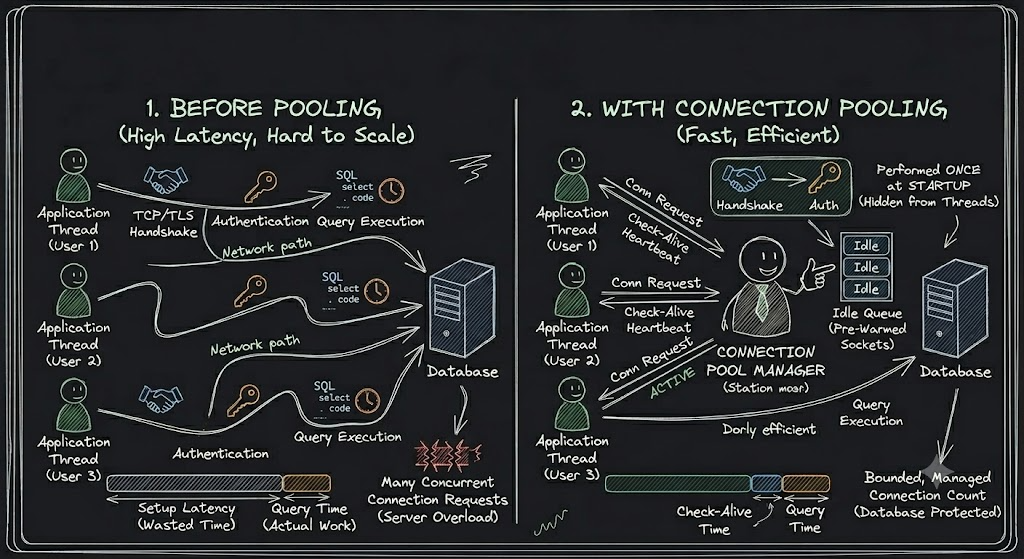
When your application says, “Connect to the database,” it isn’t just flipping a switch. It is executing a heavy, multi-step process over the network:
- DNS Resolution: Finding the database server’s IP address.
- TCP Handshake: Establishing a reliable network route (SYN, SYN-ACK, ACK).
- TLS/SSL Negotiation: Setting up encryption so your data isn’t sent in plaintext.
- Authentication: Sending the username and password and waiting for the database to verify them.
- Session Initialization: Allocating memory on the database server for this specific client.
Doing this takes tens to hundreds of milliseconds. If you have 1,000 users making requests, doing this from scratch 1,000 times will absolutely crush your server’s CPU and network bandwidth before a single line of data is even read.
Solution to this Problem : Connection Pooling
A Connection Pool is exactly what it sounds like: a reservoir of pre-established, fully authenticated database connections that are kept warm and alive in the background.
So Connection Pooling says “Wait lets instead of establishing connection for every connection, lets just keep some 100s or 1000s open connections “
Okay lets now implement it. Here is implementing a Connection Pool in FastAPI + Database project 100% **Asynchronous** .
You must ensure that the underlying library talking to the database over the network is async.
- PostgreSQL: Using
asyncpg - MySQL: Use
asyncmyoraiomysql.
from sqlalchemy.ext.asyncio import create_async_engine, async_sessionmaker, AsyncSession
from fastapi import FastAPI, Depends
# The Database URL (async drivers)
# PostgreSQL: "postgresql+asyncpg://user:pass@localhost/dbname"
# MySQL: "mysql+asyncmy://user:pass@localhost/dbname"
DATABASE_URL = "postgresql+asyncpg://user:password@localhost/my_db"# Create the Engine (This IS the Connection Pool)
engine = create_async_engine(
DATABASE_URL,
pool_size=10, # The standard "Taxi Rank" (default is usually 5)
max_overflow=20, # The "Emergency Taxis" for traffic spikes
pool_timeout=30.0, # Max seconds a user waits if the pool is empty
pool_recycle=3600, # Recycle connections every hour to prevent timeouts
pool_pre_ping=True, # Test the connection right before handing it out!
echo=False
)# The Session Factory
AsyncSessionLocal = async_sessionmaker(
bind=engine,
class_=AsyncSession,
expire_on_commit=False
)# DB Dependency
async def get_async_db():
async with AsyncSessionLocal() as session:
# The pool hands over a connection here
yield session
# The connection is returned to the pool when this block ends- MongoDB: Using
AsyncMongoClient.
from fastapi import FastAPI, Request
from pymongo import AsyncMongoClient
from contextlib import asynccontextmanager
@asynccontextmanager
async def lifespan(app: FastAPI):
# 1. Initialize the native PyMongo Async Client
mongodb_client = AsyncMongoClient(
"mongodb://user:password@localhost:27017/",
maxPoolSize=50,
minPoolSize=10,
maxIdleTimeMS=60000
)
# 2. Attach the database to the app state
app.state.db = mongodb_client.get_database("my_nosql_db")
print("PyMongo AsyncClient connected!")
yield # App runs here
# 3. Clean up on shutdown
await mongodb_client.close()
print("MongoDB connection closed.")app = FastAPI(lifespan=lifespan)# DB Dependency
async def get_mongo_db(request: Request):
return request.app.state.dbHow it works Under the Hood:-
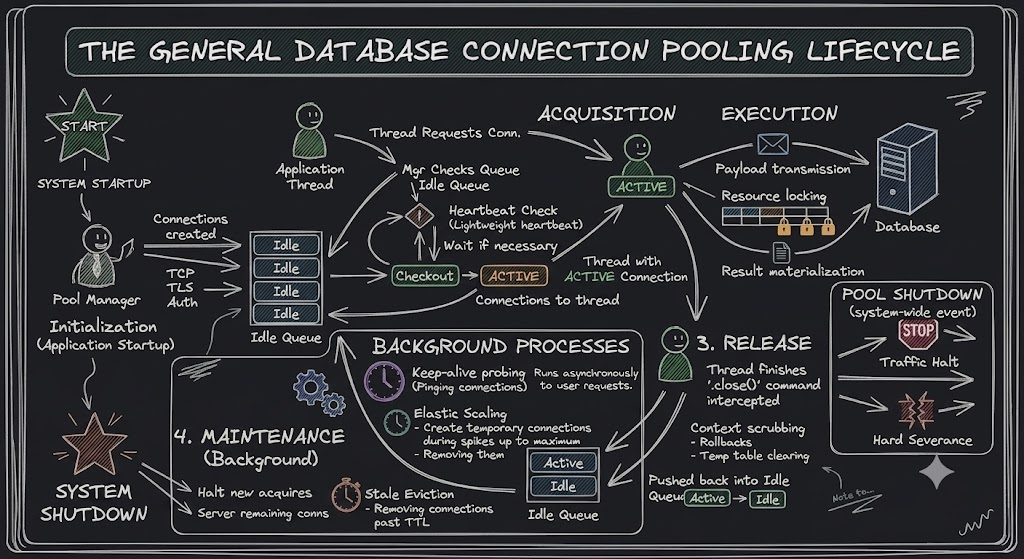
1. Pool Initialization (The Pre-Warm)
- 1a. Eager Provisioning: The pool manager automatically establishes a predefined baseline of database connections during application startup.
- 1b. Protocol Execution: Each connection completes the computationally expensive network setup (TCP 3-way handshake, TLS negotiation, and database authentication).
- 1c. State Tagging: The fully established sockets are held in memory within a concurrent queue and tagged with an
Idlestatus.
2. Connection Acquisition (The Checkout)
- 2a. Request Interception: When an application thread needs database access, it asks the pool manager for a connection rather than opening a new network socket.
- 2b. Availability Check: The pool manager pulls an
Idlesocket from the queue. Ifpool_pre_ping=Trueis configured, a lightweight heartbeat check is run to verify the connection is still alive; otherwise the connection is handed out immediately. - 2c. State Mutation: The connection is instantly marked as
Activeand leased exclusively to the thread, bypassing standard connection latency.
3. Operation Execution (The Workload)
- 3a. Payload Transmission: The application thread leverages the
Activesocket to stream queries or transactional commands directly to the database engine. - 3b. Resource Locking: The database processes the execution plan. Row or table locks are acquired only if the query requires it (e.g.,
UPDATE,DELETE, orSELECT FOR UPDATE); read-only queries typically acquire no locks. - 3c. Result Materialization: The resultant dataset or acknowledgment is streamed back across the socket and processed into application memory.
4. Connection Release (The Return)
- 4a. Lease Reclamation: In pooled implementations (e.g., SQLAlchemy’s
QueuePool), the application's.close()command is intercepted by the pool manager, keeping the underlying TCP socket alive rather than closing it - 4b. Context Scrubbing: The pool manager sanitizes the connection to prevent data leakage (clearing temporary tables, rolling back uncommitted transactions, and resetting isolation levels).
- 4c. Pool Re-entry: The connection’s state is mutated back to
Idle, and it is pushed back into the memory queue for the next request.
5. Pool Maintenance (The Housekeeping)
- 5a. Keep-Alive Probing: Background threads periodically dispatch lightweight ping commands through
Idleconnections to prevent network firewalls or database timeouts from silently dropping the sockets. - 5b. Elastic Scaling: If thread demand outpaces the baseline, the pool dynamically spawns and authenticates supplementary connections up to a predefined
Maximumthreshold. - 5c. Stale Eviction: Sockets that remain
Idlebeyond a configured Time-To-Live (TTL) are forcefully severed to free up infrastructure resources, shrinking the pool back to its baseline.
6. Pool Shutdown (The Teardown)
- 6a. Traffic Halting: The pool stops accepting new acquisition requests from the application, immediately rejecting incoming query attempts.
- 6b. Graceful Drain:
Activeconnections are granted a brief timeout window to complete their in-flight network operations and return to the pool. - 6c. Hard Severance: The pool manager broadcasts a termination signal, permanently closing all managed TCP/TLS sockets and releasing memory allocations on both the application and database sides.
Why design it this way? (The “Unit of Work” Pattern)
In software architecture, this is called the Unit of Work pattern. We scope one database connection to one web request for a few critical reasons:
- Isolation: If User A is buying a product and User B is updating their password at the exact same time, they each get their own separate
dbsession. If User A's transaction fails and crashes, it only rolls back User A's session. User B's update succeeds perfectly because they are completely isolated. - Concurrency: Your database can handle many simultaneous connections. Giving each request its own temporary connection allows hundreds of users to interact with your app at the exact same time without waiting in line for a single, global database connection to finish.
- Cleanliness: It prevents data from “leaking” between different users’ requests. Every request gets a completely fresh, blank-slate connection to work with.
메타데이터
- post_id
- 63ef232fa5e8
- slug
- why-connection-pooling-in-an-application-63ef232fa5e8
- url
- https://medium.com/@humancodermj/why-connection-pooling-in-an-application-63ef232fa5e8
- canonical_url
- https://medium.com/@humancodermj/why-connection-pooling-in-an-application-63ef232fa5e8
- author_url
- https://medium.com/@humancodermj
- status
- ok
- fetched_at
- 2026-07-22 12:16:40